1. المقدمة
This manual provides comprehensive instructions for the installation, operation, and maintenance of the SINOTIMER TM919B 30A Programmable Electronic Timer Switch. This device is designed to automatically control the ON/OFF switching of various electrical appliances based on user-defined daily or weekly programs. Please read this manual carefully before installation and use to ensure proper function and safety.
2. معلومات السلامة
WARNING: Risk of electric shock. Installation should only be performed by a qualified electrician or trained personnel.
- Always disconnect power at the circuit breaker before installing or servicing the timer switch.
- تأكد من أن جميع توصيلات الأسلاك آمنة وتتوافق مع القوانين الكهربائية المحلية.
- لا تتجاوز الحد الأقصى للحمل المقنن وهو 30 أمبير.
- هذا الجهاز مخصص للاستخدام الداخلي فقط. تجنب تعريضه للرطوبة أو درجات الحرارة القصوى.
- لا تحاول تفكيك أو إصلاح الجهاز بنفسك. اتصل بفني صيانة مؤهل.
3. انتهى المنتجview
The SINOTIMER TM919B is a digital timer switch featuring a large LCD display, multiple programming options, and a manual override function. It is designed for DIN rail mounting.
3.1. المكونات والضوابط
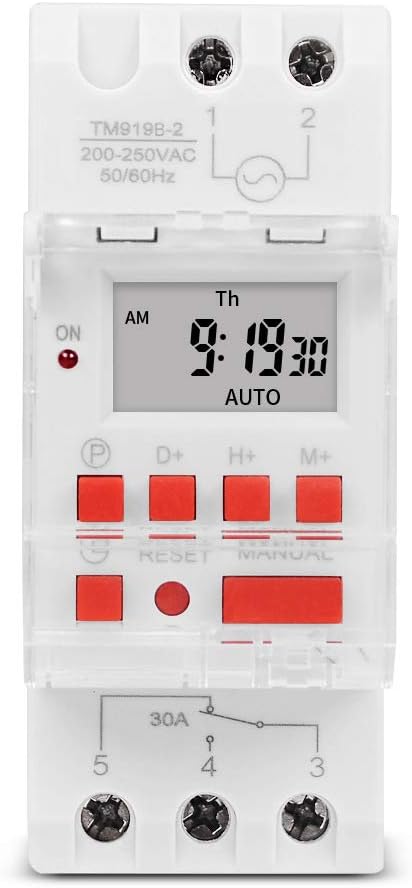
الشكل 1: أمام view of the TM919B timer switch, showing the LCD display, control buttons, and terminal connections.

الشكل 2: بزاوية view of the TM919B with the transparent protective cover open, revealing the programming buttons (P, D+, H+, M+, RESET, MANUAL).
- شاشة LCD: يعرض الوقت الحالي واليوم وحالة البرنامج.
- زر البرنامج (P): يدخل/يخرج من وضع إعداد البرنامج.
- D+ (Day) Button: Adjusts day of the week in setting modes.
- H+ (Hour) Button: Adjusts hour in setting modes.
- M+ (Minute) Button: Adjusts minute in setting modes.
- زر إعادة الضبط: Clears all settings and resets the timer to factory defaults.
- زر يدوي: يُبدّل بين أوضاع التشغيل والتلقائي والإيقاف.
- اتصالات المحطة الطرفية: For power input and load output.
4. المواصفات
| ميزة | مواصفة |
|---|---|
| نموذج | TM919B |
| المجلدtage | 220V (AC200-250V) |
| تكرار | 50/60 هرتز |
| أقصى حمولة | 30A (حمل مقاوم) |
| البرامج | 16 ON/OFF programs per day/week |
| الحد الأدنى للفاصل الزمني | 1 دقيقة |
| النسخ الاحتياطي للبطارية | Built-in rechargeable battery (for memory retention) |
| التركيب | 35 ملم DIN السكك الحديدية |
| أبعاد | راجع الشكل 3 |

الشكل 3: Detailed dimensions of the TM919B timer switch, showing height, width, and depth measurements.
5. الإعداد والتثبيت
Follow these steps for safe and correct installation of your timer switch.
5.1. التركيب
- تأكد من فصل التيار الكهربائي من قاطع الدائرة الرئيسي.
- Mount the TM919B onto a standard 35mm DIN rail. The device features a clip mechanism on the back for secure attachment.
- Press the orange clip at the bottom of the unit to release it from the DIN rail if removal is necessary.

الشكل 4: جانب view of the TM919B, highlighting the orange DIN rail mounting clip.

الشكل 5: خلف view of the TM919B, illustrating the DIN rail mounting mechanism.
5.2. مخطط الأسلاك
Refer to the diagram below for correct wiring connections. Ensure all connections are tight and insulated.

الشكل 6: جانب view of the TM919B showing the wiring diagram printed on the casing. Terminals 1 and 2 are for power input (L and N). Terminals 3, 4, and 5 are for load output (Common, Normally Open, Normally Closed).
- المحطتان 1 و 2: Power Input (L - Live, N - Neutral). Connect your 220V AC supply here.
- المحطة رقم 3: Common (COM) for the output relay.
- المحطة رقم 4: Normally Open (NO) output. The load will be powered when the timer is ON.
- المحطة رقم 5: Normally Closed (NC) output. The load will be powered when the timer is OFF.
For typical applications where the load is switched ON by the timer, connect the load between Terminal 3 (COM) and Terminal 4 (NO).
6. تعليمات التشغيل
6.1. Initial Setup and Reset
- After connecting power, the display may be blank or show random characters. Press the إعادة ضبط button with a pointed object (e.g., a pen tip) to clear all memory and reset the timer. The display will show "0:00" and "MO".
- Allow the internal battery to charge for at least 30 minutes before programming for optimal performance and memory retention during power outagإِسْ
6.2. ضبط الوقت واليوم الحاليين
- اضغط مع الاستمرار على D+ button to set the current day of the week (MO, TU, WE, TH, FR, SA, SU).
- اضغط مع الاستمرار على H+ button to set the current hour (0-23).
- اضغط مع الاستمرار على M+ button to set the current minute (0-59).
- Release the buttons when the correct time and day are displayed. The timer will automatically save the settings.
6.3. برمجة دورات التشغيل/الإيقاف
The TM919B supports up to 16 ON/OFF programs. Each program consists of an ON time and an OFF time.
- اضغط على P button once. The display will show "1 ON". This is for the first ON program.
- يستخدم D+ to select the day(s) for this program. Options include:
- MO TU WE TH FR SA SU (Every day)
- MO (Monday only)
- TU (Tuesday only)
- ...
- الاثنين الثلاثاء الأربعاء الخميس الجمعة (أيام الأسبوع)
- SA SU (Weekends)
- MO TU WE (Mon-Wed)
- TH FR SA (Thu-Sat)
- MO WE FR (Mon, Wed, Fri)
- TU TH SA (Tue, Thu, Sat)
- MO TU WE TH FR SA (Mon-Sat)
- يستخدم H+ و M+ to set the desired ON hour and minute.
- اضغط على P button again. The display will show "1 OFF". This is for the first OFF program.
- يستخدم D+, H+، و M+ to set the desired OFF day, hour, and minute. Ensure the OFF time is after the ON time for the same program.
- Repeat steps 1-5 for additional ON/OFF programs (up to 16). If you don't need all 16 programs, simply press P to cycle through unused programs until you return to the current time display.
- To exit programming mode and save settings, press the clock button (usually labeled with a clock icon, or simply wait for 30 seconds without input).
6.4. تجاوز يدوي
اضغط على يدوي زر للتنقل بين أوضاع التشغيل:
- على: The timer output is continuously ON, ignoring all programs.
- تلقاءي: The timer operates according to the programmed ON/OFF cycles. This is the standard operating mode.
- OFF: The timer output is continuously OFF, ignoring all programs.
تأكد من ضبط المؤقت على آلي للتشغيل المبرمج.
7. الصيانة
- The TM919B is designed for maintenance-free operation.
- نظّف السطح الخارجي بقطعة قماش ناعمة وجافة. لا تستخدم المنظفات الكاشطة أو المذيبات.
- Ensure the internal battery is charged by keeping the unit powered for at least 24 hours initially, and periodically thereafter, to maintain time and program memory during power outagإِسْ
8. استكشاف الأخطاء وإصلاحها
| مشكلة | السبب المحتمل | حل |
|---|---|---|
| العرض فارغ. | لا يوجد مصدر طاقة؛ البطارية الداخلية فارغة. | Check power connections. Allow unit to charge for 30 minutes. |
| Timer not switching load. | Incorrect wiring; timer in MANUAL ON/OFF mode; incorrect program settings. | Verify wiring (refer to Figure 6). Ensure timer is in AUTO mode. Check program times and days. |
| Programs are lost after power outage. | Internal battery not fully charged or faulty. | Ensure unit is powered for at least 24 hours to fully charge the battery. If problem persists, contact support. |
| الأزرار لا تستجيب. | Unit frozen; temporary glitch. | اضغط على إعادة ضبط زر. |
9. الضمان والدعم
SINOTIMER products are manufactured to high-quality standards. For warranty information or technical support, please refer to the documentation provided with your purchase or visit the official SINOTIMER webالموقع. احتفظ بإيصال الشراء كإثبات للشراء.
For further assistance, you may contact SINOTIMER customer service through their official channels.


