مقدمة
This manual provides comprehensive instructions for the setup, operation, maintenance, and troubleshooting of your MageGee TS92 Wireless 60% Gaming Keyboard. Please read this manual carefully before using the product to ensure optimal performance and longevity.
دليل الإعداد
محتويات الحزمة
- MageGee TS92 Wireless 60% Gaming Keyboard
- كابل USB Type-C
- مستقبل نانو USB بتردد 2.4 جيجا هرتز
الإعداد الأولي والاتصال
The MageGee TS92 keyboard utilizes a 2.4GHz wireless connection for stable and reliable operation up to 10 meters. No software or drivers are required for initial setup.
- Locate the 2.4G USB Nano Receiver. It is typically stored in a dedicated slot on the back of the keyboard for convenience.
- Insert the USB Nano Receiver into an available USB port on your computer (Mac, Windows, Linux, etc.).
- Locate the power switch on the back of the keyboard. Slide the switch to the "ON" position.
- The keyboard should automatically connect to your computer. You can begin using it immediately.
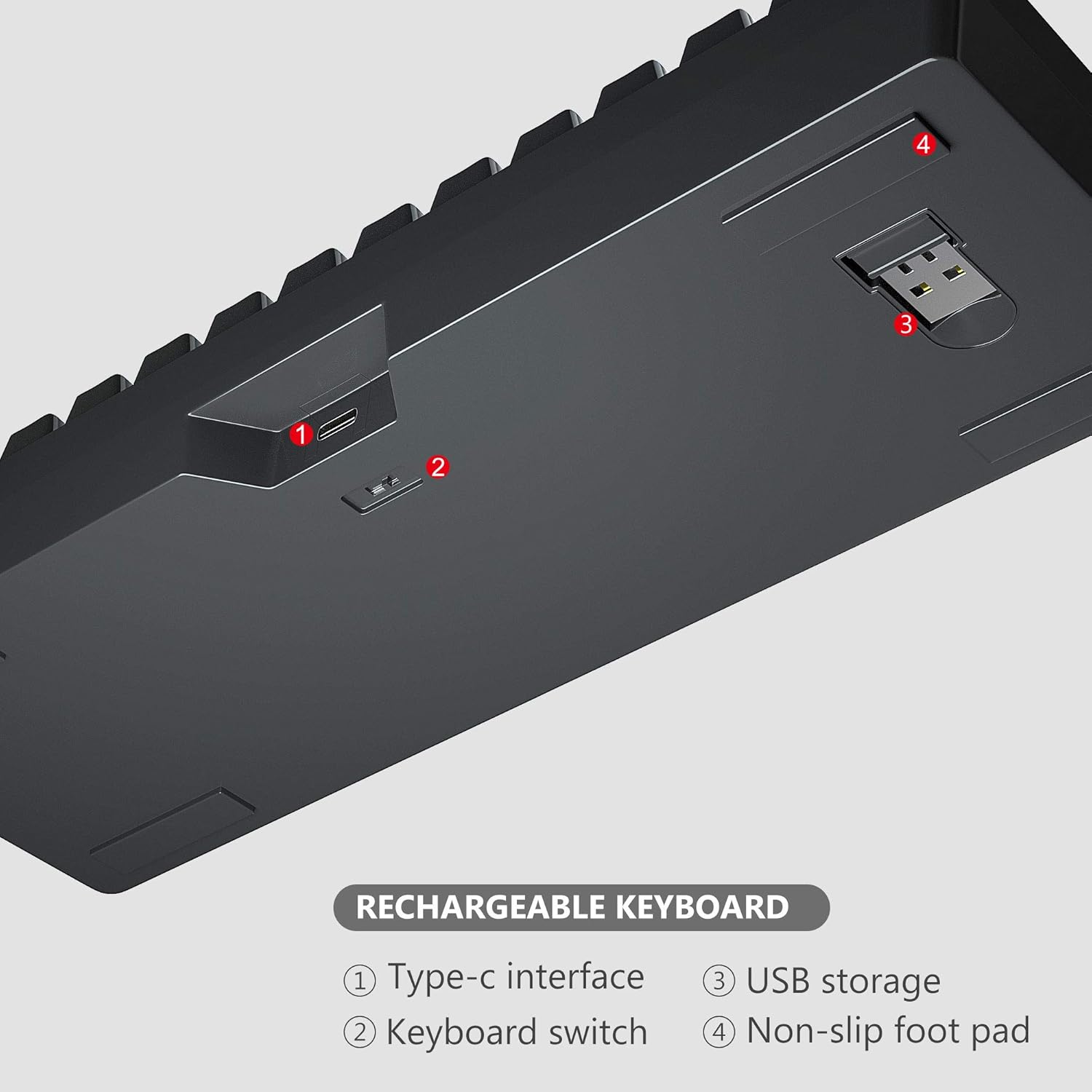
الشكل 1: خلفي view of the keyboard highlighting the Type-C interface (1), keyboard switch (2), USB storage for the receiver (3), and non-slip foot pads (4).
شحن لوحة المفاتيح
The keyboard features a built-in 2000mAh rechargeable battery. Use the provided USB Type-C cable for charging.
- Connect the USB Type-C end of the cable to the keyboard's Type-C interface.
- Connect the USB-A end of the cable to a USB power source (e.g., computer USB port, USB wall adapter).
- A full charge provides up to 24 hours of wireless usage and 480 hours of standby time.

Figure 2: The keyboard connected for charging via its detachable USB Type-C cable, illustrating both wired charging and wireless connection capabilities.
فيديو المنتج الرسمي: الإعداد والميزاتview
Video 1: This official video from MageGee Direct demonstrates the initial setup process, including connecting the USB-C cable and turning on the keyboard, followed by a showcase of the various RGB lighting effects and keycap structure.
تعليمات التشغيل
التحكم في الإضاءة الخلفية RGB
The MageGee TS92 keyboard features brilliant RGB backlighting with 7 kinds of colors (red, green, purple, yellow, blue, white, cyan) and various lighting effects.
- To switch light modes: Hold down FN مفتاح + K key together.
- To adjust brightness: Hold down FN مفتاح + [ key (decrease) or ] key (increase).
- To adjust speed: Hold down FN مفتاح + U key (speed up) or J key (slow down).
- To turn lights off/on: Hold down FN مفتاح + \ مفتاح.

الشكل 3: لوحة المفاتيح المعروضةasing its gorgeous RGB backlighting with multiple solid colors and dynamic effects.
مفاتيح الوسائط المتعددة والوظائف
Despite its compact 61-key layout, the keyboard retains essential multimedia and function keys accessible via the FN مجموعات المفاتيح.
| مزيج | وظيفة |
|---|---|
| FN + R. | خفض الصوت |
| فن + ت | رفع الصوت |
| الجبهة الوطنية + ص | صامت |
| الجبهة الوطنية + يو | Speed up backlight speed |
| FN + J. | إبطاء سرعة الإضاءة الخلفية |
| FN + K. | تبديل أوضاع الإضاءة الخلفية |
| الجبهة الوطنية + [ | Adjust backlight brightness (decrease) |
| FN +] | Adjust backlight brightness (increase) |
| الجبهة الوطنية + \ | تشغيل / إيقاف الإضاءة الخلفية |

Figure 4: Visual guide to common FN key combinations for controlling multimedia and lighting features.
وضع توفير الطاقة
To conserve battery life, the keyboard will automatically enter sleeping mode after 1 minute of inactivity. To wake it up, simply click any key.
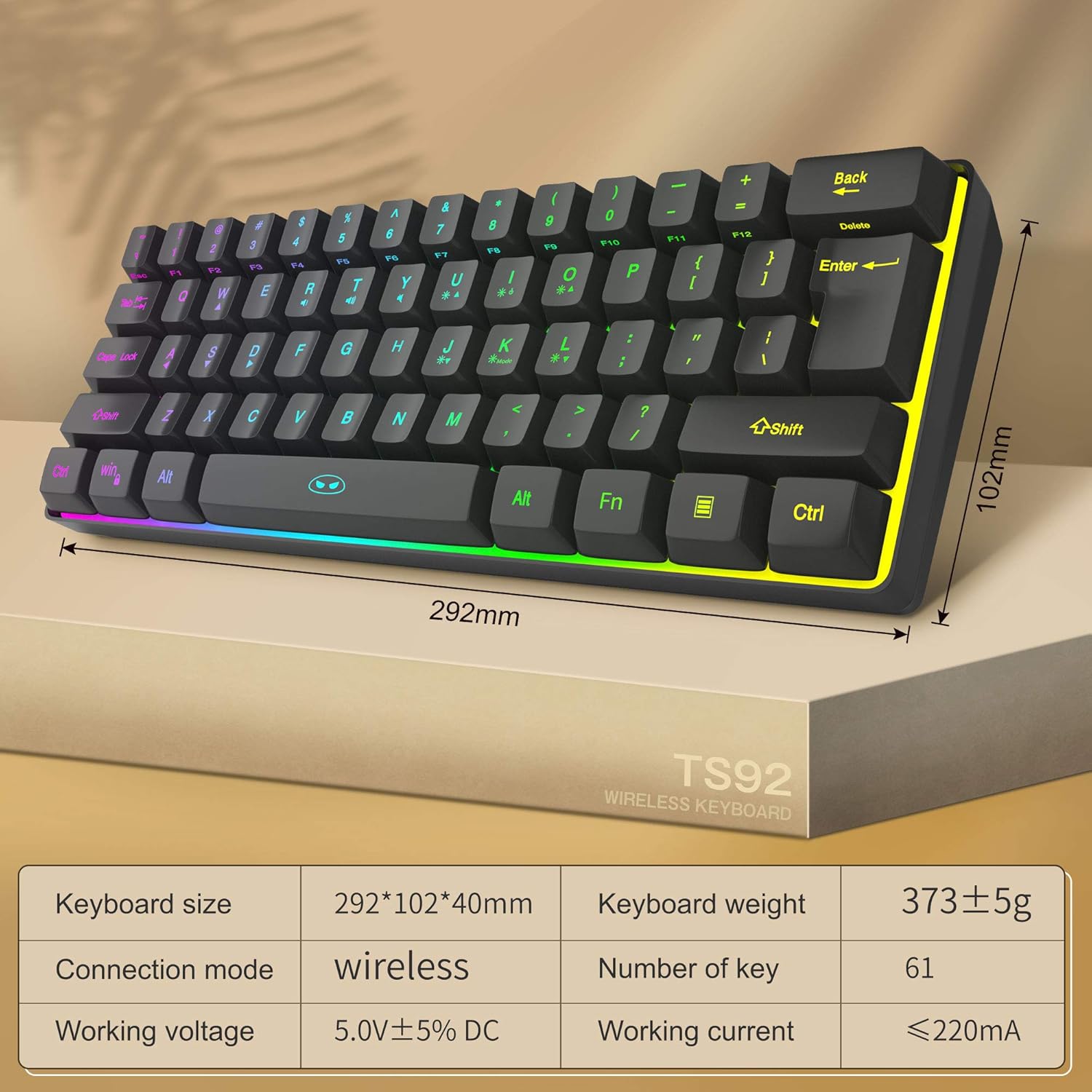
Figure 5: The keyboard in a typical usage scenario, demonstrating its power-saving feature.
صيانة
التنظيف والعناية
The MageGee TS92 keyboard is designed to be water-resistant, which helps prevent damage from spilled drinks or coffee. However, it is crucial to note the following:
- لا soak the keyboard in water.
- لا rinse the keyboard under tap water.
- For cleaning, gently wipe the surface with a damp cloth. Ensure the keyboard is powered off before cleaning.
عمر البطارية
To maximize the lifespan of the built-in rechargeable battery:
- تجنب تفريغ البطارية بالكامل بشكل متكرر.
- قم بتخزين لوحة المفاتيح في مكان بارد وجاف عندما لا تكون قيد الاستخدام لفترات طويلة.
- Use the provided USB Type-C cable for charging to ensure compatibility and safety.
استكشاف الأخطاء وإصلاحها
If you encounter issues with your MageGee TS92 keyboard, please refer to the following common solutions:
Keyboard Not Responding / No Connection
- التحقق من الطاقة: تأكد من أن مفتاح الطاقة الخاص بلوحة المفاتيح في وضع "التشغيل".
- التحقق من البطارية: The battery might be low. Connect the keyboard to a power source using the USB Type-C cable and allow it to charge.
- مستقبل USB: Verify that the 2.4G USB Nano Receiver is securely plugged into a working USB port on your computer. Try a different USB port if necessary.
- الاستيقاظ من النوم: If the keyboard has been inactive for over a minute, it enters sleep mode. Press any key to wake it up.
- مسافة: Ensure the keyboard is within the 10-meter operating range of the USB receiver.
مشاكل الإضاءة الخلفية
- الانوار منطفئة: يضعط FN + \ to toggle the backlighting on/off.
- سطوع: ضبط السطوع باستخدام FN + [ or ].
- تغيير الوضع: Cycle through lighting modes with FN + K.
المفاتيح لا تعمل بشكل صحيح
- مفاتيح نظيفة: Ensure no debris is lodged under the keycaps.
- إعادة تشغيل: Try turning the keyboard off and then on again. Restart your computer if the issue persists.
تحديد
| ميزة | التفاصيل |
|---|---|
| ماركة | ماجي |
| رقم الموديل | TS92 (f1144005-c294-4d17-99ac-163b893e1f35) |
| تكنولوجيا الاتصال | 2.4G Wireless, USB Type-C (for charging) |
| عدد المفاتيح | 61 |
| الخلفية الخلفية لوحة المفاتيح | RGB (7 colors, various effects) |
| سعة البطارية | 2000 مللي أمبير |
| وقت الاستخدام اللاسلكي | تصل إلى 24 ساعة |
| وقت الاستعداد | تصل إلى 480 ساعة |
| مسافة التشغيل | حتى 10 مترا (33 قدما) |
| التوافق | Win2000, Win XP, Win ME, Vista, Win 7, Win 8, Win 10, MAC, Linux |
| المميزات الخاصة | Water-resistant, Compact Design, RGB Backlit |
| وزن العنصر | 1.12 رطل (حوالي 508 جرامًا) |
| أبعاد الحزمة | 12.24 × 5 × 1.93 بوصة (حوالي 31.1 × 12.7 × 4.9 سم) |

Figure 6: Detailed dimensions and key specifications of the MageGee TS92 Wireless Keyboard.
الضمان والدعم
MageGee is committed to providing quality computer peripherals. For any product-related inquiries, technical support, or warranty claims, please contact MageGee customer service through the retailer where you purchased the product or visit the official MageGee webموقع لمعلومات الاتصال.
يرجى الاحتفاظ بإثبات الشراء لأغراض الضمان.
لمزيد من المعلومات، يمكنك زيارة متجر ماجي على أمازون.


