1. المقدمة
This manual provides essential information for the safe and efficient use of your MEDION P14371 (MD 30044) Full HD 43 inch Android Smart TV. Please read these instructions carefully before operating the device and retain them for future reference.
The MEDION P14371 is a 43-inch Full HD (1920x1080) Smart TV featuring Android TV, HDR support, PVR readiness, and integrated Google Chromecast and Assistant. It offers access to popular streaming services like Netflix and Amazon Prime Video, along with a triple HD tuner for DVB-T2 HD, cable, and satellite reception.
2. معلومات السلامة
التزم دائمًا باحتياطات السلامة التالية لمنع الصدمات الكهربائية أو الحرائق أو الإصابات:
- لا تعرض التلفزيون للمطر أو الرطوبة.
- تأكد من التهوية المناسبة؛ ولا تسد فتحات التهوية.
- استخدم فقط سلك الطاقة المرفق مع التلفزيون.
- لا تفتح التلفازasinج؛ إحالة جميع الخدمات إلى الموظفين المؤهلين.
- احتفظ بالبطاريات بعيدًا عن متناول الأطفال وتخلص منها بالطريقة الصحيحة.
3. محتويات العبوة
تأكد من وجود جميع العناصر في العبوة:
- MEDION LIFE Smart TV P14371 (MD 30044)
- Feet with screws for stand assembly
- جهاز تحكم عن بعد ببطاريات AAA
- دليل المستخدم
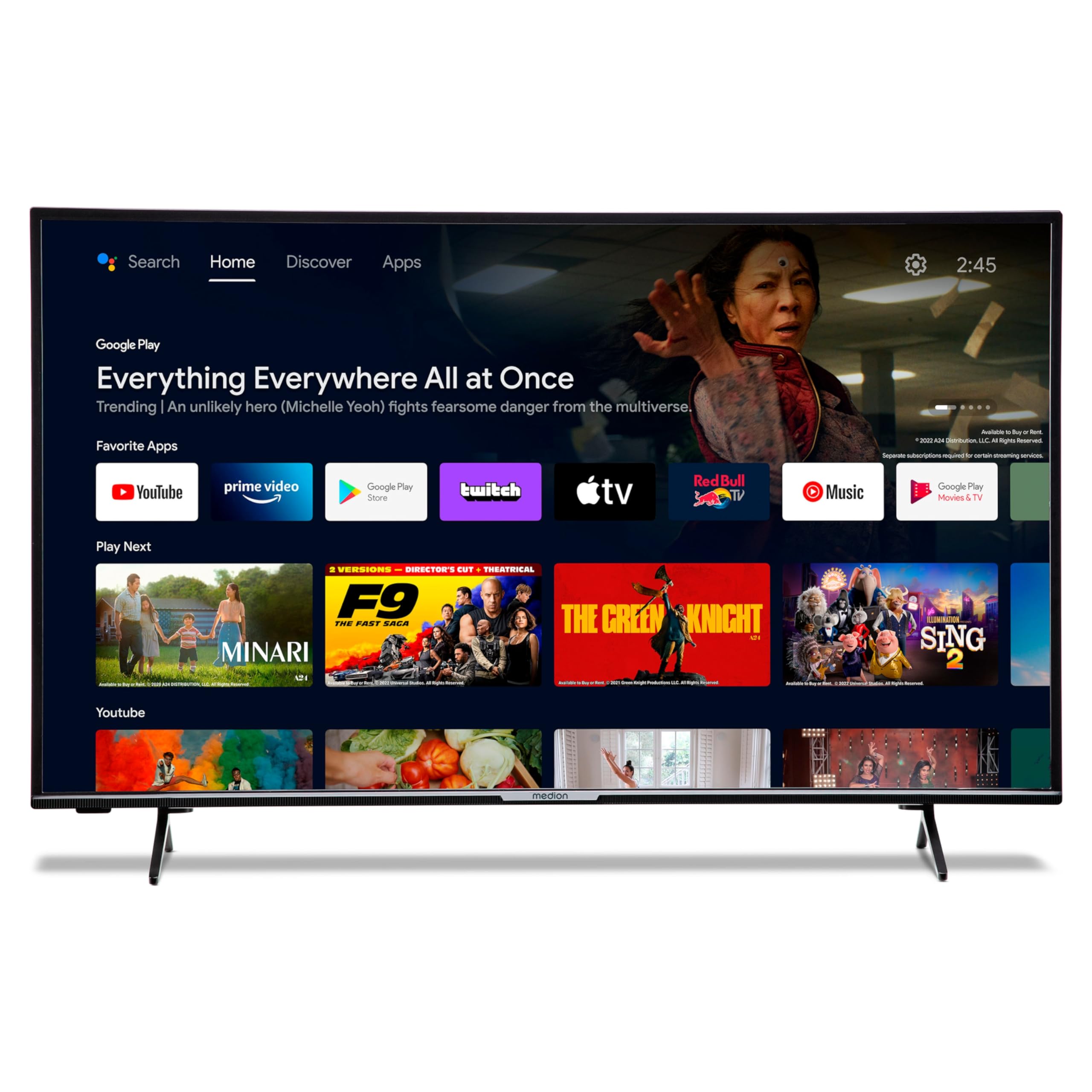
Image: The MEDION P14371 Smart TV with its remote control, illustrating the main components included in the package.
4. الإعداد
4.1. التثبيت المادي
إرفاق الحامل:
- قم بوضع شاشة التلفزيون بعناية على سطح ناعم ومسطح لمنع تعرضها للتلف.
- Align the TV feet with the corresponding screw holes on the bottom of the TV.
- قم بتأمين القدمين باستخدام البراغي المتوفرة.

Image: The MEDION P14371 television securely placed on its stand, ready for use.
التثبيت على الحائط: If wall mounting, ensure you use a VESA compatible bracket (100 x 100 mm) and follow the bracket manufacturer's instructions. Remove the stand feet before mounting.
4.2. الاتصالات
قم بتوصيل أجهزتك الخارجية بمنافذ التلفزيون. راجع الصورة أدناه لمعرفة مواقع المنافذ:
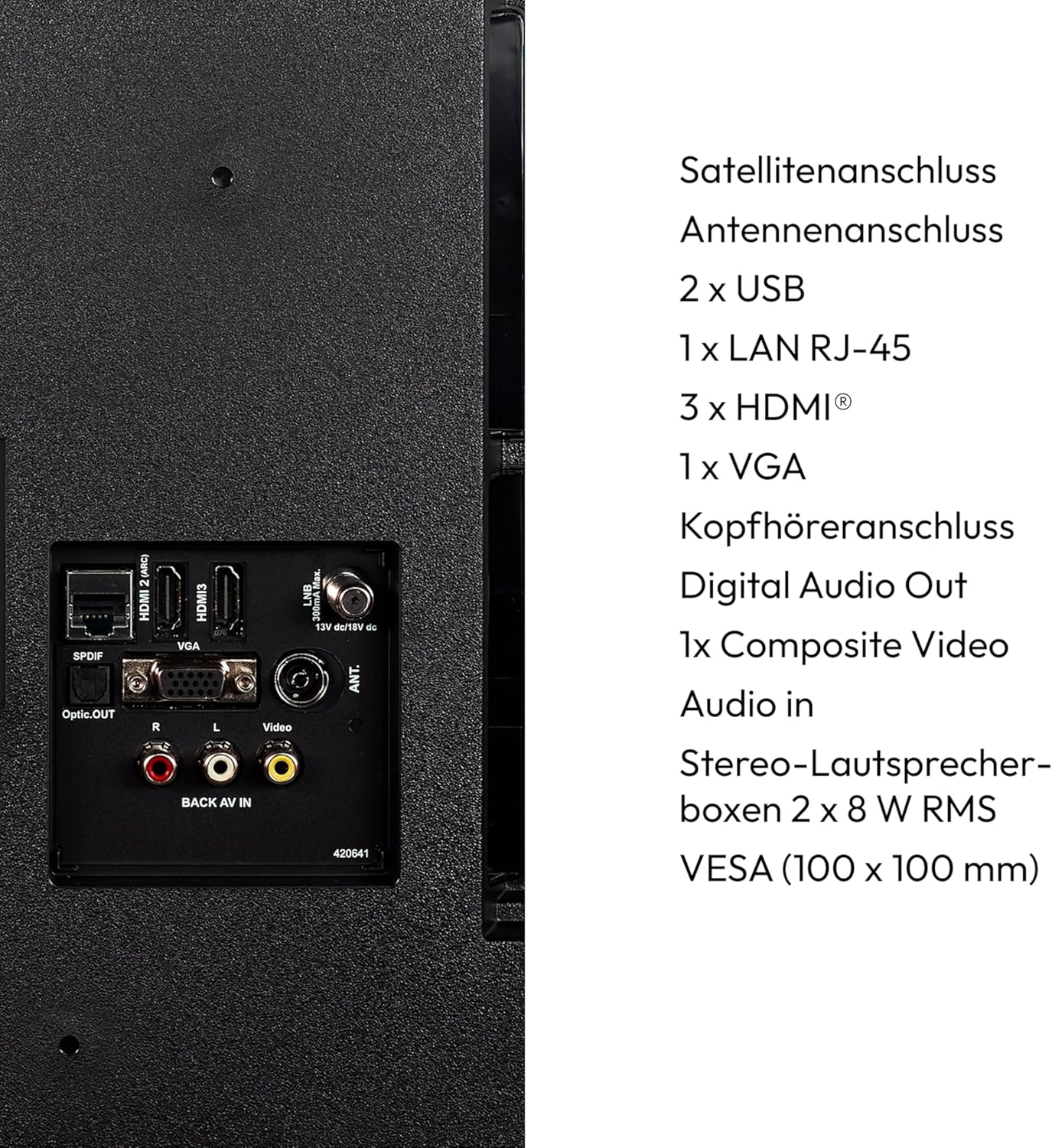
الصورة: تفصيلية view of the rear panel of the MEDION P14371 TV, showing various input and output ports including Satellite, Antenna, USB, LAN, HDMI, VGA, Headphone, Digital Audio Out, Composite Video, and Audio In.
- اتصال القمر الصناعي: Connect your satellite dish cable.
- اتصال الهوائي: Connect your terrestrial antenna cable.
- 2 x USB: For connecting USB storage devices for media playback or PVR functionality.
- 1 x LAN RJ-45: للاتصال بالإنترنت السلكي.
- 3 x HDMI®: لتوصيل الأجهزة عالية الدقة مثل مشغلات Blu-ray أو وحدات التحكم في الألعاب أو أجهزة فك التشفير.
- 1 x VGA: لتوصيل جهاز كمبيوتر.
- مقبس سماعة الرأس: لتوصيل سماعات الرأس.
- مخرج الصوت الرقمي (البصري): للاتصال بنظام صوتي خارجي.
- 1 x Composite Video (AV In): لتوصيل الأجهزة القديمة.
4.3. التشغيل الأولي
- After all connections are made, plug the power cord into a wall outlet.
- اضغط على زر الطاقة الموجود في جهاز التحكم عن بعد أو في التلفزيون.
- اتبع التعليمات التي تظهر على الشاشة للإعداد الأولي، بما في ذلك اختيار اللغة، والاتصال بالشبكة، ومسح القنوات.
5. تشغيل التلفزيون
5.1. جهاز التحكم عن بعد
يُتيح لك جهاز التحكم عن بُعد المرفق الوصول إلى جميع وظائف التلفزيون. أدخل بطاريتي AAA كما هو موضح في حجرة البطاريات.
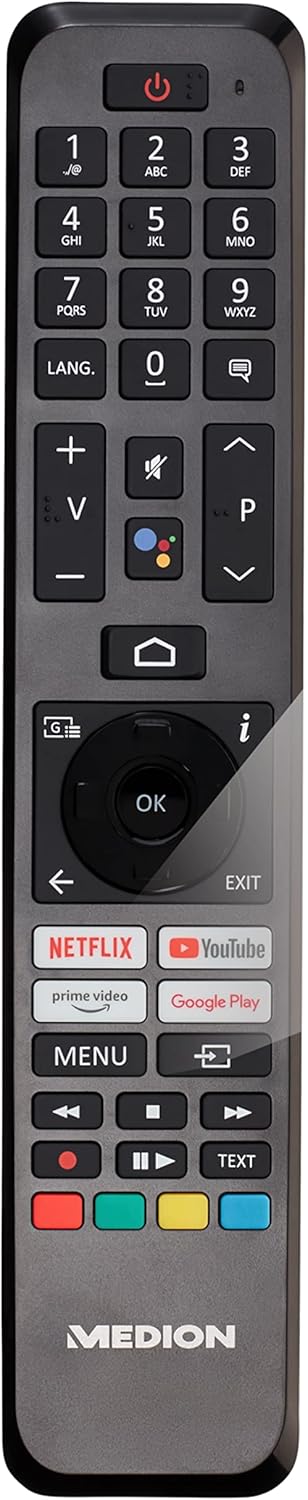
Image: The remote control for the MEDION P14371 TV, showing buttons for power, volume, channel, navigation, Netflix, Prime Video, Google Play, and Google Assistant.
- زر الطاقة: يقوم بتشغيل/إيقاف تشغيل التلفزيون أو وضعه في وضع الاستعداد.
- أزرار الأرقام (0-9): لاختيار القناة المباشرة.
- الحجم (+/-): ضبط مستوى الصوت.
- القناة (P+/P-): يغير القنوات.
- أزرار التنقل (أعلى/أسفل/يسار/يمين/موافق): للتنقل في القائمة والاختيار.
- زر الصفحة الرئيسة: الوصول إلى الشاشة الرئيسية لجهاز Android TV.
- زر الرجوع: العودة إلى الشاشة السابقة.
- زر مساعد جوجل: يقوم بتفعيل التحكم الصوتي (يا جوجل).
- Netflix, Amazon Prime Video, Google Play Buttons: الوصول المباشر إلى خدمات البث هذه.
5.2. ميزات التلفزيون الذكي (تلفزيون أندرويد)
Your TV runs on Android TV, providing access to a wide range of apps and services.

Image: The MEDION P14371 TV displaying the Google Play interface with various apps and games, highlighting its Smart TV capabilities.
- متجر جوجل بلاي: Download and install your favorite apps, games, and streaming services.
- مدمج في Chromecast: قم بإرسال المحتوى من هاتفك الذكي أو جهازك اللوحي أو الكمبيوتر مباشرة إلى التلفزيون.
- مساعد جوجل: استخدم الأوامر الصوتية عبر جهاز التحكم عن بعد للبحث عن المحتوى، والتحكم في أجهزة المنزل الذكية، والحصول على المعلومات.
- المدى الديناميكي العالي (HDR): Enjoy enhanced contrast and color detail with compatible content.
5.3. Triple HD Tuner
The integrated triple tuner allows reception of digital television signals without an external receiver:
- DVB-T2 HD: Terrestrial digital television.
- DVB-C: التلفزيون الرقمي عبر الكابل.
- DVB-S2: Digital satellite television.
Perform a channel scan during initial setup or via the TV menu to find available channels.
5.4. PVR (Personal Video Recorder)
Connect a USB storage device to record TV programs. Access the PVR function through the TV menu to schedule recordings or record live TV.
5.5. الاتصال اللاسلكي
- واي فاي: اتصل بشبكة الواي فاي المنزلية للوصول إلى الإنترنت وميزات التلفزيون الذكي.
- بلوتوث: قم بتوصيل سماعات الرأس اللاسلكية أو مكبرات الصوت أو الأجهزة الأخرى التي تدعم تقنية البلوتوث.
6. الصيانة
6.1. التنظيف
- افصل دائمًا التلفاز عن الكهرباء قبل التنظيف.
- استخدم قطعة قماش ناعمة وجافة لمسح الشاشة والخزانة.
- لإزالة البقع الصعبة، استخدمي القليل منamp cloth with a mild, non-abrasive cleaner. Do not spray cleaner directly onto the screen.
6.2. تحديثات البرامج
The TV may receive software updates to improve performance and add new features. Ensure your TV is connected to the internet to receive these updates. You can check for updates manually in the TV's settings menu.
7. استكشاف الأخطاء وإصلاحها
إذا واجهت مشكلات مع التلفزيون الخاص بك، فراجع الحلول الشائعة التالية:
| مشكلة | الحل المحتمل |
|---|---|
| لا يوجد طاقة | تأكد من توصيل سلك الطاقة بإحكام بالتلفزيون ومقبس الكهرباء. جرّب مقبسًا آخر. |
| لا توجد صورة، ولكن الصوت موجود | تحقق من مصدر الإدخال. تأكد من توصيل جميع كابلات الفيديو بإحكام. |
| لا يوجد صوت ولكن الصورة موجودة | Check the volume level and mute settings. Ensure audio cables are connected correctly. |
| جهاز التحكم عن بعد لا يعمل | استبدل البطاريات. تأكد من عدم وجود عوائق بين جهاز التحكم عن بُعد ومستشعر الأشعة تحت الحمراء الخاص بالتلفزيون. |
| Smart TV features are slow or unresponsive | Check your internet connection. Restart the TV by unplugging it for a few minutes and plugging it back in. Clear app caches in settings. |
| لا يمكن الاتصال بشبكة Wi-Fi | Ensure your router is on and working. Re-enter the Wi-Fi password. Try restarting your router and the TV. |
8. المواصفات
Detailed technical specifications for the MEDION P14371 (MD 30044) TV:
| ميزة | مواصفة |
|---|---|
| ماركة | MEDION |
| رقم الموديل | P14371 (MD 30044) |
| حجم الشاشة | 43 بوصة (108 سم) |
| تكنولوجيا العرض | شاشات الكريستال السائل LED |
| دقة | 1080p Full HD (1920 x 1080 pixels) |
| نسبة العرض إلى الارتفاع | 1.77:1 (16:9) |
| معدل التحديث | 60 هرتز |
| نظام التشغيل | تلفزيون أندرويد |
| تكنولوجيا الاتصال | Bluetooth, HDMI, USB, WLAN (Wi-Fi) |
| إجمالي منافذ USB | 2 |
| المميزات الخاصة | Bluetooth, USB Recording (PVR), HDR, Smart/Internet TV, Wi-Fi, Google Chromecast, Google Assistant |
| خدمات الإنترنت المدعومة | نتفليكس، أمازون برايم فيديو |
| فئة كفاءة الطاقة (SDR) | E |
| استهلاك الطاقة (SDR) | 42.0 واط / 1000 ساعة |
| فئة كفاءة الطاقة (HDR) | G |
| استهلاك الطاقة (HDR) | 62.0 واط / 1000 ساعة |
| الشركة المصنعة | MEDION |
| المكونات المضمنة | تلفزيون ذكي (MD30044) |
For more detailed energy information, please refer to the EU EPREL database: https://eprel.ec.europa.eu/qr/1587496

Image: Diagram showing the physical dimensions of the MEDION P14371 TV, including width (973 mm), height (570 mm without stand, 627 mm with stand), and depth (92 mm without stand, 250 mm with stand).
9. الضمان والدعم
MEDION is committed to providing excellent customer service and product support.
- الضمان العام: A minimum general warranty of 2 years is offered by the supplier.
- دعم المنتج: Guaranteed product support for up to 10 years.
- توفر قطع الغيار: Guaranteed availability of spare parts for up to 7 years from the date of market withdrawal.
- تحديثات البرامج: Guaranteed software and firmware updates for up to 8 years from the date of market withdrawal.
Our competent customer service team is available 365 days a year. Our customer relationship does not end with the purchase. If an issue cannot be resolved through direct communication, our repair service will handle it quickly and efficiently.
For support, please visit the official MEDION webالموقع أو اتصل بخدمة العملاء الخاصة بهم مباشرة.


