1. المقدمة
The Alfatron ALF CAM100 is an HD web camera designed for video conferencing, streaming, and other video communication needs. It provides 1080p video resolution for clear and sharp images. This manual provides instructions for setting up, operating, and maintaining your ALF CAM100 web آلة تصوير.
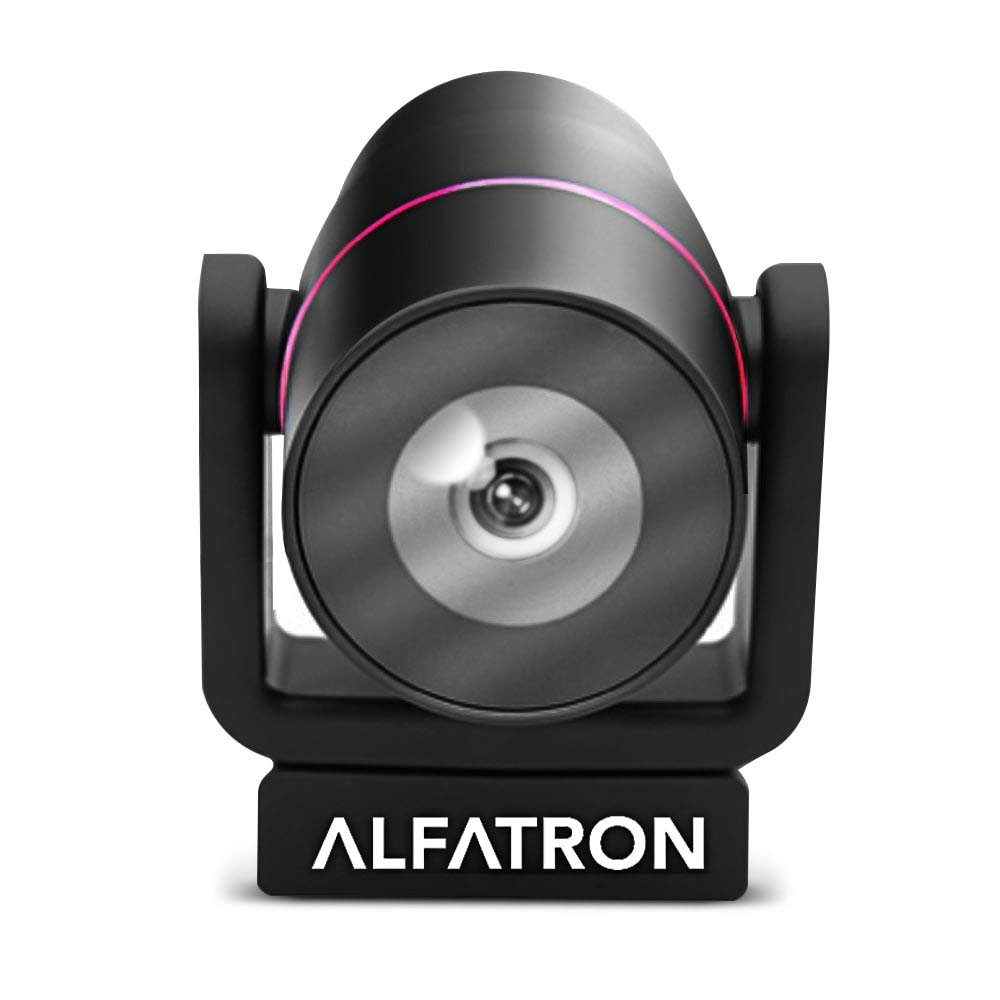
Image 1.1: The Alfatron ALF CAM100 HD Camera, highlighting its 1080p resolution, 120-degree wide shooting angle, and compatibility with video conferencing software like Skype and Zoom.
2. ماذا يوجد في الصندوق
تأكد من وجود جميع العناصر في العبوة:
- Alfatron ALF CAM100 HD Web آلة تصوير
- كابل يو اس بي
3. تعليمات الإعداد
The ALF CAM100 web camera is designed for plug-and-play operation, requiring no additional driver installation for most operating systems.
- قم بتوصيل كبل USB: Plug the provided USB cable into the USB port on the ALF CAM100 camera.
- الاتصال بجهاز الكمبيوتر: Insert the other end of the USB cable into an available USB 2.0 port on your computer.
- التعرف على النظام: Your operating system (Windows, macOS, Linux) should automatically detect and install the necessary drivers for the camera. This process may take a few moments.
- موضع الكاميرا: Place the camera on a stable surface, monitor, or tripod. The adjustable lens allows for flexible positioning.
- Select Camera in Software: Open your preferred video conferencing or streaming application (e.g., Zoom, Skype, WeChat) and select "ALF CAM100" as your video input device in the application's settings.
4. تعليمات التشغيل
4.1 التشغيل الأساسي
Once connected and selected in your software, the ALF CAM100 will begin streaming video. Ensure adequate lighting for optimal video quality.
4.2 Smart Hanging Mode
The camera features an intelligent hanging mode. If the camera is mounted upside down, it will automatically detect the orientation and adjust the video image stream accordingly, ensuring the picture is always right-side up.

Image 4.1: The Alfatron ALF CAM100 camera mounted in a conference room setting, illustrating its use and the intelligent hanging mode feature that automatically adjusts image orientation.
4.3 Adjustable Lens
The ALF CAM100 is equipped with a mechanically adjustable lens. This allows for precise framing and angle adjustments to achieve the desired view for your video calls or recordings.
5. انتهت الميزاتview
- فيديو عالي الدقة: Streams in 1080p for clear and sharp video quality.
- Wide Range Shooting Angle: Features a 120-degree wide-angle lens to capture more of the environment.
- التوافق العالمي: Works with popular video meeting software including Zoom, Skype, and WeChat.
- التوصيل والتشغيل: Simple USB connection with no driver installation required for most systems.
- Smart Hanging Mode: Automatically adjusts video orientation if the camera is mounted upside down.
- عدسة قابلة للتعديل: Mechanically adjustable lens for flexible framing and angle adjustments.
- أداء الإضاءة المنخفضة: Designed to perform well in low-light conditions.
6. الصيانة
Proper maintenance ensures the longevity and optimal performance of your ALF CAM100 web آلة تصوير.
- تنظيف العدسة: استخدم قطعة قماش ناعمة وخالية من الوبر مصممة خصيصًا للعدسات البصرية لمسح عدسة الكاميرا برفق. تجنب استخدام المواد الكاشطة أو المواد الكيميائية القاسية.
- تنظيف الجسم: امسح جسم الكاميرا بقطعة قماش ناعمة وجافة. إذا لزم الأمر، استخدم قطعة قماش مبللة قليلاًamp يمكن استخدام القماش، ولكن تأكد من عدم دخول الرطوبة إلى الكاميرا.
- تخزين: When not in use for extended periods, store the camera in a clean, dry place away from direct sunlight and extreme temperatures.
- العناية بالكابلات: تجنب ثني أو لف كابل USB بشكل مفرط لتجنب التلف.
7. استكشاف الأخطاء وإصلاحها
If you encounter issues with your ALF CAM100 web camera, refer to the following common solutions:
- لم يتم اكتشاف الكاميرا:
- تأكد من توصيل كابل USB بشكل آمن بكل من الكاميرا والكمبيوتر.
- حاول توصيل الكاميرا بمنفذ USB مختلف على جهاز الكمبيوتر الخاص بك.
- أعد تشغيل الكمبيوتر الخاص بك.
- Check your operating system's device manager (Windows) or system information (macOS) to see if the camera is listed.
- لا يوجد مخرج فيديو:
- Verify that the ALF CAM100 is selected as the video input device in your video conferencing or streaming application's settings.
- Ensure no other application is currently using the camera, as some software may not allow simultaneous access.
- Check for any privacy settings on your operating system that might be blocking camera access for certain applications.
- جودة الفيديو رديئة:
- Ensure adequate lighting in your environment. The camera performs best with sufficient illumination.
- Clean the camera lens using a soft, lint-free cloth.
- Check your internet connection speed if streaming, as low bandwidth can affect video quality.
- Confirm that your video application is set to use 1080p resolution if available.
8. المواصفات
| ميزة | التفاصيل |
|---|---|
| رقم الموديل | ALFCAM100 |
| أبعاد | 104mm x 139mm x 124mm / 7.48 x 6.1 x 5.12 inches |
| الوزن الصافي | 500 جم / 1.93 رطل |
| لون | أسود |
| الواجهة | يو اس بي 2.0 |
| عدسة | 1/2.8, fixed focus, 120-degree angle |
| المستشعر | Full HD CMOS Sensor |
| دقة الفيديو | 1920 × 1080 (1080 بكسل) |
| سرعة نقل الصورة | حتى 30 إطارًا في الثانية |
| Aperture Coefficient | ف2.0 |
| ميزة خاصة | أداء الإضاءة المنخفضة |
Note: Dimensions and weight are provided in both metric and imperial units as found in product data.
9. الضمان والدعم
The Alfatron ALF CAM100 comes with a limited 7-year warranty.
For technical support or warranty claims, please refer to the official Alfatron webيمكنك زيارة موقعهم الإلكتروني أو الاتصال بقسم خدمة العملاء. تتوفر معلومات الاتصال عادةً على عبوة المنتج أو على موقع الشركة المصنعة. webموقع.


