1. المقدمة
Welcome to the user manual for your Behringer RHYTHM DESIGNER RD-6 Analog Drum Machine. This device is designed to provide authentic analog drum sounds with modern connectivity and sequencing capabilities. The RD-6 features true analog circuitry, 8 distinct drum voices, a 16-step sequencer, and a built-in distortion effect. Please read this manual thoroughly to ensure proper setup, operation, and maintenance, allowing you to fully explore its creative potential.
2. تعليمات السلامة الهامة
- اقرأ هذه التعليمات.
- احتفظ بهذه التعليمات.
- انتبه لكل التحذيرات.
- اتبع جميع التعليمات.
- لا تستخدم هذا الجهاز بالقرب من الماء.
- نظف فقط بقطعة قماش جافة.
- لا تقم بسد أي فتحات تهوية. قم بالتركيب وفقًا لتعليمات الشركة المصنعة.
- لا تقم بالتثبيت بالقرب من أي مصادر للحرارة مثل المشعات أو فتحات التدفئة أو المواقد أو أي أجهزة أخرى (بما في ذلك ampالمُضخِّمات) التي تنتج الحرارة.
- لا تفسد الغرض الأمني للقابس المستقطب أو القابس الأرضي. يحتوي القابس المستقطب على شفرتين إحداهما أوسع من الأخرى. يحتوي القابس الأرضي على شفرتين وشوكة أرضية ثالثة. يتم توفير الشفرة العريضة أو الشوكة الثالثة لسلامتك. إذا لم يكن القابس المرفق مناسبًا للمأخذ الكهربائي لديك، فاستشر كهربائيًا لاستبدال المقبس القديم.
- احمِ سلك الطاقة من أن يدوس عليه أحد أو يضغط عليه، خاصة عند المقابس ومنافذ التوصيل الكهربائية ونقطة خروجها من الجهاز.
- استخدم فقط المرفقات/الملحقات المحددة من قبل الشركة المصنعة.
- استخدم فقط مع العربة أو الحامل أو الحامل ثلاثي القوائم أو الحامل أو الطاولة المحددة من قبل الشركة المصنعة أو المباعة مع الجهاز. عند استخدام العربة، توخ الحذر عند تحريك مجموعة العربة/الجهاز لتجنب الإصابة نتيجة الانقلاب.
- افصل هذا الجهاز أثناء العواصف الرعدية أو عند عدم استخدامه لفترات طويلة من الزمن.
- أحل جميع أعمال الصيانة إلى موظفي الصيانة المؤهلين. يلزم إجراء الصيانة عند تعرض الجهاز للتلف بأي شكل من الأشكال، مثل تلف سلك مصدر الطاقة أو القابس، أو انسكاب السوائل أو سقوط الأشياء داخل الجهاز، أو تعرض الجهاز للمطر أو الرطوبة، أو عدم تشغيله بشكل طبيعي، أو سقوطه.
3. ماذا يوجد في الصندوق
- Behringer RHYTHM DESIGNER RD-6 Analog Drum Machine
- محول الطاقة
- كابل يو اس بي
- دليل البدء السريع
4. Controls and Connectors Overview
The Behringer RD-6 features an intuitive layout for easy access to all its functions, designed for both performance and studio integration.
4.1 ضوابط اللوحة الأمامية

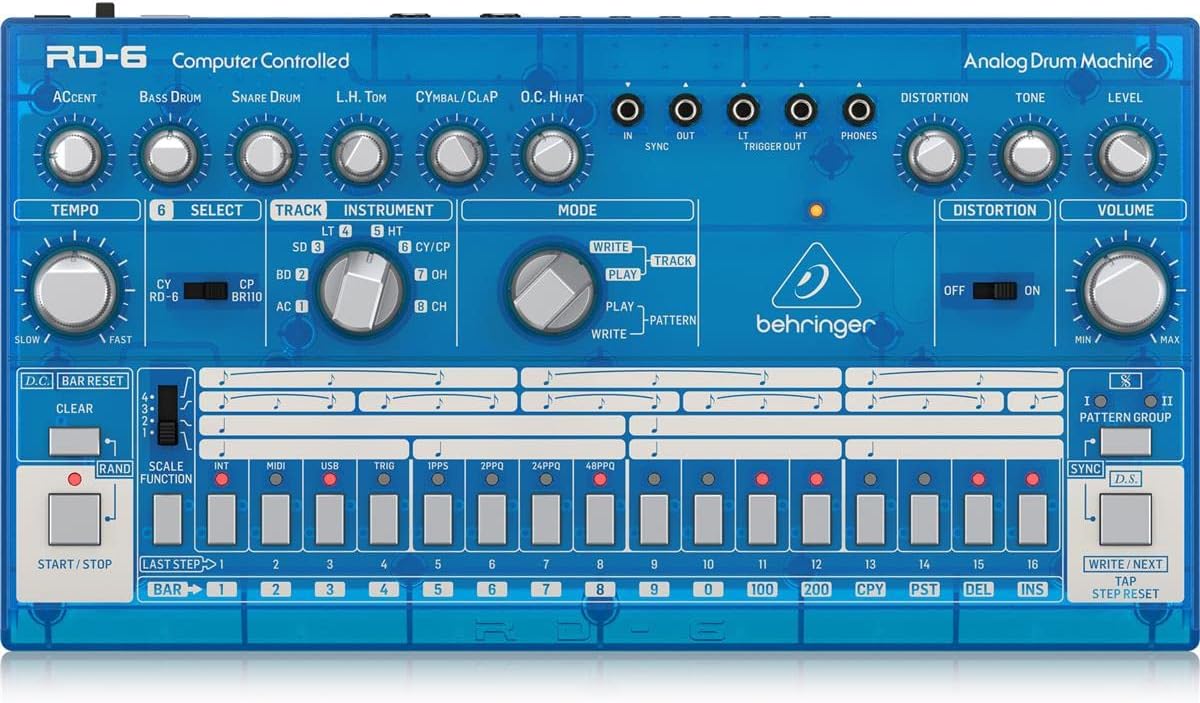
الصورة: من أعلى إلى أسفل view of the Behringer RD-6 front panel, showing various knobs, buttons, and the 16-step sequencer.
- جهاز TEMPO: Adjusts the playback speed of patterns.
- لهجة: Controls the intensity of accented steps.
- BASS DRUM, SNARE DRUM, L.H. TOM, CYMBAL/CLAP, O.C. HI HAT: Individual controls for tone, decay, and level of each drum voice.
- تشوه: Activates the built-in distortion effect.
- TONE/LEVEL (Distortion): Adjusts the character and intensity of the distortion.
- حجم التداول: التحكم في مستوى الصوت الناتج.
- يختار: Used to select various functions or parameters.
- TRACK/INSTRUMENT: Selects the current track or instrument for editing.
- الوضع (كتابة/تشغيل/نمط): Switches between pattern writing, playback, and pattern selection modes.
- 16 STEP BUTTONS: Used to program steps in a pattern or select patterns.
- بدء توقف: Initiates or halts pattern playback.
- واضح: Erases patterns or steps.
- SCALE FUNCTION: Adjusts the timing scale for patterns.
- المزامنة: Selects the synchronization source (Internal, MIDI, USB, Clock).
- اكتب/التالي: Saves patterns or advances to the next step/pattern.
- TAP/STEP RESET: Used for tap tempo or resetting the step sequencer.
4.2 موصلات اللوحة الخلفية
الصورة: الخلفية view of the Behringer RD-6, highlighting the various audio outputs, MIDI ports, USB port, and power input.
- VOICE OUT (OH/CH, CP, CY, LT/HT, SD, BD): Individual 3.5 mm TS outputs for each drum voice, allowing for external processing.
- اخلط: 6.35 mm TS output for the main stereo mix.
- بدء توقف: 3.5 mm TS input for external start/stop control.
- مدخل/مخرج/ممر MIDI: 5-pin DIN connectors for MIDI communication with other devices.
- USB: USB-B port for MIDI over USB and firmware updates.
- POWER DC INPUT: اتصال لمحول الطاقة 9V DC المرفق.
5. الإعداد الأولي
5.1 توصيل الطاقة
قم بتوصيل محول الطاقة المرفق بجهد 9 فولت تيار مستمر بـ مدخلات الطاقة DC on the rear panel. Plug the adapter into a suitable power outlet. Ensure the قوة switch is in the OFF position before connecting the power supply.
5.2 اتصال الصوت
For a combined stereo mix, connect the اخلط (6.35 mm TS) to your mixer or audio interface. For individual drum sound processing and recording, use the dedicated VOICE OUT jacks (3.5 mm TS) for each drum voice (OH/CH, CP, CY, LT/HT, SD, BD).
5.3 USB/MIDI Connection
قم بتوصيل USB port to your computer for MIDI control and firmware updates. Use the MIDI IN/OUT/THRU ports for connecting to other MIDI devices such as synthesizers, sequencers, or MIDI interfaces.
6. التشغيل الأساسي
6.1 تشغيل/إيقاف التشغيل
اقلب قوة switch on the rear panel to the ON position. The unit will power up and be ready for use. To power off, flip the switch back to OFF.
6.2 Creating a Pattern
- Select a pattern bank (I or II) using the مجموعة الأنماط أزرار.
- اضغط على يكتب button to enter pattern write mode. The يكتب سوف يضيء مؤشر LED.
- Select an instrument (e.g., Bass Drum, Snare Drum) using the أداة مقبض محدد.
- استخدم 16 step buttons to program your rhythm. Pressing a button will activate or deactivate a step for the selected instrument. Illuminated buttons indicate active steps.
- Adjust parameters like لهجة, الإيقاع, and individual drum sound controls (e.g., Tone, Decay) as desired to shape your sound.
- يضعط يلعب to hear your pattern.
- يضعط يكتب again to exit write mode and save the pattern.
6.3 Real-time Recording
بينما في يلعب الوضع، اضغط على يكتب button to enable real-time recording. The يكتب LED will flash. Play the drum sounds using the step buttons or an external MIDI controller. The notes will be recorded into the current pattern. Press يكتب again to stop real-time recording.
6.4 Using Distortion
انخرط في تشويه switch to activate the built-in distortion effect. Adjust the نغمة و مستوى knobs to shape the distortion character and intensity to add grit and aggression to your drum sounds.
7. اتصال MIDI و USB
7.1 التحكم عبر MIDI
The RD-6 supports MIDI In, Out, and Thru via its 5-pin DIN connectors. Connect to other MIDI devices to synchronize tempo, trigger sounds, or control parameters. The MIDI THRU port allows you to daisy-chain multiple MIDI devices. Refer to the full MIDI implementation chart in the comprehensive manual for detailed CC messages and settings.
7.2 USB Audio/MIDI
The USB port provides class-compliant MIDI connectivity to your computer. This allows the RD-6 to be used as a MIDI controller or to receive MIDI data from your Digital Audio Workstation (DAW) for seamless integration into your production environment.
8. الصيانة
8.1 التنظيف
Keep the unit clean using a soft, dry cloth. Avoid abrasive cleaners, solvents, or waxes, as these can damage the finish and internal components.
8.2 التخزين
Protect the RD-6 from dust, moisture, and extreme temperatures. When not in use for extended periods, store it in a cool, dry place, preferably in its original packaging or a protective case.
8.3 الخدمة
Do not attempt to service the unit yourself. Refer all servicing to qualified service personnel to prevent electric shock or damage to the device.
9. استكشاف الأخطاء وإصلاحها
9.1 لا يوجد إخراج صوت
- Check that the power adapter is securely connected and the unit is powered ON.
- Verify all audio cables are correctly connected to the اخلط أو فردي VOICE OUT ports and to your audio system.
- تأكد من أن السيد مقدار knob and individual instrument level knobs are turned up.
- Confirm that a pattern is playing and that the selected instrument has active steps.
9.2 MIDI Not Responding
- Verify MIDI cables are correctly connected to the MIDI IN / OUT ports of the RD-6 and your external device.
- Check that the MIDI channel settings on both the RD-6 and your external device match.
- Ensure the RD-6 is in the correct sync mode (e.g., MIDI Sync, USB Sync) if synchronizing with an external clock.
9.3 Unexpected Behavior
If the unit exhibits unexpected behavior, try powering it off and on again. If the issue persists, a factory reset may resolve it. Refer to the comprehensive manual for instructions on how to perform a factory reset.
10. المواصفات الفنية
| ميزة | التفاصيل |
|---|---|
| اسم الموديل | RD-6 |
| ماركة | بيهرينغر |
| وزن العنصر | 1.98 جنيه (900 جرام) |
| أبعاد المنتج | 17.2 × 8.95 × 3.8 بوصة |
| مادة الجسم | Coal Fiber |
| مادة | الفولاذ المقاوم للصدأ |
| لون | أزرق |
| نوع الموصل | USB |
| المجلدtage | 230 فولت |
| رقم موديل العنصر | 000-EE204-00010 |
| رمز المنتج الموحد | 644216639205 |
| الشركة المصنعة | ميوزيك ترايب الولايات المتحدة |
10.1 الميزات الرئيسية
- True analog circuitry for authentic sound reproduction.
- 8 original drum sounds, including Bass Drum, Snare Drum, Low Tom, High Tom, Cymbal, Clap, Open Hi-Hat, and Closed Hi-Hat.
- 16-step sequencer with 256 patterns for complex rhythm creation.
- Built-in distortion effect with Tone and Level controls.
- USB/MIDI connectivity for seamless integration with modern DAWs and external MIDI devices.
- 7 independent analog outputs for flexible mixing and individual drum sound processing.
- Multiple sync options: USB, MIDI, Clock, and Internal.
11. الضمان والدعم
للحصول على معلومات مفصلة حول الضمان، وتسجيل المنتج، والدعم الفني، يرجى زيارة موقع Behringer الرسمي website or contact your local distributor. It is recommended to keep your proof of purchase for any warranty claims.


