1. المقدمة
This manual provides detailed instructions for the IPEGA PG-SW023 Bluetooth Wireless Game Controller. This versatile controller is designed to enhance your gaming experience across multiple platforms, including N-S consoles, PlayStation 3 (PS3), Android devices, and personal computers running Windows 7, 8, or 10.
Please read this manual carefully before using the product to ensure proper operation and to maximize its features.
2. مواصفات المنتج
- التوافق مع منصات متعددة: Suitable for gaming on N-S consoles, PS3, Android devices, and PCs (Windows 7/8/10).
- تجربة لعب محسّنة: Supports vibration feedback and a six-axis gyroscope function for immersive gameplay and precise control.
- Customizable Macro Function: Rear buttons can be configured as common keys or combination keys for simplified actions.
- Continuous TURBO Function: Features a dedicated TURBO button for rapid-fire actions, compatible with N-S Pro gamepads.
- تصميم مريح: Engineered for comfort during extended gaming sessions, fitting securely in the palm.

Image: The IPEGA PG-SW023 Wireless Game Controller highlighting its key features: two vibrating motors, six-axis design, high-sensitive buttons, and Turbo function.
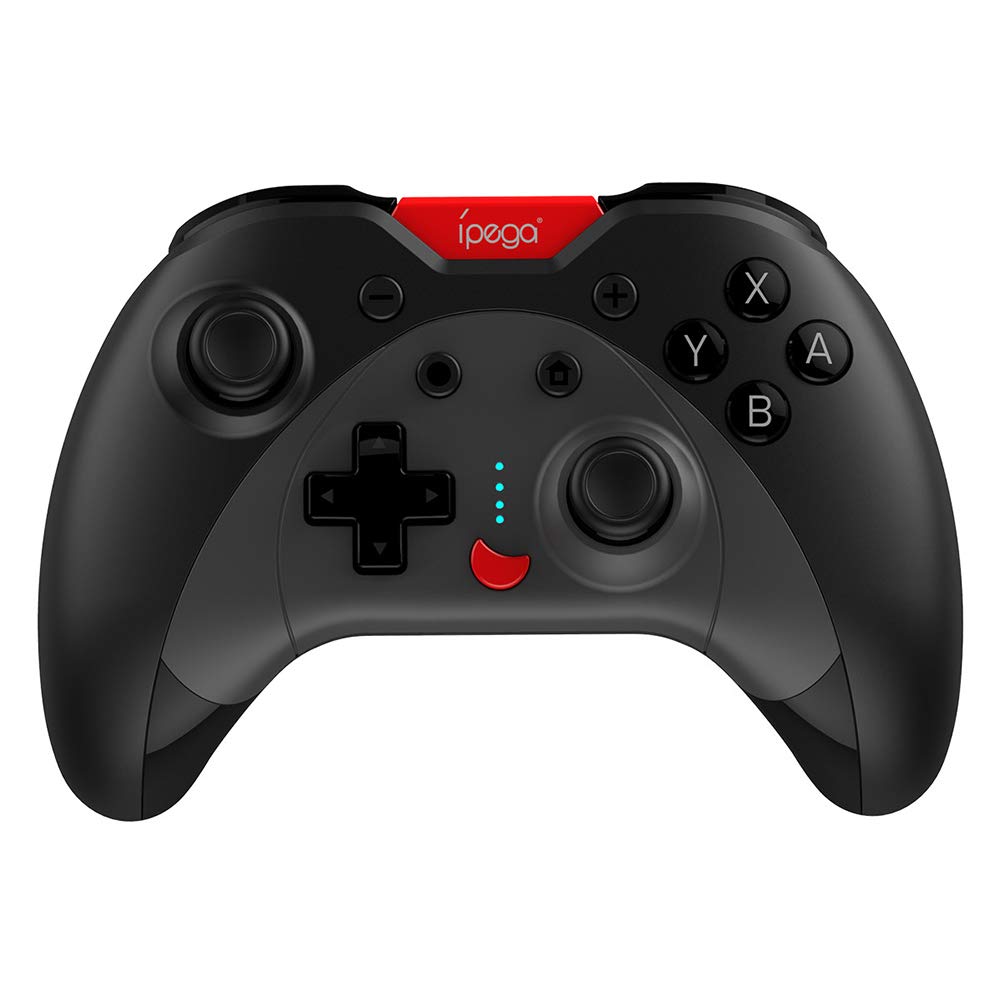
Image: A green IPEGA PG-SW023 controller illustrating its built-in six-axis gyroscope design for improved body feeling and accurate targeting.
3. محتويات العبوة
يرجى التأكد من وجود جميع العناصر في الحزمة:
- 1 x IPEGA PG-SW023 Wireless Game Controller
- 1 × كابل شحن من النوع C
- 1 × دليل المستخدم
4. المواصفات
| ميزة | مواصفة |
|---|---|
| ماركة | إيبيجا |
| نموذج | PG-SW023 |
| خيارات الألوان | Black, Green, Blue, Yellow |
| حجم التشغيلtage | تيار مستمر 3.7 فولت |
| تيار التشغيل | <30 مللي أمبير |
| ساكنة الحالية | <20 ميكرو أمبير |
| وقت اللعب المستمر | حوالي 15 ساعات |
| حجم الإدخالtagهـ / الحالية | تيار مستمر 5 فولت/500 مللي أمبير |
| وقت الشحن | حوالي 2 ساعات |
| نسخة البلوتوث | 3.0 |
| مسافة الإرسال | ≤8 أمتار |
| سعة البطارية | 400 مللي أمبير |
| أبعاد المنتج | 15 x 10 x 5.5 cm (5.91 x 3.94 x 2.17 inches) |
| وزن المنتج | حوالي 215 جرامًا (7.58 أونصة) |
| الأجهزة المتوافقة | N-S Console, PS3, Android, PC (Win 7/8/10) |
| الاتصال | لاسلكي (بلوتوث) |
| مصدر الطاقة | تعمل بالبطارية |
5. الإعداد
5.1 شحن وحدة التحكم
- Connect the provided Type-C charging cable to the controller's charging port.
- قم بتوصيل الطرف الآخر من الكابل بمصدر طاقة USB (مثل جهاز كمبيوتر أو محول حائط USB).
- The indicator lights on the controller will show charging status. Once fully charged (approx. 2 hours), the lights will indicate completion or turn off.
5.2 الاقتران بالأجهزة
The pairing method varies slightly depending on the device. Ensure the controller is sufficiently charged before attempting to pair.

Image: A blue IPEGA PG-SW023 controller positioned in front of a Nintendo Switch, PlayStation 3, and a laptop, illustrating its multi-platform compatibility.
5.2.1 Pairing with N-S Console
- On your N-S console, go to the HOME Menu.
- حدد "وحدات التحكم" > "تغيير المقبض/الترتيب".
- Press and hold the pairing button on the IPEGA controller (refer to controller diagram for exact location) until the indicator lights begin to flash rapidly.
- The console will detect the controller. Once paired, the indicator light will become solid.
5.2.2 Pairing with PS3
- Connect the controller to the PS3 console using the Type-C cable.
- اضغط على زر الصفحة الرئيسية على وحدة التحكم.
- Once recognized, you can disconnect the cable and the controller should remain paired wirelessly.
5.2.3 الاقتران بأجهزة Android
- قم بتمكين Bluetooth على جهاز Android الخاص بك.
- On the controller, press and hold the Android pairing button combination (refer to controller diagram or quick start guide for specific button combination, usually 'A' + HOME or 'X' + HOME) until the indicator lights flash rapidly.
- On your Android device, search for new Bluetooth devices and select 'IPEGA PG-SW023' (or similar name) from the list.
- بمجرد الاقتران، سيصبح ضوء المؤشر الموجود على وحدة التحكم مضاءً بشكل ثابت.
5.2.4 Pairing with PC (Windows 7/8/10)
- تأكد من تمكين تقنية Bluetooth في جهاز الكمبيوتر الخاص بك.
- Go to 'Settings' > 'Devices' > 'Bluetooth & other devices' and click 'Add Bluetooth or other device'.
- اختر "بلوتوث".
- On the controller, press and hold the PC pairing button combination (refer to controller diagram or quick start guide for specific button combination, usually 'L1' + HOME or 'Y' + HOME) until the indicator lights flash rapidly.
- Select 'IPEGA PG-SW023' (or similar name) from the list of available devices on your PC.
- بمجرد الاقتران، سيصبح ضوء المؤشر الموجود على وحدة التحكم مضاءً بشكل ثابت.
6. تعليمات التشغيل
6.1 وظائف الأزرار الأساسية
The controller features standard gaming buttons including directional pad, analog sticks, action buttons (A, B, X, Y), shoulder buttons (L1, R1), and triggers (L2, R2). Specific button mapping may vary by game and platform.

Image: Hands comfortably gripping a black IPEGA PG-SW023 controller, showcasing its ergonomic design for comfortable and convenient use.
6.2 وظيفة توربو
The TURBO function allows for continuous rapid input of a selected button. This can be useful in games requiring fast, repeated button presses.
- To activate TURBO: Press and hold the desired action button (e.g., A, B, X, Y) and then press the TURBO button simultaneously. The button will now continuously input as long as it's held down.
- To deactivate TURBO: Repeat the same process (press the action button and TURBO button simultaneously).

Image: A yellow IPEGA PG-SW023 controller with its prominent TURBO button, shown with a Nintendo Switch console, illustrating the auto-fire feature.
6.3 وظيفة ماكرو
The macro function allows you to assign a sequence of button presses or a single common button to the programmable rear buttons. This can simplify complex in-game actions.
- Refer to the specific instructions provided in the quick start guide or on the manufacturer's website for detailed steps on programming macro buttons, as this process can vary.
6.4 Vibration and Gyroscope
The controller features dual motors for vibration feedback, providing tactile sensations that correspond to in-game events. The built-in six-axis gyroscope allows for motion control in supported games, offering a more immersive and precise aiming experience.

Image: A blue IPEGA PG-SW023 controller in use, with visual cues indicating its double motor vibrating design for immersive feedback during gameplay.
7. الصيانة
العناية المناسبة ستطيل عمر جهاز التحكم الخاص بك:
- تنظيف: استخدم قطعة قماش ناعمة وجافة لتنظيف وحدة التحكم. لإزالة الأوساخ المستعصية، امسحها برفق.ampاغسل قطعة القماش بالماء أو محلول تنظيف معتدل. تجنب المواد الكيميائية القاسية.
- تخزين: قم بتخزين وحدة التحكم في مكان بارد وجاف بعيدًا عن أشعة الشمس المباشرة ودرجات الحرارة القصوى.
- تجنب التأثير: لا تقم بإسقاط وحدة التحكم أو تعريضها لصدمات قوية، لأن ذلك قد يؤدي إلى تلف المكونات الداخلية.
- التعرض السائل: Keep the controller away from liquids. If it comes into contact with liquid, power it off immediately and allow it to dry completely before attempting to use it again.
8. استكشاف الأخطاء وإصلاحها
If you encounter issues with your IPEGA PG-SW023 controller, try the following solutions:
- وحدة التحكم غير متصلة:
- تأكد من أن وحدة التحكم مشحونة بالكامل.
- تأكد من تمكين البلوتوث على جهازك.
- Try re-pairing the controller by following the setup instructions for your specific device.
- Move the controller closer to the device to ensure it is within the 8-meter transmission range.
- Restart both the controller and your gaming device.
- الأزرار لا تستجيب:
- Check if the controller is properly connected and paired.
- Test the controller with another game or application to rule out software-specific issues.
- تأكد من عدم وجود أي شوائب عالقة تحت الأزرار.
- الاهتزاز لا يعمل:
- Verify that the game or system settings have vibration enabled.
- قد لا تدعم بعض الألعاب خاصية الاهتزاز.
- عمر البطارية قصير:
- تأكد من شحن وحدة التحكم بالكامل قبل الاستخدام.
- Battery life can vary based on usage intensity (e.g., continuous vibration).
- تجنب الشحن في البيئات شديدة الحرارة أو البرودة.
9. الضمان والدعم
For warranty information, technical support, or service inquiries regarding your IPEGA PG-SW023 Bluetooth Wireless Game Controller, please refer to the product packaging or contact the manufacturer directly through their official webالموقع الإلكتروني أو قنوات خدمة العملاء. احتفظ بإيصال الشراء كإثبات للشراء لأي مطالبات ضمان.


