1. المقدمة
This manual provides essential information for the safe and effective use of your Sony MHC-V43D High Power Party Speaker. Please read these instructions thoroughly before operating the unit and retain them for future reference.

الشكل 1: الجبهة view of the Sony MHC-V43D Party Speaker.
المميزات الرئيسية:
- Jet Bass Booster: Enhances bass for powerful sound.
- Party Light & Speaker Light: Illuminates your space with dynamic lighting effects.
- Karaoke & Guitar Input: Connect microphones and guitars for interactive entertainment.
- التحكم بالإيماءات: Manage music playback and effects with simple hand movements.
- NFC and Bluetooth Connectivity: بث صوتي لاسلكي سلس.
- Music Center App Compatibility: Control speaker functions from your smartphone.
- Fiestable App Integration: Access DJ Control, Illumination, Karaoke, and Motion Control features.
- Built-in CD/DVD Player: Enjoy your favorite discs.
- USB and HDMI Connectivity: Versatile media playback options.
2. الإعداد
2.1 محتويات الصندوق
- AC Cord (1U)
- هوائي FM (1U)
- Batteries (2U)
- Remote Control (1U)
- Setup Guide (1U)
2.2 التعيين الأولي
Place the speaker on a stable, flat surface. Ensure adequate ventilation around the unit to prevent overheating. Avoid placing it near heat sources or in direct sunlight.
2.3 توصيل الطاقة
- قم بتوصيل سلك الطاقة المرفق بمنفذ AC IN الموجود في الجزء الخلفي من السماعة.
- Plug the other end of the AC power cord into a wall outlet (240 Volts).
2.4 توصيل هوائي FM
Connect the supplied FM antenna to the FM ANTENNA terminal on the rear of the speaker for improved radio reception.
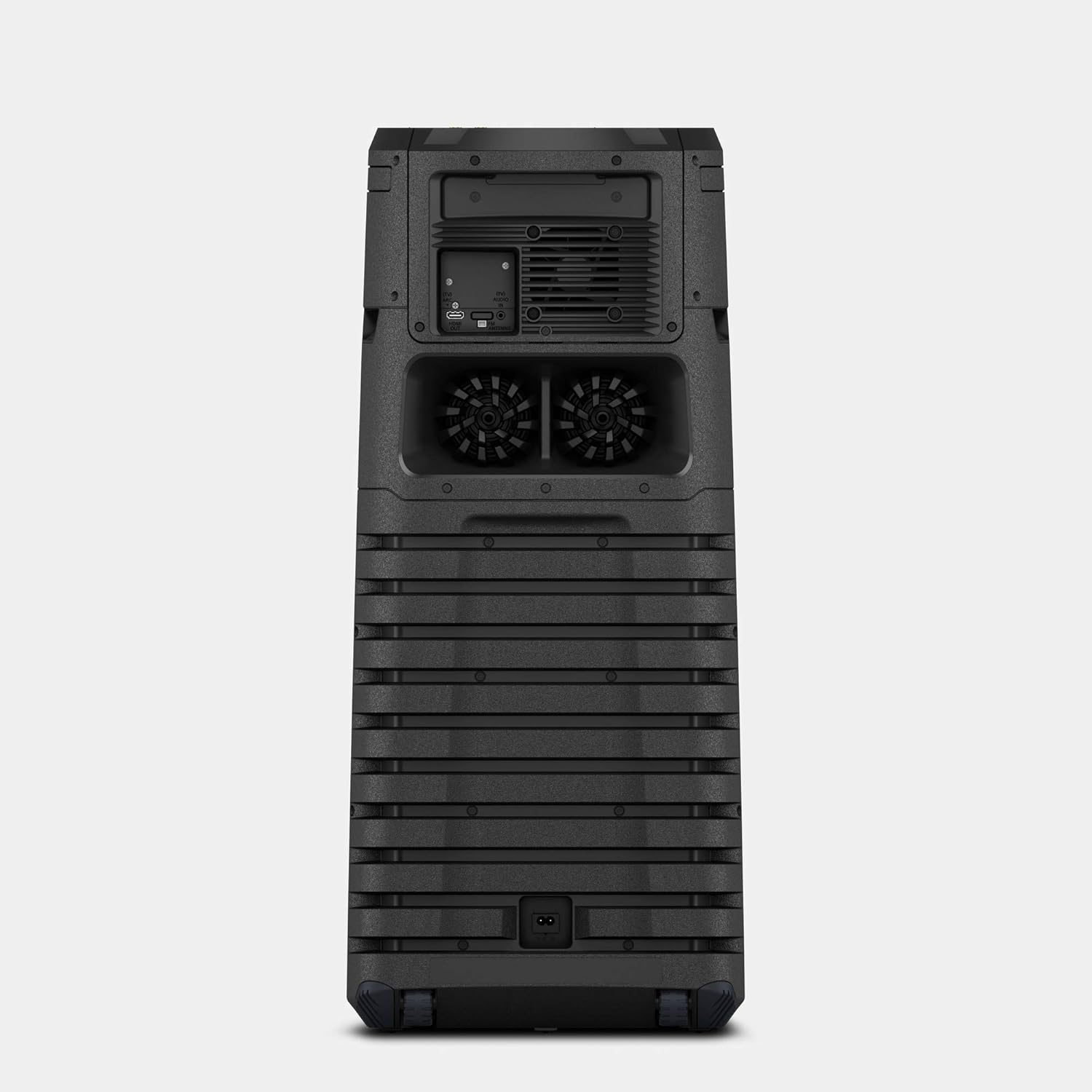
Figure 2: Rear panel connections including AC IN and FM Antenna port.
3. تعليمات التشغيل
3.1 الضوابط الأساسية
The main controls are located on the top panel of the speaker. These include power, volume, playback controls, and function selection buttons.

Figure 3: Top panel controls for power, volume, and function selection.
3.2 Bluetooth and NFC Connectivity
للاتصال لاسلكيا:
- الاقتران بلوتوث: Press the Bluetooth button on the speaker or remote control. On your device, search for "MHC-V43D" and select to pair.
- NFC (اتصال المجال القريب): Touch your NFC-enabled smartphone to the N-Mark on the speaker for instant pairing.
3.3 Karaoke and Guitar Input
The speaker features two microphone/guitar inputs for karaoke and live performances.
- Connect your microphone or guitar to the MIC/GUITAR jacks on the top panel.
- Adjust the MIC/GUITAR LEVEL and VOCAL FADER controls as needed.
3.4 التحكم بالإيماءات
Control various functions by waving your hand over the gesture control panel on the top of the speaker.
- رفع/خفض الصوت: Twist your hand right/left.
- تخطي المسار: Shake your hand left/right.
- إيقاف مؤقت/تشغيل: Move your hand up/down.

Figure 4: Demonstrating gesture control for music playback.
3.5 Music Center and Fiestable App
Enhance your experience by downloading the Sony Music Center and Fiestable apps on your smartphone.
- Music Center: Manage music playback, sound settings, and speaker grouping.
- Fiestable: Access party features like DJ Control, Illumination, Karaoke, and Motion Control.
3.6 Media Playback (CD/DVD, USB, HDMI)
- قرص مضغوط/دي في دي: Insert a disc into the disc tray. Select the 'Disc' function.
- USB: Connect a USB device to the USB port. Select the 'USB' function.
- HDMI: Connect to a TV or other device using an HDMI cable. Select the 'HDMI' function.
4. الصيانة
4.1 التنظيف
- امسح الجزء الخارجي من السماعة بقطعة قماش ناعمة وجافة.
- لا تستخدم الوسادات الكاشطة أو مسحوق التنظيف أو المذيبات مثل الكحول أو البنزين.
4.2 التخزين
عند عدم الاستخدام لفترات طويلة، قم بتخزين مكبر الصوت في مكان بارد وجاف بعيدًا عن أشعة الشمس المباشرة ودرجات الحرارة القصوى.
5. استكشاف الأخطاء وإصلاحها
5.1 لا يوجد طاقة
- Ensure the AC power cord is securely connected to both the speaker and the wall outlet.
- تحقق من عمل مقبس الحائط بشكل صحيح عن طريق توصيل جهاز آخر.
5.2 لا يوجد صوت
- Verify the volume level on both the speaker and the connected device.
- Ensure the correct input source (Bluetooth, USB, CD/DVD, HDMI) is selected.
- Check all cable connections for wired inputs.
5.3 مشاكل اقتران البلوتوث
- تأكد من أن مكبر الصوت في وضع الاقتران عبر Bluetooth.
- Ensure your device's Bluetooth is enabled and within range (approx. 10 meters).
- Delete the speaker from your device's Bluetooth list and attempt to re-pair.
6. المواصفات
| ميزة | التفاصيل |
|---|---|
| اسم الموديل | MHC-V43D |
| نوع التركيب | يقف الكلمة |
| مادة | بلاستيك |
| نوع السماعة | Bookshelf/Outdoor |
| ميزة خاصة | NFC Enabled |
| الاستخدامات الموصى بها | للهواتف الذكية أو الأجهزة اللوحية |
| الأجهزة المتوافقة | الهاتف الذكي والكمبيوتر اللوحي |
| قطر الصبووفر | 12 بوصة |
| تكوين قناة الصوت المحيطي | 2.1 |
| لون | أسود |
| أبعاد المنتج | 32.9 عمق × 35 عرض × 79.5 ارتفاع سنتيمتر |
| وزن العنصر | 14 كجم 500 جرام |
| مقاوم للماء | حقيقي |
| أقصى مدى (بلوتوث) | 10 metres / 30 Feet |
| طريقة التحكم | يلمس |
| تكنولوجيا الاتصالات اللاسلكية | بلوتوث |
| مصدر الطاقة | كهرباء سلكية |
| واتtage | 400 واط |
| استجابة التردد | 20000 هرتز |
7. الضمان والدعم
7.1 معلومات الضمان
This product comes with a Limited Warranty. Please refer to the warranty card included in your package for specific terms and conditions.
7.2 دعم العملاء
For any queries, technical assistance, or service requests, please contact Sony India Private Limited customer care:
- رقم خدمة العملاء: 080 6500 6500
- بريد إلكتروني: sonyindia.care@ap.sony.com
عنوان المستورد: Sony India Private Limited, A-18, Mohan Co-operative Industrial Estate, Mathura Road, NEW DELHI 110044, INDIA.