مقدمة
The Phomemo D30 is a compact and portable thermal label maker designed for efficient and convenient labeling in various environments, including home, office, and school. Utilizing thermal printing technology, it eliminates the need for ink or toner, offering a clean and cost-effective labeling solution. This device connects wirelessly via Bluetooth to your smartphone or tablet, allowing you to design and print custom labels using the dedicated 'Print Master' application. Its lightweight design and rechargeable battery make it ideal for on-the-go use, simplifying organization tasks.

Image: The Phomemo D30 label maker, shown in green, alongside a roll of labels and a smartphone screen displaying the 'Print Master' app, illustrating its compact size and digital interface.
ماذا يوجد في الصندوق
Upon unboxing your Phomemo D30 Label Maker, please verify that all the following components are included:
- جهاز طباعة ملصقات Phomemo D30 واحد
- 1 x Roll of Label Paper
- 1 × كابل شحن USB
- 1 × دليل المستخدم
دليل الإعداد
1. شحن الجهاز
Before initial use, ensure the Phomemo D30 is fully charged. Connect the provided USB cable to the charging port on the device and plug the other end into a standard USB power adapter (not included) or a computer's USB port. The indicator light will show charging status. A full charge allows for continuous printing of approximately 34 rolls of paper.
2. تحميل ورق الملصقات
Proper loading of the label paper is crucial for optimal printing performance.
- افتح غطاء جهاز طباعة الملصقات.
- Insert the label paper roll into the compartment, ensuring the printing surface faces upwards and the paper feeds smoothly through the slot.
- أغلق الغطاء بإحكام حتى تسمع صوت طقطقة عند تثبيته في مكانه.
3. تثبيت التطبيق والاتصال عبر البلوتوث
The Phomemo D30 operates via the 'Print Master' mobile application.
- تنزيل التطبيق: بحث عن "Print Master" in the Apple App Store (for iOS devices) or Google Play Store (for Android devices) and install it.
- تشغيل الجهاز: Press and hold the power button on your D30 label maker until the indicator light illuminates.
- تمكين البلوتوث: On your smartphone or tablet, ensure Bluetooth is enabled.
- الاتصال عبر التطبيق: Open the 'Print Master' app. The app will guide you to search for and connect to your D30 printer. Select your device from the list (e.g., "D30").
- تأكيد الاتصال: بمجرد الاتصال، سيشير التطبيق إلى نجاح عملية الاقتران.
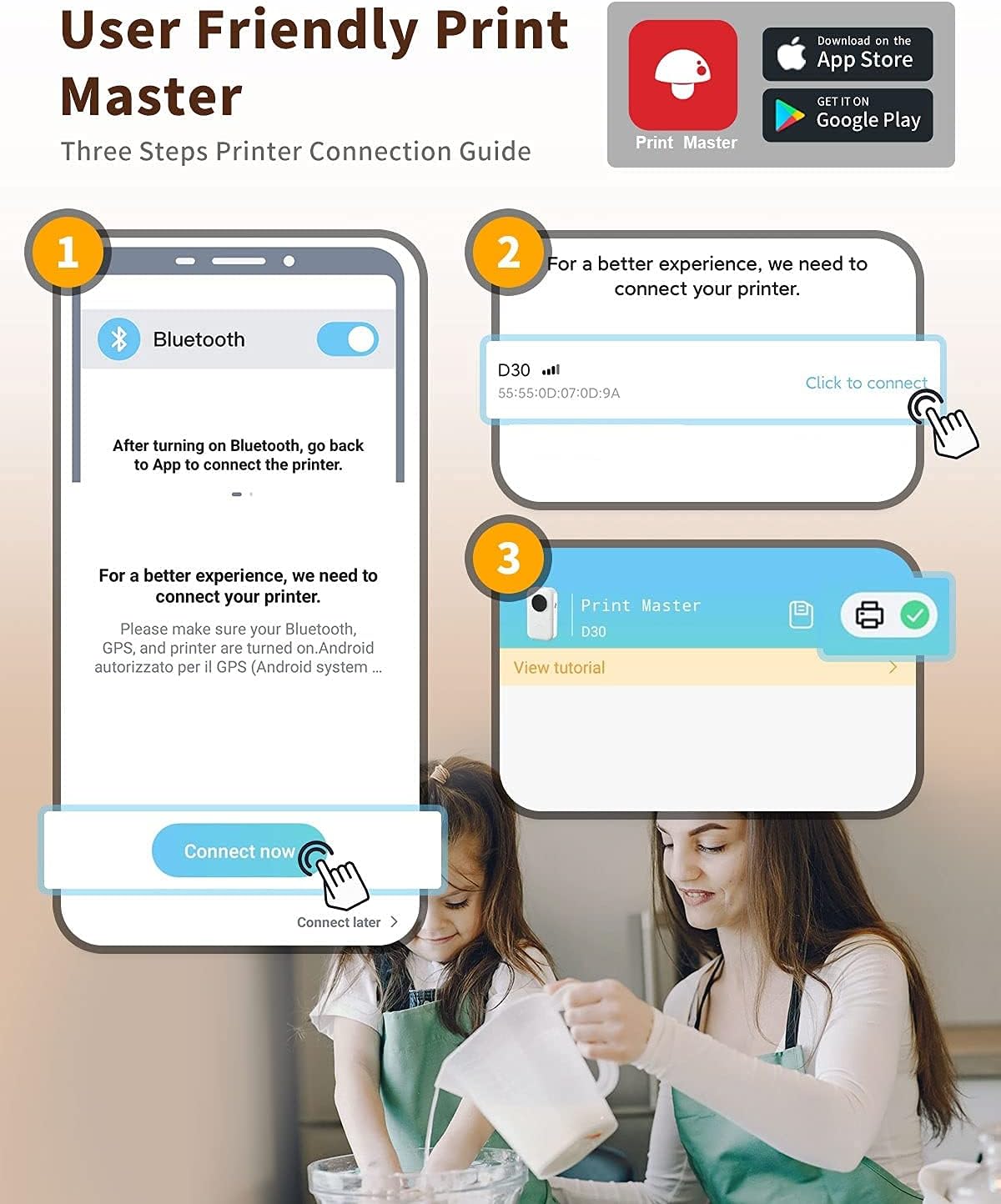
Image: A visual guide demonstrating the three steps to connect the Phomemo D30 to the 'Print Master' app via Bluetooth, as displayed on a smartphone screen.
تعليمات التشغيل
1. Creating Labels with the Print Master App
The 'Print Master' app provides a comprehensive suite of tools for label design:
- نص: Enter custom text, choose from various fonts, sizes, and styles.
- الرموز والرموز: Access a library of icons and symbols to enhance your labels.
- QR Codes & Barcodes: Generate and print QR codes or various barcode types.
- القوالب: Utilize pre-designed templates for common labeling needs.
- الصور: Insert images from your device's gallery.
Ensure you select the correct label size within the app before you begin editing to match the paper roll loaded in your device.

Image: The 'Print Master' app interface, showcasing its user-friendly design tools for creating custom labels, including text, icons, and borders.
2. طباعة الملصقات
Once your label design is complete in the 'Print Master' app:
- Review تصميم ملصقك على شاشة التطبيق.
- انقر على زر "طباعة" داخل التطبيق.
- The D30 label maker will print the label. Gently tear off the printed label along the serrated edge.
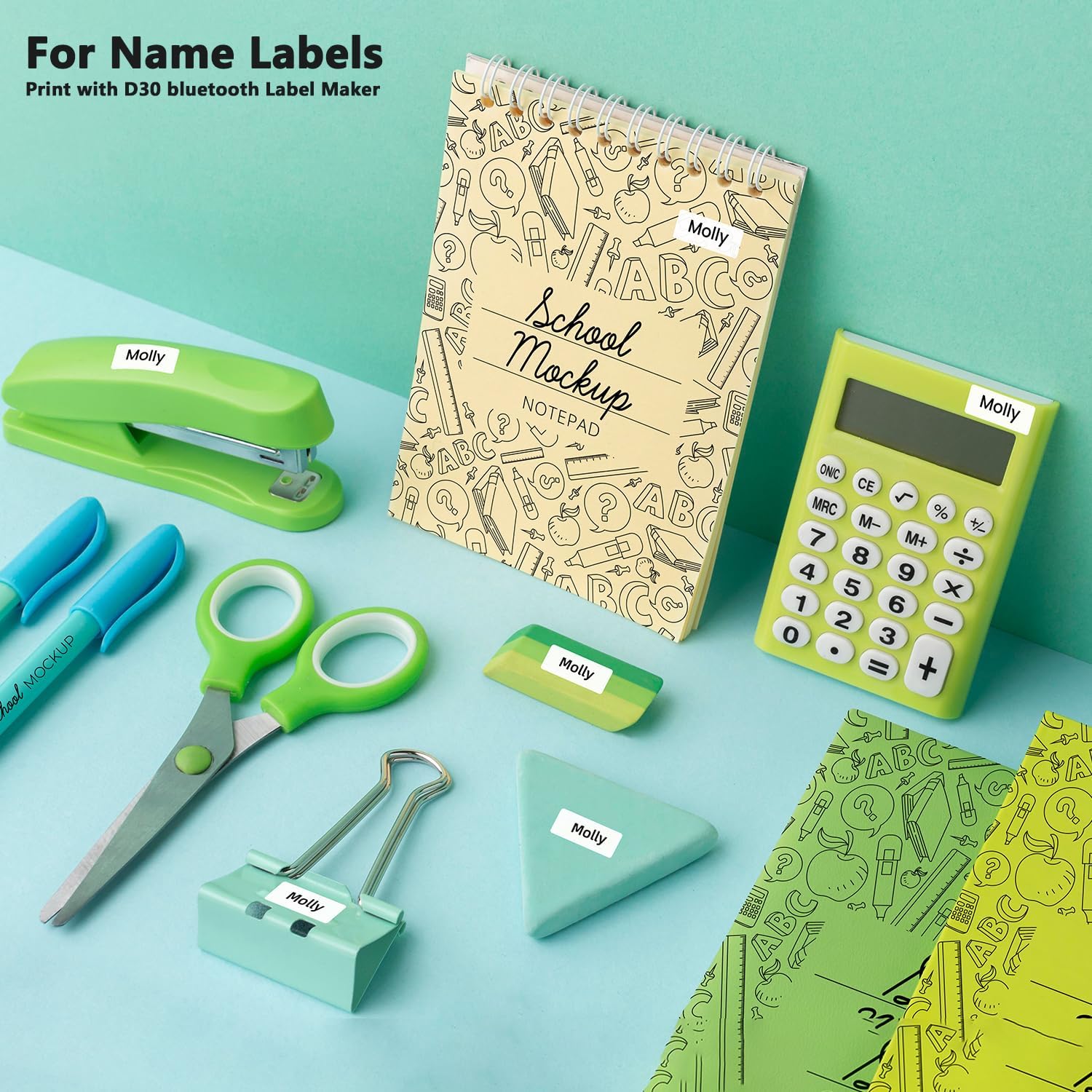
الصورة: السابقamples of labels printed with the Phomemo D30, applied to school and office supplies, demonstrating its utility for name labels and organization.
صيانة
Regular maintenance ensures the longevity and optimal performance of your Phomemo D30 Label Maker.
- تنظيف رأس الطباعة: If print quality degrades, gently wipe the thermal print head with a cotton swab lightly dampened with rubbing alcohol. Ensure the device is powered off before cleaning. Allow it to dry completely before use.
- تخزين: Store the label maker in a cool, dry place away from direct sunlight and high humidity. Avoid extreme temperatures.
- Label Paper Care: Keep label paper rolls sealed in their original packaging until ready for use. Avoid exposing labels to direct sunlight or humid environments, as this can affect their quality and adhesion. The labels are designed to be slightly waterproof, abrasion-resistant, and oil-resistant.

الصورة: صورة مرئيةamples illustrating the durability of Phomemo D30 labels, highlighting their resistance to water, abrasion, and oil, ensuring long-lasting legibility.
استكشاف الأخطاء وإصلاحها
If you encounter issues with your Phomemo D30, refer to the following common problems and solutions:
| مشكلة | السبب المحتمل | حل |
|---|---|---|
| الجهاز لا يعمل. | بطارية منخفضة. | اشحن الجهاز باستخدام كابل USB المرفق. |
| لا يمكن الاتصال عبر البلوتوث. | Bluetooth is off on phone/tablet; device not in pairing mode; app issue. | Ensure Bluetooth is enabled on your mobile device. Restart the D30 and the 'Print Master' app. Try forgetting the device in your phone's Bluetooth settings and reconnecting through the app. |
| Poor print quality / Faint printing. | Print head dirty; incorrect label paper; low battery. | Clean the print head (refer to Maintenance section). Ensure you are using genuine Phomemo D30 thermal label paper. Charge the device. |
| انحشار الورق. | Improper paper loading; foreign object. | Open the cover and carefully remove any jammed paper. Reload the paper correctly. Check for any obstructions. |
| يتعطل التطبيق أو يتجمد. | App software issue; outdated app version. | Close and restart the app. Check for app updates in your device's app store. Reinstall the app if necessary. |
تحديد
Key technical specifications for the Phomemo D30 Label Maker:
| ميزة | التفاصيل |
|---|---|
| اسم الموديل | د30 |
| تكنولوجيا الطباعة | حراري |
| تكنولوجيا الاتصال | بلوتوث |
| الحد الأقصى لحجم الوسائط | 12*40 ملم |
| دقة الطباعة القصوى | 203 X 203 DPI |
| الأجهزة المتوافقة | Smartphones, Tablets (iOS, Android) |
| مصدر الطاقة | Rechargeable Lithium Ion Batteries (included) |
| سعة البطارية | 1200 مللي أمبير |
| وزن العنصر | 160 جرام (5.6 أونصة) |
| أبعاد المنتج | 4.72 بوصة عمق × 1.97 بوصة عرض × 3.15 بوصة ارتفاع (12 × 5 × 8 سم) |
| لون | Green (for this variant) |

Image: A diagram illustrating the compact dimensions of the Phomemo D30 and its key features, including inkless thermal printing, rechargeable battery, and Bluetooth connectivity.
الضمان والدعم
Phomemo products are designed for reliability and performance. For specific warranty details, please refer to the warranty card included with your product or visit the official Phomemo website. For technical support, troubleshooting assistance, or inquiries regarding your Phomemo D30 Label Maker, please contact Phomemo customer service through their official channels. A digital version of the user guide is also available for download:
دليل المستخدم الرسمي (PDF): تحميل هنا
لمزيد من المساعدة، يمكنك أيضًا زيارة متجر فوميمو على أمازون.


