1. المقدمة
The ASTRO Gaming A20 Wireless Headset Gen 2 provides a high-quality audio experience for gaming across multiple platforms. This manual details the setup, operation, maintenance, and troubleshooting for your headset, ensuring optimal performance and longevity.

Image 1.1: The ASTRO Gaming A20 Wireless Headset Gen 2, featuring a white and green design.
2. محتويات العبوة
تأكد من وجود جميع العناصر في عبوة المنتج الخاص بك:
- ASTRO Gaming A20 Wireless Headset Gen 2
- USB Transmitter (Console Specific)
- كابل شحن USB-C إلى USB-A
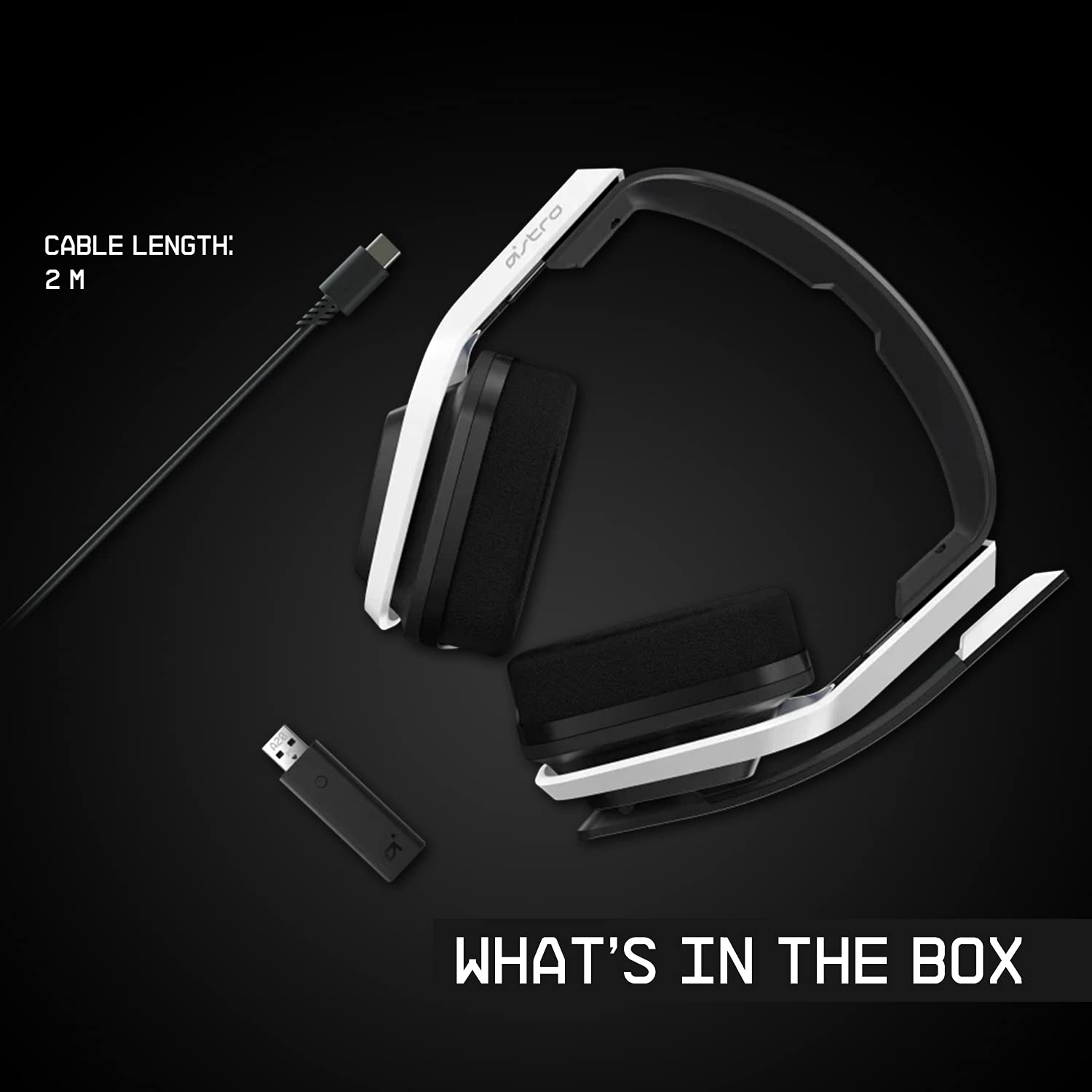
Image 2.1: Contents of the ASTRO Gaming A20 Wireless Headset Gen 2 package, including the headset, USB transmitter, and charging cable.
3. الإعداد
3.1 الشحن الأولي
Before first use, fully charge the headset. Connect the USB-C end of the charging cable to the headset's USB-C port and the USB-A end to a powered USB-A port on your console, PC, or a wall adapter. A full charge provides approximately 15 hours of battery life.
3.2 Connecting to Xbox (Series X|S, Xbox One)
- Plug the USB Transmitter into an available USB port on your Xbox console.
- Power on your ASTRO A20 Wireless Headset.
- The headset and transmitter should automatically pair. The LED indicator on both devices will show a solid light when connected.
- Ensure your Xbox audio output settings are configured to send audio to the headset.
3.3 Connecting to PC / Mac
- Plug the USB Transmitter into an available USB port on your PC or Mac.
- Power on your ASTRO A20 Wireless Headset.
- The headset and transmitter should automatically pair. The LED indicator on both devices will show a solid light when connected.
- Navigate to your operating system's sound settings and select the ASTRO A20 as the default playback and recording device.

Image 3.1: The ASTRO Gaming A20 Wireless Headset Gen 2 demonstrating cross-platform connectivity with an Xbox console.
4. تعليمات التشغيل
4.1 عناصر التحكم في سماعة الرأس
The ASTRO A20 Gen 2 features intuitive controls located on the headset for easy access during gameplay.
- زر الطاقة: تشغيل سماعة الرأس أو إيقاف تشغيلها.
- عجلة الحجم: يضبط مستوى الصوت الإجمالي.
- Game/Voice Balance Buttons: Allows you to adjust the balance between game audio and voice chat audio. Press the 'Game' button to increase game volume relative to chat, or the 'Voice' button to increase chat volume relative to game.
- EQ Preset Button: Cycles through 3 different equalizer presets to optimize audio for various content types.
- ميكروفون قابل للقلب لكتم الصوت: Flipping the microphone boom arm up mutes the microphone. Flipping it down unmutes it.

Image 4.1: The ASTRO Gaming A20 Wireless Headset Gen 2 demonstrating the flip-to-mute microphone feature.
4.2 عمر البطارية والشحن
The headset provides over 15 hours of continuous use on a full charge. When the battery is low, you will hear an audible alert. Recharge the headset using the provided USB-C to USB-A cable as described in Section 3.1.

Image 4.2: The ASTRO Gaming A20 Wireless Headset Gen 2 highlighting its 15+ hours of battery life.
5. الصيانة
تضمن العناية المناسبة طول عمر سماعة الرأس وأدائها الأمثل:
- تنظيف: استخدم قطعة قماش ناعمة وجافة لتنظيف سماعة الرأس. تجنب استخدام المنظفات الكاشطة أو المذيبات.
- تخزين: قم بتخزين سماعة الرأس في مكان بارد وجاف بعيدًا عن أشعة الشمس المباشرة ودرجات الحرارة القصوى.
- العناية بالبطارية: For optimal battery health, avoid fully discharging the battery frequently. Recharge when the low battery indicator appears.
6. استكشاف الأخطاء وإصلاحها
If you encounter issues with your ASTRO A20 Wireless Headset Gen 2, refer to the following common solutions:
| مشكلة | الحل المحتمل |
|---|---|
| No audio / Headset not connecting |
|
| Microphone not working / Static in mic |
|
| Short battery life / Not charging |
|
| Audio cutting out / Wireless range issues |
|
7. المواصفات
| ميزة | التفاصيل |
|---|---|
| اسم الموديل | ASTRO A20 Wireless Headset Gen 2 |
| رقم موديل العنصر | 939-001882 |
| تكنولوجيا الاتصال | لاسلكي (RF 2.4 جيجاهرتز) |
| لاسلكي المدى | حتى 15 مترا (50 قدما) |
| عمر البطارية | حوالي 15 ساعات |
| حجم برنامج تشغيل الصوت | مكبرات صوت ديناميكية مقاس 40 مم |
| نطاق التردد | 20 هرتز - 20 كيلو هرتز |
| ميكروفون | Flip-to-mute functionality |
| عناصر التحكم | Volume wheel, Game/Voice balance, EQ preset button |
| منفذ الشحن | USB-C (for charging via USB-A source) |
| وزن | 318 جرام (11.2 أونصة) |
| الأجهزة المتوافقة | Xbox Series X|S, Xbox One, PC, Mac |
8. الضمان والدعم
For detailed warranty information, technical support, and additional resources, please visit the official Logitech G / ASTRO Gaming support website. You can also refer to the official User Guide PDF for further details:
- دليل المستخدم الرسمي (PDF): تحميل هنا
- Logitech G Support: يزور Webموقع


