1. انتهى المنتجview
The AWOW TH213 is a smart WiFi thermostat designed for controlling gas and water boiler heating systems. It features a large LCD display with white backlight for clear visibility and offers both manual and smart control options via a smartphone application. This thermostat is compatible with popular smart home platforms like Amazon Alexa and Google Assistant, providing convenient voice control.
المميزات الرئيسية:
- Compatibility with gas and water boiler systems.
- شاشة LCD كبيرة بإضاءة خلفية.
- المجلدtage: 100-240V, 50/60Hz; Max Switching Power: 3A.
- Remote control via Smart Life app (requires 2.4 GHz Wi-Fi).
- Voice control compatible with Amazon Alexa and Google Assistant.
- Programmable modes: 24-hour, 5+2 day, or 7-day options.
- Temperature accuracy: 1°C, adjustable range from 5°C to 35°C.

Image 1.1: The AWOW TH213 Smart WiFi Thermostat displaying current and set temperatures, alongside a smartphone showing the thermostat's control interface in the Smart Life app.
2. دليل التثبيت
Proper installation is crucial for the safe and efficient operation of your thermostat. It is recommended that installation be performed by a qualified electrician.
2.1 احتياطات السلامة
- Always turn off the power supply at the main circuit breaker before beginning any electrical work.
- Ensure the thermostat is compatible with your heating system (gas or water boiler).
- Do not install in locations with extreme temperatures, direct sunlight, or high humidity.
2.2 مخطط الأسلاك
The thermostat requires a 100-240V AC power supply and connections to your boiler. It typically uses four wires: two for power (Live and Neutral) and two for the boiler control (dry contact switch). The thermostat is designed to fit standard European 60mm round boxes or Italian 503 boxes.
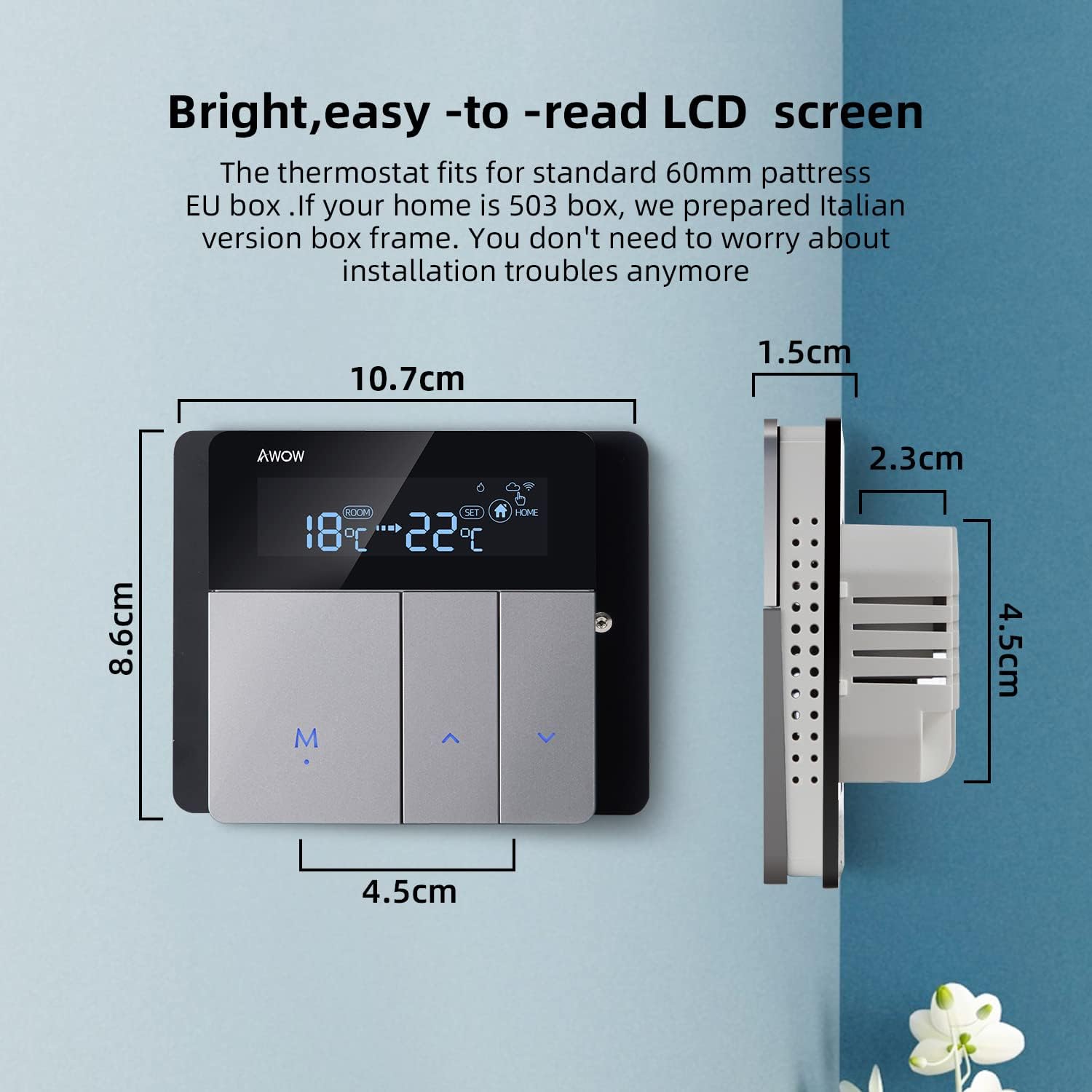
Image 2.1: Detailed wiring diagram showing connections for power supply (L, N) and boiler control (1, 2) on the back of the AWOW TH213 thermostat. The diagram also illustrates the thermostat's dimensions.
خطوات التوصيل:
- Turn off the main power supply to your heating system.
- Mount the thermostat base plate to the wall box (European 60mm or Italian 503).
- Connect the Live (L) and Neutral (N) wires from your 100-240V AC power supply to the corresponding terminals on the thermostat.
- Connect the two boiler control wires (often referred to as dry contacts) to terminals 1 and 2. These wires typically come from your boiler's thermostat input.
- Carefully attach the front panel of the thermostat to the base plate.
- أعد تشغيل نظام التدفئة.
- After power-up, press and hold the 'M' button to initiate the thermostat.

Image 2.2: Illustrative diagram demonstrating how the AWOW TH213 thermostat connects to a boiler, which then supplies heat to an underfloor heating system, ensuring a comfortable room temperature of 22°C.
2.3 اتصال واي فاي
To enable smart features, connect your thermostat to your home Wi-Fi network using the Smart Life app.
- قم بتنزيل تطبيق "Smart Life" من App Store (iOS) أو Google Play Store (Android).
- قم بالتسجيل أو تسجيل الدخول إلى حساب Smart Life الخاص بك.
- Ensure your smartphone is connected to a 2.4 GHz Wi-Fi network. The thermostat does not support 5 GHz networks.
- Follow the in-app instructions to add a new device. The thermostat should enter pairing mode automatically or by following specific button presses (refer to the app for exact steps).
- Once connected, you can control and program your thermostat remotely.
3. تعليمات التشغيل
3.1 التحكم اليدوي
You can adjust the temperature directly on the thermostat unit:
- استخدم Up و تحت arrow buttons to increase or decrease the desired temperature.
- اضغط على M button to cycle through different modes (e.g., Manual, Auto).
Image 3.1: The AWOW TH213 thermostat's LCD screen showing room temperature and set temperature, along with the 'M' (Mode) and arrow buttons for manual adjustments.
3.2 التحكم عبر تطبيق الحياة الذكية
The Smart Life app provides comprehensive control and programming capabilities from your smartphone, allowing you to manage your heating from anywhere.

Image 3.2: A user interacting with the Smart Life mobile application on a smartphone to control their thermostat remotely, illustrating the convenience of managing home heating from any location.
3.3 Programmable Modes
The thermostat offers three programming options to optimize energy savings and comfort:
- 24-Hour Program: Set a consistent schedule for each day of the week.
- 5+2 Day Program: Separate schedules for weekdays (Monday-Friday) and weekends (Saturday-Sunday).
- 7-Day Program: Customize the schedule for each individual day of the week.
These programs can be configured within the Smart Life app under the "Smart" mode setting. Common preset modes include "Wake," "Away," "Home," and "Sleep," allowing for quick adjustments based on your daily routine.

Image 3.3: A smartphone displaying the Smart Life app interface, highlighting the three programming options (24H, 5+2, 7 days) for the AWOW TH213 thermostat, along with examples of temperature settings for different scenarios like "Get up," "Away," "Go home," and "Sleep."
3.4 التحكم الصوتي (أليكسا ومساعد جوجل)
Integrate your AWOW TH213 thermostat with Amazon Alexa or Google Assistant for hands-free control.
- Ensure your thermostat is connected to the Smart Life app and your Alexa/Google Home device is set up.
- قم بتفعيل ميزة/إجراء "الحياة الذكية" في تطبيق Alexa أو Google Home الخاص بك.
- Discover devices. Your thermostat should appear.
- يمكنك الآن استخدام الأوامر الصوتية مثل:
- "Alexa, set the living room to 22 degrees."
- "Hey Google, what's the temperature in the bedroom?"
- "Alexa, turn on the heating."

Image 3.4: The AWOW TH213 thermostat mounted on a wall, with an Amazon Echo Dot nearby, illustrating its compatibility with Amazon Alexa and Google Assistant for voice-controlled temperature adjustments.
4. الصيانة
The AWOW TH213 thermostat requires minimal maintenance to ensure optimal performance.
- تنظيف: امسح الشاشة برفق وasing with a soft, dry cloth. Avoid using abrasive cleaners, solvents, or chemical sprays, as these can damage the display or internal components.
- تحديثات البرامج: Ensure the Smart Life app is updated to the latest version to benefit from new features and performance improvements. Firmware updates for the thermostat may also be available through the app.
- دورة الطاقة: If the thermostat becomes unresponsive, try turning off the main power supply to the heating system for a few minutes, then restore power.
5. استكشاف الأخطاء وإصلاحها
If you encounter issues with your AWOW TH213 thermostat, refer to the following common problems and solutions:
| مشكلة | السبب المحتمل | حل |
|---|---|---|
| منظم الحرارة لا يعمل. | لا يوجد مصدر للطاقة، الأسلاك غير صحيحة. | Check main circuit breaker. Verify L and N wiring connections. Ensure 'M' button is pressed after power-up. |
| لا يمكن الاتصال بشبكة Wi-Fi. | Incorrect Wi-Fi band; weak signal; incorrect password. | Ensure your router is broadcasting a 2.4 GHz Wi-Fi signal. Move thermostat closer to router. Double-check Wi-Fi password. Restart router and thermostat. |
| لا يتم تشغيل/إيقاف التدفئة وفقًا للبرمجة. | Incorrect programming; manual override; wiring issue to boiler. | Review programming schedules in the Smart Life app. Check if the thermostat is in manual mode. Verify boiler control wiring (terminals 1 and 2). |
| Inaccurate temperature readings or heating behavior. | Sensor calibration needed; thermostat placed in an unsuitable location; hysteresis. | The thermostat has an NTC temperature sensor with 1°C accuracy. If readings seem off, check for drafts or direct heat sources near the thermostat. The Smart Life app may offer a temperature calibration option. Note that thermostats often have a built-in hysteresis (temperature differential) to prevent rapid cycling of the heating system. |
| Display shows "F" or is blank/faulty. | Internal error; display damage. | Perform a power cycle (turn off/on main power). If the issue persists, contact customer support. |
| التحكم الصوتي لا يعمل. | Smart Life skill/action not enabled; device not discovered; incorrect commands. | Ensure the Smart Life skill/action is enabled in your Alexa/Google Home app. Redo device discovery. Use correct voice commands as specified in the app. |
6. المواصفات
| ميزة | التفاصيل |
|---|---|
| ماركة | أوووه |
| رقم الموديل | TH213 |
| لون | رمادي، أسود |
| أبعاد | 11 × 11 × 6 سم |
| وزن | 240 جرام |
| قوة | 1.5 واط |
| المجلدtage | 100-240 فولت تيار متردد، 50/60 هرتز |
| Max Switching Power | 3A |
| تكنولوجيا الاتصال | واي فاي (2.4 جيجاهرتز فقط) |
| نوع وحدة التحكم | أمازون أليكسا، مساعد جوجل |
| نوع العرض | شاشة LCD مع إضاءة خلفية |
| طريقة التحكم | App, Voice, Manual |
| مستشعر درجة الحرارة | مركز التحكم الوطني |
| دقة درجة الحرارة | ±1 درجة مئوية |
| نطاق درجة حرارة قابل للتعديل | 5 درجة مئوية إلى 35 درجة مئوية |


