1. المقدمة
This manual provides essential information for setting up, operating, and maintaining your Acer Predator Triton 500 PT515-52-73L3 Gaming Laptop. Please read it thoroughly to ensure optimal performance and longevity of your device.
The Acer Predator Triton 500 PT515-52-73L3 is a high-performance gaming laptop designed for demanding tasks and immersive gaming experiences. It features a 10th Generation Intel Core i7-10750H processor, NVIDIA GeForce RTX 2070 SUPER graphics, a 15.6-inch Full HD display with a 300Hz refresh rate and NVIDIA G-SYNC technology, 16GB of DDR4 RAM, and a 512GB NVMe SSD.
2. معلومات السلامة
- لا تعرض الكمبيوتر المحمول لدرجات حرارة عالية، أو أشعة الشمس المباشرة، أو الرطوبة العالية.
- تجنب وضع أشياء ثقيلة على الكمبيوتر المحمول.
- Use only the provided AC adapter and power cord.
- Keep liquids away from the device. In case of spills, immediately power off and disconnect the adapter.
- لا تحاول تفكيك أو إصلاح الكمبيوتر المحمول بنفسك. استشر فني صيانة مؤهلًا.
- تأكد من التهوية المناسبة لمنع ارتفاع درجة الحرارة، خاصة أثناء الاستخدام المكثف.
3. محتويات العبوة
تأكد من وجود جميع العناصر في العبوة:
- Acer Predator Triton 500 PT515-52-73L3 Gaming Laptop
- محول التيار المتردد
- سلك الطاقة
4. جسديا أكثرview
4.1. الجبهة View
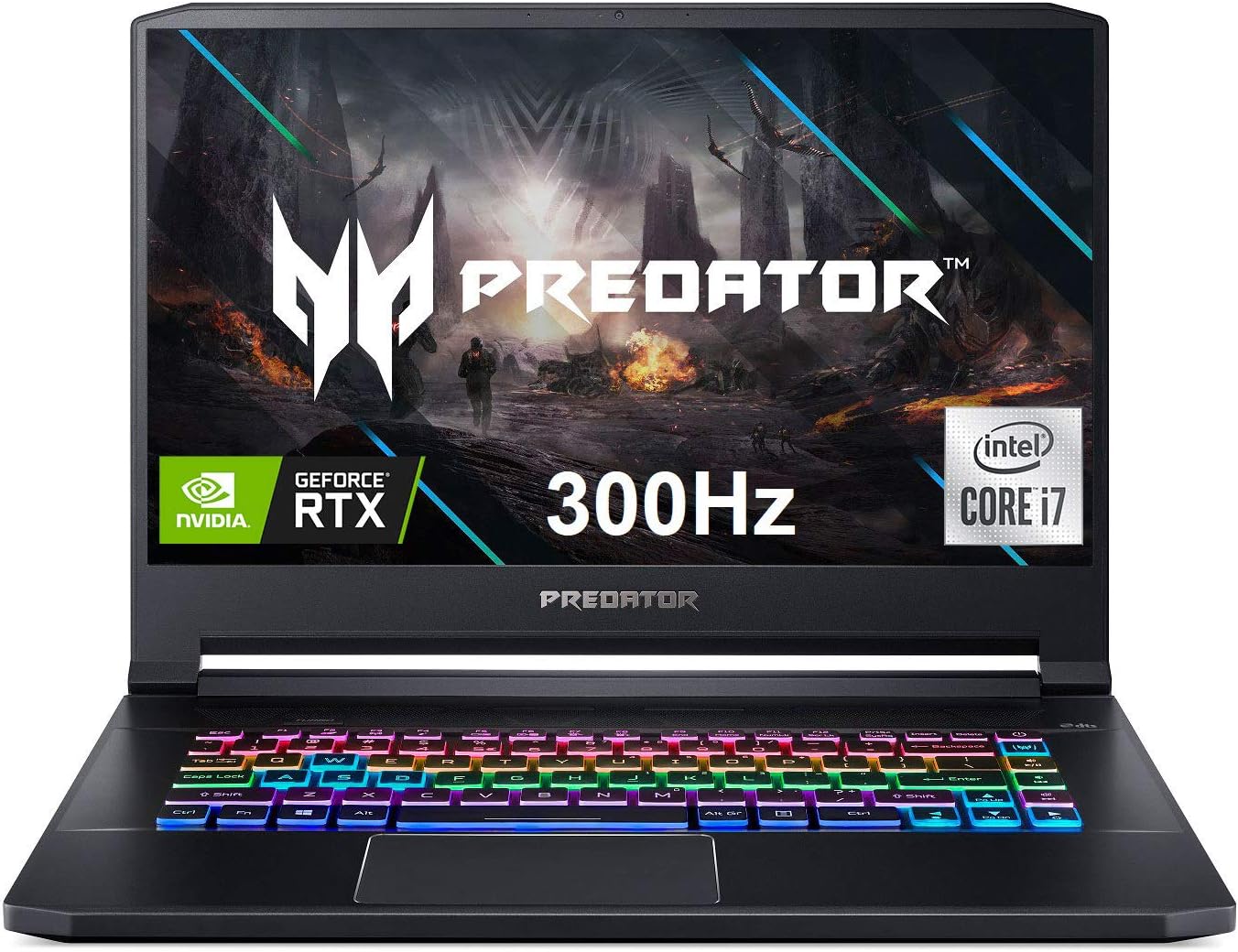
الشكل 4.1: الجبهة view of the Acer Predator Triton 500, showcasing the display with Predator branding, RGB backlit keyboard, and thin bezels.
4.2. ميزات العرض

Figure 4.2: The 15.6-inch Full HD (1920 x 1080) display features a 300Hz refresh rate and 3ms Overdrive Response Time, enhanced by NVIDIA G-SYNC technology for tear-free gameplay.
4.3. لوحة المفاتيح ولوحة اللمس

Figure 4.3: The laptop features a per-key RGB backlit keyboard with customizable lighting and a dedicated 'Turbo' key for instant overclocking. The touchpad is located below the keyboard.
4.4. المنافذ والموصلات

Figure 4.4: The laptop is equipped with a comprehensive selection of ports, including Power (DC-In), Ethernet (RJ-45), multiple USB 3.2 Gen 2 ports, HDMI, Mic-in, Headset/speaker, Thunderbolt 3 / USB Type-C, Mini DisplayPort, and a Kensington lock slot.
5. الإعداد
5.1. التشغيل الأولي
- قم بتوصيل محول التيار المتردد بمنفذ الطاقة الخاص بالكمبيوتر المحمول، ثم بمأخذ الطاقة.
- افتح غطاء الكمبيوتر المحمول.
- اضغط على زر الطاقة، والذي يوجد عادةً أعلى لوحة المفاتيح أو على الجانب.
- Follow the on-screen instructions to complete the initial Windows 10 Home setup.
5.2. توصيل الأجهزة الطرفية
Connect your mouse, external keyboard, or other USB devices to the available USB 3.2 Gen 2 ports. For external displays, use the HDMI or Mini DisplayPort 1.4. The Thunderbolt 3 port supports full USB 3.1 Type-C functionality.
6. التشغيل
6.1. تشغيل/إيقاف التشغيل
- تشغيل الطاقة: اضغط على زر الطاقة.
- إيقاف التشغيل: انقر فوق زر البدء، ثم الطاقة > إيقاف التشغيل.
- وضع السكون: أغلق الغطاء أو انقر فوق زر البدء، ثم الطاقة > السكون.
6.2. ميزات العرض
The 15.6-inch Full HD (1920 x 1080) IPS display offers a 300Hz refresh rate and 3ms Overdrive Response Time. NVIDIA G-SYNC technology synchronizes the display's refresh rate with the GPU, eliminating screen tearing and minimizing display stutter and input lag.
6.3. خصائص لوحة المفاتيح
The per-key RGB backlit keyboard allows for customizable lighting effects. Use the PredatorSense software to personalize the lighting zones and effects. The 'Turbo' key can be used for instant CPU/GPU overclocking.
6.4. Performance Management with PredatorSense

Figure 6.4: The PredatorSense software provides comprehensive control over your laptop's performance, including fan speed adjustments (Auto, Max, Custom), monitoring CPU and GPU temperatures, and managing RGB lighting.
PredatorSense allows you to monitor system performance, adjust fan speeds, customize RGB lighting, and manage overclocking settings for optimal gaming and productivity. You can switch between different performance modes (e.g., Quiet, Default, Extreme) based on your needs.
6.5. الاتصال
- لاسلكي: Killer Double Shot Pro Wireless-AX 1650i 802.11ax Wi-Fi 6 for high-speed wireless internet.
- السلكية: Killer Gaming Network E3100G 10/100/1000 Gigabit Ethernet LAN for stable wired connections.
- بلوتوث: بلوتوث متكامل لتوصيل الأجهزة الطرفية اللاسلكية.
6.6. سمعي
The laptop features DTS X: Ultra-Audio with optimized Bass, Loudness, and Speaker Protection, along with Acer True Harmony Technology and two built-in stereo speakers. Acer Purified.Voice technology with two built-in microphones enhances voice clarity for communication.
7. الصيانة
7.1. التنظيف
- استخدم قطعة قماش ناعمة وخالية من الوبر لتنظيف الشاشة والجزء الخارجي.
- بالنسبة للبقع العنيدة، استخدمي القليل منampامسح القماش بالماء أو بمنظف الشاشة.
- استخدم الهواء المضغوط لإزالة الغبار من مفاتيح لوحة المفاتيح وشبكات التهوية.
7.2. تحديثات البرامج
Regularly update your operating system (Windows 10 Home), graphics drivers (NVIDIA), and Acer-specific software (PredatorSense) to ensure optimal performance and security.
7.3. إدارة التخزين
The laptop comes with a 512GB PCIe NVMe SSD. It includes two PCIe M.2 slots, with one slot available for easy storage upgrades. Regularly back up important data and manage disk space to maintain performance.
7.4. العناية بالبطارية
To prolong battery life, avoid fully discharging the battery frequently. It is recommended to keep the laptop plugged in during intensive gaming sessions to ensure consistent power delivery and prevent performance throttling.
8. استكشاف الأخطاء وإصلاحها
- الكمبيوتر المحمول لا يعمل: تأكد من توصيل محول التيار المتردد بإحكام وأن مأخذ الطاقة يعمل. جرب مأخذاً آخر.
- ارتفاع درجة الحرارة: Ensure ventilation grilles are clear of obstructions. Use PredatorSense to increase fan speeds. Consider using a cooling pad for extended heavy use.
- Display issues (tearing/stuttering): Verify NVIDIA G-SYNC is enabled in NVIDIA Control Panel and PredatorSense. Ensure graphics drivers are up to date.
- عمر البطارية ضعيف: Adjust power settings in Windows to a more power-efficient mode. Reduce screen brightness. Close unnecessary background applications.
- لا يوجد صوت: Check volume levels in Windows and ensure speakers/headphones are properly connected. Update audio drivers.
9. المواصفات
| ميزة | التفاصيل |
|---|---|
| المعالج | 10th Generation Intel Core i7-10750H 6-Core (Up to 5.0GHz) |
| الرسومات | Overclockable NVIDIA GeForce RTX 2070 SUPER with Max-Q Design & 8GB GDDR6 VRAM |
| عرض | 15.6" Full HD (1920 x 1080) IPS, 300Hz Refresh Rate, 3ms Overdrive, NVIDIA G-SYNC, 300nit Brightness, 100% sRGB |
| كبش | 16 جيجا بايت DDR4 2933 ميجا هرتز |
| تخزين | 512GB PCIe NVMe SSD (2 x PCIe M.2 Slots, 1 Slot Available) |
| نظام التشغيل | ويندوز 10 هوم |
| لوحة المفاتيح | Per-key RGB Backlit Keyboard with Customizable Lighting |
| الاتصال اللاسلكي | Killer Double Shot Pro Wireless-AX 1650i 802.11ax Wi-Fi 6 |
| الاتصال السلكي | Killer Gaming Network E3100G 10/100/1000 Gigabit Ethernet LAN |
| الموانئ | 1x Thunderbolt 3 (Full USB 3.1 Type C), 3x USB 3.2 Gen 2 (1 with Power-off Charging), 1x HDMI 2.0, 1x Mini Display Port 1.4 |
| صوتي | DTS X: Ultra-Audio, Acer True Harmony Technology, Dual Stereo Speakers, Acer Purified.Voice |
| عمر البطارية | حتى 5.5 ساعة (متوسط) |
| وزن | 4.63 رطل (2.1 كجم) |
| الأبعاد (الطول × العرض × الارتفاع) | 14.11 × 10.04 × 0.7 بوصة |
10. مقاطع فيديو رسمية للمنتج
10.1. Predator Triton 500 PT515-52 360 Degree View
This video provides a brief 360-degree view of the Acer Predator Triton 500 PT515-52, showcasinتصميمه وزواياه المختلفة.
10.2. Full-Featured Gaming Laptop with RGB Keyboard
This video highlights the full features of the Acer Predator Triton 500, emphasizing its RGB keyboard and overall gaming capabilities.
11. معلومات الضمان
Your Acer Predator Triton 500 PT515-52-73L3 Gaming Laptop is covered by a manufacturer's warranty. Please refer to the warranty card included in your package or visit the official Acer support webموقع للحصول على الشروط والأحكام التفصيلية.
- 2-Year Protection Plan (Optional)
- 4-Year Protection Plan (Optional)
12. الدعم
للحصول على مزيد من المساعدة أو الدعم الفني أو لتنزيل أحدث برامج التشغيل والأدلة، يرجى زيارة موقع دعم Acer الرسمي webموقع:
You can also find additional resources and contact information on the Acer brand store:


