1. المقدمة
The Sandberg USB Office Headset Pro Mono is designed for clear communication in office environments, online meetings, and calls. This manual provides essential instructions for setting up, operating, maintaining, and troubleshooting your headset to ensure optimal performance.
2. محتويات العبوة
يرجى التأكد من وجود جميع العناصر في الحزمة الخاصة بك:
- Sandberg USB Office Headset Pro Mono (with integrated USB cable)

Image 1: The Sandberg USB Office Headset Pro Mono packaging, showing the headset and its features.
3. الإعداد
Follow these steps to connect your headset to your computer:
- حدد موقع منفذ USB-A المتوفر على جهاز الكمبيوتر الخاص بك.
- Plug the USB-A connector of the headset into the USB-A port on your computer.
- Your operating system (Windows, macOS, etc.) should automatically detect and install the necessary drivers. This process typically takes a few moments.
- Once installed, the headset will be ready for use. You may need to select it as the default audio input and output device in your computer's sound settings or within your communication application (e.g., Zoom, Microsoft Teams, Skype).
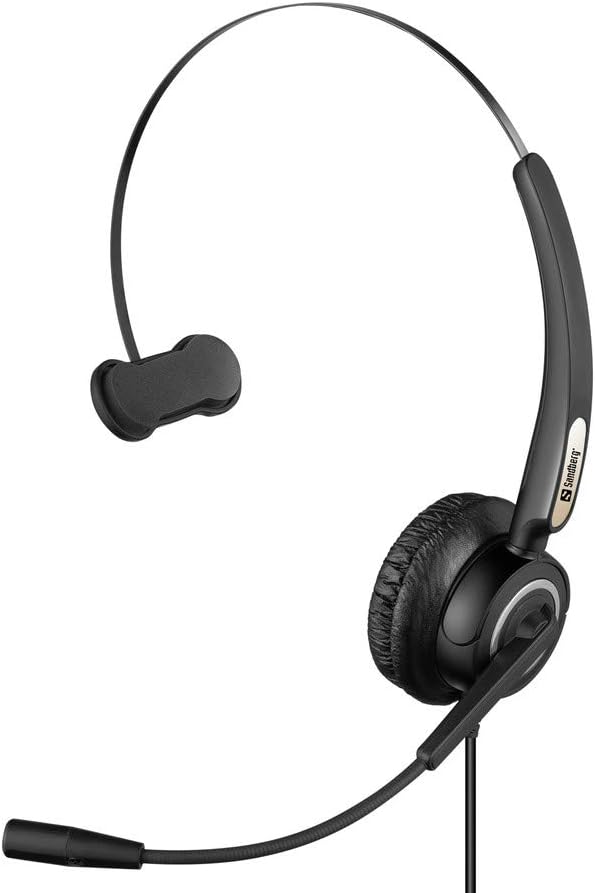
Image 2: The Sandberg USB Office Headset Pro Mono, illustrating its design for single-ear use with an adjustable microphone boom.
4. تعليمات التشغيل
4.1 ارتداء سماعة الرأس
- Place the earcup over one ear and adjust the headband for a comfortable fit.
- Position the microphone boom so that the microphone is approximately 1-2 inches (2.5-5 cm) from your mouth for optimal voice pickup.
4.2 Volume Control and Mute
The headset features an inline control unit on the USB cable for easy access to audio functions:
- رفع الصوت: اضغط على زر "+" لزيادة مستوى صوت الاستماع.
- اخفض الصوت: اضغط على زر "-" لخفض مستوى صوت الاستماع.
- ميكروفون كتم الصوت: Press the microphone button to mute or unmute your microphone. An indicator light on the control unit typically shows the mute status.
4.3 Making Calls and Using Applications
Once connected and selected as the default audio device, your headset will function with most communication applications. Ensure the headset is selected as the audio input (microphone) and output (speaker) device within the settings of your specific application (e.g., video conferencing software, softphone client).
5. الصيانة
5.1 التنظيف
- امسح سماعة الرأس برفق باستخدام قطعة قماش ناعمة وجافة.
- For ear cushions, use a slightly damp cloth with mild soap if necessary, then wipe dry immediately.
- لا تستخدم المواد الكيميائية القاسية أو المذيبات أو المنظفات الكاشطة.
- Avoid getting moisture into the earcup or microphone openings.
5.2 التخزين
- قم بتخزين سماعة الرأس في مكان نظيف وجاف بعيدًا عن درجات الحرارة العالية وأشعة الشمس المباشرة.
- تجنب تشابك الكابل لتجنب التلف.
6. استكشاف الأخطاء وإصلاحها
6.1 لا يوجد صوت من سماعة الرأس
- Ensure the USB connector is fully inserted into the computer's USB port.
- Check the volume level on the inline control unit and on your computer's operating system.
- Verify that the Sandberg USB Office Headset Pro Mono is selected as the default playback device in your computer's sound settings.
- Try connecting the headset to a different USB port on your computer.
6.2 الميكروفون لا يعمل
- تأكد من عدم كتم صوت الميكروفون عبر وحدة التحكم المضمنة.
- Check that the Sandberg USB Office Headset Pro Mono is selected as the default recording device in your computer's sound settings.
- Adjust the microphone input level in your computer's sound settings.
- Confirm that the microphone boom is positioned correctly near your mouth.
6.3 Headset Not Detected by Computer
- Unplug the headset and plug it back into a different USB port.
- أعد تشغيل الكمبيوتر الخاص بك.
- Check your computer's Device Manager (Windows) or System Information (macOS) to see if the USB device is listed.
7. المواصفات
| ميزة | التفاصيل |
|---|---|
| اسم الموديل | Pro Mono |
| رقم الموديل | 126-14 |
| موصل | 1 x USB A Male Plug |
| طول الكابل | 6.6 قدم (2.0 متر) |
| نوع التحكم | Volume Control (Inline) |
| ميزة خاصة | يتضمن ميكروفون |
| مادة | بلاستيك |
| وزن العنصر | 0.035 أونصة (حوالي 1 غرام) |
| أبعاد المنتج | 6.3 × 4.72 × 6.69 بوصة |
8. الضمان والدعم
For warranty information, please refer to the documentation provided with your purchase or visit the official Sandberg website. For technical support or further assistance, please contact Sandberg customer service or your retailer.
يمكنك العثور على مزيد من المعلومات وموارد الدعم على ساندبرج webموقع.


