1. المقدمة
This manual provides essential information for the installation, operation, and maintenance of the FERMAX 4825 DUOX Plus DIN10 24VDC 2.5A Power Supply with Filter. This unit is designed to provide stable and reliable power to various FERMAX DUOX Plus intercom system components.
The FERMAX 4825 is a DIN rail mountable power supply, featuring a 24V DC output at 2.5A, and an integrated filter for optimal performance within DUOX Plus systems. It is protected by an electronic fuse to ensure safety and longevity.
2. انتهى المنتجview
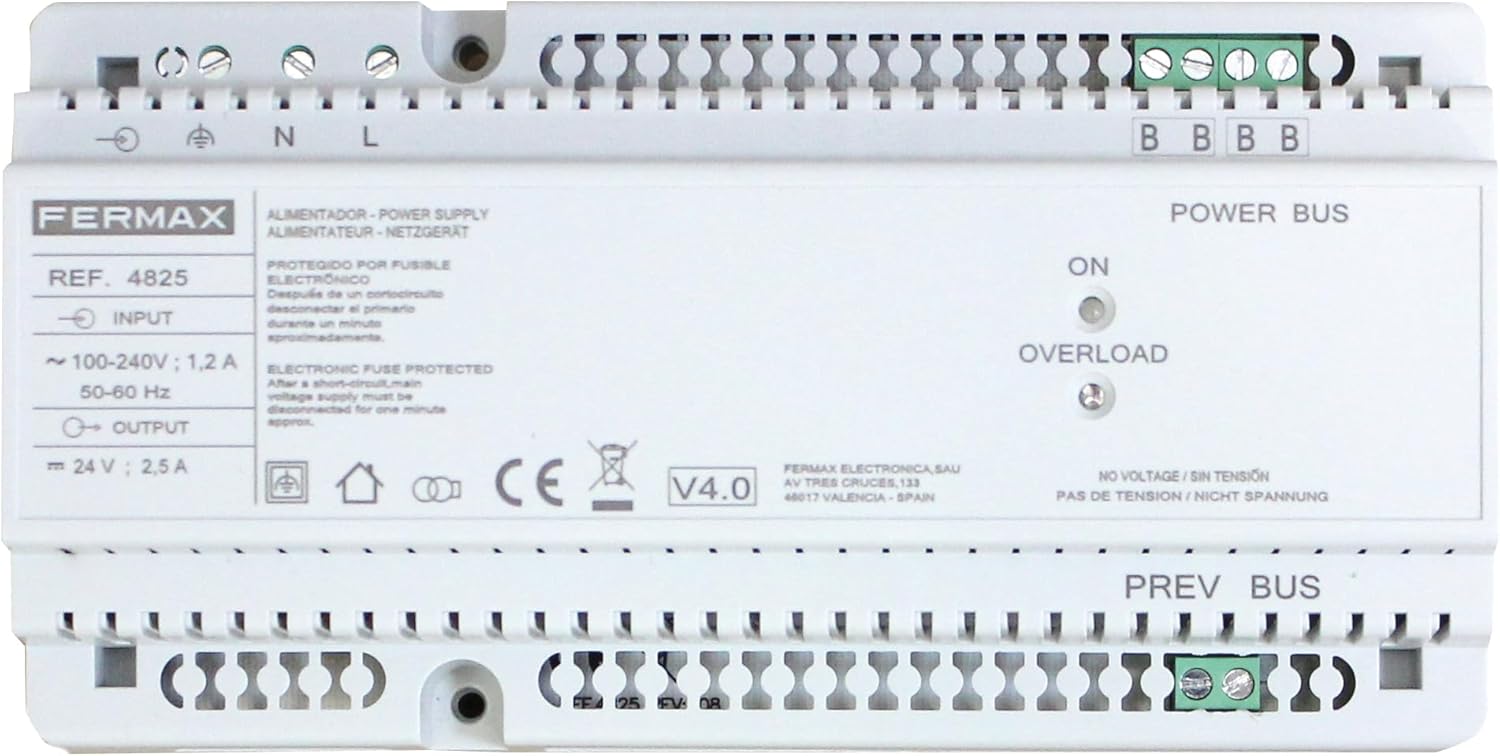
الشكل 1: أمام view of the FERMAX 4825 DUOX Plus DIN10 Power Supply. The image displays the input terminals (N, L), output terminals (24V, 2.5A), Power Bus and Prev Bus terminals, and LED indicators for ON and OVERLOAD status. Key specifications like input voltage (100-240V; 1.2A, 50-60Hz) and output voltage (24V; 2.5A) are visible, along with the FERMAX brand logo and model number REF. 4825.
The FERMAX 4825 power supply is equipped with the following key features:
- حجم الإدخالtage: تعمل مع حجم الإدخالtage range of 100-240V AC, 50-60 Hz, ensuring compatibility with standard electrical grids.
- حجم الإخراجtage: Provides a stable 24V DC output at 2.5A, suitable for various DUOX Plus components.
- Electronic Fuse Protection: Features an electronic fuse that protects the unit from short circuits. In case of a short circuit, the primary voltage supply must be disconnected for approximately one minute to reset the protection.
- فلتر متكامل: Includes an integrated filter to enhance signal quality and system stability within DUOX Plus installations.
- DIN10 Mounting: Designed for easy installation on a DIN rail, making it suitable for electrical cabinets and distribution boards.
- مؤشرات LED: Equipped with "ON" and "OVERLOAD" LED indicators for quick status monitoring.
3. تعليمات السلامة
- يجب أن يتم التركيب بواسطة فنيين مؤهلين وفقًا لقوانين ولوائح الكهرباء المحلية.
- تأكد من فصل مصدر الطاقة الرئيسي قبل إجراء أي تركيب أو توصيل أو صيانة.
- لا تعرض الوحدة للرطوبة أو الماء أو درجات الحرارة القصوى.
- لا تفتح الصندوقasinز من وحدة التزويد بالطاقة. لا توجد أجزاء قابلة للصيانة من قبل المستخدم في الداخل.
- التحقق من حجم الإدخالtage and frequency match the specifications of the power supply before connection.
4. الإعداد والتثبيت
4.1 التركيب
- Select a suitable location within an electrical cabinet or distribution board that allows for proper ventilation.
- Mount the FERMAX 4825 power supply onto a standard DIN rail. Ensure it is securely fastened.
4.2 توصيلات الأسلاك
يرجى الرجوع إلى الشكل 1 لمعرفة مواقع المحطات الطرفية.
- طاقة الإدخال (التيار المتردد): Connect the main AC power supply to the terminals labeled N (Neutral) and L (Line). Ensure proper polarity. The input range is 100-240V AC, 50-60 Hz.
- اتصال الأرض: Connect the protective earth ground to the terminal marked with the ground symbol.
- Output Power (DC): Connect the DUOX Plus equipment requiring 24V DC power to the terminals labeled + و - under "OUTPUT". The output is 24V DC, 2.5A.
- Power Bus / Prev Bus: Connect the DUOX Plus system bus lines to the "POWER BUS" and "PREV BUS" terminals as per your specific DUOX Plus system diagram. These terminals are typically used for data and power distribution within the intercom system.
Important: Double-check all wiring connections before applying power to prevent damage to the unit or connected equipment.
5. تعليمات التشغيل
5.1 التشغيل
- After ensuring all connections are secure and correct, switch on the main AC power supply to the unit.
- The "ON" LED indicator on the front panel should illuminate, indicating that the power supply is active and providing output voltage.
5.2 مؤشرات الحالة
- على الصمام: Illuminates when the power supply is receiving input power and operating normally.
- OVERLOAD LED: Illuminates if the output current exceeds the rated 2.5A, or if a short circuit is detected on the output.
6. الصيانة
The FERMAX 4825 power supply is designed for reliable, long-term operation with minimal maintenance. Follow these guidelines:
- تنظيف: Periodically clean the exterior of the unit with a soft, dry cloth. Do not use liquid cleaners or solvents. Ensure the unit is powered off before cleaning.
- تهوية: Ensure that the ventilation openings are not obstructed to allow for proper air circulation and cooling.
- فحوصات الاتصال: Occasionally check all wiring connections to ensure they remain tight and secure.
7. استكشاف الأخطاء وإصلاحها
- No "ON" LED illumination:
- Check if the main AC power supply is connected and active.
- Verify the input wiring (N, L) is correct and secure.
- "OVERLOAD" LED illuminates:
- This indicates an overcurrent condition or a short circuit on the 24V DC output or connected DUOX Plus bus lines.
- Immediately disconnect the main AC power supply to the unit.
- Inspect all connected DUOX Plus equipment and wiring for short circuits or excessive load.
- After resolving the issue, wait approximately one minute before reconnecting the main AC power supply to allow the electronic fuse to reset.
- If the problem persists, the connected equipment may be drawing too much current, or the power supply itself may be faulty.
- لا يوجد مجلدtage / Sin Tensión / Nicht Spannung:
- This label on the unit indicates the absence of voltage. If the "ON" LED is off and there is no output, refer to the "No 'ON' LED illumination" troubleshooting steps.
8. المواصفات
| ميزة | مواصفة |
|---|---|
| ماركة | فيرماكس |
| نموذج | 4825 (ف04825) |
| حجم الإدخالtage | 100-240V AC |
| تردد الإدخال | 50-60 هرتز |
| تيار الإدخال | 1.2 أ |
| حجم الإخراجtage | 24 فولت تيار مستمر |
| تيار الخرج | 2.5 أ |
| انتاج الطاقة | 60 واط |
| طريقة التبريد | Air Cooling / Ventilator |
| التركيب | DIN Rail (DIN10) |
| حماية | Electronic Fuse Protected |
| وزن | 96 جرام |
ملاحظة: المواصفات عرضة للتغيير دون إشعار.
9. الضمان والدعم
FERMAX products are manufactured to high-quality standards. This product includes a satisfaction guarantee and quality customer service.
For technical support, warranty claims, or further assistance, please contact your local FERMAX distributor or visit the official FERMAX website. Please have your product model (4825) and serial number (if applicable) ready when contacting support.
لمزيد من المعلومات يمكنك زيارة FERMAX official webموقع.


