مقدمة
Thank you for choosing the Trevi RC 85D8 DAB Digital Alarm Clock Radio. This compact device offers DAB/DAB+ and FM RDS radio reception, a large LED display, dual alarms, snooze, sleep functions, and a unique time projection feature. This manual provides detailed instructions to help you set up and operate your new alarm clock radio effectively.
محتويات الحزمة
- Trevi RC 85D8 DAB Digital Alarm Clock Radio
- محول الطاقة
- دليل المستخدم (هذا المستند)
معلومات السلامة
Please read all safety instructions before using the device. Keep this manual for future reference.
- لا تعرض الجهاز للمطر أو الرطوبة.
- لا تفكّ الجهاز. أرسِل جميع أعمال الصيانة إلى فنيين مؤهلين.
- استخدم فقط محول الطاقة المقدم.
- تأكد من التهوية المناسبة حول الجهاز.
- تخلص من البطاريات بشكل مسؤول.
المنتج انتهىview
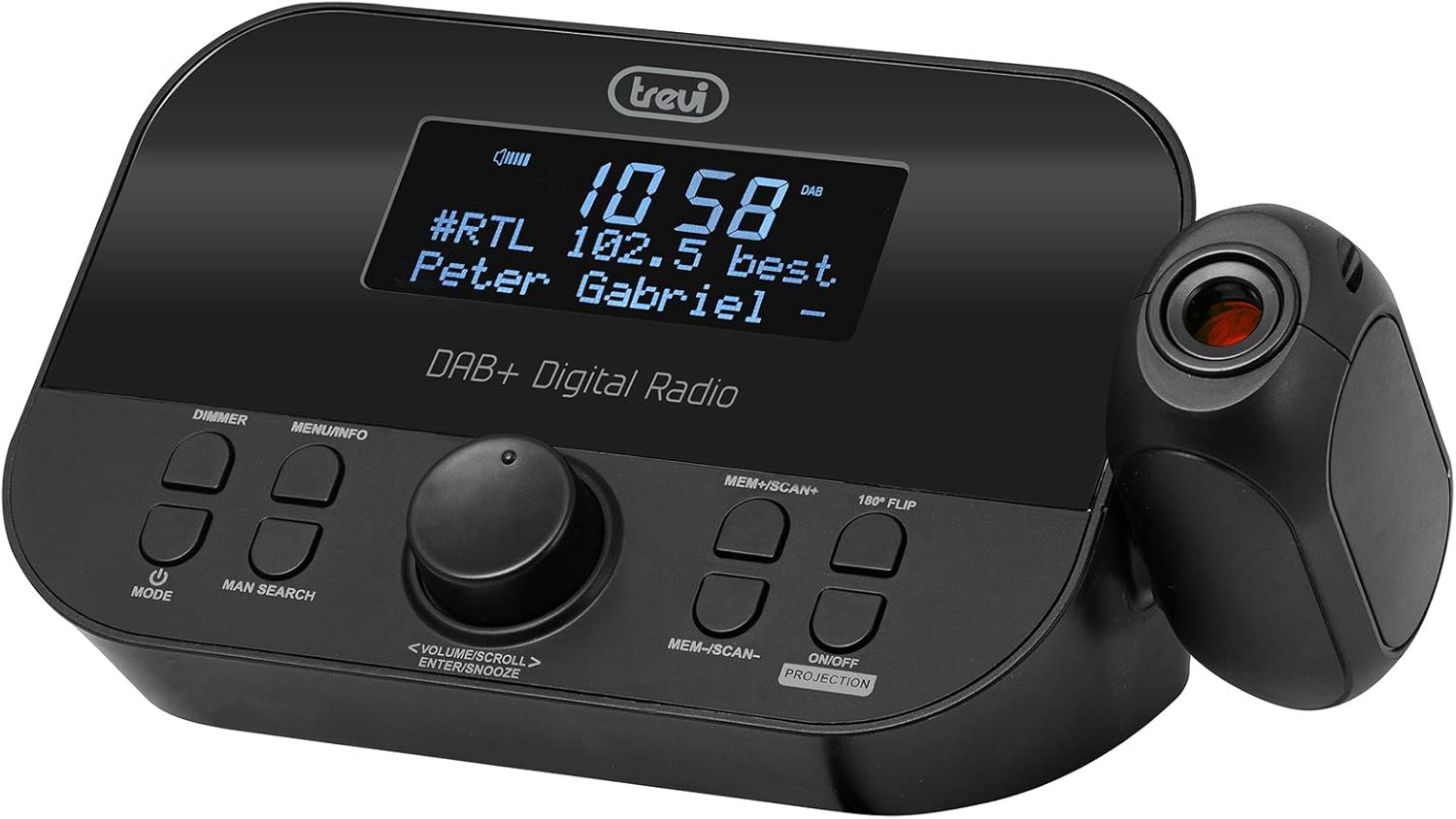
أمام view of the Trevi RC 85D8 DAB Digital Alarm Clock Radio, showing the LED display, control buttons, and the time projector.
عناصر التحكم والعرض:
- عرض الصمام: Shows time, radio station, song title/artist, volume, and other information.
- زر التعتيم: يضبط سطوع الشاشة.
- زر القائمة/المعلومات: Accesses menu options and displays radio information.
- زر الوضع: Switches between DAB, FM, and other modes.
- MAN SEARCH Button: Initiates manual station search.
- VOLUME/SCROLL/ENTER/SNOOZE Knob: Multi-function knob for volume control, menu navigation, selection, and snooze activation.
- MEM+/SCAN+ Button: Stores/recalls presets, scans forward.
- MEM-/SCAN- Button: Stores/recalls presets, scans backward.
- 180° FLIP Button: Rotates projected time display.
- ON/OFF PROJECTION Button: Turns the time projection on or off.
- عدسة الإسقاط: يعرض الوقت على سطح ما.
يثبت
1. توصيل الطاقة
- Connect the provided power adapter to the DC IN port on the back of the alarm clock radio.
- قم بتوصيل المحول بمأخذ حائط قياسي.
- سيتم تشغيل الجهاز وستضيء الشاشة.
2. تركيب نظام احتياطي للبطارية (اختياري)
The device has a battery compartment for anti-failure backup (2 AAA batteries, not included). This ensures time and alarm settings are retained during a power outage.
- افتح غطاء حجرة البطارية الموجود في الجزء السفلي من الوحدة.
- أدخل بطاريتين AAA مع مراعاة القطبية الصحيحة (+/-).
- أغلق غطاء حجرة البطارية جيدًا.
3. إعداد الهوائي
قم بتمديد الهوائي التلسكوبي بالكامل للحصول على أفضل استقبال لراديو DAB/DAB+ وراديو FM. اضبط موضعه للحصول على أفضل إشارة.

جانب view of the Trevi RC 85D8 DAB Digital Alarm Clock Radio, showing the extended telescopic antenna for improved reception.
4. إعداد الوقت والتاريخ الأولي
Upon first power-on, the device will attempt to synchronize time and date automatically via DAB or FM RDS signal. If automatic synchronization fails or you wish to set it manually:
- اضغط على القائمة / المعلومات زر للدخول إلى القائمة.
- تدوير VOLUME/SCROLL knob to navigate to "Time/Date" or "Settings".
- اضغط على يدخل (push the knob) to select.
- Follow the on-screen prompts to set the time, date, and 12/24-hour format using the VOLUME/SCROLL مقبض و يدخل زر.
تعليمات التشغيل
1. تشغيل/إيقاف التشغيل
- للتشغيل ، اضغط على وضع زر.
- لإيقاف التشغيل، اضغط مع الاستمرار على وضع زر.
2. Radio Mode Selection (DAB/DAB+ / FM RDS)
- اضغط على وضع button repeatedly to cycle between DAB/DAB+ and FM radio modes.
3. Tuning and Scanning
راديو داب/داب+:
- في وضع DAB ، اضغط على MEM+/SCAN+ or MEM-/SCAN- to automatically scan for available stations.
- بدلا من ذلك، اضغط على MAN SEARCH to manually tune. Rotate the VOLUME/SCROLL knob to select a station, then press يدخل.
FM RDS Radio:
- في وضع FM ، اضغط على MEM+/SCAN+ or MEM-/SCAN- لإجراء مسح تلقائي للمحطة التالية المتاحة.
- يضعط MAN SEARCH to manually tune. Rotate the VOLUME/SCROLL knob to adjust the frequency, then press يدخل.
4. تخزين واسترجاع الإعدادات المسبقة
- قم بضبط المحطة التي تريدها.
- اضغط مع الاستمرار MEM+/SCAN+ or MEM-/SCAN- until the display shows "Preset Store".
- تدوير VOLUME/SCROLL knob to select a preset number (e.g., P01, P02).
- يضعط يدخل لتأكيد وحفظ المحطة.
- To recall a preset, briefly press MEM+/SCAN+ or MEM-/SCAN- to cycle through stored stations.
5. التحكم في مستوى الصوت
- تدوير VOLUME/SCROLL مقبض لضبط مستوى الاستماع.
6. ضبط المنبهات (منبهات مزدوجة)
The Trevi RC 85D8 supports two independent alarms (Alarm 1 and Alarm 2).
- اضغط على القائمة / المعلومات زر للدخول إلى القائمة.
- تدوير VOLUME/SCROLL knob to navigate to "Alarm 1 Setup" or "Alarm 2 Setup".
- يضعط يدخل للاختيار.
- اتبع التعليمات التي تظهر على الشاشة لضبط ما يلي:
- وقت التنبيه: قم بضبط وقت الاستيقاظ المطلوب.
- مصدر الإنذار: Choose between "Buzzer" or "Radio" (DAB or FM).
- حجم التنبيه: اضبط مستوى صوت التنبيه المطلوب.
- تردد التنبيه: Select "Daily", "Weekdays", "Weekends", or "Once".
- حالة التنبيه: Turn the alarm "On" or "Off".
- يضعط يدخل لتأكيد كل إعداد.
7. وظيفة الغفوة
- عندما يصدر صوت التنبيه، اضغط على VOLUME/SCROLL/ENTER/SNOOZE knob to activate snooze. The alarm will pause for a set period (usually 9 minutes) and sound again.
- To cancel snooze and turn off the alarm, press the وضع زر.
8. وظيفة مؤقت النوم
يسمح مؤقت النوم بتشغيل الراديو لمدة محددة قبل إيقاف تشغيله تلقائيًا.
- اضغط على القائمة / المعلومات زر للدخول إلى القائمة.
- تدوير VOLUME/SCROLL knob to navigate to "Sleep Timer".
- يضعط يدخل للاختيار.
- تدوير VOLUME/SCROLL knob to choose the desired sleep duration (e.g., 15, 30, 60, 90 minutes, or Off).
- يضعط يدخل للتأكيد.
9. Time Projection Feature
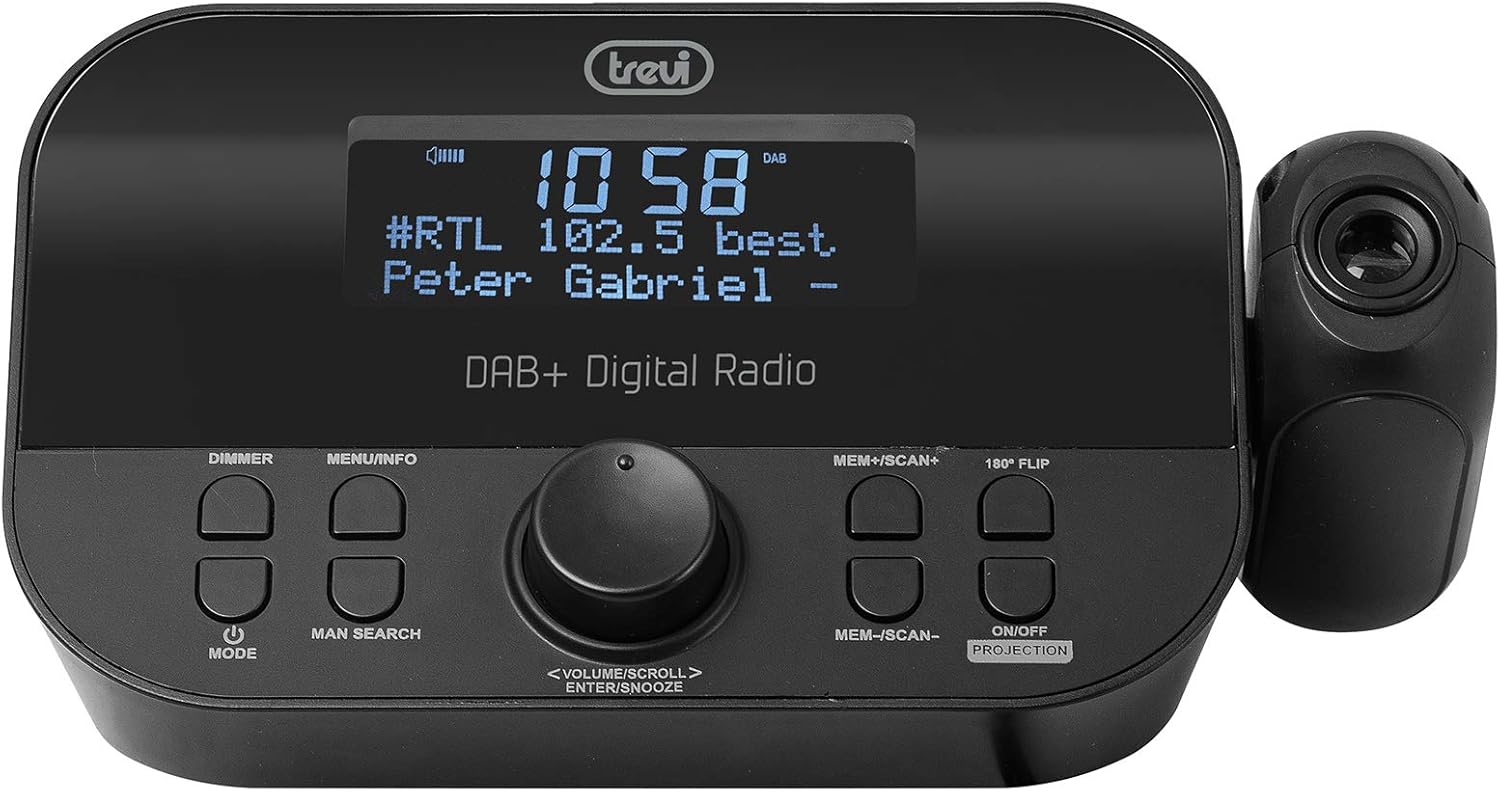
The Trevi RC 85D8 DAB Digital Alarm Clock Radio projecting the time onto a surface, demonstrating the adjustable projection lens.
- Turn Projection On/Off: اضغط على ON/OFF PROJECTION زر.
- ضبط زاوية الإسقاط: Manually adjust the projection lens on the side of the unit to direct the time display onto your ceiling or wall.
- Rotate Projected Time: If the projected time is upside down or sideways, press the 180 درجة FLIP button to rotate it for correct viewعمل.
- ضبط التركيز: Rotate the ring around the projection lens to sharpen the projected image.
10. مُخفِّض إضاءة الشاشة
- اضغط على ديمر button repeatedly to cycle through different brightness levels for the main LED display (e.g., High, Medium, Low, Off).
صيانة
- تنظيف: استخدم قطعة قماش ناعمة وجافة لتنظيف سطح الجهاز. لا تستخدم المنظفات الكاشطة أو المذيبات.
- رعاية الهوائي: Handle the telescopic antenna gently to avoid damage.
- استبدال البطارية: If using battery backup, replace AAA batteries annually or when the low battery indicator appears.
استكشاف الأخطاء وإصلاحها
| مشكلة | السبب المحتمل | حل |
|---|---|---|
| لا يوجد طاقة/شاشة مغلقة | Power adapter not connected; Power outlet faulty; DIMMER set to Off. | Ensure power adapter is securely connected and outlet is functional. Press ديمر button to adjust display brightness. |
| ضعف استقبال الراديو (DAB/FM) | Antenna not extended; Weak signal area; Interference from other electronics. | Fully extend and adjust the telescopic antenna. Try repositioning the unit. Move away from other electronic devices. Perform a full scan for DAB stations. |
| لا يصدر صوت التنبيه | Alarm not activated; Alarm volume too low; Incorrect alarm time/frequency. | Check alarm settings (Alarm 1/2 Setup) to ensure it is "On", time is correct, frequency is set, and volume is audible. |
| Projected time is blurry or unclear | Focus not adjusted; Projection distance too far/close. | Rotate the ring around the projection lens to adjust focus. Ensure the projection surface is within an optimal distance. |
| Projected time is upside down/sideways | Projection orientation incorrect. | اضغط على 180 درجة FLIP button to rotate the projected image. |
| Display is too bright at night | Dimmer setting too high. | اضغط على ديمر button repeatedly to select a lower brightness level or turn the display off. |
تحديد
| ميزة | التفاصيل |
|---|---|
| ماركة | تريفي |
| رقم الموديل | RC 85D8 (0RC85D800) |
| لون | أسود |
| تكنولوجيا الضبط | DAB, FM RDS |
| نطاقات الراديو المدعومة | DAB / DAB + ، FM |
| المميزات الخاصة | Alarm, Snooze, Sleep Timer, Time Projection, Dual Alarms |
| تكنولوجيا الاتصال | 3.5 mm Jack (for headphones) |
| مصدر الطاقة | AC Power Adapter (included), Battery backup (2x AAA, not included) |
| أبعاد المنتج | 23L x 13W x 14H centimeters (approx.) |
| عرض | LED Display with Dimmer |
الضمان والدعم
For warranty information and technical support, please refer to the documentation provided with your purchase or visit the official Trevi webالموقع. احتفظ بإثبات الشراء الخاص بك لتقديم مطالبات الضمان.
الشركة المصنعة: تريفي سبا
بلد المنشأ: الصين


