مقدمة
This manual provides essential instructions for the setup, operation, and maintenance of your DOYO R270 Racing Steering Wheel. This device is designed to enhance your racing simulation experience across multiple gaming platforms, including PC, Xbox Series X|S, Xbox One, PS4, PS3, and Nintendo Switch. Please read this manual thoroughly before use to ensure optimal performance and longevity of your product.
محتويات الحزمة
- DOYO R270 Racing Steering Wheel
- وحدة الدواسة (دواسة الوقود والفرامل)
- شيفتر والعتاد
- تصاعد Clamps
- دليل المستخدم (هذه الوثيقة)
المنتج انتهىview
Familiarize yourself with the components of your DOYO R270 Racing Steering Wheel system.

Image: The complete DOYO R270 Racing Steering Wheel setup, including the steering wheel, pedal unit, and gear shifter.
المكونات الرئيسية:
- المقود: Main control unit with buttons, D-pad, and paddle shifters.
- وحدة الدواسة: Separate unit with accelerator and brake pedals.
- شيفتر والعتاد: External lever for manual gear changes.
- تصاعد Clamps: For securing the steering wheel to a desk or table.
تعليمات الإعداد
1. تركيب عجلة القيادة
The steering wheel can be securely attached to a desk or table using the included clamps. Alternatively, its curved base allows for comfortable lap play.

الصورة: مفصلة view من clamp mounting system, showing how to attach the steering wheel to surfaces of varying thickness (0.2 inches to 2.44 inches).
- Place the steering wheel on a stable surface.
- قم بتوصيل cl المتصاعدةamps to the underside of the steering wheel and tighten them to secure the unit to your desk or table. Ensure the clamps are firmly fastened to prevent movement during use.
2. Connecting Pedals and Gear Shifter
Connect the pedal unit and gear shifter to the designated ports on the back of the steering wheel unit. Ensure all connections are firm.
3. اتصال المنصة
The DOYO R270 is compatible with multiple platforms. Connect the main USB cable from the steering wheel to an available USB port on your gaming console or PC.

Image: Visual representation of the steering wheel's compatibility with various gaming platforms, including Xbox One, PS4, PC, Xbox 360, Nintendo Switch, PS3, and Android TV.
- الكمبيوتر الشخصي: Connect via USB. Drivers may be required for some games; check the DOYO support website for the latest drivers if needed.
- Xbox Series X|S / Xbox One / PS4 / PS3 / Nintendo Switch: Connect via USB. The system should automatically recognize the device.
تعليمات التشغيل
1. عناصر التحكم الأساسية
- توجيه: The wheel offers 270 degrees of rotation for precise control.
- تسريع: Press the right pedal on the pedal unit.
- الكبح: Press the left pedal on the pedal unit.
- تغيير التروس: Use the external gear shifter or the paddle shifters located behind the steering wheel.

Image: A user demonstrating the 270-degree rotation capability of the DOYO R270 steering wheel, highlighting its range of motion.
2. تعديل الحساسية
The steering wheel features 7 levels of sensitivity adjustment to suit different driving styles and game requirements. The default setting is Grade 4.

Image: A close-up of the steering wheel's 'SEN' button and corresponding LED indicators, illustrating the 7-level sensitivity modes from Grade 1 to Grade 7.
To adjust sensitivity, press the 'SEN' button on the steering wheel. The LED indicators will change to reflect the current sensitivity grade.
3. التغذية الراجعة الاهتزازية المزدوجة
The steering wheel is equipped with dual vibration motors that provide realistic force feedback, simulating in-game events such as collisions, road textures, and engine vibrations.
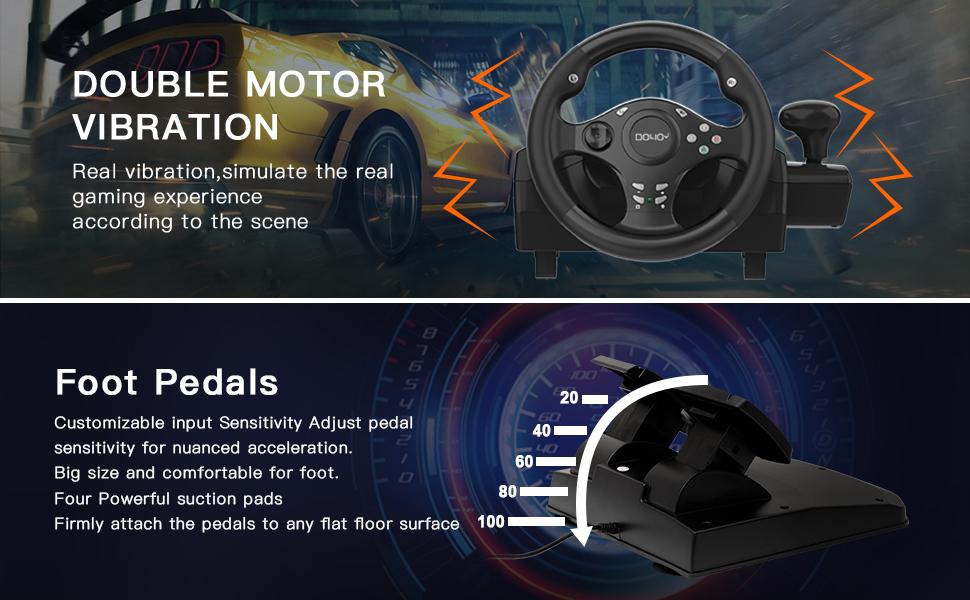
Image: An illustration highlighting the dual motor vibration feature of the steering wheel and the customizable input sensitivity of the foot pedals, which include four powerful suction pads for stability.
4. Analog Pedal Control
The pedal unit features 256-level analog change, allowing for nuanced acceleration and braking control, enhancing the realism of your driving experience.

Image: A close-up of the pedal unit, illustrating the 256-level analog change capability for precise control over acceleration and braking.
5. Recommended Games
The DOYO R270 Racing Steering Wheel is compatible with a wide range of racing titles across various platforms.
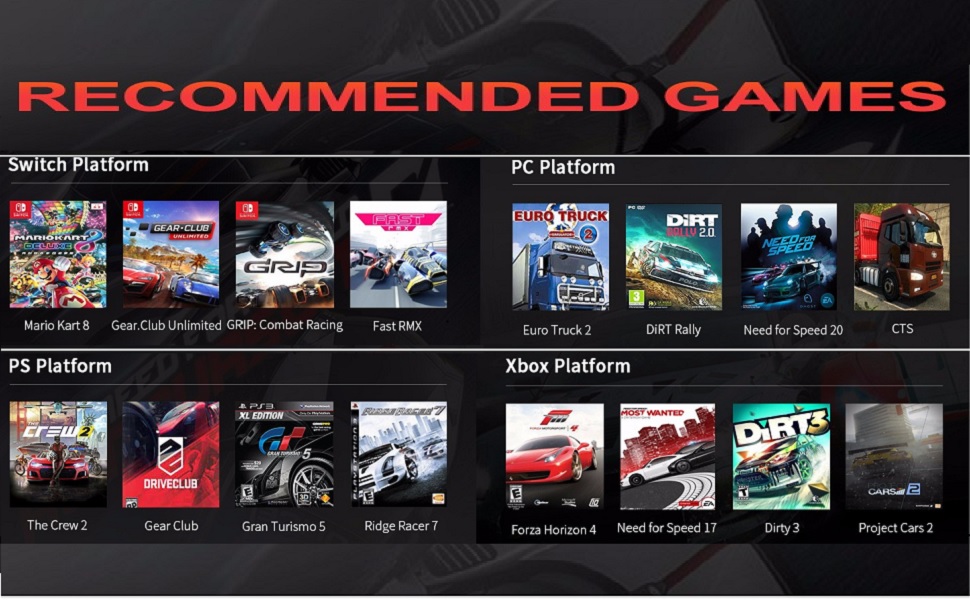
Image: A grid displaying recommended racing games categorized by platform (Switch, PC, PlayStation, Xbox) that are compatible with the DOYO R270 Racing Steering Wheel.
صيانة
- تنظيف: Use a soft, dry cloth to clean the steering wheel, pedals, and shifter. Avoid using abrasive cleaners or solvents.
- تخزين: عند عدم الاستخدام، قم بتخزين الجهاز في مكان نظيف وجاف بعيدًا عن أشعة الشمس المباشرة ودرجات الحرارة القصوى.
- إدارة الكابلات: تأكد من عدم تشابك الكابلات أو انضغاطها لمنع التلف.
استكشاف الأخطاء وإصلاحها
إذا واجهت أي مشكلات، فيرجى الرجوع إلى الحلول الشائعة التالية:
- الجهاز غير قابل للتعريف: Ensure all USB cables and interfaces are firmly connected. Try connecting to a different USB port. Restart your console or PC.
- Abnormal Input / Calibration Issues: Check your console or PC button mapping and driver settings. Recalibrate the device within the game settings if necessary. If using a wireless receiver (not applicable for this wired model, but generally for other devices), check for possible signal interference.
- لا يوجد رد فعل اهتزازي: Verify that vibration settings are enabled in your game and system settings. Ensure the device is properly connected.
- الدواسات لا تستجيب: Check the connection of the pedal unit to the steering wheel. Ensure no debris is obstructing the pedals.
تحديد
| رقم الموديل | ر270 |
| زاوية الدوران | 270 درجة |
| اهتزاز | Dual Motor Vibration Feedback |
| نوع الدواسة | Analog (256-level change) |
| الاتصال | USB سلكي |
| التوافق | PC, Xbox Series X|S, Xbox One, PS4, PS3, Nintendo Switch |
| أبعاد المنتج | 9.6 × 13 × 9.6 بوصة |
| وزن العنصر | 5.73 رطل |
الضمان والدعم
DOYO is committed to providing quality products and customer satisfaction. Your purchase includes reliable customer support. For any issues or inquiries not covered in this manual, please contact DOYO customer service. Specific warranty details may vary by region and retailer; please refer to your purchase documentation for more information.


