مقدمة
This manual provides detailed instructions for the proper use and maintenance of your Casio G-Shock DW-5610SU-3 digital watch. Designed for durability and functionality, this watch features shock resistance, 200-meter water resistance, an electro-luminescent backlight, and various timekeeping functions.

الصورة: الجبهة view of the Casio G-Shock DW-5610SU-3 digital watch, showcasing its square case and digital display.
وظائف الأزرار
Your G-Shock watch has four buttons, typically labeled as follows:
- اضبط (أعلى اليسار): تُستخدم للدخول إلى أوضاع الإعداد والخروج منها، ولتأكيد الإعدادات.
- الوضع (أسفل اليسار): Used to cycle through the watch's various modes (Timekeeping, Stopwatch, Countdown Timer, Alarm).
- الضوء (أعلى اليمين): Activates the electro-luminescent backlight.
- START/STOP (Bottom Right): Used to start/stop stopwatch operations, change selections in setting modes, and activate the flash alert.

الصورة: الجانب view of the watch, highlighting the top left (ADJUST) and bottom left (MODE) buttons.

Image: Opposite side view of the watch, showing the top right (LIGHT) and bottom right (START/STOP) buttons.
الإعداد: ضبط الوقت والتاريخ
- في وضع ضبط الوقت، اضغط مع الاستمرار على يُعدِّل اضغط على الزر حتى يبدأ رمز المدينة بالوميض، مما يشير إلى شاشة الإعدادات.
- استخدم البدء/التوقف button to cycle through the settings (City Code, DST, 12/24-hour format, Seconds, Hour, Minute, Year, Month, Day).
- استخدم ضوء button to increase a value or the البدء/التوقف button to decrease a value (for time/date settings).
- بمجرد تكوين كافة الإعدادات، اضغط على يُعدِّل زر للخروج من وضع الإعداد.
تعليمات التشغيل
أوضاع التنقل
اضغط على وضع زر للتنقل بين الأوضاع التالية:
- Timekeeping Mode (current time, date, day)
- وضع ساعة توقيت
- وضع العد التنازلي
- وضع التنبيه
- Hourly Time Signal Mode
استخدام ساعة التوقيف
- قم بالدخول إلى وضع ساعة الإيقاف بالضغط على وضع زر.
- اضغط على البدء/التوقف زر لبدء تشغيل ساعة الإيقاف.
- اضغط على البدء/التوقف button again to stop it.
- اضغط على يُعدِّل زر لإعادة ضبط ساعة الإيقاف إلى الصفر.
- The stopwatch measures up to 23 hours, 59 minutes, 59.99 seconds.
استخدام مؤقت العد التنازلي
- Enter Countdown Timer Mode by pressing the وضع زر.
- اضغط مع الاستمرار على يُعدِّل button until the hour setting flashes.
- استخدم ضوء و البدء/التوقف buttons to set the desired countdown time (up to 24 hours).
- يضعط يُعدِّل to confirm and exit the setting mode.
- يضعط البدء/التوقف لبدء العد التنازلي.
- يضعط البدء/التوقف مرة أخرى للإيقاف المؤقت/الاستئناف.
- عندما يصل العد التنازلي إلى الصفر، سيصدر صوت تنبيه. اضغط على أي زر لإيقاف التنبيه.
ضبط المنبهات
- قم بالدخول إلى وضع الإنذار بالضغط على وضع زر.
- اضغط مع الاستمرار على يُعدِّل button until the hour setting flashes.
- استخدم ضوء و البدء/التوقف buttons to set the alarm hour and minute.
- يضعط يُعدِّل to confirm and exit the setting mode.
- اضغط على البدء/التوقف button to toggle the alarm ON/OFF. An indicator will show when the alarm is active.
Electro-luminescent Backlight
اضغط على ضوء زر لإضاءة الشاشة لسهولة الاستخدام viewing in low-light conditions. The backlight duration is typically a few seconds.
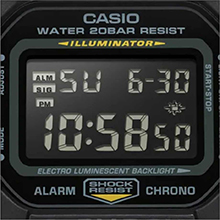
Image: Close-up of the watch display showing the electro-luminescent backlight active, illuminating the time and date.
صيانة
تنظيف
امسح الساعة بقطعة قماش ناعمة وجافة. وللأوساخ المستعصية، استخدم قطعة قماش ناعمة.ampened with water and a mild neutral detergent, then wipe dry. Avoid using volatile agents like thinner or benzine.
مقاومة الماء
This watch is water resistant to 200 meters. It is suitable for showering, swimming, and shallow diving. Do not operate buttons while the watch is wet or submerged to prevent water ingress.

Image: The Casio G-Shock DW-5610SU-3 watch partially submerged in water, illustrating its 200-meter water resistance.
استبدال البطارية
The watch uses one CR2016 battery with an approximate life of 2 years. When the display becomes dim or functions malfunction, it may be time for a battery replacement. It is recommended to have the battery replaced by an authorized service center to ensure water resistance is maintained.
استكشاف الأخطاء وإصلاحها
- العرض فارغ أو باهت: قد يكون مستوى شحن البطارية منخفضاً. استبدل البطارية.
- الأزرار لا تستجيب: Ensure the watch is not in a locked mode (if applicable, though this model typically doesn't have a lock). If issues persist, a full reset might be needed (consult service center).
- الوقت غير دقيق: Re-set the time and date as per the "Setting Time and Date" section. If inaccuracy continues, the watch may require servicing.
- الماء داخل الساعة: خذ الساعة فوراً إلى مركز خدمة معتمد. لا تحاول فتحها بنفسك.
تحديد
| ميزة | مواصفة |
|---|---|
| رقم الموديل | DW-5610SU-3 |
| مادة الهيكل/الإطار | الراتنج |
| مادة الفرقة | الراتنج |
| نوع الزجاج | زجاج معدني |
| مقاومة الماء | 200 متر (20 بار) |
| مقاومة الصدمات | نعم |
| الإضاءة الخلفية | Electro-luminescent backlight with Afterglow |
| ساعة توقيت | 1/100-second, measuring capacity 23:59'59.99" |
| عداد تنازلي | Measuring unit 1 second, range 24 hours, auto-repeat |
| إنذار | Multi-function alarm, Hourlإشارة الوقت y |
| تقويم | Full auto-calendar (to year 2099) |
| تنسيق الوقت | تنسيق 12 / 24-hour |
| دقة | ±15 ثانية شهريا |
| نوع البطارية | سي آر 2016 |
| عمر البطارية التقريبي | سنتان |
| Case Dimensions (H×W×D) | 48.9 × 43.8 × 13.5 ملم |
| الوزن الإجمالي | 52 جرام |

Image: Diagram showing the dimensions of the Casio G-Shock DW-5610SU-3 watch, with a credit card for scale, indicating a case height of 48.9 mm and width of 43.8 mm.
الضمان والدعم
Your Casio G-Shock DW-5610SU-3 watch comes with a Limited Warranty. For warranty claims, service, or technical support, please contact Casio India Co Pvt Ltd.
Manufacturer/Importer Contact:
Casio India Co Pvt Ltd
A-41, 1st Floor, MCIE, Mathura Road,
نيودلهي - 110044 ، الهند
For additional information and support, please visit the official Casio website or an authorized service center.


