1. المقدمة
This manual provides detailed instructions for the setup, operation, maintenance, and troubleshooting of your iProda T1045A 10.1 inch Android Tablet. Please read this manual thoroughly before using your device to ensure proper functionality and to maximize your user experience.
The iProda T1045A is a 10.1-inch tablet featuring an HD IPS display with 1280x800 resolution, powered by a 64-bit Quad-core processor running Android 9 Pie. It includes 3GB RAM, 64GB internal storage expandable up to 128GB via TF card, dual-band Wi-Fi, HDMI output, and a 5000mAh battery for extended use.
2. انتهى المنتجview
2.1 محتويات العبوة
عند فتح العبوة، تأكد من وجود جميع العناصر:
- iProda T1045A 10.1 inch Android Tablet
- كابل يو اس بي
- محول الطاقة
- دليل المستخدم (هذا المستند)

Image: Contents of the iProda T1045A tablet package.
2.2 تخطيط الجهاز
Familiarize yourself with the physical components and ports of your tablet:
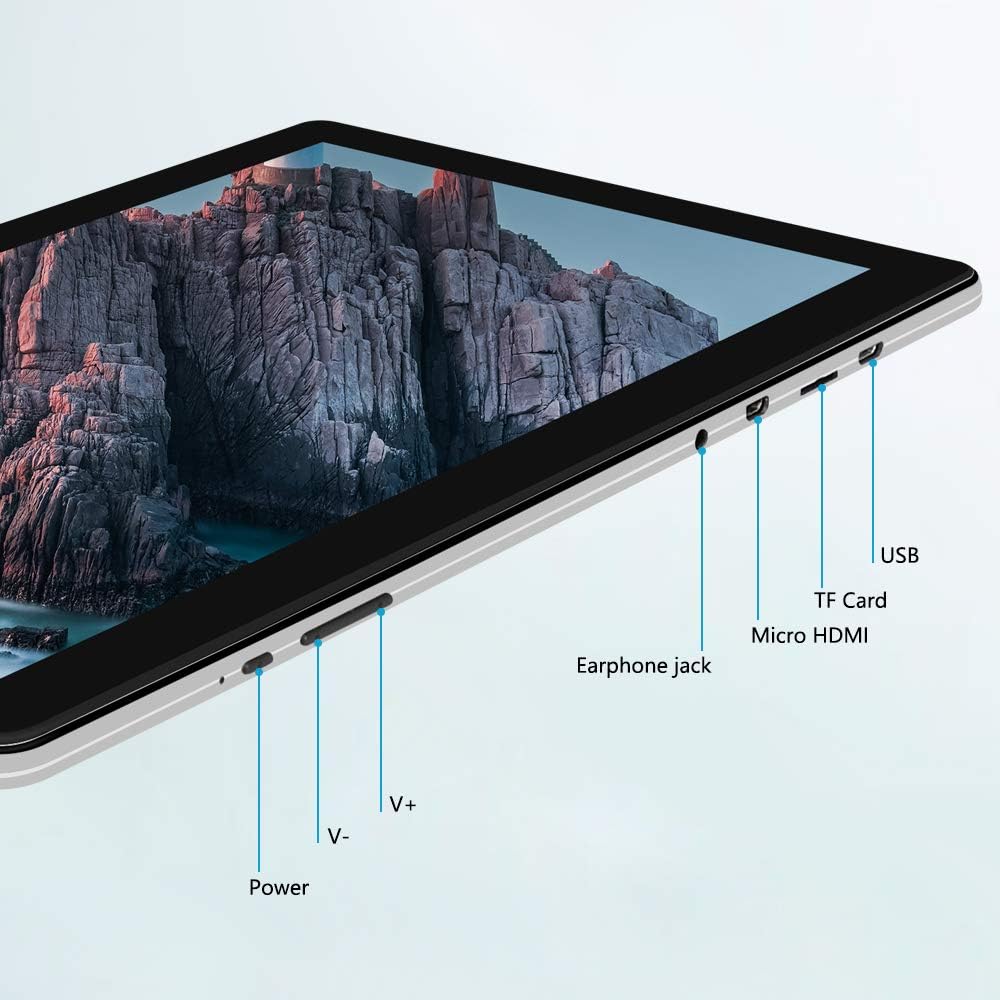
الصورة: الجانب view of the iProda T1045A tablet highlighting port locations.
- زر الطاقة: Press and hold to power on/off or restart the tablet. Short press to turn the screen on/off.
- Volume Buttons (V+, V-): ضبط مستوى الصوت.
- مدخل سماعة الأذن: قم بتوصيل سماعات 3.5 ملم.
- فتحة بطاقة TF: Insert a microSD card for expandable storage (up to 128GB).
- منفذ Micro HDMI: Connect to an external display using a Micro HDMI to HDMI cable.
- منفذ USB: Connect to a computer for data transfer or for charging the device.
3. الإعداد
3.1 الشحن الأولي
Before first use, fully charge the tablet. Connect the provided USB cable to the tablet's USB port and the power adapter, then plug the adapter into a wall outlet. The charging indicator will typically illuminate. A full charge may take several hours.
3.2 تشغيل/إيقاف التشغيل
- لتشغيل: اضغط مع الاستمرار على زر التشغيل حتى تضيء الشاشة.
- لإيقاف التشغيل: Press and hold the Power button until a power menu appears on the screen. Select "Power off" and confirm.
- لإعادة التشغيل: من قائمة الطاقة، حدد "إعادة التشغيل".
- تشغيل/إيقاف الشاشة: Briefly press the Power button to turn the screen off (sleep mode) or wake it up.
3.3 معالج الإعداد الأولي
The first time you power on the tablet, you will be guided through an initial setup process. Follow the on-screen prompts to:
- اختر اللغة المفضلة لديك.
- الاتصال بشبكة Wi-Fi.
- قم بإعداد حساب Google الخاص بك (اختياري، ولكن يوصى به لتنزيلات التطبيقات).
- تكوين إعدادات التاريخ والوقت.
3.4 Inserting a TF Card (MicroSD)
To expand the tablet's storage:
- حدد مكان فتحة بطاقة الذاكرة الخارجية (TF) على جانب الجهاز اللوحي.
- Carefully insert a microSD card (up to 128GB) into the slot with the gold contacts facing down until it clicks into place.
- لإزالتها، ادفع البطاقة برفق إلى الداخل حتى تخرج.
4. تعليمات التشغيل
4.1 الملاحة الأساسية
The iProda T1045A uses a touch-sensitive screen for navigation:
- مقبض: حدد عنصرًا أو افتح تطبيقًا.
- انقر مع الاستمرار: الوصول إلى القوائم السياقية أو نقل الأيقونات.
- انتقاد: تصفح القوائم أو انتقل بين الشاشات الرئيسية.
- قرصة: تكبير أو تصغير الصور و web الصفحات.
4.2 اتصال واي فاي
للاتصال بشبكة لاسلكية:
- اذهب الى إعدادات > الشبكات والانترنت > واي فاي.
- تبديل Wi-Fi On.
- حدد الشبكة المطلوبة من القائمة.
- أدخل كلمة المرور إذا طُلب منك ذلك، ثم انقر فوق يتصل.
The tablet supports both 2.4G and 5G dual-band Wi-Fi for faster and more stable connections.
4.3 اقتران بلوتوث
للاقتران بأجهزة البلوتوث (مثل سماعات الرأس ومكبرات الصوت):
- اذهب الى إعدادات > الأجهزة المتصلة > بلوتوث.
- تبديل البلوتوث On.
- تأكد من أن جهاز البلوتوث الخاص بك في وضع الاقتران.
- Select your device from the list of available devices and follow any on-screen prompts to complete pairing.
4.4 استخدام الكاميرات
The tablet is equipped with a 2MP front camera and a 5MP rear camera.
- افتح آلة تصوير application from the app drawer.
- انقر على أيقونة الكاميرا للتبديل بين الكاميرا الأمامية والخلفية.
- اضغط على زر الغالق لالتقاط الصور أو بدء/إيقاف تسجيل الفيديو.

Image: Tablet in use, showcasing its camera capabilities.
4.5 توصيل شاشة خارجية (HDMI)
To display your tablet's screen on a larger monitor or TV:
- Connect one end of a Micro HDMI cable to the tablet's Micro HDMI port.
- Connect the other end of the cable to an HDMI input on your external display.
- Select the correct HDMI input source on your external display.
- The tablet's screen content should now be mirrored on the external display.
4.6 إدارة التطبيقات
The tablet runs Android 9 Pie and supports applications from the Google Play Store.
- تثبيت تطبيقات: افتح متجر بلاي ابحث عن التطبيق الذي تريده، ثم انقر عليه. ثَبَّتَ.
- إلغاء تثبيت التطبيقات: Tap and hold an app icon on the home screen or in the app drawer, then drag it to "Uninstall" or select "App info" and choose "Uninstall". Alternatively, go to إعدادات > التطبيقات والإشعاراتحدد التطبيق، ثم انقر إلغاء التثبيت.
5. الصيانة
5.1 تنظيف الجهاز
لتنظيف جهازك اللوحي:
- قم بإيقاف تشغيل الجهاز اللوحي قبل التنظيف.
- استخدم قطعة قماش ناعمة وخالية من الوبر، وجففها قليلاً.ampيُنظف بالماء أو بمنظف الشاشات، لمسح الشاشة والجسم.
- تجنب استخدام المواد الكيميائية القاسية، أو المنظفات الكاشطة، أو الرطوبة الزائدة.
5.2 تحديثات البرامج
Periodically check for software updates to ensure optimal performance and security:
- اذهب الى إعدادات > نظام > متقدم > تحديث النظام.
- اتبع التعليمات الظاهرة على الشاشة لتنزيل وتثبيت أي تحديثات متاحة. تأكد من شحن جهازك اللوحي بشكل كافٍ أو توصيله بمصدر طاقة أثناء التحديثات.
5.3 إدارة التخزين
To manage internal storage and the TF card:
- اذهب الى إعدادات > تخزين.
- هنا يمكنك view storage usage, free up space, and manage files on both internal storage and the inserted TF card.
6. استكشاف الأخطاء وإصلاحها
This section addresses common issues you might encounter with your iProda T1045A tablet.
6.1 الجهاز لا يعمل
- Ensure the tablet is sufficiently charged. Connect it to the power adapter and allow it to charge for at least 30 minutes before attempting to power on again.
- حاول الضغط باستمرار على زر الطاقة لمدة 10-15 ثانية لإجبار الجهاز على إعادة التشغيل.
6.2 مشاكل الاتصال بشبكة Wi-Fi
- Verify that Wi-Fi is enabled in إعدادات.
- تأكد من إدخال كلمة مرور Wi-Fi الصحيحة.
- أعد تشغيل جهاز توجيه Wi-Fi والكمبيوتر اللوحي.
- Try connecting to a different Wi-Fi network to determine if the issue is with the tablet or the network.
6.3 الأداء البطيء
- أغلق التطبيقات الخلفية غير الضرورية.
- Clear cached data for apps in إعدادات > التطبيقات والإشعارات > [اسم التطبيق] > التخزين والذاكرة المؤقتة > مسح ذاكرة التخزين المؤقت.
- Ensure sufficient free storage space. Uninstall unused apps or move large files to a TF card.
- أعد تشغيل الجهاز اللوحي.
6.4 استنزاف البطارية بسرعة
- تقليل سطوع الشاشة.
- قم بتعطيل Wi-Fi وBluetooth وGPS عند عدم استخدامها.
- قم بإغلاق التطبيقات الخلفية التي تستهلك قدرًا كبيرًا من الطاقة.
- تحقق من استخدام البطارية في إعدادات > بطارية لتحديد التطبيقات التي تستهلك الكثير من الطاقة.
- Ensure the tablet is not allowed to run below 15% charge frequently, as this can impact battery longevity.
6.5 إعادة ضبط المصنع
في حال استمرار المشاكل، قد يؤدي إعادة ضبط المصنع إلى حلها. تحذير: سيؤدي هذا إلى مسح جميع البيانات الموجودة على جهازك اللوحي. لذا، يُرجى عمل نسخة احتياطية من البيانات المهمة قبل المتابعة.
- اذهب الى إعدادات > نظام > متقدم > خيارات إعادة الضبط.
- يختار مسح جميع البيانات (إعادة ضبط المصنع).
- أكد قرارك واتبع التعليمات التي تظهر على الشاشة.
7. المواصفات
Below are the technical specifications for the iProda T1045A tablet:
| اسم الموديل | ت1045ا |
| نظام التشغيل | أندرويد 9 باي |
| حجم العرض | 10.1 بوصة |
| دقة العرض | 1280 × 800 بكسل (HD IPS) |
| المعالج | MediaTek Quad-core 1.5Ghz |
| كبش | 3 جيجا بايت |
| التخزين الداخلي | 64 جيجا بايت SSD |
| تخزين قابل للتوسيع | Up to 128 GB via TF Card (MicroSD) |
| معالج الرسوميات المساعد | ARM Mali-T720 MP2 |
| الكاميرا الخلفية | 5 ميجا بكسل |
| الكاميرا الأمامية | 2 ميجا بكسل |
| سعة البطارية | 5000 مللي أمبير ليثيوم بوليمر |
| متوسط عمر البطارية | تصل إلى 8 ساعة |
| الاتصال اللاسلكي | Dual-Band Wi-Fi (802.11a/b/g/n), Bluetooth 4.0 |
| الموانئ | 1x USB 2.0, 1x Micro HDMI, 3.5mm Earphone Jack, TF Card Slot |
| أبعاد | 34.5 × 19.7 × 5.5 سم |
| وزن | 550 جرام |

صورة: المواصفات الرئيسية لأداء الجهاز اللوحي.

Image: Tablet portability and battery details.
8. الضمان والدعم
8.1 ضمان المنتج
The iProda T1045A tablet comes with a ضمان لمدة 12 شهرًا يسري هذا الضمان من تاريخ الشراء. ويغطي عيوب التصنيع والأعطال الناتجة عن الاستخدام العادي. ولا يغطي الأضرار الناجمة عن سوء الاستخدام أو الحوادث أو الإصلاحات غير المصرح بها أو التلف الناتج عن الاستخدام العادي.
8.2 دعم العملاء
If you encounter any issues not covered in the troubleshooting section or require further assistance, please contact iProda customer support. Refer to your purchase documentation or the iProda official webموقع لمعلومات الاتصال.
When contacting support, please have your tablet's model number (T1045A) and purchase details readily available.


