1. المقدمة
Thank you for choosing the IMILAB EC2 Outdoor IP Security Camera. This manual provides essential information for the proper installation, operation, and maintenance of your device. The IMILAB EC2 is a versatile security camera designed for both indoor and outdoor use, featuring Full HD resolution, infrared night vision, motion detection, and two-way audio communication. Please read this manual thoroughly before using the product to ensure optimal performance and safety.
2. محتويات العبوة
تأكد من تضمين جميع العناصر المذكورة أدناه في طردك. في حال وجود أيٍّ منها مفقودًا أو تالفًا، يُرجى التواصل مع خدمة العملاء.
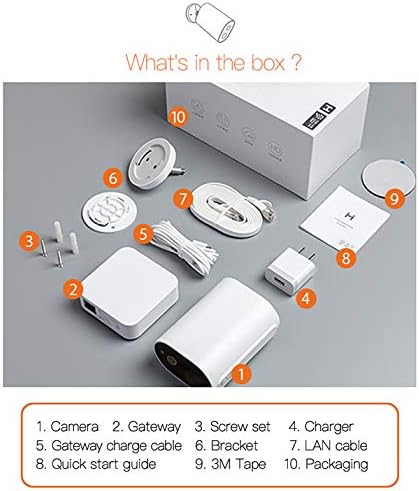
Image: Contents of the IMILAB EC2 package, including the camera, gateway, and accessories.
- آلة تصوير
- بوابة
- مجموعة براغي
- شاحن
- Gateway charge cable
- قوس
- كابل الشبكة المحلية
- دليل البدء السريع
- شريط 3M
- التعبئة والتغليف
3. انتهى المنتجview
The IMILAB EC2 camera is designed for robust security monitoring with several key features:
- تصميم لاسلكي: Offers flexible placement without power cable limitations.
- AI Scanning: Advanced artificial intelligence for improved detection accuracy.
- عمر بطارية ممتد: Up to 4 months on a single charge under typical usage conditions.
- لا رسوم شهرية: Cloud storage for recorded events is available without subscription.
- IP66 مقاوم للطقس: Certified for dust and water resistance, suitable for outdoor environments.
- Passive IR Detection: Utilizes Passive Infrared (PIR) for motion sensing.
- الرؤية الليلية: Integrated infrared LEDs for clear monitoring in low-light or dark conditions.
- دقة 1080P عالية الدقة: يوفر مقاطع فيديو واضحة ومفصلةtage.
- تشفير AES128: Ensures secure data transmission and storage.

Image: Visual representation of the IMILAB EC2's main features.
4. الإعداد
Follow these steps to set up your IMILAB EC2 camera:
- اشحن الكاميرا: Before initial use, fully charge the camera using the provided charger and gateway charge cable.
- تنزيل التطبيق: Download the official IMILAB Home app (or compatible Xiaomi Home app) from your smartphone's app store (available for Android and iOS).
- الطاقة على البوابة: Connect the Gateway to a power source and to your router via the LAN cable. Wait for the indicator light to show it's ready for pairing.
- قم بإقران الكاميرا: Open the app, create an account, and follow the on-screen instructions to add the Gateway and then the EC2 camera. Ensure your smartphone is connected to a 2.4GHz Wi-Fi network during setup.
- تركيب الكاميرا: Choose a suitable location for mounting. The camera can be mounted on a wall or other flat surface using the provided bracket, screws, and 3M tape. Ensure the camera has a clear field of view and is within Wi-Fi range of the Gateway.

Image: The IMILAB EC2 camera shown mounted on a wall, illustrating its installation flexibility.
5. تعليمات التشغيل
5.1 مباشر View والتسجيل
Access the live video feed from your camera through the IMILAB Home app. You can manually record video or capture screenshots directly from the live view واجهة.
5.2 كشف الحركة وأجهزة الإنذار
The camera features a PIR motion sensor and AI-powered human detection to minimize false alarms. When motion is detected, the camera can automatically record a short video clip and send a notification to your smartphone.
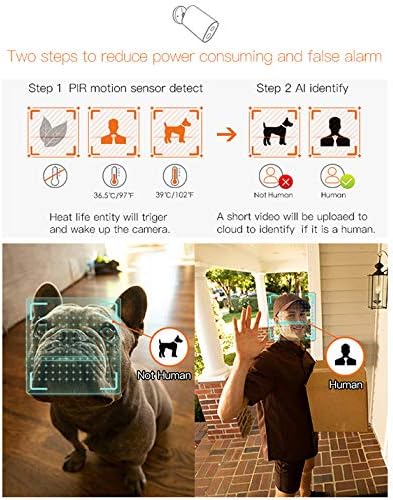
Image: Illustration of the camera's PIR motion detection and AI human identification process.
5.3 الرؤية الليلية
The IMILAB EC2 is equipped with infrared night vision, allowing it to capture clear video footage even in complete darkness. This feature activates automatically in low-light conditions.

Image: Comparison demonstrating the superior night vision capabilities of the IMILAB EC2 camera.
5.4 الصوت ثنائي الاتجاه
Utilize the built-in microphone and speaker to communicate with individuals near the camera, directly through the app.
5.5 التخزين السحابي
The camera offers free cloud storage for recorded events for a limited duration (e.g., 7 days), eliminating the need for a local memory card. This ensures your footage is securely backed up.

Image: The IMILAB EC2 camera highlighting its free cloud storage feature.
6. الصيانة
6.1 مقاومة الطقس
The IMILAB EC2 camera has an IP66 rating, making it resistant to dust and powerful water jets. It is designed to withstand various outdoor weather conditions, including heat, wind, snow, and rain.

Image: The IMILAB EC2 camera's internal structure and its resilience to extreme weather conditions.
6.2 شحن البطارية
The camera is powered by a rechargeable Lithium Polymer battery. When the battery level is low, you will receive a notification via the app. Recharge the camera using the provided charging cable and adapter. A full charge can last up to 4 months, depending on usage and environmental factors.

Image: The IMILAB EC2 camera demonstrating its long battery life, capable of 4 months on a single charge.
6.3 التنظيف
Periodically clean the camera lens and housing with a soft, dry cloth to ensure clear image quality and proper operation. Do not use harsh chemicals or abrasive materials.
7. استكشاف الأخطاء وإصلاحها
If you encounter issues with your IMILAB EC2 camera, refer to the following common solutions:
- الكاميرا غير متصلة بشبكة Wi-Fi: Ensure the Gateway is powered on and connected to your router. Verify your Wi-Fi network is 2.4GHz. Restart the camera and Gateway, then attempt pairing again.
- جودة الفيديو رديئة: Check your Wi-Fi signal strength at the camera's location. Ensure the camera lens is clean and free from obstructions.
- خاصية كشف الحركة لا تعمل: Verify motion detection settings are enabled in the app. Adjust sensitivity levels if necessary. Ensure the camera's view لا يتم إعاقة.
- استنزاف البطارية بسرعة: أحداث متكررة لكشف الحركة، مباشرة view access, or poor Wi-Fi signal can increase battery consumption. Reduce detection sensitivity or optimize camera placement.
- لا يوجد إشعارات: Check your smartphone's app notification settings and ensure they are enabled for the IMILAB Home app.
8. المواصفات
Detailed technical specifications for the IMILAB EC2 Outdoor IP Security Camera (Model CMSXJ11A):
| ميزة | مواصفة |
|---|---|
| اسم الموديل | Xiaomi CMSXJ11A |
| دقة التقاط الفيديو | 1080 بكسل (عالي الدقة بالكامل) |
| دقة الفيديو الفعالة | 1080 |
| معدل الإطارات | 30 إطارًا في الثانية |
| تكنولوجيا الاتصال | لاسلكي (واي فاي) |
| تقنيات الاتصالات اللاسلكية | واي فاي |
| بروتوكول الاتصال | واي فاي |
| الاستخدام الداخلي والخارجي | داخلي، خارجي |
| المميزات الخاصة | Night Vision, Motion Detector |
| مصدر الطاقة | تعمل بالبطارية |
| البطاريات | مطلوب بطارية ليثيوم بوليمر واحدة (متضمنة) |
| محتوى طاقة بطارية الليثيوم | ساعات 0.6 وات |
| حجم بطارية الليثيومtage | 5 فولت |
| وزن بطارية الليثيوم | 0.9 جرام |
| تصنيف IP | IP66 (Dust and Water Resistance) |
| الأجهزة المتوافقة | الهاتف الذكي (Android وiOS) |
| نوع التركيب | حامل الحائط |
| لون | أبيض |
| أبعاد العنصر (الطول × العرض × الارتفاع) | 3 × 2 × 4 سم |
| وزن العنصر | 530 جرام |
9. الضمان والدعم
For warranty information, please refer to the documentation provided with your purchase or contact your retailer. Specific warranty terms may vary by region and seller.
For technical support or further assistance, please visit the official IMILAB website or contact their customer service. You may also find support resources on the IMILAB brand page on Amazon.


