1. المقدمة
The ScopeAround MS450 Digital Otoscope Ear Camera is designed to provide a clear and detailed view of the ear canal and eardrum. This device features a 4.5-inch IPS screen, a high-definition camera with adjustable LED lights, and an intelligent gyroscope for image stabilization. It is intended for personal ear inspection and can assist in monitoring ear health. This manual provides essential information for the safe and effective use of your otoscope.
2. معلومات السلامة
- Do not insert the otoscope too deeply into the ear canal. Excessive insertion can cause injury to the eardrum or inner ear structures.
- Always use the provided ear specula to prevent over-insertion and protect the ear canal.
- Clean the camera lens and ear specula thoroughly before and after each use with alcohol wipes to prevent infection.
- This device is for observation and minor earwax removal only. For significant earwax impaction or ear infections, consult a medical professional.
- Keep the device out of reach of children. Adult supervision is required if used on children.
- Avoid using the device if you experience pain, discomfort, or bleeding during examination. Seek medical attention immediately.
- لا تحاول تفكيك الجهاز أو تعديله. قد يؤدي ذلك إلى إلغاء الضمان ويشكل مخاطر على السلامة.
3. محتويات العبوة
تأكد من وجود جميع العناصر في العبوة:
- MS450 Otoscope Camera Unit
- كابل الشحن (USB Type-C)
- دليل المستخدم
- 4 x Silicone Ear Spoons (various types)
- 3 x Ear Specula (protective cones)
- 1 Pack of Alcohol Prep Pads
- 32GB MicroSD Memory Card (pre-installed or included separately)

4. انتهى المنتجview
The MS450 otoscope consists of a main display unit and a connected camera probe. Familiarize yourself with the components and controls:

- وحدة عرض: Features a 4.5-inch IPS screen for real-time viewعمل.
- مسبار الكاميرا: Equipped with an HD camera, 6 adjustable LED lights, and a gyroscope.
- أزرار التحكم: Power, Photo/Video, Light Control, Mode Switch, Navigation (Up/Down), OK, and Settings.
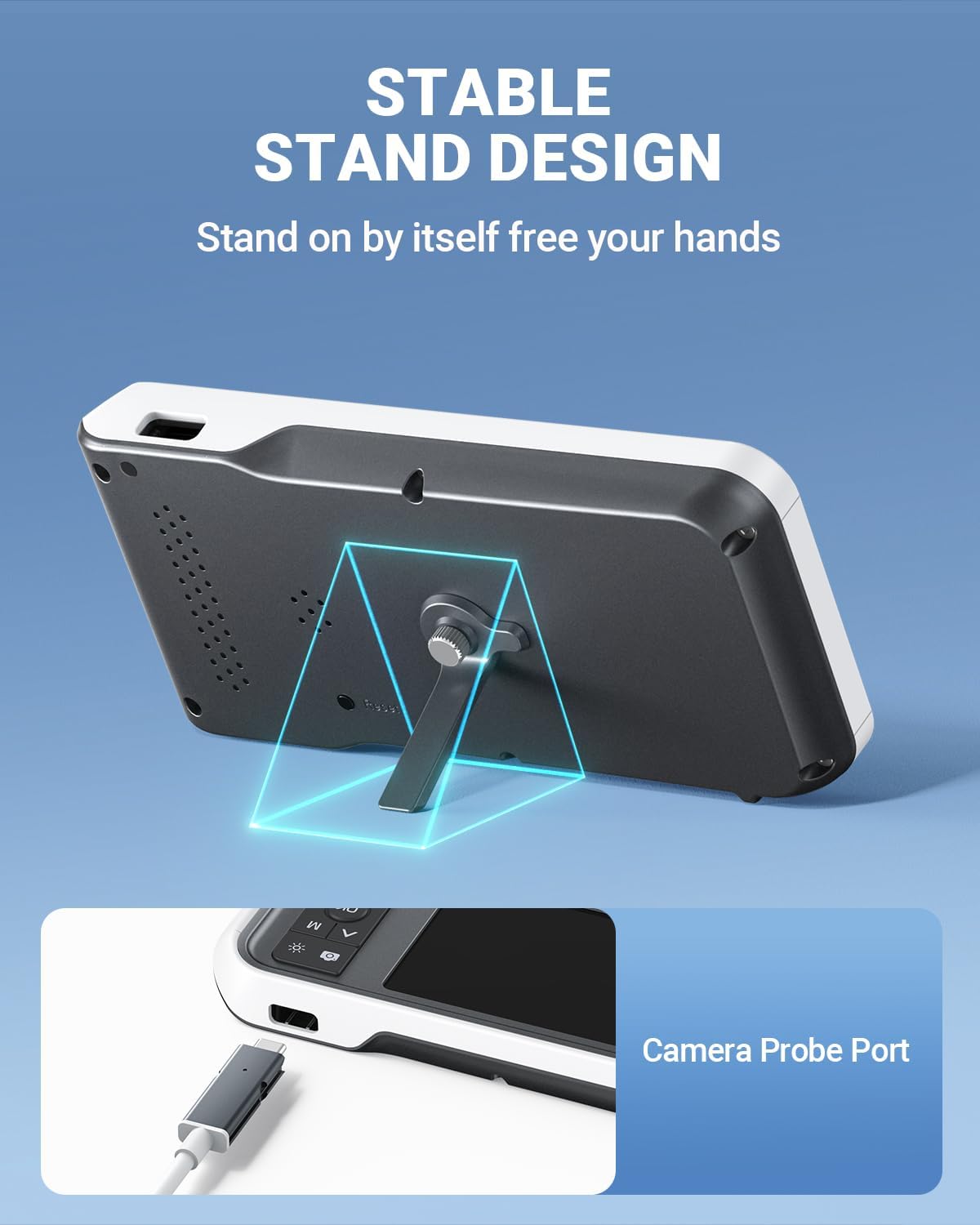
- الموانئ: USB Type-C Charging Port, TF Card Slot, Camera Probe Connector.
- حامل متكامل: يسمح بالتشغيل بدون استخدام اليدين.
5. الإعداد
- اشحن الجهاز: Before first use, fully charge the otoscope using the provided USB Type-C cable and a compatible power adapter (not included). The charging port is located on the side of the display unit. A full charge provides over 4 hours of continuous use.
- أدخل بطاقة MicroSD: Ensure the 32GB MicroSD card is properly inserted into the TF Card Slot. This card is used to store photos and videos.
- قم بتوصيل مسبار الكاميرا: Connect the camera probe cable securely to the Camera Probe Connector on the display unit.
- Select and Attach Specula/Ear Spoon: Choose an appropriate ear speculum (protective cone) or silicone ear spoon. Gently push it onto the tip of the camera probe until it is secure. Always use a speculum to protect the ear canal.


6. تعليمات التشغيل
- تشغيل الطاقة: Press and hold the Power Button (blue button) for a few seconds until the screen turns on.
- ضبط سطوع LED: Use the Light Control Button (sun icon) to cycle through 3 levels of LED brightness to achieve optimal illumination for your ear canal.
- التمركز: Gently insert the camera probe into the ear canal. The 4.5-inch IPS screen will display a real-time view. The intelligent directional gyroscope helps stabilize the image, preventing disorientation.
- التشغيل بدون استخدام اليدين: Utilize the integrated stand on the back of the display unit to position the device on a flat surface, allowing for hands-free viewing and easier manipulation of the probe.
- التقاط الصور/الفيديوهات:
- Press the Mode Switch Button (M) to switch between photo and video modes.
- In photo mode, press the Photo/Video Button (camera icon) once to take a picture.
- In video mode, press the Photo/Video Button once to start recording, and press again to stop.
- Review وسائط: Use the navigation buttons (Up/Down) to browse captured photos and videos. Press the OK button to view عنصر محدد.
- نقل البيانات: Connect the device to a computer using the USB Type-C cable to transfer photos and videos from the MicroSD card. Alternatively, remove the MicroSD card and insert it into a card reader.
- إيقاف التشغيل: اضغط مع الاستمرار على زر الطاقة حتى تنطفئ الشاشة.

7. الصيانة
- تنظيف عدسة الكاميرا: After each use, gently wipe the camera lens with an alcohol prep pad or a soft, dry cloth. Ensure no residue remains.
- Cleaning Ear Spoons/Specula: Wash reusable ear spoons and specula with soap and water, then sterilize with alcohol prep pads. Replace disposable specula after each use.
- تنظيف الجهاز: Wipe the main unit with a soft, dry cloth. Do not immerse the main unit in water. The camera probe is waterproof and can be cleaned with water and alcohol.
- تخزين: Store the otoscope in a clean, dry place at room temperature, away from direct sunlight and extreme temperatures.
- العناية بالبطارية: لإطالة عمر البطارية، تجنب تفريغ الجهاز بالكامل بشكل متكرر. اشحنه بانتظام، حتى لو لم تستخدمه لفترات طويلة.

8. استكشاف الأخطاء وإصلاحها
| مشكلة | السبب المحتمل | حل |
|---|---|---|
| الجهاز لا يعمل. | بطارية منخفضة، الجهاز متجمد. | Charge the device fully. If unresponsive, press the Reset button with a pin. |
| لا توجد صورة على الشاشة. | Camera probe not connected; faulty probe. | Ensure camera probe is securely connected. If problem persists, contact support. |
| الصورة غير واضحة. | Dirty lens; incorrect focal distance. | Clean the camera lens. Ensure the probe is within the optimal focal distance (approx. 1 inch / 2.5 cm). |
| لا يمكن التقاط الصور/مقاطع الفيديو. | MicroSD card full or not inserted; incorrect mode. | Check MicroSD card status and ensure it is inserted. Verify device is in photo or video mode. |
| مصابيح LED لا تعمل. | تم إطفاء الأنوار أو ضبطها على أدنى مستوى سطوع. | Press the Light Control Button to adjust brightness levels. |
9. المواصفات
- نموذج: رقم MS450
- عرض: شاشة IPS مقاس 4.5 بوصة
- دقة الكاميرا: Full HD (1080P for images, 720P for video)
- مصدر الضوء: 6 adjustable LED lights (3 brightness levels)
- بطارية: بطارية ليثيوم بوليمر 2500 مللي أمبير (قابلة لإعادة الشحن)
- عمر البطارية: ما يقرب من 4 ساعة من الاستخدام المتواصل
- تخزين: بطاقة ذاكرة مايكرو إس دي سعة 32 جيجابايت (مرفقة)
- البعد البؤري: Approximately 1 inch (2.5 cm)
- جيروسكوب: Intelligent directional gyroscope for image stabilization
- الاتصال: منفذ USB من النوع C للشحن ونقل البيانات
- أبعاد المنتج: 5.9 × 2.9 × 0.79 بوصة
- وزن السلعة: 12 أونصات
- مادة: Glass (lens), other components as specified by manufacturer
10. الضمان
ScopeAround products are covered by a limited manufacturer's warranty against defects in materials and workmanship. Please refer to the warranty card included in your package or visit the official ScopeAround webللاطلاع على شروط وأحكام الضمان المفصلة، يُرجى الاحتفاظ بإيصال الشراء لتقديم مطالبات الضمان.
11. الدعم
For technical assistance, troubleshooting, or product inquiries, please contact ScopeAround customer support:
- Webموقع: Visit the official ScopeAround webالموقع للأسئلة الشائعة وموارد الدعم.
- بريد إلكتروني: راجع عبوة المنتج أو الموقع الرسمي webموقع مخصص لبريد خدمة العملاء الإلكتروني.
- هاتف: راجع عبوة المنتج أو الموقع الرسمي webموقع إلكتروني يحتوي على رقم هاتف خدمة العملاء.
Our US-based after-sales support team is available to assist you.


