1. المقدمة
This manual provides detailed instructions for the installation, operation, and maintenance of your Caliber RMD402DAB-BT car radio. The RMD402DAB-BT is a 1-DIN car radio featuring DAB+ digital radio reception, Bluetooth connectivity for audio streaming and hands-free calls, and multiple media playback options including USB, SD card, and auxiliary input.
2. معلومات السلامة
- اقرأ جميع التعليمات بعناية قبل التثبيت والتشغيل.
- Ensure proper wiring and connections to prevent damage to the unit or vehicle. Consult a professional if unsure about installation.
- لا تشغّل الجهاز بطريقة تُشتّت انتباهك عن القيادة. اجعل سلامة الطريق دائمًا على رأس أولوياتك.
- تجنب تعريض الوحدة للرطوبة أو درجات الحرارة العالية.
- استخدم فقط الملحقات المحددة من قبل الشركة المصنعة.
3. محتويات العبوة
The Caliber RMD402DAB-BT package includes the car radio unit and its original packaging. Please verify all components are present upon unboxing.
4. الإعداد والتثبيت
The RMD402DAB-BT is designed for standard 1-DIN installation slots, allowing for straightforward replacement of existing car radios. Proper electrical connections are crucial for optimal performance and safety.
4.1. توصيلات الأسلاك
Connect the power, ground, speaker, and antenna cables according to your vehicle's wiring diagram and the unit's instructions. Ensure all connections are secure to prevent intermittent operation or damage.
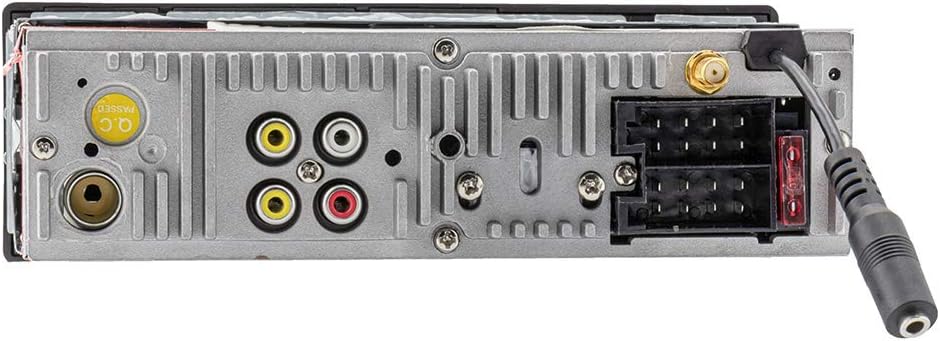
Figure 4.1: Rear Connections. This image displays the rear panel of the car radio, highlighting the antenna input, RCA outputs, and wiring harness connectors for power and speakers.

Figure 4.2: Front Panel Connections. زاوية view of the front panel, illustrating the accessible USB ports (one for charging, one for audio), SD card slot, and auxiliary input jack.
4.2. External Microphone Installation
Connect the included external microphone to the designated input on the unit. Position the microphone in a location that ensures clear voice pickup for hands-free calling, typically near the driver's sun visor or steering column.

Figure 4.3: External Microphone and Media Connections. This image shows the car radio with the external microphone connected, alongside a USB stick and SD card, demonstrating the various media input options.
5. تعليمات التشغيل
5.1. تشغيل/إيقاف التشغيل
اضغط على الطاقة / كتم الصوت button to turn the unit on or off. A short press will mute/unmute the audio.
5.2. تشغيل الراديو (DAB+/FM)
Switch between DAB+ and FM modes using the فرقة button. In DAB+ mode, the unit provides high-quality digital radio reception. The RDS EON function displays useful information such as program titles and station names, and can provide traffic announcements.

Figure 5.1: DAB+ Radio Display. The unit's display showing active DAB+ radio reception, including station frequency and program information.
5.3. اتصال البلوتوث
Pair your mobile device with the RMD402DAB-BT via Bluetooth for wireless audio streaming and hands-free calling. The unit supports A2DP and AVRCP profiles for clear audio transmission. During music playback, ID3-Tag information (artist, track title) will be displayed on the screen.
- الاقتران: Activate Bluetooth on your mobile device and search for "Caliber RMD402DAB-BT". Select to pair.
- مكالمات بدون استخدام اليدين: Use the external microphone for clear communication during calls. Answer and end calls using the unit's controls.
5.4. تشغيل الوسائط (USB، SD، AUX)
- USB: Insert a USB drive into the designated USB port for music playback. One USB port also functions as a charging port for smartphones.
- بطاقة SD: Insert an SD card (up to 32GB) into the SD card slot for audio playback.
- مدخلات AUX: Connect external audio devices using a 3.5mm auxiliary cable to the AUX input jack.
5.5. إعدادات الصوت والعرض
- Bassboost: Activate the Bassboost function for enhanced low-frequency audio output.
- أنماط الألوان: Customize the button and display illumination with 7 different color themes to match your vehicle's interior or personal preference.
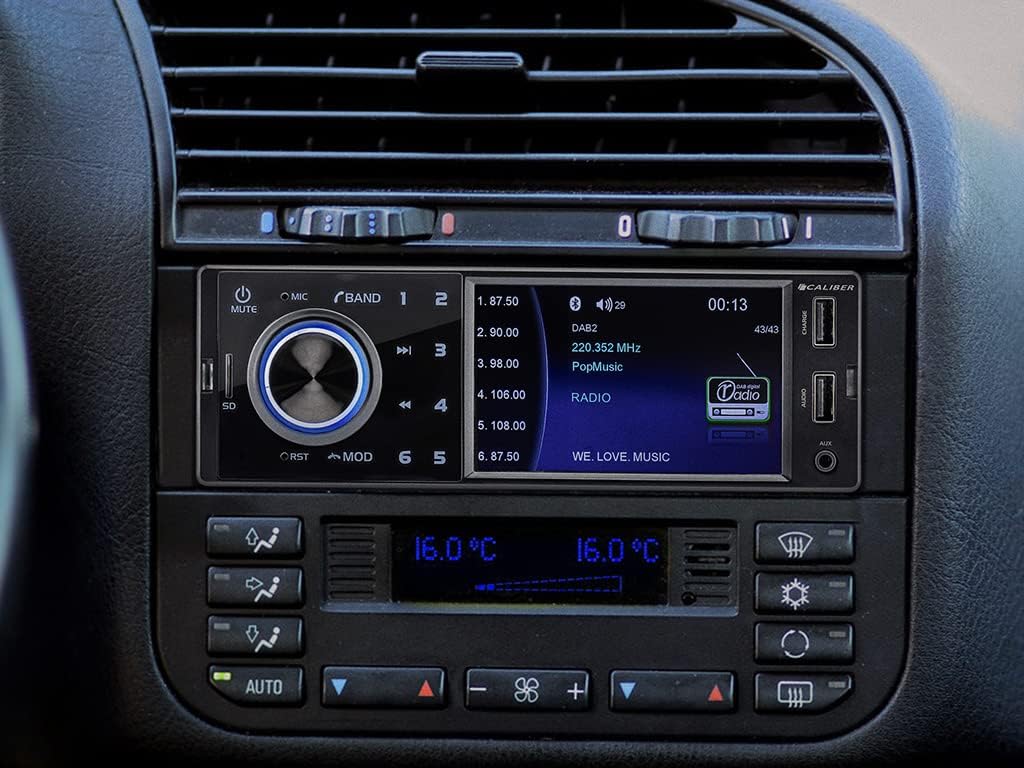
Figure 5.2: Unit Installed in Dashboard. This image shows the Caliber RMD402DAB-BT car radio seamlessly integrated into a vehicle's dashboard, displaying radio information.

Figure 5.3: Reverse Camera Display. The car radio's screen displaying a live feed from a connected reverse camera, indicating its compatibility with parking assistance systems.
6. الصيانة
- تنظيف: استخدم قطعة قماش ناعمة وجافة لتنظيف شاشة الجهاز وأزراره. تجنب استخدام المنظفات الكاشطة أو المذيبات.
- تراب: Regularly remove dust from the unit's vents to ensure proper cooling.
- الاتصالات: قم بإجراء فحص دوري لجميع توصيلات الأسلاك للتأكد من إحكامها والتآكل.
7. استكشاف الأخطاء وإصلاحها
If you encounter issues with your Caliber RMD402DAB-BT, refer to the following common troubleshooting steps:
- لا يوجد طاقة: Check all power connections, including the fuse. Ensure the vehicle's ignition is on if wired to an accessory circuit.
- لا يوجد صوت: Verify speaker connections are correct and secure. Check volume levels and ensure the unit is not muted.
- ضعف استقبال الراديو (DAB+/FM): Ensure the antenna is properly connected and undamaged. For DAB+, ensure you are in an area with sufficient digital radio coverage.
- مشكلات الاقتران بالبلوتوث: Ensure Bluetooth is enabled on both the car radio and your mobile device. Delete previous pairings and attempt to re-pair.
- USB/SD Playback Errors: Check that the media format is supported. Ensure the USB drive or SD card is not corrupted and has sufficient power (for USB).
- Unit Freezes or Reboots: Disconnect power for a few minutes, then reconnect. If the issue persists, consult a professional installer.
8. المواصفات
| ماركة | عيار |
| رقم الموديل | RMD402DAB-BT |
| لون | أسود |
| المميزات الخاصة | داب + موالف |
| تكوين الصوت المحيطي | 2.2 |
| انتاج الطاقة | 300 واط |
| تكنولوجيا الاتصال | بلوتوث |
| وضع إخراج الصوت | RCA, Internal |
| أبعاد المنتج (الطول × العرض × الارتفاع) | 23 × 16 × 10 سم |
| وزن | 555 جرام |
| الأجهزة المتوافقة | الهاتف الذكي |
| نوع الموصل | 3.5 ملم جاك |
| نوع وحدة التحكم | اضغط الزر |
9. الضمان والدعم
The Caliber RMD402DAB-BT comes with a ضمان الشركة المصنعة لمدة عامين. For warranty claims or technical support, please refer to the contact information provided with your purchase or visit the official Caliber website. Caliber products are designed to meet required certifications and EU electrical product standards.


