1. المقدمة
The LAUNCH CRP239 is an intelligent and networkable automotive diagnostic tool designed for passenger cars. It offers comprehensive OBD II full functionality and rapid testing capabilities for four major vehicle systems: Engine, Automatic Transmission (A/T), Anti-lock Braking System (ABS), and Supplemental Restraint System (SRS). Additionally, the CRP239 includes advanced reset functions such as Oil Reset, Steering Angle Reset, Brake-Pad Reset, Battery Matching, Throttle Adaptation, and Diesel Particulate Filter (DPF) Regeneration, catering to the needs of professional technicians and DIY enthusiasts.
2. معلومات السلامة
Always observe the following safety precautions when operating the LAUNCH CRP239:
- تأكد من إيقاف تشغيل محرك السيارة قبل توصيل أو فصل أداة التشخيص.
- لا تقم بتشغيل الأداة في ظروف رطبة أو بالقرب من السوائل أو الغازات القابلة للاشتعال.
- ارتدِ معدات الوقاية الشخصية المناسبة، مثل نظارات السلامة، عند العمل على المركبات.
- يرجى الرجوع إلى دليل خدمة السيارة للتعرف على إجراءات التشخيص المحددة وتحذيرات السلامة.
- Keep the tool away from strong magnetic fields.
- استخدم فقط الكابلات والملحقات المرفقة.
3. محتويات العبوة
تأكد من وجود جميع العناصر في العبوة:
- LAUNCH CRP239 Main Unit
- كابل التشخيص OBD II
- كابل يو اس بي
- دليل المستخدم
- حقيبة الحمل

Figure 3.1: Contents of the LAUNCH CRP239 package, showing the diagnostic tool, cables, and storage case.
4. انتهى المنتجview
The LAUNCH CRP239 features a robust design with a 5.0-inch 720p touch screen for intuitive navigation. It includes physical buttons for common operations and a durable rubber exterior for protection.

الشكل 4.1: الجبهة view of the LAUNCH CRP239, highlighting the touch screen display and navigation buttons.
4.1. المكونات
- شاشة لمس مقاس 5.0 بوصات: High-resolution display for clear data presentation and touch input.
- أزرار التنقل: Directional pad, OK button, and Return button for menu navigation.
- OBD II Connector: Standard 16-pin connector for vehicle communication.
- منفذ USB: للاتصال بجهاز كمبيوتر لتحديث البرامج أو نقل البيانات.
- مؤشر الطاقة: ضوء LED يشير إلى حالة الطاقة.
5. الإعداد
Follow these steps for initial setup of your LAUNCH CRP239:
- اشحن الجهاز: Connect the CRP239 to a power source using the provided USB cable to ensure the internal 4000mAh lithium-polymer battery is fully charged before first use.
- تشغيل الطاقة: اضغط مع الاستمرار على زر الطاقة لتشغيل الجهاز.
- اختيار اللغة: On the initial setup screen, select your preferred language. The device supports multilingual operation.
- اتصال واي فاي: Navigate to the 'Settings' menu and select 'Wi-Fi'. Connect to an available wireless network to enable online updates and diagnostic report sharing.
- تحديث البرنامج: It is recommended to perform a software update immediately after connecting to Wi-Fi to ensure you have the latest features and vehicle coverage. Navigate to the 'Update' section and follow the on-screen prompts.

Figure 5.1: The LAUNCH CRP239 with its diagnostic cable connected, ready for vehicle communication.
6. تعليمات التشغيل
The LAUNCH CRP239 provides a comprehensive suite of diagnostic functions. Below are instructions for common operations.
6.1. الاتصال بالمركبة
- Locate the vehicle's 16-pin OBD II diagnostic port (usually under the dashboard).
- تأكد من إيقاف تشغيل محرك السيارة.
- Connect the OBD II diagnostic cable to the vehicle's OBD II port and to the CRP239.
- Turn the vehicle's ignition to the ON position (engine off). The CRP239 will power on automatically.
6.2. التنقل في القائمة الرئيسية
From the main menu, you can access various functions:
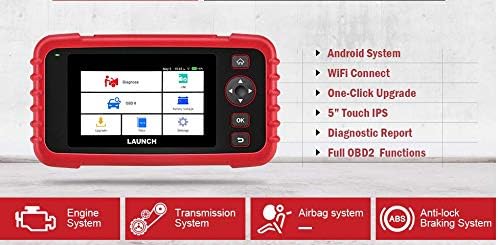
Figure 6.1: The main menu interface of the LAUNCH CRP239, providing access to all primary functions.
- التشخيص: For full system diagnostics (Engine, A/T, ABS, SRS).
- أنا أكون: Readiness status for emissions.
- OBD II: Standard OBD II functions (read/clear DTCs, live data, freeze frame, O2 sensor test, etc.).
- إعادة تعيين: Access various maintenance reset functions.
- حجم البطاريةtage: Displays real-time vehicle battery voltage.
- تحديث: For software and firmware updates via Wi-Fi.
- بيانات: Review saved diagnostic data and reports.
- إعدادات: Configure device settings such as language, Wi-Fi, and display.
6.3. إجراء فحص تشخيصي
- من القائمة الرئيسية، حدد "Diagnose".
- ستحاول الأداة تحديد هوية المركبة تلقائيًا عبر مسح رقم تعريف المركبة (VIN). في حال عدم نجاح ذلك، قد تحتاج إلى تحديد ماركة المركبة وطرازها وسنة صنعها يدويًا.
- Choose the system you wish to diagnose (e.g., Engine, Transmission, ABS, SRS).
- يختار "Read Fault Codes" ل view Diagnostic Trouble Codes (DTCs).
- يختار "Clear Fault Codes" to erase DTCs after repairs have been made. Caution: Clearing codes without addressing the underlying issue will result in the codes reappearing.
- يختار "Read Data Stream" ل view live sensor data.
6.4. Using Reset Functions
The CRP239 supports several common maintenance reset functions:
- إعادة ضبط الزيت: يعيد ضبط مؤشر عمر الزيت بعد تغيير الزيت.
- إعادة ضبط زاوية التوجيه: Resets the steering angle sensor after alignment or component replacement.
- Brake-Pad Reset (EPB): يعيد ضبط نظام فرامل الانتظار الإلكترونية بعد استبدال وسادات الفرامل.
- Battery Matching (BMS): Registers a new battery with the vehicle's Battery Management System.
- تعديل الخانق: يعيد ضبط وضع جسم الخانق بعد التنظيف أو الاستبدال.
- تجديد مرشح جسيمات الديزل (DPF): Initiates the Diesel Particulate Filter regeneration process.
To use a reset function, select "إعادة ضبط" from the main menu, then choose the desired function and follow the on-screen instructions.
6.5. تحديثات البرامج
The CRP239 supports one-click Wi-Fi updates for software and vehicle coverage, ensuring you always have the latest diagnostic capabilities.
- تأكد من أن الجهاز متصل بشبكة Wi-Fi مستقرة.
- من القائمة الرئيسية، حدد "Update".
- The device will check for available updates. Select the updates you wish to install and confirm.
- Allow the update process to complete without interruption. The device may restart during this process.

Figure 6.2: The update screen on the LAUNCH CRP239, showing available software updates for various vehicle brands.
6.6. إعداد تقرير التشخيص
The CRP239 can automatically generate diagnostic reports, which can be shared via email.
- After completing a diagnostic session, the tool will prompt you to generate a report.
- Confirm to generate the report.
- انتقل إلى "Data" القائمة إلى view saved reports.
- Select a report and choose the option to share via email. Ensure your Wi-Fi is connected and email settings are configured in the 'Settings' menu.
7. الصيانة
Proper maintenance ensures the longevity and optimal performance of your LAUNCH CRP239:
- تنظيف: استخدم قطعة قماش ناعمة وجافة لتنظيف الجهاز. لا تستخدم منظفات أو مذيبات كاشطة.
- تخزين: Store the device in its carrying case in a cool, dry place when not in use. Avoid extreme temperatures.
- العناية بالبطارية: Charge the battery regularly, even if the device is not in frequent use, to maintain battery health. Avoid fully discharging the battery for extended periods.
- فحص الكابلات: Periodically inspect the diagnostic and USB cables for any signs of damage. Replace damaged cables immediately.
8. استكشاف الأخطاء وإصلاحها
This section addresses common issues you might encounter with the LAUNCH CRP239.
| مشكلة | السبب المحتمل | حل |
|---|---|---|
| الجهاز لا يعمل. | Low battery; faulty connection to vehicle. | Charge the device fully. Ensure the OBD II cable is securely connected to both the CRP239 and the vehicle. Check vehicle's ignition is ON. |
| Cannot communicate with vehicle. | Incorrect vehicle protocol; faulty OBD II port; damaged cable. | Verify vehicle compatibility. Check the vehicle's OBD II port for power. Try a different vehicle or cable if available. Ensure vehicle ignition is ON. |
| فشل تحديث البرنامج. | اتصال واي فاي غير مستقر؛ مساحة تخزين غير كافية. | Ensure a strong and stable Wi-Fi connection. Check available storage space on the device. Restart the update process. |
| الشاشة لا تستجيب. | خلل في البرنامج؛ ضرر مادي. | Perform a soft reset by holding the power button until the device restarts. If the issue persists, contact customer support. |
9. المواصفات
| ميزة | التفاصيل |
|---|---|
| نموذج | CRP239 (CREADER PROFESSIONAL 239) |
| عرض | 5.0-inch 720p Touch Screen |
| بطارية | بطارية ليثيوم بوليمر قابلة لإعادة الشحن بسعة 4000 مللي أمبير في الساعة (متضمنة) |
| الاتصال | OBD II, Wi-Fi, USB |
| تغطية المركبات | Domestic, Asian, European vehicles (1996 and newer OBD2) |
| الأنظمة المدعومة | Engine, Automatic Transmission (A/T), ABS, SRS |
| وظائف خاصة | Oil Reset, Steering Angle Reset, Brake-Pad Reset (EPB), Battery Matching (BMS), Throttle Adaptation, DPF Regeneration |
| أبعاد | 32.4 × 25.4 × 8 سم (الحزمة) |
| وزن العنصر | 560 جرام |
| المواد الخارجية | ممحاة |
10. معلومات الضمان
The LAUNCH CRP239 comes with a standard manufacturer's warranty. For specific warranty terms and conditions, please refer to the warranty card included in your product package or visit the official Launch webالموقع. احتفظ بإيصال الشراء الخاص بك كإثبات للشراء في حالة مطالبات الضمان.
قد تتوفر خيارات الضمان الممتد من مزودي خدمات خارجيين. على سبيل المثالampيتم تقديم ضمان ممتد لمدة عام واحد وسنتين من شركة سلامة كير لهذا المنتج.
11. الدعم
For technical assistance, product inquiries, or support, please contact Launch customer service through their official website or the contact information provided in your product documentation. Ensure you have your product model number (CRP239) and serial number ready when contacting support.
للحصول على موارد إضافية، قم بزيارة Launch Official Webموقع.


