1. المقدمة
Thank you for choosing the Genesis 20-Inch Box Fan. This fan is designed to provide powerful and efficient cooling for various indoor spaces, including bedrooms and offices. Its durable construction and user-friendly features ensure reliable performance.
This manual provides important information regarding the safe operation, setup, maintenance, and troubleshooting of your new Genesis Box Fan. Please read it thoroughly before use and retain it for future reference.

الصورة 1.1: الجبهة view of the Genesis 20-inch Box Fan. The fan features a black square frame with a protective grille and a central Genesis logo on the fan blades.
2. معلومات هامة حول السلامة
لتقليل خطر الحريق أو الصدمة الكهربائية أو الإصابة، يرجى مراعاة احتياطات السلامة التالية:
- افصل المروحة دائمًا قبل التنظيف أو إجراء أي صيانة.
- لا تشغّل المروحة بسلك أو قابس تالف. في حال تلف السلك أو القابس، يُرجى الاتصال بفني صيانة مؤهل.
- أبقِ المروحة بعيدة عن الماء أو السوائل الأخرى. لا تغمر المروحة في الماء.
- تأكد من وضع المروحة على سطح مستوٍ وثابت لمنع انقلابها.
- لا تدخل أصابعك أو أي أجسام أخرى من خلال الشبكة أثناء تشغيل المروحة.
- This fan is equipped with overload safety protection and a fuse in the plug for added safety. If the fuse blows, replace it only with a fuse of the correct type and rating.
- This product is ETL listed and UL approved, ensuring it meets recognized safety standards.
- للاستخدام الداخلي فقط. لا تستخدم في الهواء الطلق.

Image 2.1: ETL Listed and Approved Logo, indicating the product meets safety standards.
3. الإعداد والوضع
The Genesis 20-Inch Box Fan requires no assembly and is ready for use right out of the box.
- فك التعبئة: Carefully remove the fan from its packaging. Retain packaging for storage or future transport.
- الموقع: Place the fan on a firm, level surface such as a floor, dresser, or table. Ensure there is adequate space around the fan for optimal airflow and to prevent obstruction of the air intake/output.
- توصيل الطاقة: قم بتوصيل سلك الطاقة الخاص بالمروحة بمأخذ كهربائي قياسي بقوة 120 فولت تيار متردد.

Image 3.1: The Genesis Box Fan positioned on the floor in an office environment, demonstrating suitable placement.

Image 3.2: The Genesis Box Fan placed on the floor near a doorway in a home, illustrating its versatility for various room types.
4. تعليمات التشغيل
Your Genesis Box Fan features a simple rotary control knob for power and speed selection.
- تشغيل/إيقاف التشغيل: Rotate the control knob clockwise from the "OFF" position to turn the fan on. Rotate it counter-clockwise back to "OFF" to turn the fan off.
- اختيار السرعة: The fan offers three energy-efficient speed settings:
- الإعداد 1 (منخفض): For gentle airflow and quiet operation.
- الإعداد 2 (متوسط): For moderate cooling.
- الإعداد 3 (عالي): For maximum airflow and rapid cooling.

الصورة 4.1: عن قرب view of the fan's control knob, located on the top right corner, used to select power and fan speed settings.
5. الرعاية والصيانة
سيساعد التنظيف المنتظم في الحفاظ على أداء المروحة وإطالة عمرها.
- تنظيف: افصل المروحة دائمًا قبل التنظيف. استخدم قطعة قماش ناعمة.amp cloth to wipe the exterior surfaces of the fan. Do not use abrasive cleaners or chemicals.
- تنظيف الشبكة: To clean dust from inside the grilles and blades, use a vacuum cleaner with a brush attachment or compressed air. Do not attempt to disassemble the fan for cleaning.
- تخزين: إذا كنت ستخزن المروحة لفترة طويلة، فقم بتغطيتها لحمايتها من الغبار وخزنها في مكان بارد وجاف.

الصورة 5.1: خلفي view of the Genesis Box Fan, showing the back grille which should be kept clean for optimal airflow.
6. استكشاف الأخطاء وإصلاحها
If you encounter issues with your Genesis Box Fan, please refer to the following common problems and solutions:
| مشكلة | السبب المحتمل | حل |
|---|---|---|
| المروحة لا تعمل. | Not plugged in; power outlet not working; fuse blown in plug; control knob not set to a speed. | Ensure fan is securely plugged into a working outlet. Check household circuit breaker. Inspect the fuse in the plug and replace if necessary (refer to safety section). Rotate the control knob to speed setting 1, 2, or 3. |
| تدفق الهواء ضعيف. | Fan set to low speed; grilles are obstructed by dust. | Increase the fan speed setting. Clean the front and back grilles as described in the maintenance section. |
| ضوضاء أو خشخشة غير عادية. | Fan not on a level surface; foreign object caught in grille. | Ensure the fan is on a stable, flat surface. Unplug the fan and carefully check for any obstructions in the grilles. |
إذا استمرت المشكلة بعد محاولة هذه الحلول، فيرجى الاتصال بدعم العملاء.
7. مواصفات المنتج
| ميزة | مواصفة |
|---|---|
| ماركة | التكوين |
| رقم الموديل | G20BOX-BLK |
| لون | أسود |
| تصميم المروحة الكهربائية | Floor Fan / Box Fan |
| مصدر الطاقة | تيار متردد/تيار مستمر |
| أبعاد المنتج (العمق × العرض × الارتفاع) | 4.5 بوصة عمق × 20 بوصة عرض × 20 بوصة ارتفاع |
| الاستخدامات الموصى بها | Cooling (Indoor) |
| مستوى الضوضاء | 73 ديسيبل |
| واتtage | 53 واط |
| عدد الشفرات | 1 |
| Blade Length / Size | 20 بوصة |
| المجلدtage | 120 فولت |
| المكونات المضمنة | وحدة المروحة |
| ميزة خاصة | Manual Control, Durable Copper Motor, Overload Safety Protection with Fuse in Plug |
| كفاءة | كفاءة الطاقة |
| الشهادات | ETL Listed, UL Approved |
| وزن العنصر | 8.13 رطل |
| مطلوب التجميع | لا |
| تعليمات العناية | امسح نظيفا |
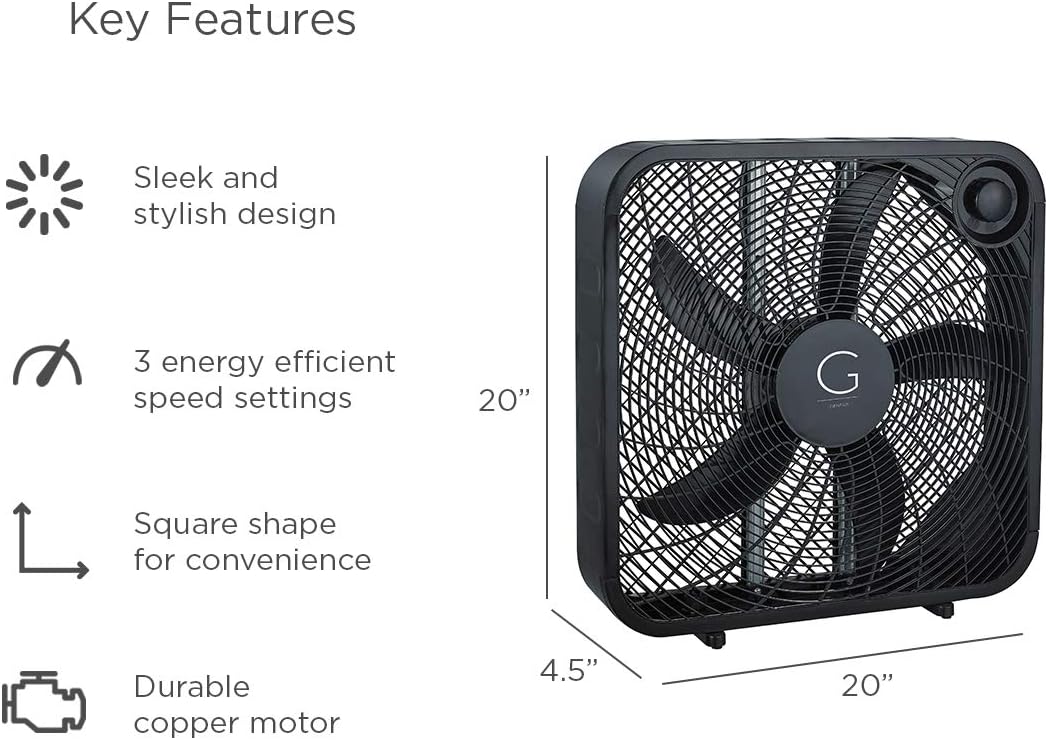
Image 7.1: Visual representation of key features and dimensions (20"W x 20"H x 4.5"D) of the Genesis Box Fan.
8. معلومات الضمان
Specific warranty details for your Genesis 20" Box Fan may vary. Please refer to the warranty card included with your product or visit the official Genesis website for the most up-to-date warranty policy and registration information.
Typically, Genesis products are covered by a limited warranty against defects in materials and workmanship under normal use. Keep your purchase receipt as proof of purchase for warranty claims.
9. دعم العملاء
If you have any questions, require technical assistance, or need to report an issue with your Genesis 20" Box Fan, please contact Genesis customer support.
For the most current contact information, please visit the official Genesis webالموقع أو راجع تفاصيل الاتصال المقدمة في عبوة المنتج الخاص بك.
يمكنك أيضًا زيارة Genesis Store on Amazon لمزيد من المعلومات حول المنتج وموارد الدعم.


