مقدمة
The Redragon Wheeljack GC-606WH is an ATX mid-tower PC case designed to house your computer components with a focus on airflow and aesthetic appeal. This manual provides essential information for the proper setup, operation, and maintenance of your PC case.
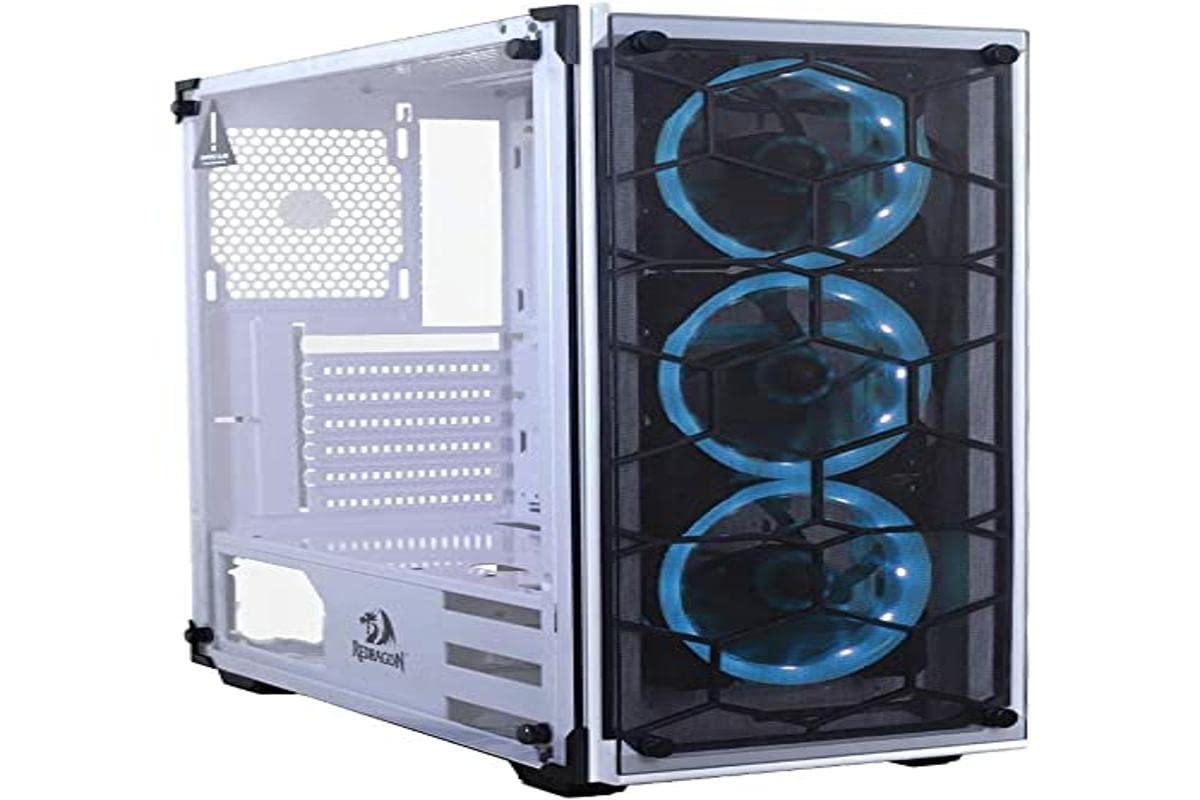
Image: Redragon Wheeljack GC-606WH ATX Mid Tower PC Case. This image shows the white case with its tempered glass side panel and a front panel designed for airflow.
Key features of the Redragon Wheeljack GC-606WH include:
- Spaced Front Panel Design: Engineered for improved airflow to internal components.
- نافذة جانبية من الزجاج المقوى: يوفر صورة واضحة view of your internal PC build.
- Integrated Dust Filters: Located on the front, top, and bottom to prevent dust accumulation.
- غطاء PSU: Facilitates clean cable management and a tidy interior.
الإعداد وتركيب المكونات
Follow these steps for proper installation of your computer components into the Redragon Wheeljack GC-606WH case.
1. التفريغ والتحضير
- قم بإزالة علبة الكمبيوتر الشخصي من عبوتها بعناية.
- ضع العلبة على سطح ثابت ومستوٍ.
- قم بإزالة اللوحة الجانبية المصنوعة من الزجاج المقوى عن طريق فك البراغي اليدوية (إن وجدت) أو فكها.asinقم بفك آلية المزلاج. ضع اللوحة جانبًا على سطح ناعم وغير كاشط لمنع الخدوش.
2. تركيب اللوحة الأم
The GC-606WH supports Mini-ITX, Micro-ATX, and ATX motherboards.
- Install the I/O shield that came with your motherboard into the designated opening at the rear of the case.
- Align your motherboard with the standoffs inside the case. Ensure all screw holes on the motherboard match the standoffs.
- ثبّت اللوحة الأم باستخدام البراغي المرفقة. لا تُشدّها أكثر من اللازم.
3. تثبيت محرك التخزين
The case supports 2x 2.5" drives and 2x 3.5" drives.
- 2.5" Drives (SSDs): Locate the 2.5" drive mounts, typically on the back of the motherboard tray or dedicated brackets. Secure your SSDs with screws.
- محركات الأقراص الصلبة (HDDs) مقاس 3.5 بوصة: Locate the 3.5" drive cage, usually near the PSU shroud. Slide your HDDs into the trays/slots and secure them, often with tool-less clips or screws.
4. تركيب وحدة إمداد الطاقة (PSU)
The PSU mounts at the bottom of the case, under the PSU cover.
- Slide your power supply into the designated compartment from the rear of the case.
- Align the PSU with the screw holes at the back of the case.
- قم بتثبيت وحدة تزويد الطاقة باستخدام البراغي.
5. PCI Expansion Card Installation
The case features 7 horizontal PCI expansion slots.
- Remove the necessary slot covers from the rear of the case.
- Insert your graphics card or other expansion cards into the appropriate PCI-E slots on your motherboard.
- قم بتأمين البطاقات باستخدام البراغي.
6. تركيب نظام التبريد
The case supports various fan and radiator configurations:
- دعم المشجعين:
- Top: 2x 120mm fans
- Front: 3x 120mm fans
- الخلفية: مروحة واحدة مقاس 120 مم
Note: This product does not include pre-installed fans. Fans must be purchased separately.
- Watercooler (Radiator) Support:
- Front: Up to 240mm radiator
- Rear: 120mm radiator
- Top: Not supported for radiators.
- Maximum CPU Air Cooler Height: 160 ملم
Install fans and radiators according to your cooling needs, ensuring proper airflow direction (intake/exhaust).
7. توصيلات اللوحة الأمامية
Connect the front panel cables to your motherboard. Refer to your motherboard manual for specific pin layouts.
- 1 منافذ يو اس بي 3.0
- 2 منافذ يو اس بي 2.0
- 1 × مقبس صوت 3.5 ملم
- مقبس ميكروفون مقاس 1x 3.5 مللي متر
- Power Button, Reset Button, Power LED, HDD LED (standard motherboard headers)
8. إدارة الكابلات
Utilize the space behind the motherboard tray and the PSU cover to route and secure cables. This improves airflow and the aesthetic of your build.
عملية
Once all components are installed and connected, replace the tempered glass side panel and secure it. Your Redragon Wheeljack GC-606WH case is now ready for operation.
- زر الطاقة: Press to turn on or off your computer.
- زر إعادة الضبط: Press to restart your computer.
- منافذ USB: Use the front panel USB 3.0 and USB 2.0 ports for connecting peripherals and external storage devices.
- مقابس الصوت: Connect headphones, speakers, or a microphone to the front panel 3.5mm audio and microphone jacks.
صيانة
تساعد الصيانة الدورية على ضمان الأداء الأمثل وطول عمر مكونات جهاز الكمبيوتر الخاص بك.
- فلاتر الغبار: The case includes dust filters on the front, top, and bottom. Periodically remove and clean these filters to maintain good airflow and prevent dust buildup inside the case. They can typically be cleaned with compressed air or by rinsing with water (ensure they are completely dry before reinstallation).
- ألواح زجاجية مقسّى: Clean the tempered glass side panel and front panel (if applicable) with a soft, lint-free cloth and a glass cleaner designed for electronics. Avoid abrasive materials that could scratch the glass.
- التنظيف الداخلي: استخدم الهواء المضغوط لإزالة الغبار من المكونات الداخلية وشفرات المروحة. تأكد من فصل النظام عن الكهرباء قبل التنظيف.
استكشاف الأخطاء وإصلاحها
إذا واجهت مشاكل، فضع في اعتبارك خطوات استكشاف الأخطاء وإصلاحها الشائعة التالية:
- جهاز الكمبيوتر لا يعمل:
- تأكد من تشغيل مصدر الطاقة وتوصيله بشكل صحيح بمأخذ الحائط.
- تأكد من توصيل جميع كابلات الطاقة (24-pin ATX، 8-pin CPU، طاقة GPU) بشكل آمن باللوحة الأم والمكونات.
- تأكد من أن كابل زر الطاقة الموجود باللوحة الأمامية متصل بشكل صحيح بموصل اللوحة الأمامية للوحة الأم.
- Poor Airflow or Overheating:
- Clean all dust filters and internal fans.
- Ensure fans are installed with the correct airflow direction (intake for front/bottom, exhaust for rear/top).
- تأكد من عدم وجود كابلات تعيق مسارات تدفق الهواء.
- منفذ USB/الصوت في اللوحة الأمامية لا يعمل:
- Check that the USB and audio cables from the front panel are securely connected to the correct headers on your motherboard.
- Ensure motherboard drivers are installed correctly.
تحديد
| ميزة | التفاصيل |
|---|---|
| اسم الموديل | Redragon Wheeljack GC-606WH |
| نوع الحالة | البرج الاوسط |
| مواد | Steel, ABS Plastic, Tempered Glass |
| لون | أبيض |
| دعم اللوحة الأم | Mini-ITX و Micro-ATX و ATX |
| فتحات PCI التوسع | 7 أفقي |
| حجرات القيادة | 2 × 2.5 بوصة، 2 × 3.5 بوصة |
| اللوحة الأمامية I / O | 1x USB 3.0, 2x USB 2.0, 1x 3.5mm Audio, 1x 3.5mm Microphone |
| دعم الجماهير (أعلى الصفحة) | 2 × 120 مم |
| دعم المروحة (الأمامي) | 3 × 120 مم |
| دعم المروحة (الخلفي) | 1 × 120 مم |
| Watercooler Support (Front) | مشعاع يصل إلى 240 ملم |
| Watercooler Support (Rear) | 120 مم المبرد |
| أقصى ارتفاع لمبرد وحدة المعالجة المركزية الهوائي | 160 ملم |
| أبعاد المنتج (الطول × العرض × الارتفاع) | 31.5 × 23.62 × 7.87 بوصة |
| وزن العنصر | 14.99 رطل (حوالي 6.8 كجم) |
الضمان والدعم
For detailed warranty information, please refer to the warranty card included with your purchase or visit the official Redragon website. Redragon provides customer support for product inquiries and technical assistance.
ريدراجون الرسمي Webموقع: www.redragonusa.com
يرجى الاحتفاظ بإثبات الشراء الخاص بك لمطالبات الضمان.


