مقدمة
The ZWO ASI533MC-Pro is a versatile and highly sensitive color astronomy camera designed for advanced deep-sky and solar system imaging through a telescope. It features an 11.3mm x 11.3mm 9 megapixel CMOS sensor with high quantum efficiency and minimal amp glow, ensuring maximum detail capture with low noise. Integrated TEC-cooling reduces sensor temperature for superior performance with faint astronomical objects. This manual provides essential information for setting up, operating, and maintaining your ASI533MC-P camera.
المنتج انتهىview
The ASI533MC-P camera is a compact and robust device designed for astrophotography. Understanding its components is crucial for proper use.
Camera Body and Connections
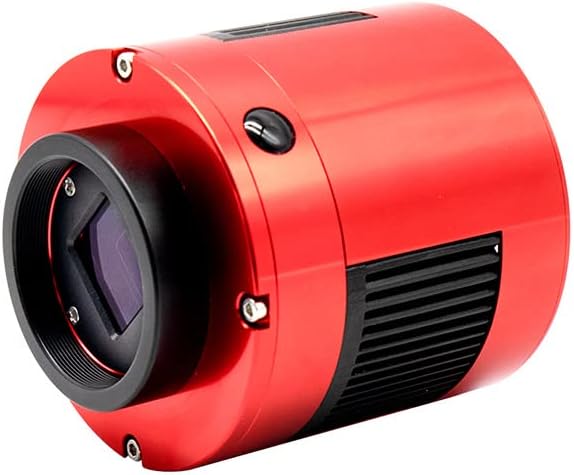
الشكل 1: أمام view of the ZWO ASI533MC-P camera, showing the main optical input and the red anodized aluminum body.

الشكل 2: مؤخرة view of the ZWO ASI533MC-P camera, detailing the USB2.0 OUT ports, USB3.0 IN port, DC 12V=3A power input, and cooling fan.
الملحقات المتضمنة

الشكل 3: Contents of the ZWO ASI533MC-P package, including the camera bag, camera body, 1.25" T-Mount, two USB 2.0 cables (0.5m), one USB 3.0 cable (2m), T2-M48 16.5mm extender, T2 21mm extender, M42-M48 adapter, T2-1.25" adapter, and three spacers.
Key Features and Specifications Overview

الشكل 4: Graphical representation of key camera specifications, including CMOS sensor (IMX533), 1" sensor size (11.31x11.31mm), 3008x3008 resolution, 14-bit ADC, 1.0e read noise, 40°C cooling temperature, 256MB DDR3 buffer, USB 3.0 interface, 20 FPS, 50000e full well capacity, and 3.76µm pixel size.
يثبت
Proper setup is essential for optimal performance of your ZWO ASI533MC-P camera.
الاتصال بالتلسكوب
- Attach the Nosepiece/Adapter: Depending on your telescope's focuser, attach the included 1.25" T-threaded nosepiece or 2" adapter to the camera's front opening. Ensure it is securely threaded.
- Insert into Focuser: Carefully insert the camera (with attached nosepiece/adapter) into your telescope's focuser. Secure it using the focuser's thumbscrews.
- Consider Back Focus: For optimal imaging, especially with field flatteners or reducers, ensure correct back focus distance. Refer to your telescope or accessory manual for specific requirements.
Power and Data Connections
- USB3.0 Connection: Connect the provided USB3.0 cable from the camera's USB3.0 IN port to a USB3.0 port on your computer. This connection provides data transfer and powers the camera electronics.
- TEC Cooler Power: The TEC cooler requires a separate 12V@3A DC power supply (not included). Connect this power supply to the DC 12V=3A input port on the camera. The TEC cooler is crucial for reducing sensor temperature and minimizing noise during long exposures.
- USB2.0 Hub: The camera includes a separate USB2.0 hub (USB2.0 OUT ports) for powering accessories such as an autoguiding camera or electronic focuser (accessories not included). Connect these devices to the USB2.0 OUT ports as needed.
تشغيل الكاميرا
Once connected, the camera is controlled via dedicated astrophotography software.
البرامج وبرامج التشغيل
Before operating the camera, ensure all necessary software and drivers are installed. These are available for download from the official ZWO website. The camera is compatible with Mac OS X and Windows (32-bit and 64-bit) XP and later versions.
- السائقين: Install the latest camera drivers from the ZWO webموقع.
- Imaging Software: Popular software choices include SharpCap, N.I.N.A. (Nighttime Imaging N' Astronomy), Astro Photography Tool (APT), or MaximDL. These programs allow you to control camera settings, capture images, and manage cooling.
- ASCOM Platform (Windows): For Windows users, the ASCOM Platform is highly recommended as it provides a standardized interface for various astronomy equipment, including ZWO cameras.
Basic Imaging Workflow
- الاتصال وتشغيل الطاقة: Ensure the camera is connected to your computer via USB3.0 and the 12V power supply for the TEC cooler is connected and turned on.
- Launch Imaging Software: Open your preferred astrophotography software and select the ZWO ASI533MC-P camera.
- Set Cooling Temperature: In your software, set the desired cooling temperature. A common setting is -10°C to -20°C below ambient, or as low as the camera can maintain stably. Allow a few minutes for the sensor to reach the target temperature.
- Adjust Gain and Exposure: For deep-sky imaging, a common starting point for gain is "Unity Gain" (typically around Gain 100 for this sensor) to balance read noise and dynamic range. Exposure times will vary depending on the target, light pollution, and filters used.
- ركز: Achieve critical focus using a focusing aid in your software or a Bahtinov mask.
- التقاط الصور: Begin capturing a series of light frames. For best results, also capture dark frames, flat frames, and dark flat frames for calibration.
صيانة
إن الصيانة المناسبة تضمن طول عمر الكاميرا وأدائها.
- تنظيف المستشعر: The camera features a sealed sensor chamber, minimizing dust ingress. If dust appears on images, it is likely on the protective window. Use a specialized optical blower or lens cleaning solution and wipes designed for camera sensors. Never touch the sensor directly.
- تنظيف الجسم: Wipe the camera body with a soft, dry cloth. Avoid abrasive cleaners or solvents.
- تخزين: When not in use, store the camera in its protective bag or a dry, dust-free environment.
- Desiccant Tablet: The camera may contain a desiccant tablet to absorb moisture. If condensation occurs on the sensor window, the desiccant may need to be recharged or replaced. Refer to the ZWO webموقع للحصول على التعليمات.
استكشاف الأخطاء وإصلاحها
المشكلات الشائعة وحلولها المحتملة.
| مشكلة | السبب المحتمل / الحل |
|---|---|
| Camera not detected by computer. | Ensure USB3.0 cable is securely connected to both camera and computer. Try a different USB port or cable. Install/reinstall the latest drivers from ZWO's webموقع. |
| Cooling not working. | Verify the 12V@3A power supply is connected and functioning. Check cooling settings in your imaging software. Ensure the power supply meets the required specifications. |
| Images show excessive noise or amp يشع. | Ensure TEC cooling is active and set to a sufficiently low temperature. Capture and apply dark frames during post-processing. Check gain settings; unity gain (around 100) is often recommended. |
| Dust spots on images. | Dust is likely on the camera's protective window. Clean the window using appropriate optical cleaning methods (blower, lens wipes). |
تحديد
Detailed technical specifications for the ZWO ASI533MC-P camera.
- المستشعر: 1" CMOS IMX533
- دقة: 3008 x 3008 (9 Megapixels)
- حجم البكسل: 3.76 ميكرومتر
- الاستشعار الحجم: 11.31mm x 11.31mm (Square)
- ADC: 14 بت
- قراءة الضوضاء: 1.0e (at Unity Gain)
- سعة البئر الكاملة: 50000هـ
- المخزن المؤقت DDR3: 256 ميجا بايت
- الواجهة: يو اس بي 3.0
- Max FPS (Full Resolution): 20 إطارًا في الثانية
- تبريد: TEC (Thermoelectric Cooling), up to 35°C below ambient
- أبعاد: 6 × 6 × 5 بوصات (تقريبًا)
- وزن: 2 رطل (تقريبًا)
- Power Requirement (Cooler): 12V @ 3A DC (external power supply, not included)
- توافق نظام التشغيل: Mac OS X, Windows XP and later (32-bit and 64-bit)
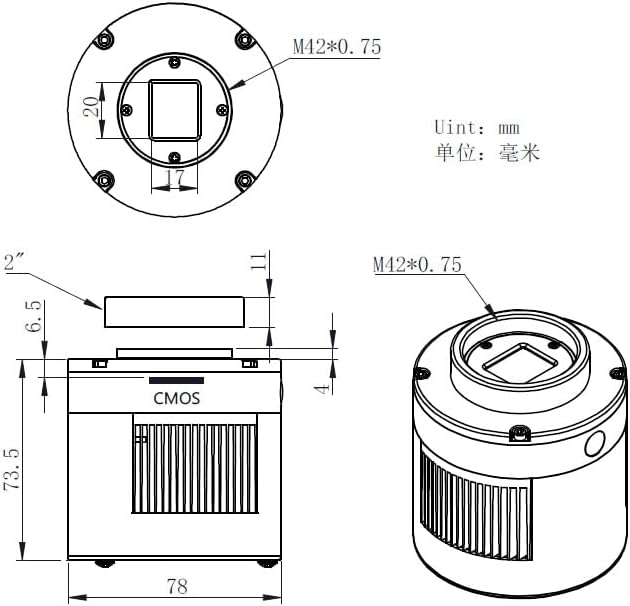
الشكل 5: Technical drawing illustrating the dimensions and sensor placement of the ZWO ASI533MC-P camera. All units are in millimeters.
الضمان والدعم
للحصول على معلومات الضمان والدعم الفني، يرجى الرجوع إلى موقع ZWO الرسمي. website. Software and driver updates are also available there.
- رسمي Webموقع: www.zwoptical.com
- برامج التشغيل والبرامج: Always download the latest versions directly from the manufacturer's webالموقع لضمان التوافق والأداء الأمثل.


