مقدمة
The Hyperkin Armor3 NuWave Controller is designed to provide accurate and fluid motion control for your Nintendo Wii U and Wii consoles. Featuring built-in Nu+ technology, this controller enhances your gaming experience by offering a wider range of motion in compatible titles. This manual provides essential information on setting up, operating, maintaining, and troubleshooting your NuWave Controller.
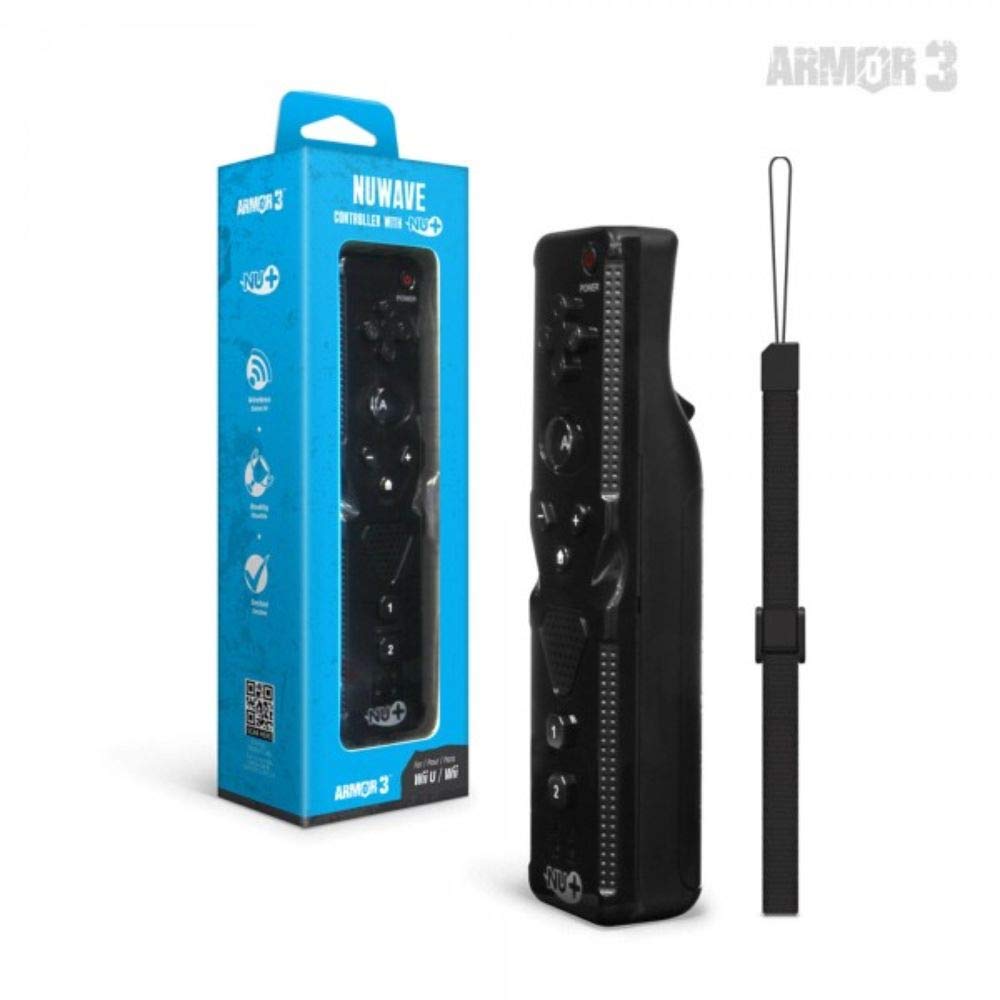
الشكل 1: Hyperkin Armor3 NuWave Controller and its packaging. The controller is black with a wrist strap, and the packaging highlights its Nu+ technology and compatibility with Wii U and Wii.
المنتج انتهىview
The Armor3 NuWave Controller is a motion-sensing controller compatible with both Wii U and Wii systems. It integrates advanced Nu+ technology for enhanced motion detection and precision in supported games.
المميزات الرئيسية:
- التوافق: Fully compatible with Nintendo Wii U and Nintendo Wii consoles.
- Nu+ Technology: Built-in technology for a wider range of motion and improved accuracy in compatible titles.
- تصميم مريح: Designed for comfortable grip and extended gameplay sessions.
- مصدر الطاقة: يتطلب بطاريات 2 AA (غير مدرجة).
يثبت
1. تركيب البطارية
- حدد مكان حجرة البطارية على الجزء الخلفي من وحدة التحكم.
- قم بتحريك غطاء البطارية إلى الأسفل لفتحه.
- أدخل بطاريتين (2) من نوع AA، مع التأكد من صحة القطبية (+/-) كما هو موضح داخل الحجرة.
- أعد تركيب غطاء البطارية عن طريق تحريكه لأعلى حتى يستقر في مكانه.
2. Connecting to Your Console
To connect the NuWave Controller to your Wii U or Wii console, follow these steps:
- تأكد من تشغيل جهازك.
- On your Wii U or Wii console, press the SYNC button (usually located near the SD card slot or battery compartment).
- On the NuWave Controller, open the battery cover and locate the small red SYNC button inside the battery compartment.
- Press and release the SYNC button on the controller.
- The player indicator lights on the bottom of the controller will flash. Once a single light remains lit, the controller is successfully connected.
- If connection fails, repeat steps 2-5. Ensure the controller is within range of the console.
تعليمات التشغيل
الضوابط الأساسية:
- لوحة الاتجاهات (D-Pad): Used for menu navigation and character movement.
- الزر: Primary action button, often used for selection or interaction.
- B Button (Trigger): Located on the underside, typically used for grabbing or firing.
- الأزرار 1 و 2: Auxiliary action buttons, functions vary by game.
- زر الصفحة الرئيسة: Returns to the console's Home Menu.
- Plus (+) & Minus (-) Buttons: Often used for zooming, adjusting settings, or specific in-game actions.
- زر الطاقة: Turns the controller on/off.
Motion Sensing with Nu+ Technology:
The built-in Nu+ technology provides enhanced motion tracking. For games that support it, you will experience more precise and responsive movements. Hold the controller firmly and ensure clear line of sight to the sensor bar for optimal performance.
- معايرة: Some games may require initial calibration. Follow on-screen prompts.
- سوار المعصم: Always use the included wrist strap to prevent accidental drops during active gameplay.
صيانة
تنظيف:
- امسح وحدة التحكم بقطعة قماش ناعمة وجافة.
- بالنسبة للأوساخ العنيدة، قم بإزالة الأوساخ برفق.ampاغسل قطعة القماش بالماء. لا تستخدم مواد كيميائية قاسية أو منظفات كاشطة.
- تأكد من عدم دخول أي سائل إلى فتحات وحدة التحكم.
تخزين:
- قم بتخزين وحدة التحكم في مكان بارد وجاف بعيدًا عن أشعة الشمس المباشرة ودرجات الحرارة القصوى.
- في حالة التخزين لفترة طويلة، قم بإزالة البطاريات لمنع التسرب.
العناية بالبطارية:
- Always use new, high-quality AA batteries.
- لا تخلط بين البطاريات القديمة والجديدة أو أنواع مختلفة من البطاريات.
- تخلص من البطاريات المستعملة بطريقة مسؤولة وفقًا للوائح المحلية.
استكشاف الأخطاء وإصلاحها
| مشكلة | السبب المحتمل | حل |
|---|---|---|
| لا يتم تشغيل وحدة التحكم. | البطاريات الميتة أو المدخلة بشكل غير صحيح. | استبدل البطاريات ببطاريات AA جديدة، مع التأكد من صحة القطبية. |
| Controller does not sync with console. | Incorrect syncing procedure; out of range; console interference. | Ensure console is on. Repeat syncing steps (press SYNC on console, then on controller). Move closer to console. Check for other wireless device interference. |
| الأزرار لا تستجيب أو تتأخر في الاستجابة. | Low battery; connection issue; physical obstruction. | Replace batteries. Re-sync the controller. Ensure buttons are not stuck. |
| Motion control is inaccurate. | Sensor bar obstruction; improper calibration; environmental factors. | Ensure clear line of sight to the sensor bar. Re-calibrate in-game if prompted. Avoid strong light sources directly facing the sensor bar. |
تحديد
- نموذج: M07399-bk
- ماركة: هايبركين
- التوافق: Nintendo Wii U, Nintendo Wii
- مصدر الطاقة: 2 بطاريات AA (غير متضمنة)
- أبعاد: 2.8 × 1.8 × 8 بوصات (تقريبًا)
- وزن: 3.88 ounces (approximate, without batteries)
- تكنولوجيا: Built-in Nu+ motion technology
- لون: أسود
الضمان والدعم
For specific warranty information and terms, please refer to the documentation included with your purchase or visit the official Hyperkin website. Hyperkin provides customer support for their products.
الدعم عبر الإنترنت: Visit the official Hyperkin webموقع للأسئلة الشائعة وأدلة استكشاف الأخطاء وإصلاحها ومعلومات الاتصال. www.hyperkin.com
اتصال: Refer to the Hyperkin website for the most current customer service contact methods (phone, email, etc.).


