1. انتهى المنتجview
The EARISE M37 is a portable 100W PA system designed for various audio applications, including home parties, small events, and karaoke. It features a wooden cabinet for enhanced acoustics, built-in Bluetooth connectivity, and comes with two wireless microphones for immediate use. The system supports multiple audio inputs including AUX and USB, offering versatile playback options.

Image: The EARISE M37 PA system, showcasing its wooden box design and two included wireless microphones.
2. معلومات السلامة
- لا تعرض الجهاز للمطر أو الرطوبة لتجنب نشوب حريق أو التعرض لصدمة كهربائية.
- لا تفتح الخزانة. لا توجد أجزاء قابلة للصيانة من قبل المستخدم بالداخل. يُرجى إحالة جميع أعمال الصيانة إلى فنيين مؤهلين.
- تأكد من التهوية الجيدة حول الوحدة. لا تسد فتحات التهوية.
- تجنب وضع الوحدة بالقرب من مصادر الحرارة مثل المشعات أو أجهزة التدفئة أو المواقد أو الأجهزة الأخرى (بما في ذلك ampالمُضخِّمات) التي تنتج الحرارة.
- احمِ سلك الطاقة من أن يدوس عليه أحد أو يضغط عليه، وخاصةً عند المقابس ومنافذ التوصيل الكهربائية ونقطة خروجها من الجهاز.
- افصل هذا الجهاز أثناء العواصف الرعدية أو عند عدم استخدامه لفترات طويلة من الزمن.
3. محتويات العبوة
يرجى التحقق من الحزمة للعناصر التالية:
- EARISE M37 PA System Unit
- 2 × ميكروفون لاسلكي
- جهاز التحكم عن بعد
- محول الطاقة
- دليل المستخدم (هذا المستند)

Image: A visual representation of key features and included accessories: wireless microphone, Bluetooth 4.2, USB auto-play, and remote controller.
4. ميزات المنتج ومكوناته
Familiarize yourself with the main components and controls of your EARISE M37 PA System.

Image: The control panel of the EARISE M37, showing various inputs and adjustment knobs. Key controls include: Mode, Previous/Next Track, Play/Pause, Record, EQ, Light, Mic 1/2 inputs, AUX In/Out, USB, TF card slot, DC Power In, ON/OFF switch, Charging indicator, ECHO, DELAY, MIC VOL, MASTER VOL, TREBLE, EXTRA BASS, and BASS.
وظائف لوحة التحكم:
- اتجاهات: يقوم بالتبديل بين أوضاع الإدخال (بلوتوث، AUX، USB، بطاقة TF).
- المسار السابق / التالي: Navigates tracks during media playback.
- تشغيل/إيقاف مؤقت: يتحكم في تشغيل الوسائط.
- سِجِلّ: Initiates or stops recording (requires USB/TF storage).
- EQ: يضبط إعدادات معادلة الصوت.
- ضوء: يتحكم في إضاءة LED المدمجة.
- الميكروفون 1 / الميكروفون 2: Inputs for wired microphones (if used).
- AUX IN / AUX OUT: Audio input and output jacks for external devices.
- USB: USB port for media playback or recording.
- TF: TF (MicroSD) card slot for media playback or recording.
- DC Power IN: مدخل الطاقة للشحن والتشغيل.
- تشغيل / إيقاف: مفتاح تشغيل الوحدة.
- مؤشر الشحن: ضوء يشير إلى حالة الشحن.
- صدى: يضبط تأثير الصدى للميكروفونات.
- تأخير: يضبط تأثير التأخير للميكروفونات.
- ميكروفون VOL: Adjusts the volume of the microphones.
- المجلد الرئيسي: Controls the overall master volume of the system.
- ثلاثية: يقوم بضبط خرج الصوت عالي التردد.
- صوت إضافي: يعمل على تعزيز إخراج الصوت منخفض التردد.
- صوت عميق: يقوم بضبط خرج الصوت منخفض التردد.
5. الإعداد
5.1 شحن نظام الصوت
Before first use, fully charge the PA system. Connect the provided power adapter to the "DC Power IN" port on the unit and plug it into a standard wall outlet. The charging indicator light will show the charging status. A full charge provides up to 7 hours of play time.

Image: Illustration highlighting the 3600mAh battery capacity, providing up to 7 hours of continuous play time.
5.2 إعداد الميكروفون اللاسلكي
The two wireless microphones are pre-paired with the PA system. Insert AA batteries (not included) into each microphone. Turn on the microphones using their respective power switches. They should automatically connect to the PA system.
5.3 توصيل مصادر الصوت
اتصال بلوتوث:
- Turn on the EARISE M37 PA system.
- اضغط على وضع button until the display shows "Bluetooth" or a Bluetooth icon.
- على جهازك المحمول (الهاتف الذكي، الجهاز اللوحي، وما إلى ذلك)، قم بتمكين البلوتوث وابحث عن الأجهزة المتاحة.
- Select "EARISE M37" from the list. Once connected, you will hear a confirmation sound.

Image: A hand holding a smartphone displaying a Bluetooth connection screen, indicating the ease of pairing with the EARISE M37 PA system.
تشغيل بطاقة USB/TF:
أدخل ذاكرة فلاش USB أو بطاقة TF (MicroSD) تحتوي على ملفات صوتية MP3 files into the respective port. The system will automatically detect and begin playing music. Use the Previous/Next Track and Play/Pause buttons to control playback.
مدخلات AUX:
Connect an external audio device (e.g., MP3 player, computer) to the AUX IN port using a 3.5mm audio cable (not included). Press the وضع button until AUX input is selected.
6. تعليمات التشغيل
6.1 تشغيل/إيقاف التشغيل
To turn the unit on or off, use the تشغيل/إيقاف switch located on the control panel.
6.2 ضبط مستوى الصوت والمؤثرات
- المجلد الرئيسي: Rotate this knob to adjust the overall volume of the PA system.
- ميكروفون VOL: يضبط مستوى صوت الميكروفونات المتصلة.
- ECHO / DELAY: Use these knobs to add or reduce echo and delay effects to the microphone sound.
- TREBLE / BASS / EXTRA BASS: Adjust these knobs to fine-tune the high and low frequencies of the audio output.
6.3 استخدام الميكروفونات
Once the wireless microphones are powered on and connected, speak into them. Adjust the مايك فول, صدى، و تأخير knobs on the PA system to achieve the desired sound. For optimal performance, hold the microphone a few inches from your mouth.

Image: Two individuals enjoying karaoke with the EARISE M37 PA system and its wireless microphones, demonstrating typical usage.
6.4 وظيفة التسجيل
To record audio (e.g., microphone input or music playback), ensure a USB flash drive or TF card is inserted into the corresponding slot. Press the سِجِلّ button to start recording. Press it again to stop. Recorded fileسيتم حفظ الملفات على جهاز التخزين المُدخل.
7. الصيانة
- نظّف الجهاز بقطعة قماش ناعمة وجافة. لا تستخدم منظفات أو مذيبات كاشطة.
- قم بتخزين نظام الصوت في مكان بارد وجاف بعيدًا عن أشعة الشمس المباشرة ودرجات الحرارة القصوى.
- If the unit will not be used for an extended period, fully charge the battery before storage and recharge it every few months to maintain battery health.
8. استكشاف الأخطاء وإصلاحها
| مشكلة | السبب المحتمل | حل |
|---|---|---|
| لا يوجد طاقة | تم تفريغ البطارية؛ كابل الطاقة غير متصل. | اشحن الجهاز؛ تأكد من توصيل كابل الطاقة بإحكام. |
| لا يوجد صوت من الميكروفونات | Microphones off; Batteries low/dead; MIC VOL too low. | Turn on microphones; Replace batteries; Increase MIC VOL. |
| البلوتوث غير متصل | PA system not in Bluetooth mode; Device too far; Interference. | Press MODE button to select Bluetooth; Move device closer; Restart both devices. |
| بطاقة USB/TF لا تعمل | غير صحيح file التنسيق؛ لم يتم إدخال البطاقة/محرك الأقراص بشكل صحيح؛ تالف files. | يضمن files are MP3; Reinsert card/drive; Try different files/device. |
9. المواصفات
| ميزة | التفاصيل |
|---|---|
| ماركة | آريز |
| نموذج | م37 |
| انتاج واتtage | 100 واط |
| مصدر الطاقة | تعمل بالبطارية |
| تكنولوجيا الاتصال | بلوتوث، يو اس بي، ايه يو اكس |
| نسخة البلوتوث | 4.2 (from image) |
| مدخل الصوت | Wireless Microphone, AUX |
| عدد القنوات | 2 |
| وزن العنصر | 11.62 رطل |
| أبعاد الحزمة | 18.7 × 12 × 11.9 بوصة |
| أبعاد المنتج (تقريبًا) | 32.5 cm (12.8 in) H x 25.5 cm (10 in) W x 23.8 cm (9.4 in) D |
| لون | أسود |
| نوع التركيب | سطح الطاولة |
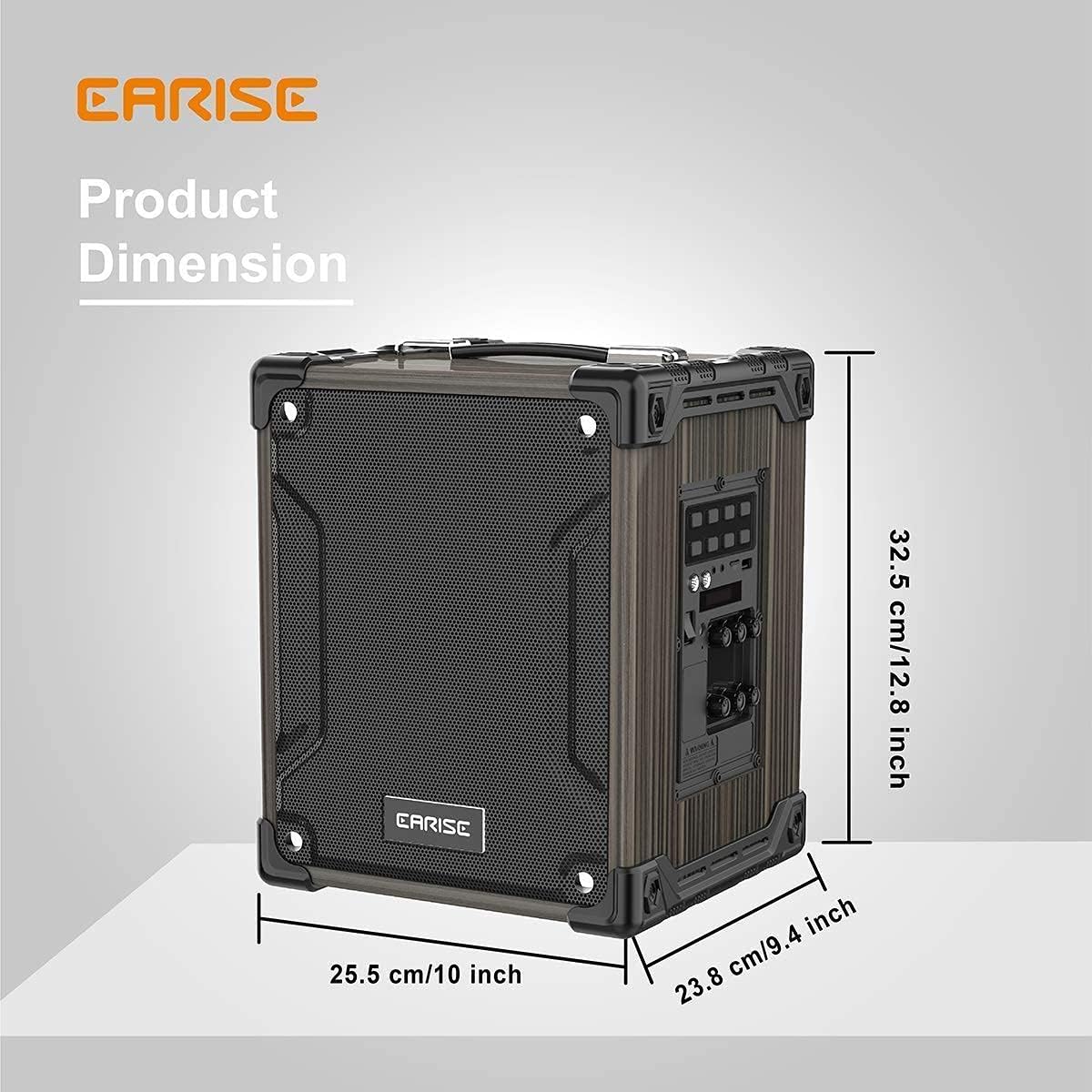
Image: Product dimensions of the EARISE M37, measuring approximately 32.5 cm (12.8 inches) in height, 25.5 cm (10 inches) in width, and 23.8 cm (9.4 inches) in depth.
10. الضمان والدعم
For warranty information or technical support, please refer to the contact details provided with your purchase or visit the official EARISE webالموقع. احتفظ بإثبات الشراء الخاص بك لتقديم مطالبات الضمان.


