مقدمة
This manual provides detailed instructions for the setup, operation, and maintenance of your LIGE BW0223 Smart Watch. Please read this guide thoroughly to ensure proper use and to maximize the features of your device. The LIGE BW0223 Smart Watch is designed to assist with fitness tracking, health monitoring, and smart notifications, compatible with both iOS and Android devices.
1. الإعداد
1.1 شحن الجهاز
Before initial use, fully charge your LIGE BW0223 Smart Watch. Connect the magnetic charging cable to the charging contacts on the back of the watch and plug the USB end into a standard USB power adapter (5V/1A recommended). The watch display will indicate charging status. A full charge typically takes approximately 2 hours.

The back of the LIGE Smart Watch features a magnetic charging interface and advanced optical sensors for continuous monitoring of heart rate, blood pressure, and blood oxygen levels.
1.2 تثبيت التطبيق وإقرانه
- قم بتنزيل التطبيق المصاحب: Scan the QR code provided in the watch packaging or search for the designated companion app (e.g., 'FitPro' or 'LIGE Smart') in your smartphone's app store (App Store for iOS, Google Play Store for Android).
- تمكين البلوتوث: تأكد من تمكين Bluetooth على هاتفك الذكي.
- افتح التطبيق: قم بتشغيل التطبيق المثبت واتبع التعليمات التي تظهر على الشاشة لإنشاء حساب أو تسجيل الدخول.
- إقران الساعة: Within the app, navigate to the device management section (often labeled 'Device', 'My Device', or 'Add Device'). The app will search for available Bluetooth devices. Select 'BW0223' or 'LIGE Smart Watch' from the list to initiate pairing. Confirm the pairing request on both your phone and the watch if prompted.
1.3 الإعدادات الأولية
بعد إتمام عملية الاقتران بنجاح، أكمل ملفك الشخصي الاحترافيfile within the app, including gender, age, height, and weight. This information helps improve the accuracy of fitness and health data. You can also set preferences for units of measurement (metric/imperial) and time format (12/24-hour).
2. تعليمات التشغيل
2.1 العرض والتنقل
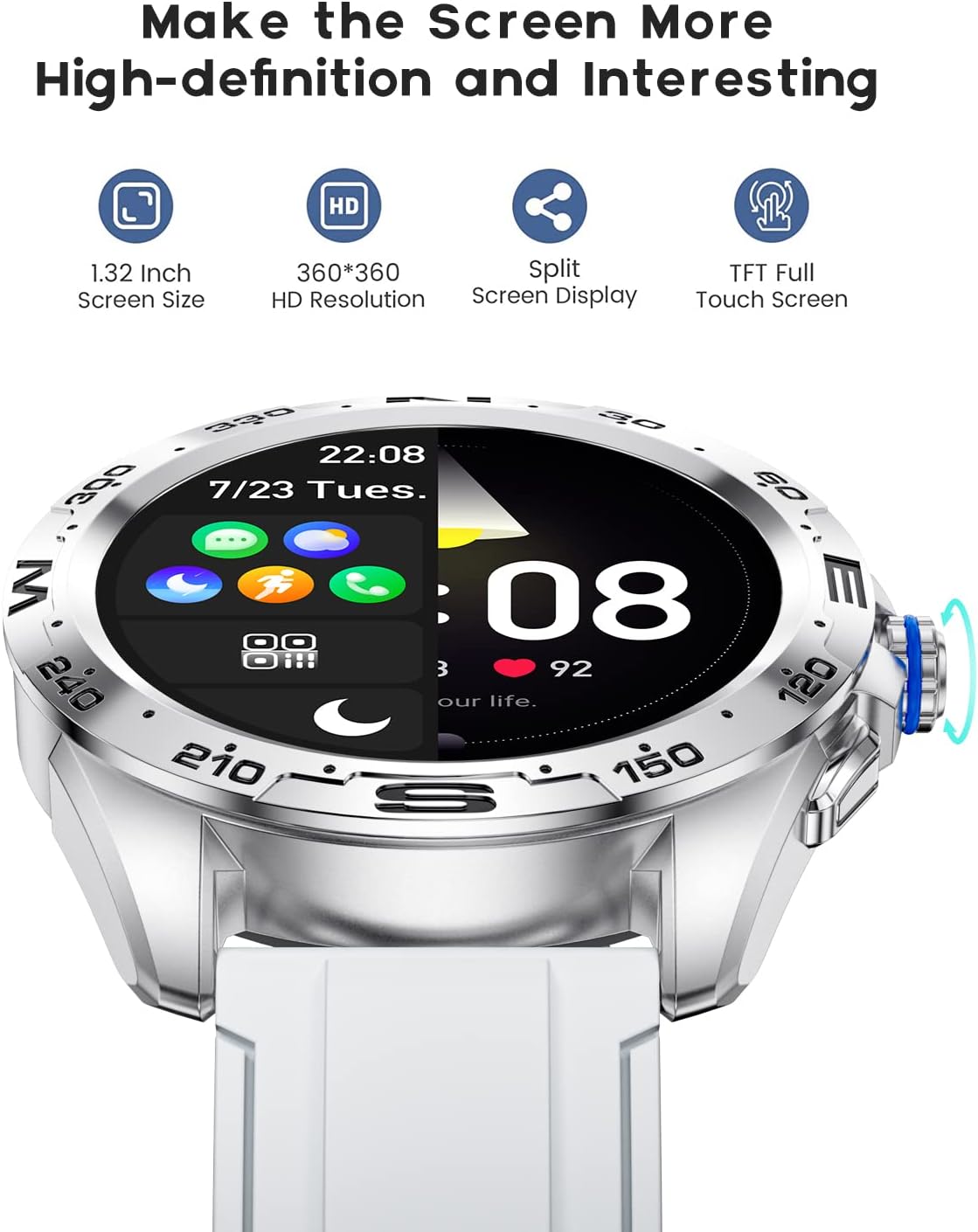
The LIGE BW0223 Smart Watch features a 1.28-inch full touch screen with 360x360 HD resolution. Navigate the watch interface using touch gestures:
- اسحب لأعلى/لأسفل: التنقل عبر القوائم أو الإشعارات.
- اسحب لليسار/اليمين: الوصول إلى الوظائف السريعة أو شاشات البيانات المختلفة.
- مقبض: حدد عنصرًا أو قم بتأكيد إجراء.
- اضغط على الزر الجانبي: Return to the home screen or power on/off the device.

The LIGE Smart Watch features a 1.28-inch full touch screen with 360x360 HD resolution, offering clear visuals and responsive interaction. It supports a split-screen display for quick access to functions.
2.2 وضعًا رياضيًا
The watch supports 7 sports modes, including walking, running, cycling, and climbing. To access:
- Swipe on the watch face to find the 'Sports' or 'Workout' icon.
- Tap to select your desired activity.
- Tap 'Start' to begin tracking. The watch will record duration, steps, calories burned, and distance.
- To end a workout, swipe right or press the side button, then select 'End' or 'Pause'.
2.3 مراقبة الصحة
The LIGE BW0223 Smart Watch provides 24/7 heart rate tracking, blood pressure, and blood oxygen monitoring. These measurements are for reference only and should not be used for medical diagnosis.
- معدل ضربات القلب: Swipe to the heart rate interface to view your current heart rate. The watch continuously monitors your heart rate throughout the day.
- ضغط الدم/نسبة الأكسجين في الدم: Swipe to the respective interfaces and tap to initiate a measurement. Ensure the watch is snug on your wrist for accurate readings.
- مراقبة النوم: ارتدِ الساعة أثناء النوم، وسوف تقوم تلقائيًا بتتبع أنماط نومك، بما في ذلك النوم العميق، والنوم الخفيف، وأوقات الاستيقاظ. View بيانات النوم التفصيلية في التطبيق المصاحب.
2.4 مكالمات البلوتوث
After pairing your watch with the app and enabling the Bluetooth call function (usually a separate Bluetooth connection in your phone's settings, e.g., 'BW0223_CALL'), you can make and receive calls directly from your watch.
- اجراء اتصالات: Access the 'Dialer' or 'Contacts' function on your watch to dial a number or select a contact.
- استقبال المكالمات: عند ورود مكالمة، ستعرض الساعة هوية المتصل. انقر على الرمز الأخضر للرد أو الرمز الأحمر لرفض المكالمة.
- The watch features a built-in microphone and speaker for hands-free communication.

With the LIGE Smart Watch, you can make and receive Bluetooth calls directly from your wrist. It includes a built-in microphone and speaker for convenient communication.
2.5 إشعارات الرسائل
Enable message notifications through the companion app to receive alerts for SMS, calls, and various social media applications (e.g., Facebook, Twitter, WhatsApp, LinkedIn, Instagram) directly on your watch.
- Ensure the app has necessary permissions to access notifications on your smartphone.
- Configure which apps send notifications to your watch within the companion app settings.
- مرر لأسفل على واجهة الساعة لـ view الإشعارات الأخيرة.

The LIGE Smart Watch provides call and message reminders, displaying notifications from SMS, Facebook, Twitter, WhatsApp, LinkedIn, and Instagram directly on your wrist.
أبدا التخصيص
Personalize your watch by changing watch faces. Many options are available directly on the watch or through the companion app.
- تحت المراقبة: Long-press the watch face, then swipe left or right to browse available faces. Tap to select.
- عبر التطبيق: Open the companion app, navigate to 'Dial Market' or 'Watch Faces' to explore and download additional designs.
Personalize your LIGE Smart Watch with a variety of customizable watch faces and a rich user interface. Choose from different styles to match your preference and occasion.
3. الصيانة
3.1 تنظيف الساعة
Regularly clean your watch to ensure optimal performance and hygiene. Use a soft, lint-free cloth to wipe the screen and watch body. For stubborn dirt, slightly dampen the cloth with water. Avoid using harsh chemicals, abrasive materials, or strong detergents.
3.2 مقاومة الماء (IP68)
The LIGE BW0223 Smart Watch is IP68 waterproof, meaning it is resistant to dust and can withstand immersion in water up to 1.5 meters for 30 minutes. It is suitable for daily use, such as hand washing, rain, and splashes.
القيود الهامة:
- Do not wear the watch in hot showers, saunas, or steam rooms, as steam and hot water can compromise the seals.
- Avoid diving or high-pressure water activities.
- Do not operate buttons or the touchscreen underwater.
- إذا تبللت الساعة، جففها جيداً قبل شحنها أو تشغيلها.
3.3 العناية بالبطارية
لإطالة عمر البطارية:
- تجنب درجات الحرارة القصوى.
- اشحن الساعة بانتظام، ولكن تجنب تركها فارغة الشحن تماماً لفترات طويلة.
- Reduce screen brightness and disable unnecessary notifications or features if battery life is a concern.
4. استكشاف الأخطاء وإصلاحها
4.1 الساعة لا تعمل أو لا تشحن
- تأكد من توصيل كابل الشحن بشكل آمن بكل من الساعة ومصدر الطاقة.
- Verify the power adapter and USB port are functional.
- Clean the charging contacts on the watch and cable to remove any dust or debris.
- Allow the watch to charge for at least 30 minutes before attempting to power it on.
4.2 مشاكل اتصال البلوتوث
- تأكد من تمكين البلوتوث على هاتفك الذكي والساعة.
- أبقِ الساعة ضمن نطاق البلوتوث الخاص بهاتفك الذكي (عادةً 10 أمتار).
- أعد تشغيل كل من هاتفك الذكي والساعة.
- Unpair the watch from your phone's Bluetooth settings and re-pair it through the companion app.
- تأكد من أن التطبيق المصاحب يعمل في الخلفية ولديه الأذونات اللازمة.
4.3 الإشعارات لا تعمل
- Verify the watch is successfully paired with the companion app.
- Check notification settings within the companion app to ensure desired apps are enabled.
- Ensure your smartphone's notification access is granted to the companion app (check phone settings: Apps & notifications > Special app access > Notification access).
- Disable 'Do Not Disturb' mode on both your phone and watch.
4.4 قراءات صحية غير دقيقة
- Ensure the watch is worn snugly on your wrist, about one finger's width from the wrist bone.
- حافظ على نظافة المستشعر وخلوه من العرق أو الأوساخ.
- ابق ثابتًا أثناء إجراء القياسات للحصول على أفضل دقة.
- Remember that health data from smartwatches is for reference and not intended for medical use.
5. المواصفات
| رقم الموديل | بي دبليو 0223 |
| ماركة | ليج |
| حجم الشاشة | 1.28 بوصة |
| مدخلات واجهة الإنسان | شاشة تعمل باللمس |
| تكنولوجيا الاتصال | بلوتوث |
| تصنيف مقاومة الماء | IP68 |
| نوع البطارية | بوليمر الليثيوم |
| شكل | دائري |
| وزن العنصر | 7 أونصات |
6. معلومات الضمان
The LIGE BW0223 Smart Watch comes with a standard limited warranty against manufacturing defects. The warranty period typically covers 12 months from the date of purchase. This warranty does not cover damage caused by misuse, accidents, unauthorized modifications, or failure to follow the instructions in this manual. Please retain your proof of purchase for warranty claims.
7. دعم العملاء
If you encounter any issues or have questions not covered in this manual, please contact LIGE customer support. Refer to the contact information provided with your product packaging or visit the official LIGE webموقع للحصول على المساعدة.


