1. المقدمة
This manual provides essential information for the safe and efficient operation of your Nilox NXGCLI20002X9V2 Line Interactive Uninterruptible Power Supply (UPS). Please read this manual thoroughly before installation and use, and retain it for future reference. The UPS is designed to protect your electronic equipment from power outages, surges, and sags, ensuring continuous operation and data integrity.
2. تعليمات السلامة الهامة
- السلامة الكهربائية: تحتوي هذه الوحدة على مجلد خطيرtages. Do not attempt to disassemble the UPS. Servicing should only be performed by qualified personnel.
- التأريض: The UPS must be connected to a grounded AC power outlet. Do not remove the grounding prong from the power cord.
- بيئة: Install the UPS in a well-ventilated area, away from direct sunlight, heat sources, and excessive moisture. Avoid placing it near flammable liquids or gases.
- التحميل الزائد: Do not overload the UPS. Ensure the total power consumption of connected equipment does not exceed the UPS's rated capacity.
- بطارية: The UPS contains sealed lead-acid batteries. Do not dispose of batteries in a fire, as they may explode. Follow local regulations for battery disposal.
- السائل: Do not allow any liquid to enter or spill onto the UPS.
3. محتويات العبوة
Carefully unpack the UPS and check the contents. The package should contain:
- Nilox NXGCLI20002X9V2 UPS Unit
- سلك (أسلاك) الطاقة
- كابل اتصال USB
- دليل المستخدم (هذا المستند)
في حالة فقدان أي من العناصر أو تلفها ، يرجى الاتصال بالموزع على الفور.
4. انتهى المنتجview
4.1. وحدة UPS
The following images illustrate the Nilox NXGCLI20002X9V2 UPS unit.

الشكل 4.1: إجمالي view of the Nilox NXGCLI20002X9V2 Line Interactive UPS. This image shows the compact, tower-style design of the black UPS unit, highlighting its ventilation grilles and the front panel with indicators and power button.
4.2. اللوحة الأمامية

الشكل 4.2: Front panel of the Nilox NXGCLI20002X9V2 UPS. This image details the front of the UPS, showing the LED indicators (red, orange, blue) and the circular power button, along with the Nilox brand logo at the bottom.
The front panel features LED indicators and a power button:
- مؤشرات LED: These lights provide status information about the UPS operation, battery level, and potential warnings. Refer to the 'Operating' section for detailed explanations.
- زر الطاقة: يُستخدم لتشغيل أو إيقاف تشغيل جهاز UPS.
4.3. اللوحة الخلفية
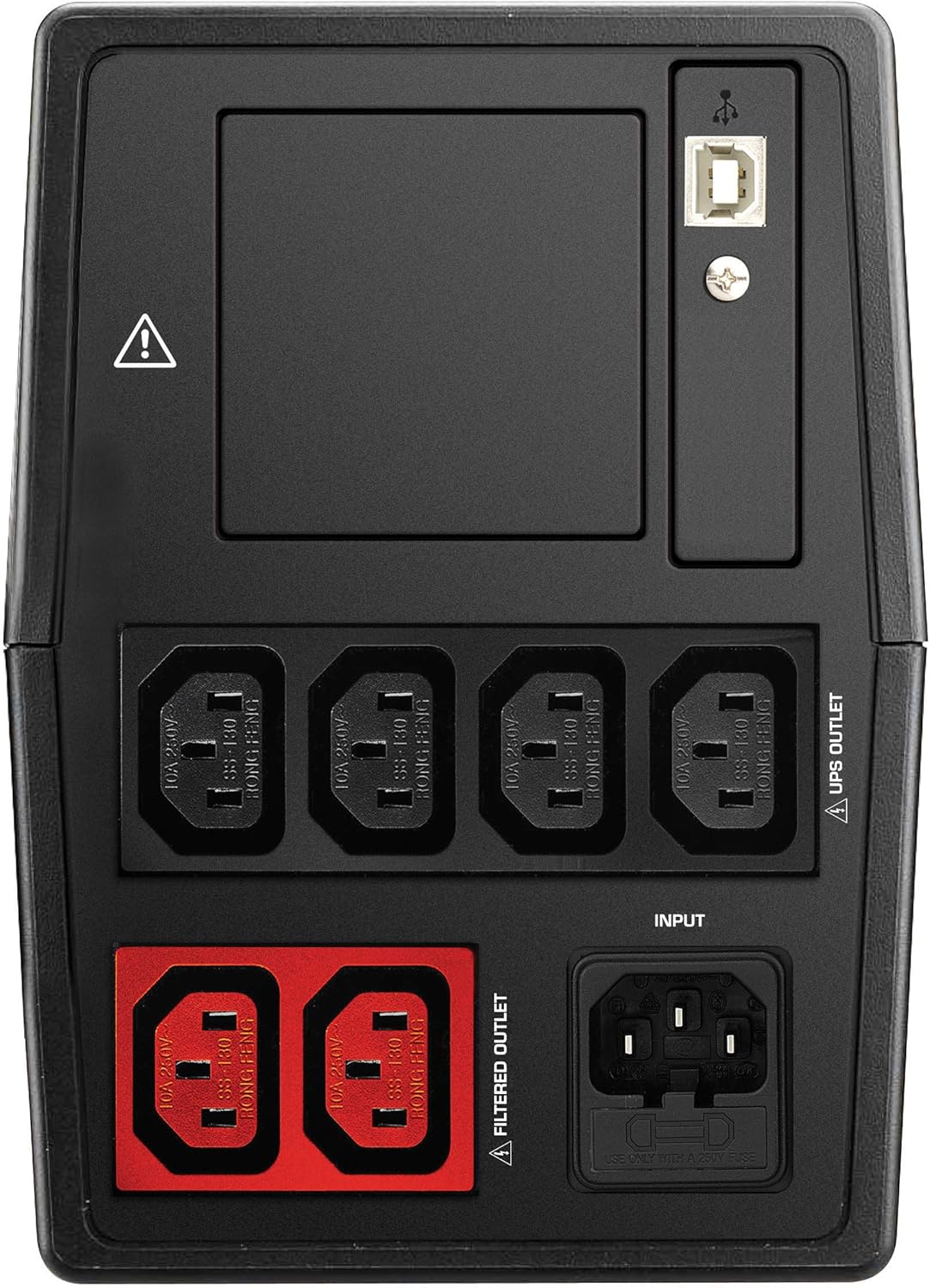
الشكل 4.3: Rear panel of the Nilox NXGCLI20002X9V2 UPS. This image displays the back of the UPS, showing the various input and output ports, including the main power input, UPS-protected outlets, filtered outlets, and USB communication ports.
The rear panel includes various connection ports:
- مدخل التيار المتردد: Connects the UPS to the main power supply.
- UPS Outlets: Provides battery backup and surge protection for connected devices.
- المنافذ المفلترة: Provides surge protection only (no battery backup).
- منافذ USB: For connecting to a computer for monitoring and management software.
5. الإعداد
5.1. تحديد مستوى
Place the UPS on a flat, stable surface in a clean, dry, and well-ventilated area. Ensure there is adequate space around the unit for proper airflow. Avoid placing the UPS near windows or areas with high humidity or dust.
5.2. الشحن الأولي
Before initial use, connect the UPS to a standard AC power outlet and allow it to charge for at least 8 hours. This ensures the internal batteries are fully charged and ready to provide optimal backup time.
5.3. توصيل المعدات
- Connect your critical equipment (e.g., computer, monitor) to the منافذ UPS on the rear panel. These outlets provide battery backup during power outagإِسْ
- قم بتوصيل المعدات غير الأساسية (مثل الطابعة والماسح الضوئي) بـ المنافذ المفلترة. These outlets provide surge protection but no battery backup.
- Connect the UPS power cord to a grounded AC wall outlet.
- Optionally, connect the USB communication cable from the UPS to your computer for monitoring software functionality.
6. تشغيل جهاز UPS
6.1. تشغيل/إيقاف
- لتشغيل: اضغط مع الاستمرار على زر الطاقة الموجود على اللوحة الأمامية لمدة 3 ثوانٍ تقريبًا حتى تسمع صوت تنبيه وتضيء المؤشرات.
- لإيقاف التشغيل: اضغط مع الاستمرار على زر التشغيل لمدة 3 ثوانٍ تقريبًا حتى تنطفئ المؤشرات.
6.2. مؤشرات LED
The LED display provides real-time status information:
- Green/Blue LED: Indicates normal operation and AC power availability.
- الصمام البرتقالي: Indicates battery mode (UPS is providing power from its batteries).
- الصمام الأحمر: Indicates a fault, overload, or low battery warning. Consult the troubleshooting section if this LED illuminates.
6.3. وظيفة البطارية الاحتياطية
في حالة انقطاع التيار الكهربائيtage, the UPS will automatically switch to battery mode, providing power to connected equipment. An audible alarm may sound to indicate battery operation. The duration of battery backup depends on the load connected and the battery charge level.
7. الصيانة
7.1. العناية بالبطارية
- إعادة شحن: Always recharge the UPS immediately after a discharge.
- تخزين: If storing the UPS for an extended period, recharge it every 3 months to prolong battery life.
- الاستبدال: Batteries have a limited lifespan. If the backup time significantly decreases, the batteries may need replacement. Contact qualified service personnel for battery replacement.
7.2. التنظيف
Disconnect the UPS from the AC power outlet before cleaning. Use a soft, dry cloth to wipe the exterior of the unit. Do not use liquid or aerosol cleaners.
8. استكشاف الأخطاء وإصلاحها
If the UPS is not functioning correctly, refer to the following table for common issues and solutions:
| مشكلة | السبب المحتمل | حل |
|---|---|---|
| لا يعمل جهاز UPS | لا يوجد مصدر طاقة تيار متردد؛ البطارية منخفضة | Check power cord connection; Charge UPS for 8 hours |
| Short backup time | Batteries not fully charged; Overload; Old batteries | Charge UPS for 8 hours; Reduce connected load; Consider battery replacement |
| Constant alarm sound | Overload; Battery mode; Fault | Reduce connected load; This is normal in battery mode; Contact support if fault persists |
| الصمام الأحمر مضاء | Overload; Battery fault; Internal fault | Reduce connected load; Contact support for battery or internal fault |
9. المواصفات
| ميزة | التفاصيل |
|---|---|
| نموذج | NXGCLI20002X9V2 |
| السعة (VA / W) | 2000 فولت أمبير / 1400 واط |
| تكنولوجيا | الخط التفاعلي |
| حجم الإدخالtage | 234 فولت |
| حجم الإخراجtage | 234 فولت |
| نوع البطارية | Sealed Lead-Acid (2 x 9 Ah) |
| وقت إعادة شحن البطارية | 8 ساعة |
| الوقت النموذجي للنسخ الاحتياطي | 7 Minutes (at average load) |
| الأبعاد (الطول × العرض × الارتفاع) | 39 × 27.5 × 19 سم |
| وزن | 8.6 كجم |
| عامل الشكل | برج |
| لون | أسود |
| منافذ USB | 4 X USB 2.0، 2 X USB 3.0 |
| نوع القابس | SCHUKO |
10. الضمان والدعم
Nilox products are manufactured to high-quality standards. This product is covered by a standard manufacturer's warranty. For specific warranty terms and conditions, please refer to the warranty card included with your product or visit the official Nilox webموقع.
For technical support, troubleshooting assistance, or service inquiries, please contact your local Nilox dealer or authorized service center. When contacting support, please have your product model number (NXGCLI20002X9V2) and serial number available.


