مقدمة
Thank you for choosing the Ksix Fitness Band GPS. This manual provides essential information for setting up, operating, and maintaining your device. Please read it carefully to ensure optimal performance and longevity of your fitness band.
The Ksix Fitness Band GPS is designed to monitor your physical activity comprehensively, featuring integrated GPS for route tracking, a dynamic 24-hour heart rate monitor, and a multi-sport mode to enhance your training sessions.
المنتج انتهىview
The Ksix Fitness Band GPS is a versatile smartband equipped with advanced features to support your fitness journey. Its lightweight design and 1.3-inch TFT color screen offer a comfortable and clear user experience.
- نظام تحديد المواقع المتكامل: Records your route during outdoor activities.
- 24-Hour Dynamic Heart Rate Monitor: يتتبع معدل ضربات قلبك بشكل مستمر.
- وضع الرياضات المتعددة: Monitors various types of workouts.
- مقاومة الماء: IP68 rated, waterproof up to 3 meters for 1 hour.
- الاتصال: Bluetooth 4.0 for seamless connection with your smartphone.
- التوافق: Works with Android 4.4 and later, and iOS 8.0 and later.
- عمر البطارية: Up to 7-8 hours with GPS and real-time heart rate monitoring, and up to 30 days in standby mode.

Image 1: Ksix Fitness Band GPS displaying time and date.
دليل الإعداد
1. شحن الجهاز
Before first use, fully charge your Ksix Fitness Band GPS. Connect the charging cable to the designated port on the device and a USB power source. The screen will indicate charging status.
2. Installing the Hi Move App
- بحث عن "Hi Move" in your smartphone's app store (Google Play Store for Android or Apple App Store for iOS).
- قم بتحميل وتثبيت التطبيق.
- افتح التطبيق واتبع التعليمات التي تظهر على الشاشة لإنشاء حساب وإعداد حسابكfile.
3. الاقتران بهاتفك الذكي
- تأكد من تمكين Bluetooth على هاتفك الذكي.
- Open the Hi Move app.
- انتقل إلى قسم إقران الأجهزة داخل التطبيق.
- The app will search for available devices. Select "Ksix Fitness Band GPS" from the list.
- Confirm the pairing request on both your smartphone and the fitness band, if prompted.
- Once paired, the time and date on your fitness band will synchronize with your phone.
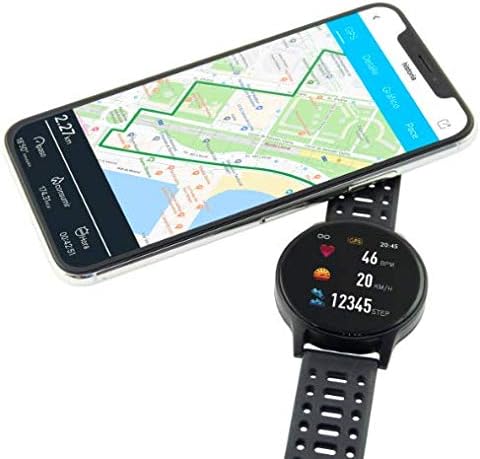
Image 2: Ksix Fitness Band GPS connected to a smartphone displaying a GPS-tracked route.
تعليمات التشغيل
التنقل عبر الواجهة
The fitness band features a touch-sensitive screen. Swipe left/right or up/down to navigate through different functions and menus. Tap to select an option or confirm an action.
تتبع نظام تحديد المواقع العالمي (GPS)
For accurate GPS tracking, ensure you are in an open outdoor area with a clear view of the sky. Start your activity from the multi-sport mode, and the device will automatically attempt to acquire a GPS signal. Your route will be recorded and can be viewed in the Hi Move app after synchronization.
مراقبة معدل ضربات القلب
The fitness band continuously monitors your heart rate. Wear the band snugly on your wrist, about one finger's width above your wrist bone, for accurate readings. You can view your current heart rate on the device and detailed historical data in the Hi Move app.
وضع الرياضات المتعددة
Access the multi-sport mode from the main menu to select specific activities such as running, walking, cycling, etc. Selecting an activity will initiate tracking of relevant metrics like duration, distance, calories burned, and heart rate. End the activity when finished to save the data.

Image 3: Ksix Fitness Band GPS showing a person running, highlighting features like pedometer, multi-sport mode, heart rate monitoring, and distance tracking.
صيانة
تنظيف
Regularly clean your fitness band and strap to prevent skin irritation and maintain device hygiene. Use a soft, damp cloth to wipe the device. Avoid using harsh chemicals or abrasive materials.
مقاومة الماء
The device is IP68 waterproof, meaning it can withstand immersion in water up to 3 meters deep for a maximum of 1 hour. It is suitable for swimming in shallow water but not recommended for diving, high-pressure water activities, or prolonged immersion. Ensure the charging port is dry before charging.
تخزين
When not in use for extended periods, store the fitness band in a cool, dry place. Avoid extreme temperatures and direct sunlight.
استكشاف الأخطاء وإصلاحها
- الجهاز لا يعمل: Ensure the device is fully charged. Connect it to the charger and wait a few minutes.
- لا يمكن الاقتران بالهاتف الذكي:
- تأكد من تمكين البلوتوث على هاتفك.
- Make sure the fitness band is within Bluetooth range of your phone.
- Restart both your phone and the fitness band.
- Try unpairing and re-pairing the device through the Hi Move app.
- قراءات غير دقيقة لمعدل ضربات القلب:
- Ensure the band is worn snugly on your wrist, not too loose or too tight.
- Clean the sensor on the back of the device.
- تجنب الحركة المفرطة أثناء القياس.
- نظام تحديد المواقع العالمي (GPS) لا يستقبل إشارة:
- تأكد من وجودك في منطقة خارجية مفتوحة ذات رؤية واضحة view من السماء.
- Wait a few minutes for the device to acquire a signal.
- Ensure the device's firmware is up to date via the Hi Move app.
- البيانات لا تتم مزامنتها مع التطبيق:
- Ensure the fitness band is connected to your phone via Bluetooth.
- Open the Hi Move app and manually initiate a sync if available.
- تحقق من اتصال الإنترنت بهاتفك.
تحديد
| رقم الموديل | BXBZGPS01 |
| ماركة | كسيكس |
| حجم الشاشة | 1.3 بوصة |
| نوع الشاشة | TFT Color |
| سعة البطارية | 230 مللي أمبير (ليثيوم أيون) |
| Battery Life (GPS + HR) | 7-8 ساعات |
| عمر البطارية (الاستعداد) | حتى 30 يوما |
| مقاومة الماء | IP68 (up to 3 meters for 1 hour) |
| الاتصال | بلوتوث 4.0 |
| التوافق | أندرويد 4.4+ / آي أو إس 8.0+ |
| وزن | 38 جرام |
| مادة | بلاستيك، بي في سي |
| لون | أسود |
الضمان والدعم
For warranty information and technical support, please refer to the documentation provided with your purchase or visit the official Ksix webالموقع. احتفظ بإثبات الشراء الخاص بك لتقديم مطالبات الضمان.
الشركة المصنعة: كسكس
اتصال: Please refer to the Ksix official webللحصول على تفاصيل الاتصال بخدمة العملاء، يرجى زيارة الموقع الإلكتروني.


