1. المقدمة
This manual provides essential information for the safe and effective operation of your Behringer C210 Powered Column Loudspeaker. The C210 is a modular column loudspeaker designed for portable PA applications and high-quality music playback. It features an 8-inch subwoofer, four high-frequency drivers, 200 watts of multi-channel Class-D power, Bluetooth audio streaming, an integrated MP3 player, LED lighting, and remote control capabilities.
يرجى قراءة هذا الدليل بعناية قبل تشغيل الجهاز والاحتفاظ به للرجوع إليه في المستقبل.
2. تعليمات السلامة
- مصدر الطاقة: قم بتوصيل الوحدة فقط بمأخذ طاقة تيار متردد بالجهد المحددtagهـ. تأكد من أن سلك الطاقة غير تالف أو مثني.
- تهوية: لا تسد أي فتحات تهوية. ثبّت المنتج وفقًا لتعليمات الشركة المصنعة.
- الماء والرطوبة: Do not expose this apparatus to rain or moisture. Do not place objects filled with liquids on the apparatus.
- حرارة: لا تقم بالتثبيت بالقرب من أي مصادر للحرارة مثل المشعات أو فتحات التدفئة أو المواقد أو أي أجهزة أخرى (بما في ذلك ampالمُضخِّمات) التي تنتج الحرارة.
- تنظيف: نظف فقط بقطعة قماش جافة.
- الخدمة: لا تحاول صيانة هذا المنتج بنفسك. يُرجى إحالة جميع أعمال الصيانة إلى فنيين مؤهلين. يلزم إجراء الصيانة في حال تعرض الجهاز لأي نوع من التلف، مثل تلف سلك الطاقة أو القابس، أو انسكاب سائل أو سقوط أجسام داخل الجهاز، أو تعرض الجهاز للمطر أو الرطوبة، أو عدم عمله بشكل طبيعي، أو سقوطه.
- الموقع: Ensure the loudspeaker is placed on a stable, level surface to prevent tipping.
- حماية السمع: Prolonged exposure to high sound pressure levels can cause permanent hearing loss. Use caution when setting volume levels.
3. محتويات العبوة
عند فتح العبوة، يرجى التأكد من وجود جميع المكونات وأنها في حالة جيدة:
- Behringer C210 Powered Column Loudspeaker Unit (Subwoofer base and column array)
- كابل الطاقة
- جهاز التحكم عن بعد
- دليل المستخدم (هذا المستند)
في حال وجود أي منتجات مفقودة أو تالفة، يرجى الاتصال ببائع التجزئة على الفور.
4. انتهى المنتجview
The Behringer C210 is a compact yet powerful column loudspeaker system designed for ease of transport and quick setup. It consists of a subwoofer base unit and a column array that houses the high-frequency drivers.
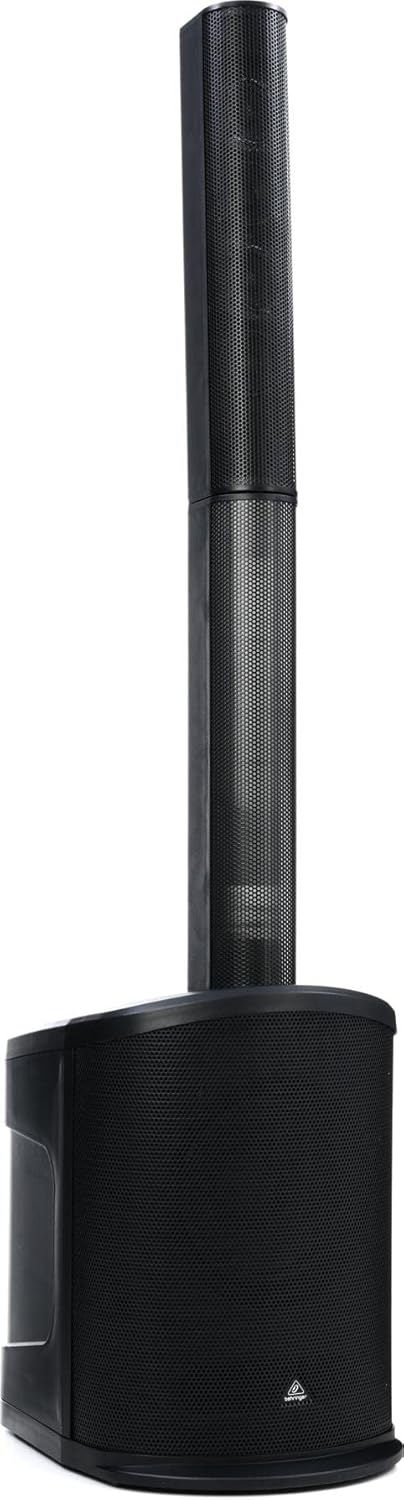
الشكل 4.1: الجبهة view of the C210 loudspeaker, illustrating its modular design with the subwoofer base and the column array.
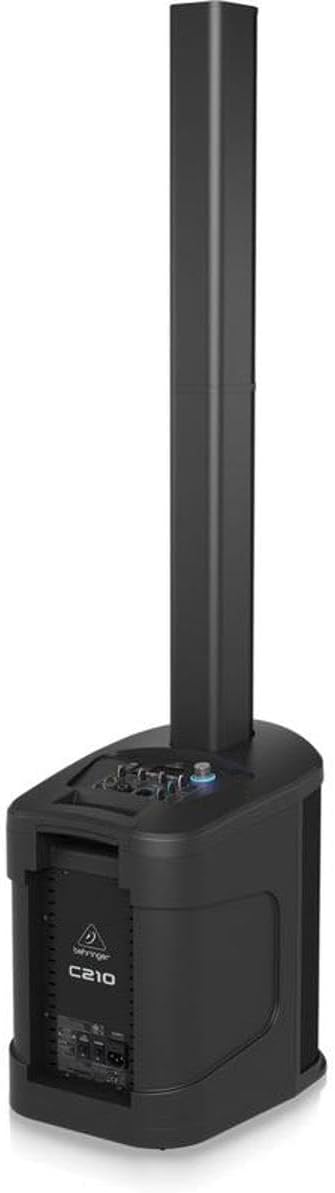
Figure 4.2: Rear/side view of the C210, highlighting the integrated control panel and input/output connections on the subwoofer unit.
المكونات الرئيسية:
- Subwoofer Base: Houses the 8-inch subwoofer, Class-D amplifier, control panel, and input/output connections.
- Column Array: Contains four high-frequency drivers for wide sound dispersion. It connects directly to the subwoofer base.
- لوحة التحكم: Located on the top of the subwoofer base, providing access to volume, input selection, MP3 player controls, and LED lighting settings.
- جهاز التحكم عن بعد: Allows for convenient adjustment of volume, track selection, and LED lighting from a distance.
5. الإعداد
Follow these steps to set up your C210 loudspeaker:
- أفرغ: قم بإزالة جميع المكونات بعناية من العبوة.
- الموقع: Choose a stable, level surface for the subwoofer base. Ensure there is adequate space around the unit for ventilation. Avoid placing it directly against walls or in corners if possible, to optimize sound dispersion.
- Assemble Column Array: Align the bottom of the column array with the connector on the top of the subwoofer base. Gently push down until it is securely seated. The connection is designed to be firm and stable.
- توصيل الطاقة: Connect the supplied power cable to the AC inlet on the rear of the subwoofer base. Plug the other end into a suitable grounded electrical outlet.
- التشغيل الأولي: Before turning on the unit, ensure all volume controls are set to their minimum level. Power on the unit using the main power switch.
6. التشغيل
6.1. التشغيل الأساسي
- تشغيل/إيقاف التشغيل: Use the power switch located on the rear of the subwoofer base to turn the unit on or off.
- الحجم الرئيسي: Adjust the main volume knob on the control panel to control the overall output level of the loudspeaker.
- اختيار الإدخال: Use the input selector buttons or knob on the control panel to switch between different audio sources (e.g., Bluetooth, MP3, Line In).
6.2. بث الصوت عبر البلوتوث
The C210 supports high-quality Bluetooth audio streaming from compatible devices.
- تفعيل البلوتوث: Select the Bluetooth input mode on the C210's control panel. The unit will enter pairing mode, indicated by a flashing Bluetooth indicator.
- إقران الجهاز: On your smartphone, tablet, or other Bluetooth-enabled device, open the Bluetooth settings and search for available devices. Select "Behringer C210" from the list.
- يتصل: Once paired, the Bluetooth indicator on the C210 will become solid, and you can begin streaming audio from your device.
6.3. MP3 Player Operation
The integrated MP3 player allows playback of audio files from USB sticks and SD/MMC cards.
- إدراج الوسائط: Insert a USB stick into the USB port or an SD/MMC card into the card slot on the control panel.
- Select MP3 Input: Switch the input mode to MP3. The unit will automatically detect and begin playing compatible audio files.
- عناصر التحكم: Use the dedicated MP3 player controls (Play/Pause, Next Track, Previous Track) on the control panel or remote control to manage playback.
6.4. إضاءة LED
The C210 features integrated LED lighting. Use the dedicated controls on the unit or the remote control to activate and select various lighting modes and effects.
6.5. جهاز التحكم عن بعد
يوفر جهاز التحكم عن بعد المرفق وصولاً سهلاً إلى الوظائف الرئيسية:
- تشغيل/إيقاف الطاقة
- Master Volume Up/Down
- اختيار مصدر الإدخال
- MP3 Player Controls (Play/Pause, Skip)
- LED Lighting Mode Selection
7. الصيانة
Proper maintenance ensures the longevity and optimal performance of your C210 loudspeaker.
- تنظيف: Disconnect the power before cleaning. Use a soft, dry cloth to wipe down the exterior surfaces. Do not use abrasive cleaners, waxes, or solvents.
- تخزين: If storing the unit for an extended period, disconnect it from power and store it in a dry, dust-free environment. It is recommended to use the original packaging for protection during storage or transport.
- تهوية: تأكد بانتظام من أن فتحات التهوية خالية من الغبار والحطام لمنع ارتفاع درجة الحرارة.
8. استكشاف الأخطاء وإصلاحها
If you encounter issues with your C210, refer to the following common problems and solutions:
| مشكلة | السبب المحتمل | حل |
|---|---|---|
| لا يوجد طاقة | Power cable disconnected; Power outlet faulty; Unit power switch off | Check power cable connection; Try a different outlet; Ensure power switch is ON |
| لا يوجد مخرج صوت | Volume too low; Incorrect input selected; Audio source issue; Column array not connected properly | Increase master volume; Select correct input; Check audio source device; Re-seat column array |
| البلوتوث غير مقترن | C210 not in pairing mode; Device already paired; Interference | Ensure C210 is in Bluetooth input and flashing; Disconnect from other devices; Move closer to C210 |
| مشاكل تشغيل ملفات MP3 | غير مدعوم file format; Corrupt media; Incorrect input selected | يضمن files are MP3; Try different USB/SD card; Select MP3 input |
| جهاز التحكم عن بعد لا يعمل | بطاريات فارغة؛ عائق؛ خارج النطاق | Replace batteries; Remove obstructions; Move closer to unit |
إذا استمرت المشكلة بعد محاولة هذه الحلول، فيرجى الاتصال بدعم العملاء.
9. المواصفات
Technical specifications for the Behringer C210 Powered Column Loudspeaker:
| ميزة | مواصفة |
|---|---|
| اسم الموديل | سي210 |
| نوع السماعة | Subwoofer (with Column Array) |
| نوع التركيب | قائما بذاته |
| المتحدث Ampنوع الترخيص | نشيط |
| الحد الأقصى لقوة خرج السماعة | 200 واط |
| قطر مكبر الصوت | 8 بوصة |
| قطر مكبر الصوت عالي التردد | 2.75 بوصات (×4) |
| استجابة التردد | 20 Hz - 20 kHz (approximate, based on 2E+4 Hz) |
| تكنولوجيا الاتصال | بلوتوث |
| تكنولوجيا الاتصالات اللاسلكية | بلوتوث |
| طريقة التحكم | بعيد |
| يشمل مشغل MP3؟ | نعم |
| مصدر الطاقة | كهرباء سلكية |
| وزن العنصر | 30.6 رطل (13.88 كجم) |
| أبعاد المنتج (الطول × العرض × الارتفاع) | 17.32 × 12.99 × 54.53 بوصة (44 × 33 × 138.5 سم) |
| مقاوم للماء | خطأ شنيع |
| الشركة المصنعة | قبيلة الموسيقى |
| رمز المنتج الموحد | 653341353139 |
10. الضمان والدعم
Your Behringer C210 Powered Column Loudspeaker comes with a limited warranty provided by the manufacturer, Music Tribe. The specific terms and duration of the warranty may vary by region and retailer.
For detailed warranty information, product registration, technical support, or service inquiries, please visit the official Behringer website or contact your authorized Behringer dealer.
يمكنك العثور على مزيد من المعلومات وموارد الدعم في متجر بيرينجر على أمازون or the official Music Tribe webموقع.


