1. المقدمة
The Maxell Bass 13 Wireless Headphones (Model B13-WHPS) are designed to provide a versatile audio experience. These headphones feature 40mm drivers for clear sound, an integrated microphone for communication, and comfortable ear pads for extended listening. They offer both wireless Bluetooth connectivity and a traditional 3.5mm wired option.
2. ماذا يوجد في الصندوق
- Maxell Bass 13 Wireless Headphones
- كابل شحن USB
- 3.5mm Audio Cable (if applicable, not explicitly listed but common for hybrid headphones)
- دليل المستخدم
3. انتهى المنتجview
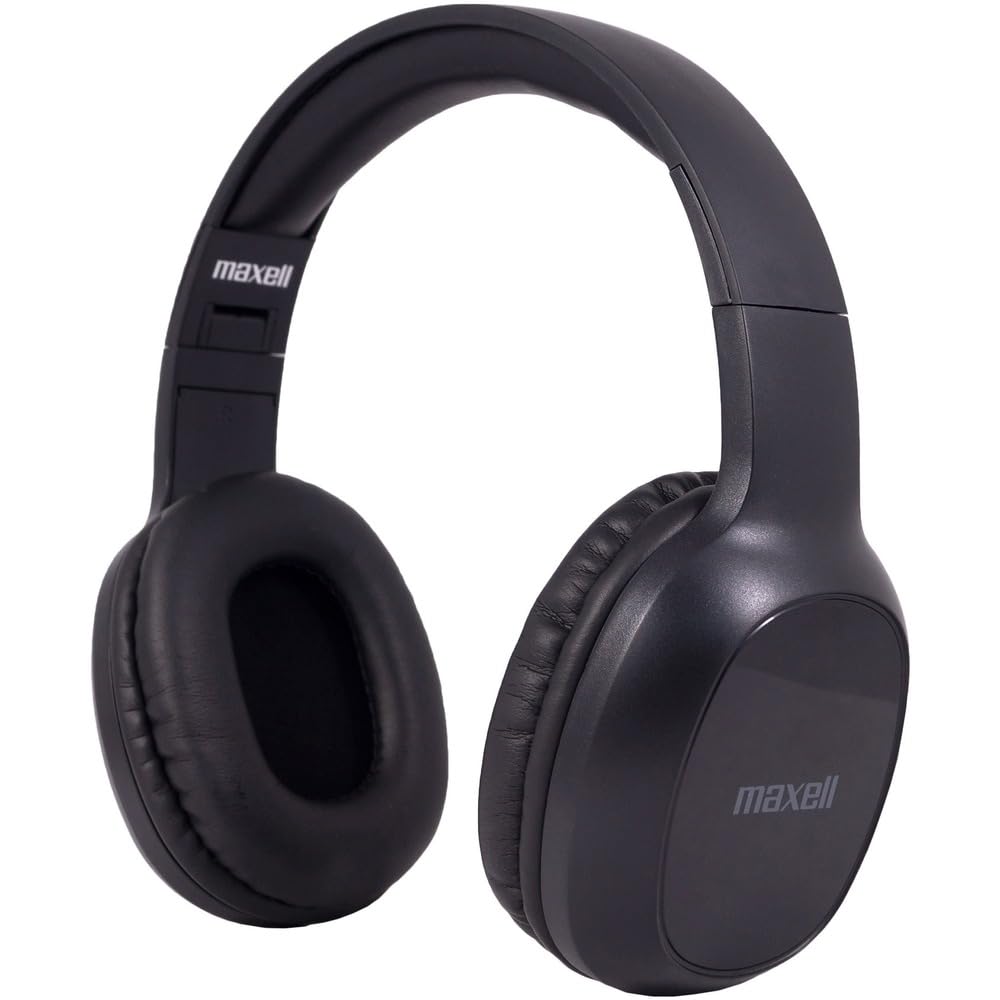
Figure 1: Maxell Bass 13 Wireless Headphones

Figure 2: Earcup Controls (Power, Volume, Play/Pause)
المميزات الرئيسية:
- محركات ديناميكية مقاس 40 مم: Deliver clear and powerful audio performance.
- ميكروفون مدمج: يتيح إجراء المكالمات بدون استخدام اليدين.
- Noise-Isolating Earpads: Provide comfort and help reduce external distractions.
- اتصال بلوتوث 5.0: للحصول على اتصال لاسلكي مستقر.
- مقبس صوت 3.5 ملم: Allows for wired connection to compatible devices.
- عقال قابل للتعديل: يضمن ملاءمة مريحة لمختلف أحجام الرأس.
- عمر البطارية يصل إلى 8 ساعة: For extended listening and talk time.
4. الإعداد
4.1 شحن سماعات الرأس

Figure 3: Connecting the USB Charging Cable
- Locate the charging port on the headphone earcup.
- Connect the small end of the provided USB charging cable to the headphone's charging port.
- قم بتوصيل الطرف الأكبر من كابل USB بمصدر طاقة USB (مثل منفذ USB في الكمبيوتر، أو محول USB الجداري).
- The LED indicator on the headphones will illuminate to show charging status. It will typically turn off or change color when fully charged.
- A full charge provides up to 8 hours of continuous talk/play time.
4.2 اقتران بلوتوث
- تأكد من شحن سماعات الرأس بالكامل.
- اضغط مع الاستمرار على زر الطاقة الموجود على سماعة الأذن حتى يومض مؤشر LED باللونين الأزرق والأحمر، مما يشير إلى وضع الاقتران.
- على جهازك (الهاتف الذكي، الجهاز اللوحي، الكمبيوتر)، انتقل إلى إعدادات البلوتوث.
- بحث عن available devices. Select "Maxell Bass 13" from the list.
- Once paired, the LED indicator will typically show a solid blue light or flash blue slowly.
- إذا طُلب منك إدخال رمز المرور، أدخل "0000".
4.3 توصيل سلكي (مقبس صوت 3.5 ملم)

Figure 4: Connecting the 3.5mm Audio Cable
بالنسبة للأجهزة التي لا تحتوي على تقنية البلوتوث أو عندما تكون البطارية منخفضة، يمكنك استخدام كابل الصوت 3.5 ملم:
- Plug one end of the 3.5mm audio cable into the audio input jack on the headphone earcup.
- قم بتوصيل الطرف الآخر بمقبس إخراج الصوت مقاس 3.5 ملم في جهازك.
- ستعمل سماعات الرأس في الوضع السلبي، وسيتم تعطيل وظيفة البلوتوث.
5. تعليمات التشغيل
5.1 تشغيل/إيقاف التشغيل
- تشغيل الطاقة: اضغط مع الاستمرار على زر الطاقة لمدة 3 ثوانٍ تقريبًا حتى يضيء مؤشر LED.
- إيقاف التشغيل: اضغط مع الاستمرار على زر الطاقة لمدة تتراوح بين 3 و 5 ثوانٍ تقريبًا حتى ينطفئ مؤشر LED.
5.2 التحكم في مستوى الصوت
- ارفع على الصوت: اضغط على زر رفع الصوت (+).
- تقليل الحجم: اضغط على زر خفض الصوت (-).
5.3 تشغيل الموسيقى
- تشغيل/إيقاف مؤقت: اضغط على الزر متعدد الوظائف (غالباً زر الطاقة أو زر التشغيل/الإيقاف المؤقت المخصص) مرة واحدة.
- المسار التالي: Press and hold the Volume Up (+) button (or double-press, refer to specific product button layout).
- المسار السابق: Press and hold the Volume Down (-) button (or double-press, refer to specific product button layout).
5.4 إدارة المكالمات
- الرد/إنهاء المكالمة: اضغط على الزر متعدد الوظائف مرة واحدة.
- رفض المكالمة: اضغط مع الاستمرار على زر الوظائف المتعددة لمدة ثانيتين تقريبًا.
- إعادة الاتصال بالرقم الأخير: اضغط مرتين على الزر متعدد الوظائف.
6. الصيانة
6.1 التنظيف
- امسح سماعات الرأس بقطعة قماش ناعمة وجافة وخالية من الوبر.
- لا تستخدم المنظفات الكاشطة أو المذيبات أو البخاخات الهوائية.
- تجنب دخول الرطوبة إلى أي فتحات.
6.2 التخزين

Figure 5: Headphones Folded for Storage
- قم بتخزين سماعات الرأس في مكان بارد وجاف بعيداً عن درجات الحرارة القصوى.
- When not in use for extended periods, ensure the headphones are fully charged before storage to preserve battery health.
- The headphones feature a foldable design for compact storage and portability.
6.3 العناية بالبطارية
- تجنب تفريغ البطارية بالكامل بشكل متكرر.
- Charge the headphones regularly, even if not used often.
- لا تعرض البطارية للحرارة الزائدة أو لأشعة الشمس المباشرة.
7. استكشاف الأخطاء وإصلاحها
| مشكلة | السبب المحتمل | حل |
|---|---|---|
| سماعات الرأس لا تعمل | بطارية منخفضة | اشحن سماعات الرأس بالكامل. |
| لا يمكن الاقتران عبر البلوتوث | سماعات الرأس ليست في وضع الاقتران؛ بلوتوث الجهاز مُعطل؛ بعيدة جدًا عن الجهاز | تأكد من أن سماعات الرأس في وضع الاقتران (يومض باللون الأزرق/الأحمر). شغّل البلوتوث في الجهاز. قرّب سماعات الرأس من الجهاز. |
| لا يوجد صوت | Volume too low; Incorrect audio source; Headphones not connected | Increase headphone and device volume. Check if headphones are properly paired/connected. Verify audio output settings on your device. |
| جودة المكالمة رديئة | Weak Bluetooth signal; Microphone obstructed | اقترب من جهازك. تأكد من عدم تغطية الميكروفون. |
8. المواصفات
| ميزة | التفاصيل |
|---|---|
| رقم الموديل | B13-WHPS |
| ماركة | ماكسيل |
| تكنولوجيا الاتصال | بلوتوث 5.0 |
| حجم برنامج تشغيل الصوت | 40 ملم |
| عمر البطارية | Up to 8 Hours (continuous talk/play time) |
| مقبس سماعات الرأس | 3.5 ملم جاك |
| ميزات التحكم في الضوضاء | Sound Isolation, Noise Cancelling |
| مقاومة | 32 أوم |
| حساسية | 100 ديسيبل |
| استجابة التردد | 20 هرتز |
| وضع الأذن | على الأذن |
| عامل الشكل | فوق الأذن |
| أبعاد المنتج | 7.25 × 3 × 9 بوصة |
| وزن العنصر | 8.4 أونصات |
| مادة | Electronic Components, Foam, Plastic, Wire |
| الأجهزة المتوافقة | Tablets, Laptops, Desktops, Portable Devices with 3.5mm Audio Jack |
9. فيديو المنتج الرسمي
Video 1: Maxell Bass 13 Bluetooth Headphones Overview. This video provides a visual demonstration of the headphones' features and design.
10. الضمان والدعم
Maxell products are designed for reliability and performance. For specific warranty information, please refer to the warranty card included with your purchase or visit the official Maxell website. For technical support or customer service inquiries, please contact Maxell customer support through their official channels.