مقدمة
This manual provides essential information for the setup, operation, and maintenance of your OREI Sony UBP-X800M2 Region Free 4K UHD Blu-ray Player. This player is designed for worldwide use, supporting all Blu-ray disc zones (A/B/C) and DVD regions (0-8), with a built-in NTSC↔PAL 4K HD converter. Enjoy stunning 4K UHD visuals, high-resolution audio including Dolby Atmos and DTS:X, and seamless access to streaming services via Wi-Fi or Ethernet.

الشكل 1: الجبهة view of the OREI Sony UBP-X800M2 4K UHD Blu-ray Player.
يثبت
1. فك التعبئة والتركيب
- قم بإزالة جميع المكونات بعناية من العبوة.
- ضع اللاعب على سطح مستوٍ وثابت مع تهوية كافية.
- Ensure no objects block the ventilation openings.
2. الاتصال بالتلفزيون الخاص بك
Connect the player to your TV using an HDMI cable for optimal 4K UHD video and audio.
- قم بتوصيل أحد طرفي كابل HDMI بـ مخرج HDMI المنفذ الموجود في الجزء الخلفي من مشغل Blu-ray.
- قم بتوصيل الطرف الآخر من كبل HDMI بإدخال HDMI على التلفزيون.
- If using an audio receiver, connect the player's HDMI OUT to the receiver's HDMI IN, then the receiver's HDMI OUT to the TV's HDMI IN.

Figure 2: Rear panel connections, showing HDMI, LAN, and audio outputs.
3. توصيل الطاقة
- Connect the AC power cord to the player's power input and then to a suitable electrical outlet.
4. الاتصال بالشبكة (اختياري)
For streaming services and firmware updates, connect the player to your home network.
- الاتصال السلكي: Connect an Ethernet cable from the player's لان (100) port to your router or modem.
- الاتصال اللاسلكي: Navigate to the network settings in the player's menu to connect to your Wi-Fi network.
5. Region Changing Instructions
This player supports all DVD regions (0-8) automatically. Blu-ray regions (A, B, C) are changed manually using the remote control.
- Turn the player ON و OPEN THE DISC TRAY.
- Once the tray is completely open, press the corresponding colored button on the remote to select the desired Blu-ray region:
- المنطقة أ: اضغط على الزر الأصفر على جهاز التحكم عن بعد.
- المنطقة ب: اضغط على الزر الأزرق على جهاز التحكم عن بعد.
- المنطقة ج: اضغط على الزر الأحمر على جهاز التحكم عن بعد.
- You can now put your disc in the tray and then close the tray.

Figure 3: Remote control with colored buttons for region selection.
تعليمات التشغيل
1. تشغيل القرص
The player supports a wide range of disc formats, including 4K UHD Blu-ray, standard Blu-ray, Blu-ray 3D, DVD, CD, and Super Audio CD (SACD).
- اضغط على فتح/إغلاق اضغط على الزر الموجود على المشغل أو جهاز التحكم عن بعد لفتح درج القرص.
- ضع القرص برفق على الصينية بحيث يكون جانب الملصق متجهًا لأعلى.
- اضغط على فتح/إغلاق زر مرة أخرى لإغلاق الدرج.
- The player will automatically begin playback or display a disc menu.

الشكل 4: الجبهة view of the player with the disc tray open, ready for disc insertion.
2. خدمات البث المباشر
Access popular streaming services like Netflix and YouTube directly from the player's home menu.
- Ensure the player is connected to the internet (Wi-Fi or Ethernet).
- من الشاشة الرئيسية، حدد تطبيق البث المطلوب.
- قم بتسجيل الدخول باستخدام بيانات حسابك لبدء البث.
3. تشغيل الوسائط عبر USB
لعب وسائل الإعلام files (audio, video, photos) from a USB storage device.
- Insert your USB device into the front USB port.
- Select the USB option from the player's home menu to browse and play your media.
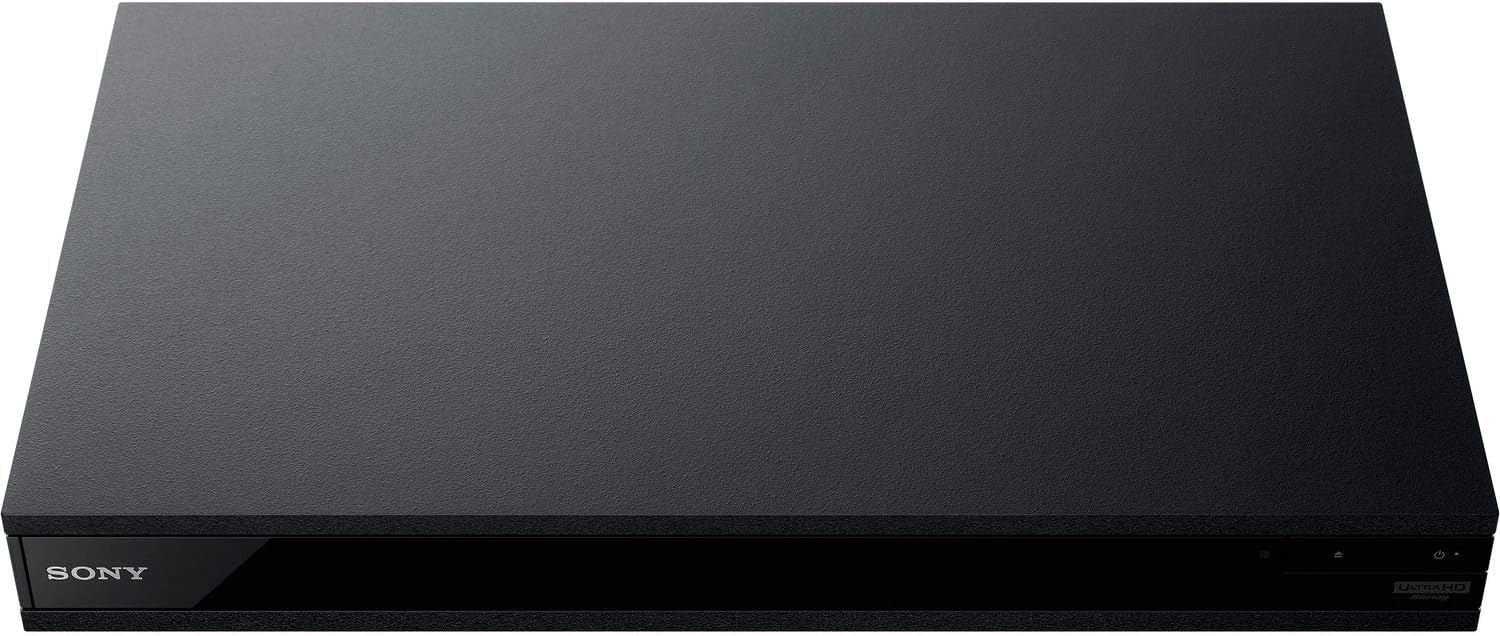
الشكل 5: الجبهة view of the player with a USB drive inserted into the front port.
صيانة
1. تنظيف المشغل
- امسح الجزء الخارجي من المشغل بقطعة قماش ناعمة وجافة.
- لا تستخدم المنظفات الكاشطة أو الشمع أو المذيبات.
- Ensure ventilation openings remain clear of dust and debris.
2. العناية بالقرص
- قم بمعالجة الأقراص من حوافها لتجنب بصمات الأصابع والخدوش.
- قم بتنظيف الأقراص باستخدام قطعة قماش ناعمة وخالية من الوبر، وامسحها من المركز إلى الخارج.
- Store discs in their cases away from direct sunlight and extreme temperatures.
3. تحديثات البرامج الثابتة
Firmware updates can be done via the internet to ensure optimal performance and access to the latest features.
- Go to the home menu, then setup menu, and then to Software Update.
- Click on "Update Via Internet". If a new firmware is available, the player will automatically update.
- لا turn off the player while it is updating.
- لا perform firmware updates by USB unless instructed by OREI support.
استكشاف الأخطاء وإصلاحها
القضايا الشائعة
- لا صورة/صوت:
- Check all HDMI and audio cable connections.
- Ensure the TV input is set to the correct HDMI port.
- Verify the player is powered on.
- Disc Does Not Play:
- تأكد من أن القرص نظيف وخالٍ من الخدوش.
- تأكد من إدخال القرص بشكل صحيح (بحيث يكون جانب الملصق لأعلى).
- For Blu-ray discs, confirm the player's region setting matches the disc's region (refer to "Region Changing Instructions" in the Setup section).
- Open the tray again and leave the disc in the tray. Once fully open, press the color button to select the region. Then close the tray.
- Region Code Error Message:
If you put in a disc before changing regions, you may get an error message indicating the wrong region. The player remembers this message. To remove that error, you need to reset the player.
- اضغط على بيت button on the remote with no disc inside to go to the home screen.
- Use arrow buttons on the remote to go to the upper right corner where it says يثبت و اضغط يدخل.
- انتقل إلى الأسفل إعادة الضبط on the bottom of the menu.
- يختار إعادة التعيين إلى إعدادات المصنع الافتراضية.
- قم بالتمرير إلى الأسفل وحدد جميع الإعدادات و اضغط يدخل -> اضغط ابدأ أدخل -> Close يدخل.
- Turn the player off and then on again after 30 seconds.
- Select Language English and then select quick start mode OFF. You may need to activate network settings again.
- If you prefer not to connect the player to the internet, you may press the بيت button and go to the home screen. Now start from step 1 under "Region Changing Instructions" to change regions.
تحديد
| ماركة | أوري |
| اسم الموديل | Sony X800M2 (UBP-X800M2) |
| أبعاد المنتج | 19 × 14.1 × 3.8 بوصة |
| وزن العنصر | 8.82 جنيه (4000 جرام) |
| نوع الوسائط | Blu-Ray Disc, DVD, 4K UHD Blu-ray, Blu-ray 3D, CD, Super Audio CD |
| دقة | 3840x2160 (4K UHD) |
| تكنولوجيا الاتصال | إيثرنت، HDMI، USB، واي فاي |
| نوع الموصل | منفذ HDMI |
| وضع إخراج الصوت | Surround (Dolby Atmos, DTS:X, High-Resolution Audio) |
| لون | أسود |
| البطاريات | يلزم وجود بطاريتين AAA (لجهاز التحكم عن بعد) |
| ميزة خاصة | Region Free (Blu-ray Zones A/B/C, DVD Regions 0-8), Built-in NTSC↔PAL 4K HD Converter |
الضمان والدعم
معلومات الضمان
For specific warranty details, please refer to the warranty card included with your product or visit the official OREI webالموقع. احتفظ بإيصال الشراء كإثبات للشراء.
دعم العملاء
If you encounter any issues or have questions regarding your OREI Sony UBP-X800M2 Blu-ray Player, please contact OREI customer support.
- الدعم عبر الإنترنت: قم بزيارة OREI Store on Amazon للحصول على الأسئلة الشائعة وموارد الدعم.
- المساعدة الفنية: Contact OREI directly for technical support. (Specific contact details not provided in source data, please refer to product packaging or official webموقع).


