المنتج انتهىview
كالAmp LMU-330 is an economical, full-featured vehicle tracking product designed for covert and reliable installation in automobiles. This device utilizes 2G GSM / GPRS technology for communication and operates on 850/1900 MHz frequencies. It is equipped with an internal battery and antenna, making it a versatile solution for various automotive track and trace applications.
The LMU-330 is an ideal solution for applications such as stolen vehicle recovery, vehicle finance management, and auto rental tracking, providing reliable GPS tracking capabilities.
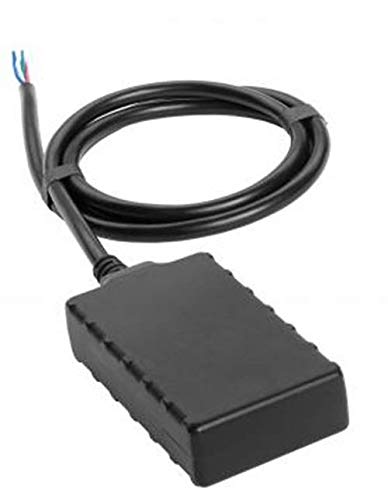
Image: The CalAmp LMU-330 GPS Tracker, a compact black rectangular device with an integrated wiring harness extending from one end. The wires are typically used for power and data connections within a vehicle.
الإعداد والتثبيت
The LMU-330 is designed for professional installation due to its hardwired nature. Proper installation ensures optimal performance and reliability.
قائمة التحقق قبل التثبيت:
- Ensure the vehicle's electrical system is compatible with the device's power requirements.
- Identify a secure, covert location within the vehicle for installation, away from direct heat or moisture.
- Gather necessary tools: wire strippers, crimpers, multimeter, electrical tape, zip ties, and appropriate connectors.
- Verify the device's internal battery is charged or will receive power upon installation.
خطوات التثبيت:
- فصل بطارية السيارة: For safety, disconnect the vehicle's negative battery terminal before beginning any wiring.
- تركيب الجهاز: Securely mount the LMU-330 in the chosen covert location. Ensure the device has a clear line of sight to the sky for optimal GPS signal reception, if possible, or at least not completely enclosed by metal.
- وصلات الأسلاك:
- Connect the device's power wire (typically red) to a constant 12V DC power source in the vehicle.
- Connect the device's ground wire (typically black) to a reliable chassis ground point.
- If applicable, connect ignition sense wire (often white or yellow) to a circuit that is active only when the ignition is on.
- Secure all connections using crimp connectors and insulate with electrical tape or heat shrink tubing.
- Reconnect Vehicle Battery: أعد توصيل الطرف السالب لبطارية السيارة.
- تحقق من العملية: Check for LED indicators on the device (if present) to confirm power and network connectivity. Perform initial tests to ensure GPS tracking data is being transmitted.
تشغيل الجهاز
كالAmp LMU-330 operates autonomously once properly installed and configured. It continuously monitors and transmits location data and other relevant vehicle parameters using its integrated GPS and 2G GSM/GPRS modules.
الجوانب التشغيلية الرئيسية:
- التتبع التلقائي: The device automatically begins tracking and transmitting data once powered on and connected to the cellular network.
- نقل البيانات: Location data, speed, ignition status, and other configured parameters are sent to a designated server or platform via the 2G GPRS network.
- البطارية الداخلية: The integrated battery provides backup power, allowing the device to continue tracking even if the primary vehicle power is interrupted.
- السياج الجغرافي: Depending on the backend platform, the device can support geofencing capabilities, triggering alerts when the vehicle enters or exits predefined areas.
- التنبيهات والإشعارات: The system can be configured to send alerts for various events, such as ignition on/off, unauthorized movement, or power disconnection.
Access to tracking data and device configuration is typically managed through a web-based portal or mobile application provided by your service provider.
صيانة
كالAmp LMU-330 is designed for low maintenance. However, periodic checks can help ensure its continued reliability and performance.
ممارسات الصيانة الموصى بها:
- سلامة الاتصال: قم بفحص توصيلات الأسلاك بشكل دوري للتأكد من أنها تبقى آمنة وخالية من التآكل.
- وضع الجهاز: Ensure the device remains securely mounted in its original location and has not shifted, which could affect GPS signal reception.
- تحديثات البرامج: While typically managed remotely by your service provider, ensure the device's firmware is up-to-date for optimal performance and security.
- الفحص البيئي: Verify that the installation location remains free from excessive moisture, dust, or extreme temperatures that could damage the device.
Avoid attempting to open the device casing, as this may void any warranties and could damage internal components.
استكشاف الأخطاء وإصلاحها
If you encounter issues with your LMU-330 GPS Tracker, refer to the following common troubleshooting steps:
| مشكلة | السبب المحتمل | حل |
|---|---|---|
| No GPS Signal / Inaccurate Location |
|
|
| No Data Transmission (No tracking updates) |
|
|
| الجهاز لا يعمل |
|
|
For issues not covered here, please contact your CalAmp service provider or authorized dealer for further assistance.
تحديد
| رقم الموديل | LMU0330G-7-G1000 |
| ماركة | كالAmp |
| عامل الشكل | Tracker: Fleet / Asset |
| تكنولوجيا | 2G GSM / GPRS |
| تكرار | 2G: 850/1900 ميجا هرتز |
| الناقل | Multiple Carriers |
| سمات | Internal Battery + Internal Antenna |
| تكنولوجيا الاتصال | خلوي |
| المميزات الخاصة | قابلة لإعادة الشحن |
| التطبيقات المدعومة | إنذار |
| استخدامات محددة للمنتج | تتبع المركبات |
| ماذا يوجد في الصندوق | Battery (internal) |
| الشركة المصنعة | كالAmp |
| تاريخ أول توفر | 16 أغسطس 2019 |
| ASIN | B07WN37KR8 |
الضمان والدعم
Information regarding the specific warranty terms and conditions for the CalAmp LMU-330 is not available in this manual. For warranty details, technical support, or service inquiries, please contact your authorized CalAmp dealer or the service provider from whom you purchased the device.
It is recommended to retain your purchase receipt and any service agreements for future reference.


