1. المقدمة
This manual provides essential information for the proper use and maintenance of your Zentality C-710 10-inch Dual SIM Tablet. Please read this guide thoroughly before operating the device to ensure optimal performance and longevity. Keep this manual for future reference.
2. انتهى المنتجview
The Zentality C-710 is a 10-inch Android tablet designed for communication and multimedia. It features dual SIM card support for cellular connectivity, a Quad-Core processor, 1GB RAM, and 16GB of internal storage. The device includes front and rear cameras, Bluetooth, and a vibrant IPS LCD display.
2.1 مكونات الجهاز
Familiarize yourself with the tablet's physical features and controls.

الصورة 1: الامام والخلف view of the Zentality C-710 Tablet, showing the screen, cameras, and rear casing.
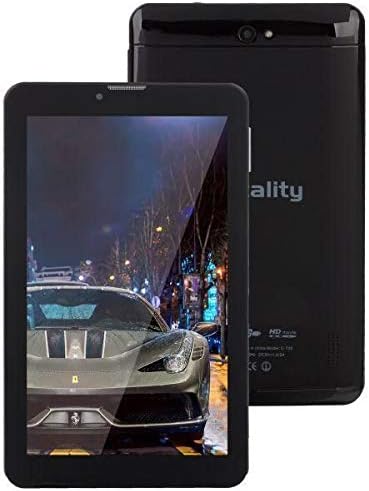
الصورة 2: أمام view of the Zentality C-710 Tablet with the screen displaying an image, highlighting the display area.
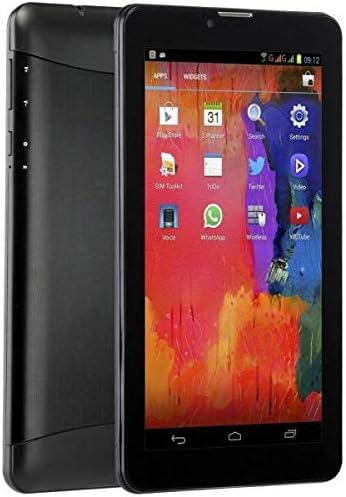
الصورة 3: جانب view of the Zentality C-710 Tablet, illustrating the placement of physical buttons and ports.
3. الإعداد
3.1 شحن البطارية
Before first use, fully charge the tablet's battery. Connect the provided charger to the tablet's charging port and plug it into a power outlet. The battery indicator on the screen will show charging status. A full charge typically takes several hours.
3.2 إدخال بطاقات SIM
The Zentality C-710 supports dual SIM cards for cellular network access. Locate the SIM card slot(s) on the side or back of the tablet. Carefully insert your standard or micro SIM cards into the designated slots, ensuring they are correctly oriented as indicated by the diagram near the slot. Close the tray securely.
3.3 إدخال بطاقة MicroSD
To expand storage, insert a microSD card (up to 32GB, not included) into the dedicated slot. Ensure the card is oriented correctly before gently pushing it in until it clicks into place.
3.4 تشغيل/إيقاف التشغيل
To power on, press and hold the Power button until the Zentality logo appears. To power off, press and hold the Power button until the power options menu appears, then select 'Power off'.
3.5 الإعداد الأولي
Upon first power-on, follow the on-screen prompts to select your language, connect to a Wi-Fi network, set up your Google account, and configure other basic settings.
4. التشغيل
4.1 إيماءات شاشة اللمس
استخدم إيماءات شاشة اللمس القياسية لنظام أندرويد للتنقل في جهازك اللوحي:
- مقبض: حدد عنصرًا أو افتح تطبيقًا.
- انقر مع الاستمرار: الوصول إلى القوائم السياقية أو نقل الأيقونات.
- انتقاد: التمرير عبر الشاشات أو القوائم.
- قرصة: تكبير أو تصغير الصور و web الصفحات.
4.2 الاتصال بشبكة Wi-Fi
اذهب الى الإعدادات > الشبكة والإنترنت > Wi-Fi. Turn Wi-Fi on, then select your desired network from the list and enter the password if required.
4.3 الاتصال بأجهزة Bluetooth
اذهب الى الإعدادات > الأجهزة المتصلة > البلوتوث. Turn Bluetooth on, then select 'Pair new device' and choose your device from the list to connect.
4.4 Making Calls (3G)
With an active SIM card, you can make and receive calls. Open the 'Phone' application, dial the number, and press the call button.
4.5 استخدام الكاميرا
Open the 'Camera' application. Tap the shutter button to take photos. Switch between front and rear cameras using the camera toggle icon. Adjust settings like flash and mode as needed.
4.6 إدارة التطبيقات
Download new applications from the Google Play Store. To uninstall an app, tap and hold its icon on the home screen or app drawer, then drag it to the 'Uninstall' option.
5. الصيانة
5.1 تنظيف الجهاز اللوحي
Use a soft, lint-free cloth to clean the screen and body of the tablet. Avoid using harsh chemicals or abrasive materials, which can damage the display or finish. For stubborn smudges, slightly dampانقع قطعة القماش في الماء أو في منظف الشاشة المخصص للإلكترونيات.
5.2 العناية بالبطارية
To prolong battery life, avoid extreme temperatures. Do not leave the tablet charging for extended periods after it's full. If storing the tablet for a long time, ensure the battery is charged to about 50%.
5.3 تحديثات البرامج
تحقق بانتظام من وجود تحديثات للنظام وقم بتثبيتها لضمان حصول جهازك اللوحي على أحدث الميزات والتصحيحات الأمنية وتحسينات الأداء. انتقل إلى الإعدادات > النظام > تحديث النظام.
6. استكشاف الأخطاء وإصلاحها
6.1 الجهاز اللوحي لا يعمل
Ensure the battery is sufficiently charged. Connect the charger and wait a few minutes before attempting to power on again. If the issue persists, try a different charger or contact support.
6.2 مشاكل الاتصال بشبكة Wi-Fi
Check if Wi-Fi is enabled in settings. Restart your tablet and your Wi-Fi router. Ensure you are entering the correct password. If the problem continues, try forgetting the network and reconnecting.
6.3 الأداء البطيء
Close unnecessary background applications. Clear cache data from apps in الإعدادات > التطبيقات والإشعارات > [اسم التطبيق] > التخزين والذاكرة المؤقتة > مسح الذاكرة المؤقتة. Consider uninstalling unused apps or performing a factory reset as a last resort (back up your data first).
6.4 App Crashes
Ensure the app is updated to its latest version. Clear the app's cache and data (this will reset the app). If the issue persists, uninstall and reinstall the app.
7. المواصفات
| ميزة | مواصفة |
|---|---|
| ماركة | Zentality |
| اسم الموديل | سي-710 |
| حجم شاشة العرض | 10 بوصة |
| نوع العرض | شاشة LCD IPS |
| نظام التشغيل | أندرويد |
| المعالج | رباعي النواة |
| حجم ذاكرة الوصول العشوائي المثبتة | 1 جيجا بايت |
| سعة تخزين الذاكرة | 16 جيجا بايت |
| Cellular Network Technology | 3G |
| Number of SIM Cards | شريحتين اتصال |
| نوع الاتصال | خلوي، بلوتوث |
| دقة الكاميرا الخلفية | 5 ميجا بكسل |
| أمام Webقرار الكاميرا | 1.3 ميجا بكسل |
| سعة البطارية | 4000 مللي أمبير |
| لون | أسود |
| وزن العنصر | 940 جرام |
| أبعاد الحزمة | 27.4 × 27 × 3.8 سم |
| تاريخ أول توفر | 23 يوليو 2019 |
8. الضمان والدعم
For warranty information and technical support, please refer to the documentation included with your purchase or visit the official Zentality webالموقع. احتفظ بإثبات الشراء الخاص بك لتقديم مطالبات الضمان.


