1. المقدمة
The NEDIS VEXT3470AT HDMI Audio Extractor allows you to separate audio signals from an HDMI source and output them to an audio system, while simultaneously passing the video signal to a display. This device is designed to integrate modern HDMI sources with audio systems that may not have HDMI inputs, providing both digital (Toslink) and analog (L/R stereo) audio outputs.
It supports 3D video and amplifies the digital video signal for reliable transmission.
2. معلومات السلامة
- اقرأ هذه التعليمات بعناية قبل الاستخدام.
- احفظ الجهاز بعيدًا عن الماء والرطوبة ودرجات الحرارة القصوى.
- لا تحاول فتح أو إصلاح الجهاز بنفسك. أحل جميع أعمال الصيانة إلى فنيين مؤهلين.
- Use only the provided power adapter. Using an incorrect adapter may damage the device and void the warranty.
- تأكد من التهوية المناسبة حول الجهاز لمنع ارتفاع درجة الحرارة.
- افصل محول الطاقة أثناء العواصف الرعدية أو عند عدم استخدامه لفترات طويلة.
3. محتويات العبوة
يرجى التحقق من محتويات الطرد للتأكد من وجود جميع العناصر وأنها في حالة جيدة:
- NEDIS VEXT3470AT HDMI Audio Extractor
- محول الطاقة
- دليل المستخدم (هذا المستند)
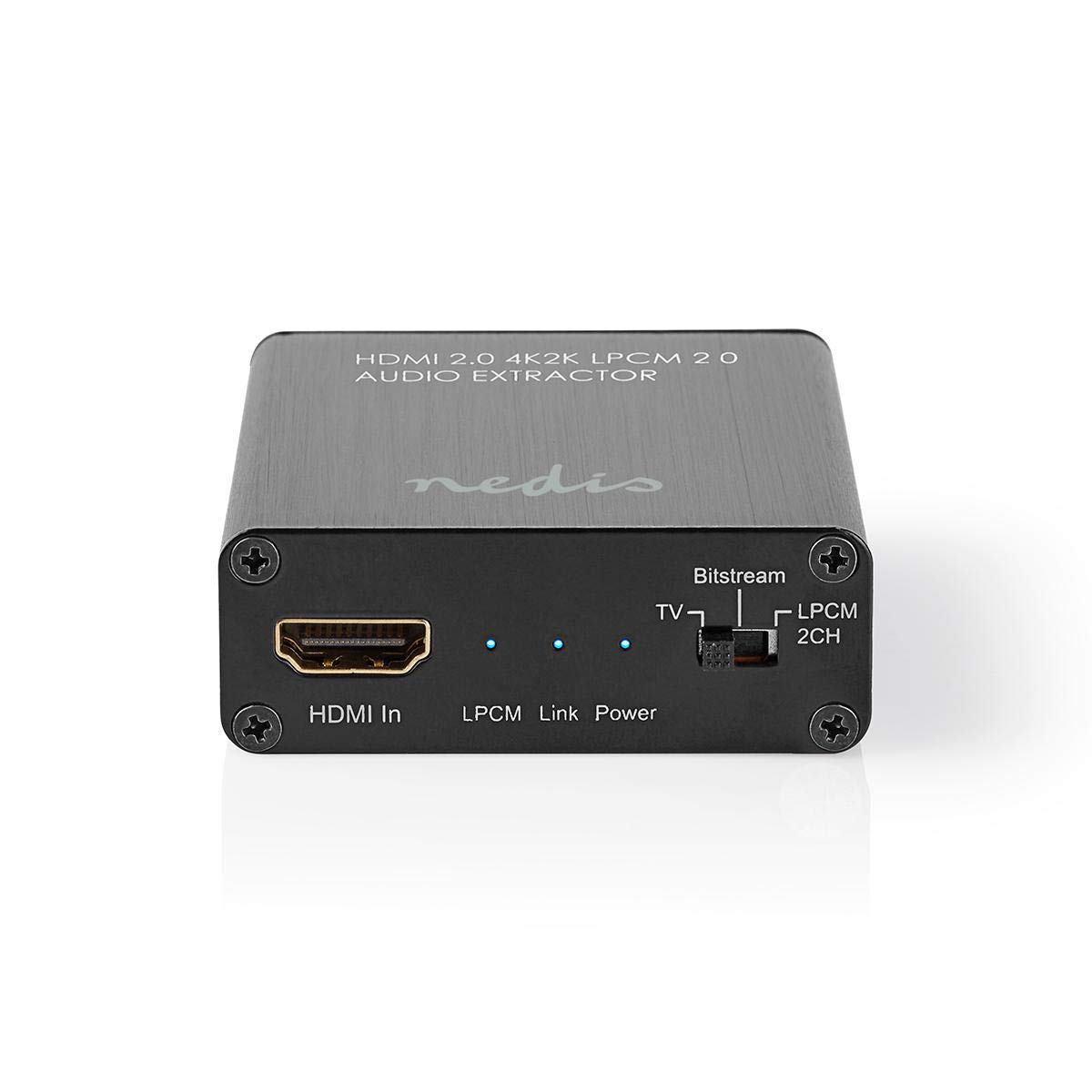
Image: The NEDIS VEXT3470AT HDMI Audio Extractor unit shown alongside its power adapter.
4. انتهى المنتجview
Familiarize yourself with the ports and indicators on the HDMI Audio Extractor:
4.1 Input Side
Image: Close-up of the input side of the audio extractor, showing the HDMI In port, LPCM, Link, and Power indicator LEDs, and the Audio Mode Switch.
- مدخل HDMI: Connect your HDMI source device (e.g., DVD/Blu-ray player, game console).
- LPCM LED: Indicates when LPCM audio format is detected.
- رابط LED: Indicates an active HDMI connection.
- مؤشر الطاقة LED: يضيء عند تشغيل الجهاز.
- Audio Mode Switch:
- تيار البت: For multi-channel audio formats like Dolby Digital or DTS.
- تلفزيون: Passes audio directly from the HDMI source to the TV.
- ال بي سي ام 2 قناة: For 2-channel stereo audio output via L/R analog and Toslink.
4.2 Output Side

Image: Close-up of the output side of the audio extractor, showing the 5V/DC power input, Optical (Toslink) audio output, HDMI Out port, and L/R analog audio outputs.
- 5V/DC: Power input port. Connect the provided power adapter here.
- بصري: Digital audio output (Toslink). Connect to an audio receiver or soundbar.
- مخرج HDMI: Connect to your TV or display.
- من اليسار إلى اليمين: Analog stereo audio output. Connect to an amplifier or stereo system using RCA cables.
5. تعليمات الإعداد
Follow these steps to connect your HDMI Audio Extractor:
- أجهزة إيقاف التشغيل: Ensure all devices (HDMI source, TV, audio system) are powered off before making connections.
- قم بتوصيل مصدر HDMI: Connect an HDMI cable from your source device (e.g., Blu-ray player) to the مدخل HDMI port on the audio extractor.
- توصيل الشاشة: Connect another HDMI cable from the مخرج HDMI port on the audio extractor to your TV or display.
- Connect Audio System:
- For digital audio, connect an optical Toslink cable from the بصري port on the extractor to your audio receiver or soundbar.
- For analog stereo audio, connect RCA cables from the يسار/يمين ports on the extractor to your stereo ampمكبرات الصوت أو مكبرات الصوت النشطة.
- توصيل الطاقة: قم بتوصيل محول الطاقة المرفق بـ 5 فولت/تيار مستمر port on the extractor, then plug the adapter into a power outlet. The Power LED should illuminate.
- تشغيل الأجهزة: Power on your TV/display, audio system, and then your HDMI source device.
6. تعليمات التشغيل
Once connected, operate the device as follows:
- حدد وضع الصوت: استخدم تبديل وضع الصوت on the input side to select the desired audio output format:
- تيار البت: For multi-channel audio (e.g., Dolby Digital, DTS) to be passed through the Optical output. Your audio receiver must support these formats.
- تلفزيون: Passes the audio directly to the TV via HDMI. Audio extraction via Optical/L/R may be limited or unavailable in this mode, depending on the source and TV capabilities.
- ال بي سي ام 2 قناة: Converts multi-channel audio to 2-channel LPCM for output via Optical and L/R analog ports. This is suitable for stereo systems or when your receiver does not support Bitstream formats.
- التحقق من المؤشرات:
- ال الصمام السلطة يجب أن يكون على.
- ال وصلة LED should be on when an active HDMI signal is detected from the source.
- ال LPCM LED will illuminate if the audio signal is in LPCM format.
- Adjust Audio System: Ensure your audio receiver or soundbar is set to the correct input (Optical or Analog L/R) and volume.
7. الصيانة
To ensure the longevity and optimal performance of your HDMI Audio Extractor:
- تنظيف: استخدم قطعة قماش ناعمة وجافة لتنظيف الجهاز. لا تستخدم المنظفات السائلة أو البخاخات.
- تخزين: قم بتخزين الجهاز في مكان بارد وجاف عندما لا يكون قيد الاستخدام.
- التعامل: تجنب إسقاط الجهاز أو تعريضه لصدمات قوية.
8. استكشاف الأخطاء وإصلاحها
في حال واجهت أي مشاكل، يرجى الرجوع إلى دليل استكشاف الأخطاء وإصلاحها التالي:
| مشكلة | السبب المحتمل / الحل |
|---|---|
| لا يوجد إخراج فيديو |
|
| لا يوجد إخراج صوتي |
|
| مؤشر الطاقة LED مطفأ |
|
| Intermittent Audio/Video |
|
9. المواصفات
Key technical specifications for the NEDIS VEXT3470AT HDMI Audio Extractor:
- رقم الموديل: VEXT3470AT
- ماركة: نيديس
- مدخل: 1 منافذ اتش دي ام اي
- الإخراج: 1x HDMI, 1x Optical (Toslink), 1x L/R Stereo (RCA)
- إصدار HDMI: Compatible with HDMI 2.0 (implied by 4K2K support in product name)
- دقة الفيديو: Up to 4K (4K2K)
- دعم ثلاثي الأبعاد: نعم
- صيغ الصوت: LPCM 2.0, Bitstream (Dolby Digital, DTS pass-through)
- مزود الطاقة: 5 فولت تيار مستمر (عبر محول مرفق)
- الأبعاد (الطول × العرض × الارتفاع): حوالي 7.7 × 6.4 × 2.3 سم
- وزن: 240 جرام
- لون: Anthracite (Black)
- بلد المنشأ: الصين
10. الضمان والدعم
NEDIS products are manufactured to high quality standards. In the unlikely event of a defect during the warranty period, please contact your retailer for support. The warranty period is subject to local consumer laws and regulations.
For technical assistance or further inquiries, please refer to the support information provided by your retailer or visit the official NEDIS webموقع.


