1. المقدمة
This manual provides essential information for the safe and effective operation of your Chauvin Arnoux C.A 1954 DiaCAM2 Thermal Camera. Please read this manual thoroughly before using the device and keep it for future reference. The C.A 1954 is a high-performance thermal imager designed for various applications, including building thermography, electrical maintenance, and mechanical diagnostics.

الشكل 1: الجبهة view of the Chauvin Arnoux C.A 1954 DiaCAM2 Thermal Camera, showing the display with a thermal image.
2. الميزات الرئيسية
The C.A 1954 DiaCAM2 Thermal Camera offers a range of advanced features for professional use:
- عمر بطارية ممتد: Up to 9 hours of continuous operation with standard NiMH or alkaline batteries.
- Focus-Free Operation: No manual focus adjustment needed, ensuring sharp images at any distance.
- مجال واسع من View: A 38° x 28° lens for comprehensive area coverage.
- الاتصال المتكامل: Bluetooth for connection to clamp current transformers, multimeters, and environmental sensors.
- Voice Comments: Directly add voice notes to captured thermal images.
- إنذارات قابلة للبرمجة: Acoustic and visual alarms for critical temperature detection.
- واجهة بديهية: Large 2.8-inch display with automatic brightness adjustment and single-hand operation.
- CAmReport Software: Advanced thermal imaging analysis and automatic report generation.
- تصميم قوي: IP54 protection rating for use in various environments.
3. الإعداد والاستخدام الأولي
3.1. تركيب البطارية
- تأكد من إيقاف تشغيل الجهاز.
- Locate the battery compartment on the handle of the camera.
- افتح غطاء الحجرة.
- Insert standard NiMH or alkaline batteries, ensuring correct polarity.
- أغلق غطاء حجرة البطارية جيدًا.
3.2. إدخال بطاقة MicroSD
- Locate the MicroSD card slot, typically on the side of the camera.
- Gently insert the MicroSD card (2GB card included, supports up to 32GB) into the slot until it clicks into place.
- To remove, press the card gently to release it.
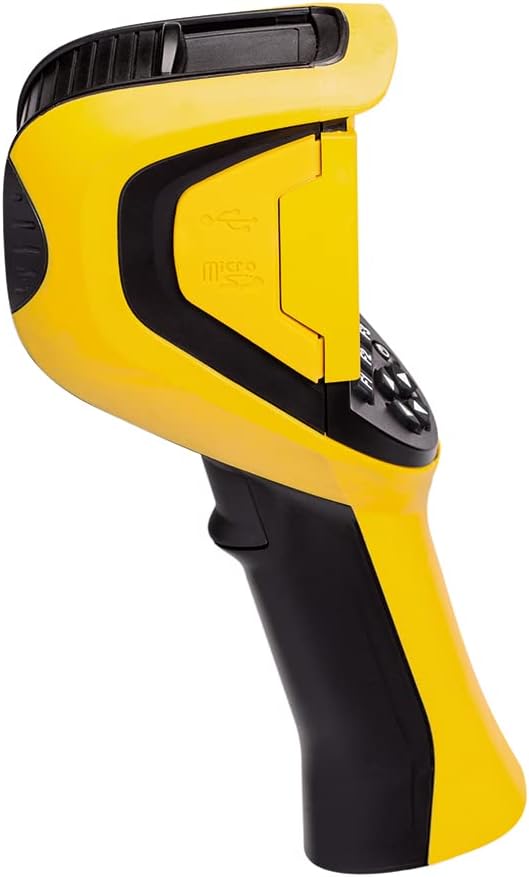
الشكل 2: الجانب view of the C.A 1954, highlighting the MicroSD card slot.
3.3. التشغيل الأولي
- اضغط مع الاستمرار على زر الطاقة حتى تضيء الشاشة.
- The camera will perform a self-test and then display the live thermal image.
4. تعليمات التشغيل
4.1. التشغيل الأساسي
The C.A 1954 is designed for comfortable single-handed use. The large 2.8-inch display automatically adjusts brightness for optimal viewعمل.

Figure 3: A user operating the C.A 1954 thermal camera to inspect an electrical panel.
4.2. Capturing Thermal Images
- Point the camera at the target area. The focus-free lens ensures clear images without manual adjustment.
- اضغط على زر الالتقاط لالتقاط صورة حرارية.
- Images are automatically saved to the MicroSD card.
4.3. Adding Voice Comments
To add a voice comment to a captured image:
- After capturing an image, select the option to add a voice comment (refer to on-screen prompts).
- Speak clearly into the integrated microphone.
- The voice comment will be saved with the image file.
4.4. اتصال البلوتوث
The C.A 1954 can connect to other Chauvin Arnoux measuring instruments via Bluetooth to record additional parameters simultaneously (e.g., current intensity, temperature, humidity, dew point). Refer to the camera's on-screen menu for Bluetooth pairing instructions.
4.5. Using CAmReport Software
The CAmReport software is a powerful tool for analyzing thermal images and generating reports. It allows for:
- Precise analysis with measurement cursors to display temperature at selected points.
- المحترف الحراريfiles showing min/max/average temperatures along a line.
- Area analysis by drawing squares or circles.
- Customization of the emissivity table.
- Automatic generation of test reports in PDF or Word format.
Install CAmReport on your PC and connect the camera (or insert the MicroSD card) to transfer and analyze data.
5. الصيانة
5.1. تنظيف الجهاز
لتنظيف جسم الكاميرا، استخدم قطعة قماش ناعمة و...amp cloth. Do not use abrasive cleaners or solvents. For the lens, use a specialized lens cleaning cloth and solution to avoid scratching.
5.2. حماية العدسات
The C.A 1954 features a captive sliding shutter to protect the lens when not in use. Always ensure the shutter is closed when storing or transporting the camera.
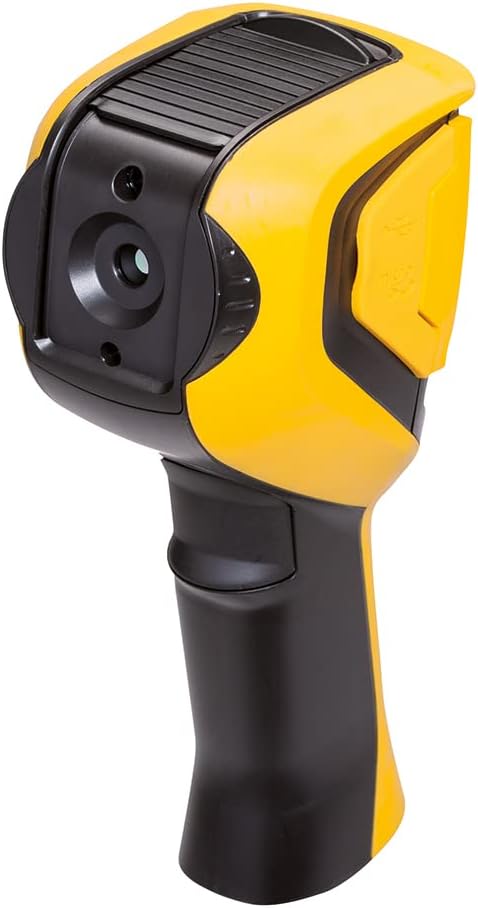
الشكل 4: خلفي view of the C.A 1954, showing the lens and its protective sliding shutter.
5.3. العناية بالبطارية
For optimal battery life and performance, use high-quality NiMH rechargeable batteries or alkaline batteries. Remove batteries if the device will not be used for an extended period.
6. استكشاف الأخطاء وإصلاحها
If you encounter issues with your C.A 1954, refer to the following common troubleshooting steps:
- الجهاز لا يعمل: تأكد من تركيب البطارية ومستوى شحنها. استبدل البطاريات إذا لزم الأمر.
- الصورة غير واضحة/ضبابية: Ensure the lens is clean and the protective shutter is fully open. The camera is focus-free, so no manual adjustment is needed.
- لا يمكن حفظ الصور: Check if the MicroSD card is properly inserted and has sufficient free space. Try reformatting the card (this will erase all data).
- مشاكل اتصال البلوتوث: Ensure both devices are in pairing mode and within range. Refer to the camera's Bluetooth settings.
For persistent issues or technical support, please contact Chauvin Arnoux customer service.
7. المواصفات الفنية
| المعلمة | قيمة |
|---|---|
| مستشعر الأشعة تحت الحمراء | 160 x 120 UFPA Microbolometer, 8 ~ 14µm |
| الحساسية الحرارية (NETD) | 0.08K @ 30°C (0.08°C @ 30°C) |
| IFOV (الدقة المكانية) | 4.4 مراد |
| مدى درجة الحرارة | -20 درجة مئوية إلى 250 درجة مئوية |
| نوع العرض | Thermal image, Photo image with auto parallax compensation, Image overlay via PC software |
| أدوات القياس | Manual cursor, Auto detection, Min/Max/Avg, Thermal profile, Isotherms (with Bluetooth dew point) |
| المعلمات القابلة للتعديل | Emissivity, Ambient temperature, Distance, Relative humidity |
| تخزين | 2GB µSD card (approx. 4000 images), expandable up to 32GB |
| تصنيف الحماية | الملكية الفكرية 54 |
| الأبعاد (الطول × العرض × الارتفاع) | 225 × 125 × 83 ملم |
| الوزن (مع البطاريات) | 700 جرام |
| مادة | بلاستيك |
| الشركة المصنعة | شوفين أرنو |
8. الضمان والدعم
For information regarding the product warranty, please refer to the documentation provided with your purchase or contact Chauvin Arnoux directly. Spare parts availability information is not provided in this manual; please inquire with the manufacturer or authorized service centers.
For technical support, service, or spare parts inquiries, please contact Chauvin Arnoux customer service through their official webالموقع أو بيانات الاتصال المقدمة عند نقطة الشراء.


