مقدمة
This user manual provides detailed instructions for the proper use and maintenance of your AUTOPHIX OM123 OBD2 Scanner. The OM123 is a universal automotive diagnostic scan tool designed to read and clear engine fault codes, view live data, and retrieve vehicle information for OBDII/EOBD+CAN compliant vehicles. Please read this manual thoroughly before operating the device.
المنتج انتهىview
The AUTOPHIX OM123 OBD2 Scanner is a compact and user-friendly diagnostic tool. It features a large LCD display with backlight for clear readability and intuitive navigation buttons.
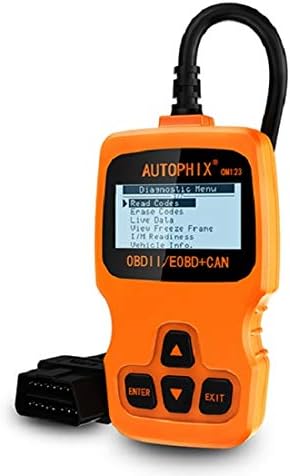
الشكل 1: أمام view of the AUTOPHIX OM123 OBD2 Scanner, showing the display and control buttons.
المميزات الرئيسية:
- وظائف التشخيص: Reads and clears Diagnostic Trouble Codes (DTCs), turns off the Malfunction Indicator Lamp (MIL), views live data streams, and displays freeze frame data.
- أنا / م الاستعداد: Checks the status of emission-related monitors to ensure vehicle readiness for emissions testing.
- استرجاع معلومات المركبة: Accesses Vehicle Identification Number (VIN), Calibration ID (CIN), and Calibration Verification Number (CVN).
- توافق واسع: Supports all OBDII protocols, including CAN, J1850 PWM, J1850 VPW, ISO9141, and KWP2000. Compatible with most vehicles manufactured from 1996 onwards.
- واجهة سهلة الاستخدام: Features a large 128 x 64 pixel LCD display with white backlight and contrast adjustment. Built-in OBD2 fault code definitions eliminate the need for external lookup.
- لا البطاريات المطلوبة: Powered directly via the detachable OBDII cable from the vehicle's OBDII port.
- دعم متعدد اللغات: Available in English, French, German, Spanish, Dutch, Finnish, Portuguese, and Russian.

الشكل 2: The OM123 scanner's display showing the main diagnostic menu options: Read Codes, Erase Codes, Live Data, View Freeze Frame, I/M Readiness, and Vehicle Info.
أبعاد الجهاز:

الشكل 3: Dimensions of the AUTOPHIX OM123 scanner: approximately 125mm (height), 70mm (width), and 22mm (thickness).
يثبت
- حدد موقع منفذ OBDII: The OBDII port is typically located under the dashboard on the driver's side of the vehicle. Refer to your vehicle's owner's manual for the exact location.
- توصيل الماسح الضوئي: With the vehicle's ignition off, firmly plug the OM123 scanner's OBDII connector into the vehicle's OBDII port.
- تشغيل الطاقة: Turn the vehicle's ignition to the "ON" position (do not start the engine). The scanner will automatically power on and display the main menu.
- اختيار اللغة (إذا لزم الأمر): If the device is not in your preferred language, navigate to the "Settings" or "System Setup" menu (if available) to select the desired language.
تعليمات التشغيل
Once the scanner is connected and powered on, use the UP و تحت arrow buttons to navigate through the menu options, the يدخل button to confirm a selection, and the EXIT زر للعودة إلى الشاشة السابقة.
1. قراءة الرموز
This function retrieves Diagnostic Trouble Codes (DTCs) from the vehicle's computer. These codes indicate specific issues detected by the vehicle's onboard diagnostic system.
- من القائمة الرئيسية، حدد "Read Codes" و اضغط يدخل.
- The scanner will communicate with the vehicle and display any stored DTCs.
- استخدم UP و تحت buttons to scroll through multiple codes if present. The built-in DTC library provides definitions for common codes.
2. محو الرموز
This function clears all Diagnostic Trouble Codes (DTCs) from the vehicle's computer and turns off the Malfunction Indicator Lamp (MIL), also known as the "Check Engine" light. Ensure any underlying issues are resolved before clearing codes, as they may reappear if the problem persists.
- من القائمة الرئيسية، حدد "Erase Codes" و اضغط يدخل.
- قم بتأكيد اختيارك عندما يُطلب منك ذلك.
- The scanner will clear the codes and the MIL should turn off.
3. البيانات المباشرة
This function displays real-time operational parameters from the vehicle's sensors and modules. This data can be useful for diagnosing intermittent problems or verifying repairs.
- من القائمة الرئيسية، حدد "بيانات مباشرة" و اضغط يدخل.
- سيعرض الماسح الضوئي قائمة بمعلمات البيانات المتاحة.
- استخدم UP و تحت buttons to scroll through the data.
4. View تجميد الإطار
When an emission-related fault occurs, the vehicle's computer stores a "freeze frame" of data, capturing the engine conditions at the moment the fault was detected. This snapshot can help in diagnosing the cause of the problem.
- من القائمة الرئيسية، حدد "View Freeze Frame" و اضغط يدخل.
- The scanner will display the stored freeze frame data.
5. جاهزية I/M
I/M Readiness (Inspection/Maintenance Readiness) indicates whether the various emission-related systems on the vehicle are functioning correctly and have completed their self-tests. This is crucial for emissions testing.
- من القائمة الرئيسية، حدد "الاستعداد للتحليل والتحليل" و اضغط يدخل.
- The scanner will display the status of various monitors (e.g., Catalyst Monitor, O2 Sensor Monitor). "OK" or "Complete" indicates the test has passed; "INC" or "Not Complete" indicates the test has not yet run or failed.
6. معلومات السيارة
This function allows you to retrieve important vehicle identification information.
- من القائمة الرئيسية، حدد "Vehicle Info." و اضغط يدخل.
- The scanner will display information such as VIN (Vehicle Identification Number), CIN (Calibration Identification Number), and CVN (Calibration Verification Number).
صيانة
- تنظيف: استخدم قطعة قماش ناعمة وجافة لتنظيف غطاء الماسح الضوئيasing and screen. Avoid using abrasive cleaners or solvents.
- تخزين: Store the device in a clean, dry environment, away from extreme temperatures and direct sunlight.
- العناية بالكابلات: Ensure the OBDII cable is not kinked or damaged. Always grasp the connector when plugging or unplugging, not the cable itself.
- تحديثات البرامج: تحقق من الشركة المصنعة webقم بزيارة الموقع بشكل دوري للاطلاع على أي تحديثات برمجية متاحة لضمان الأداء الأمثل والتوافق.
استكشاف الأخطاء وإصلاحها
| مشكلة | السبب المحتمل | حل |
|---|---|---|
| Scanner does not power on or screen is blank. |
|
|
| حدث خطأ في الاتصال بالمركبة. |
|
|
| لا يمكن مسح الرموز. |
|
|
تحديد
| ميزة | التفاصيل |
|---|---|
| رقم الموديل | أوم123 |
| عرض | 128 x 64 pixel LCD with white backlight and contrast adjustment |
| حجم التشغيلtage | 9-16V (via OBDII port) |
| البروتوكولات المدعومة | CAN, J1850 PWM, J1850 VPW, ISO9141, KWP2000 |
| درجة حرارة التشغيل | 0 درجة مئوية إلى 60 درجة مئوية (32 درجة فهرنهايت إلى 140 درجة فهرنهايت) |
| درجة حرارة التخزين | -20 درجة مئوية إلى 70 درجة مئوية (-4 درجة فهرنهايت إلى 158 درجة فهرنهايت) |
| أبعاد | تقريبا. شنومكسم x شنومكسم x شنومكسم |
| وزن | حوالي 10.4 أونصة (295 جرامًا) |
| الشهادات | لجنة الاتصالات الفيدرالية، الاتحاد الأوروبي، حظر المواد الخطرة |
الضمان والدعم
The AUTOPHIX OM123 OBD2 Scanner comes with a one-year warranty from the date of purchase, covering manufacturing defects. For technical support, warranty claims, or further assistance, please contact AUTOPHIX customer service through their official webالموقع أو بائع التجزئة الذي تم شراء المنتج منه.
لمزيد من المعلومات قم بزيارة الموقع الرسمي AUTOPHIX Store.


