1. معلومات السلامة
Before using the Zipro Beat RS Magnetic Exercise Bike, please read and understand all safety instructions. Retain this manual for future reference.
- استشر طبيبًا قبل البدء بأي برنامج تمرين جديد.
- تأكد من ربط جميع البراغي والصواميل بشكل آمن قبل كل استخدام.
- ضع الدراجة الرياضية على سطح مستوٍ وثابت. استخدم سجادة لحماية الأرضية.
- أبقِ الأطفال والحيوانات الأليفة بعيدًا عن الجهاز أثناء التشغيل.
- الحد الأقصى لوزن المستخدم لهذا الجهاز هو 120 كجم.
- ارتدِ ملابس وأحذية رياضية مناسبة.
- توقف عن ممارسة التمارين الرياضية فورًا إذا شعرت بالإغماء أو الدوار أو الألم.
2. انتهى المنتجview
The Zipro Beat RS is a magnetic exercise bike designed for home fitness. It features an ergonomic design, adjustable resistance, and a multi-function computer to track your workout progress.

الشكل 1: انتهىview of the Zipro Beat RS Magnetic Exercise Bike. This image displays the full exercise bike with its main components, including the handlebars, seat, pedals, and central unit with the computer display.
3. تعليمات التجميع
Assembly of the Zipro Beat RS exercise bike typically involves attaching the base stabilizers, pedals, seat, handlebars, and the computer console. Refer to the included assembly diagram for detailed steps.
- تثبيت المثبتات: قم بتأمين المثبتات الأمامية والخلفية بالإطار الرئيسي باستخدام البراغي والغسالات المتوفرة.
- تثبيت الدواسات: Attach the left and right pedals to their respective crank arms. Note that pedals are often marked 'L' and 'R' and thread in opposite directions.
- تركيب عمود المقعد والمقعد: أدخل عمود المقعد في الإطار وثبته. ثم قم بتوصيل المقعد بعمود المقعد.
- تجميع المقود: Attach the handlebar post to the main frame, then secure the handlebars to the post. Connect any sensor cables if applicable.
- تثبيت وحدة تحكم الكمبيوتر: Mount the computer console onto the handlebar post. Connect the sensor cables (pulse, speed) and the battery.

Figure 2: A user exercising on the Zipro Beat RS bike, demonstrating its ergonomic design and compact size suitable for home use. This image highlights the bike's overall appearance and how it fits into a living space.
4. تعليمات التشغيل
4.1 ضبط المقعد
Proper seat height is crucial for comfort and effective exercise. Adjust the seat so that your leg is slightly bent at the knee when the pedal is at its lowest point.

Figure 3: Illustration of the seat height adjustment mechanism. The image shows how to raise or lower the seat to achieve the correct ergonomic position for the user.
4.2 Using the Multifunction Computer
The integrated computer displays various workout metrics. It is battery-powered.
- تشغيل/إيقاف التشغيل: The computer typically turns on automatically when you start pedaling or press any button. It will power off after a period of inactivity.
- أوضاع العرض: Use the 'MODE' button to cycle through different display functions such as Time, Speed, Distance, Calories, and Pulse.
- وظيفة المسح الضوئي: The 'SCAN' function automatically cycles through all metrics, providing a continuous overview of your workout without manual input.
- إعادة تعيين: Press and hold the 'RESET' button to clear all current workout data.
- قياس النبض: Grip the pulse sensors on the handlebars to display your heart rate. An alarm may sound if your heart rate exceeds a preset safety level.

الشكل 4: الصورة عن قرب view of the multifunction computer display, showing various metrics and control buttons. This image illustrates the interface for tracking workout data.
4.3 ضبط المقاومة
The Zipro Beat RS features an 8-level manual magnetic resistance system. Turn the resistance knob located below the handlebars to increase or decrease the workout intensity.
- Turn the knob clockwise to increase resistance (higher numbers).
- Turn the knob counter-clockwise to decrease resistance (lower numbers).

الشكل 5: مفصل view of the manual resistance adjustment knob. The image shows the numbered dial (1-8) used to control the intensity of the magnetic resistance.
4.4 استخدام حامل الجهاز
A dedicated holder is provided on the console for your smartphone or tablet, allowing you to enjoy media during your workout.

Figure 6: The integrated smartphone or tablet holder on the exercise bike's console. This feature allows users to place their devices securely for entertainment or tracking during exercise.
5. الصيانة
تضمن الصيانة المنتظمة طول عمر الدراجة الرياضية وتشغيلها بشكل آمن.
- تنظيف: امسح الدراجة بالإعلانamp امسح بقطعة قماش بعد كل استخدام لإزالة العرق والغبار. تجنب المنظفات الكاشطة.
- تقتيش: افحص جميع البراغي والصواميل والأجزاء المتحركة دوريًا للتأكد من إحكامها وسلامتها. شد أي مثبتات مفكوكة.
- تشحيم: The magnetic resistance system is generally maintenance-free. If you notice any unusual noises from moving parts, consult the manufacturer's support.
- تخزين: When not in use, store the bike in a dry, cool place. The integrated transport wheels facilitate easy relocation.
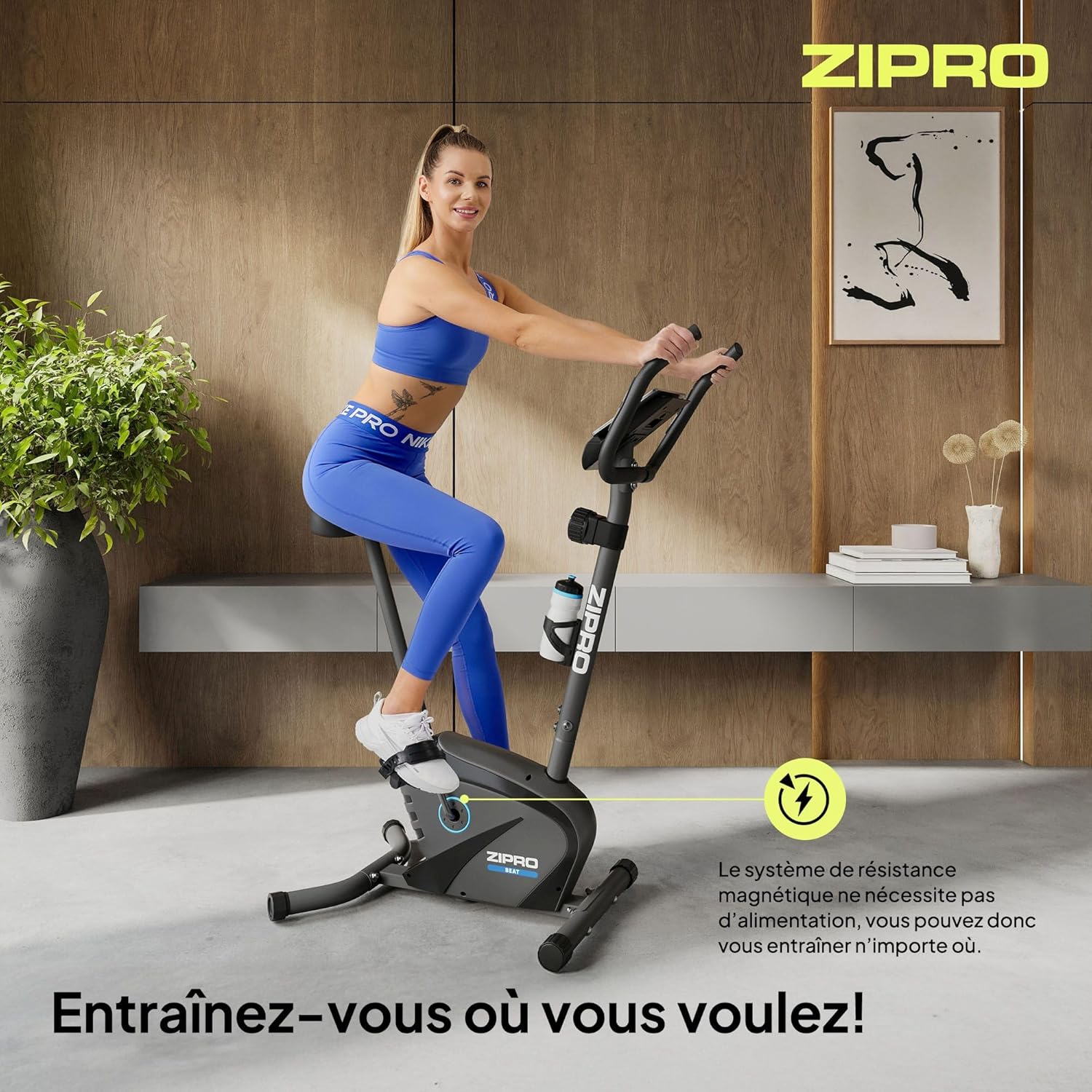
Figure 7: Close-up of the transport wheels located at the front base of the exercise bike. These wheels allow for easy movement and storage of the equipment.
6. استكشاف الأخطاء وإصلاحها
This section addresses common issues you might encounter with your Zipro Beat RS exercise bike.
- شاشة الكمبيوتر لا تعمل:
حل: Check the batteries in the computer console. Replace them if necessary. Ensure all cables connecting to the console are securely plugged in. - No Resistance or Inconsistent Resistance:
حل: Verify that the resistance adjustment knob is functioning correctly and is not stuck. Ensure no foreign objects are obstructing the magnetic flywheel. - ضوضاء غير عادية أثناء التشغيل:
حل: Stop exercising and inspect the bike for any loose parts, bolts, or connections. Tighten any loose components. If the noise persists, contact customer support. - غير مستقر أثناء الاستخدام:
حل: Ensure the bike is placed on a flat, level surface. Adjust the leveling feet (if present) on the stabilizers to eliminate wobbling.
7. المواصفات
Detailed technical specifications for the Zipro Beat RS Magnetic Exercise Bike.
| ميزة | مواصفة |
|---|---|
| نموذج | تغلب على آر إس |
| ماركة | زيبرو |
| آلية المقاومة | مغناطيسي |
| مستويات المقاومة | 8 (الضبط اليدوي) |
| الحد الأقصى لوزن المستخدم | 120 كجم |
| أبعاد المنتج (الطول × العرض × الارتفاع) | 107 × 59 × 127 سم |
| وزن المنتج | 20.5 كجم |
| وظائف الكمبيوتر | Time, Speed, Distance, Calories, Pulse, SCAN |
| Power Source (Computer) | تعمل بالبطارية |
| المميزات الخاصة | Bottle holder, Transport wheels, Device holder |
| Suggested User Height | 155-200 سم |

Figure 8: Diagram illustrating the key dimensions of the Zipro Beat RS exercise bike and the suggested user height range. This provides visual context for the product's size and ergonomic fit.
8. الضمان والدعم
For warranty information, please refer to the documentation provided with your purchase or contact your retailer. Specific warranty terms may vary by region and retailer.
If you require technical assistance or have questions not covered in this manual, please contact the manufacturer's customer support or your point of purchase. Keep your purchase receipt and model number (1592574) handy for faster service.


