مقدمة
Thank you for choosing the NEDIS Wi-Fi Smart Fan Heater. This manual provides essential information for the safe and efficient operation of your new device. Please read these instructions carefully before use and retain them for future reference. Proper use and maintenance will ensure optimal performance and longevity of the product.
تعليمات السلامة
لتقليل خطر نشوب حريق أو التعرض لصدمة كهربائية أو الإصابة، اتبع دائمًا احتياطات السلامة الأساسية التالية:
- اقرأ جميع التعليمات قبل استخدام هذا السخان.
- لا تستخدم هذا السخان بالقرب من حوض الاستحمام أو الدش أو حمام السباحة.
- لا تقم بتغطية المدفأة. فتغطية المدفأة قد تتسبب في ارتفاع درجة حرارتها بشكل مفرط ونشوب حريق.
- Keep combustible materials such as furniture, pillows, bedding, papers, clothes, and curtains at least 1 meter (3 feet) from the front of the heater and keep them away from the sides and rear.
- افصل دائمًا السخان عن التيار الكهربائي عندما لا يكون قيد الاستخدام.
- لا تقم بتشغيل أي سخان به سلك أو قابس تالف أو بعد تعطل السخان أو سقوطه أو تلفه بأي شكل من الأشكال.
- لا تمرر السلك تحت السجاد. لا تغطي السلك بسجاد أو أغطية أو أغطية مماثلة. ضع السلك بعيدًا عن منطقة المرور حيث لن يتعثر.
- من الضروري اتخاذ أقصى درجات الحذر عند استخدام أي سخان بواسطة الأطفال أو المعوقين أو بالقرب منهم وعندما يتم ترك السخان قيد التشغيل وبدون مراقبة.
- This heater is equipped with a tip-over protection switch that automatically shuts off the heater if it is accidentally knocked over.
- تأكد من وضع السخان على سطح ثابت ومستوٍ.
- للاستخدام الداخلي فقط.
المنتج انتهىview
Familiarize yourself with the main components of your NEDIS Wi-Fi Smart Fan Heater.
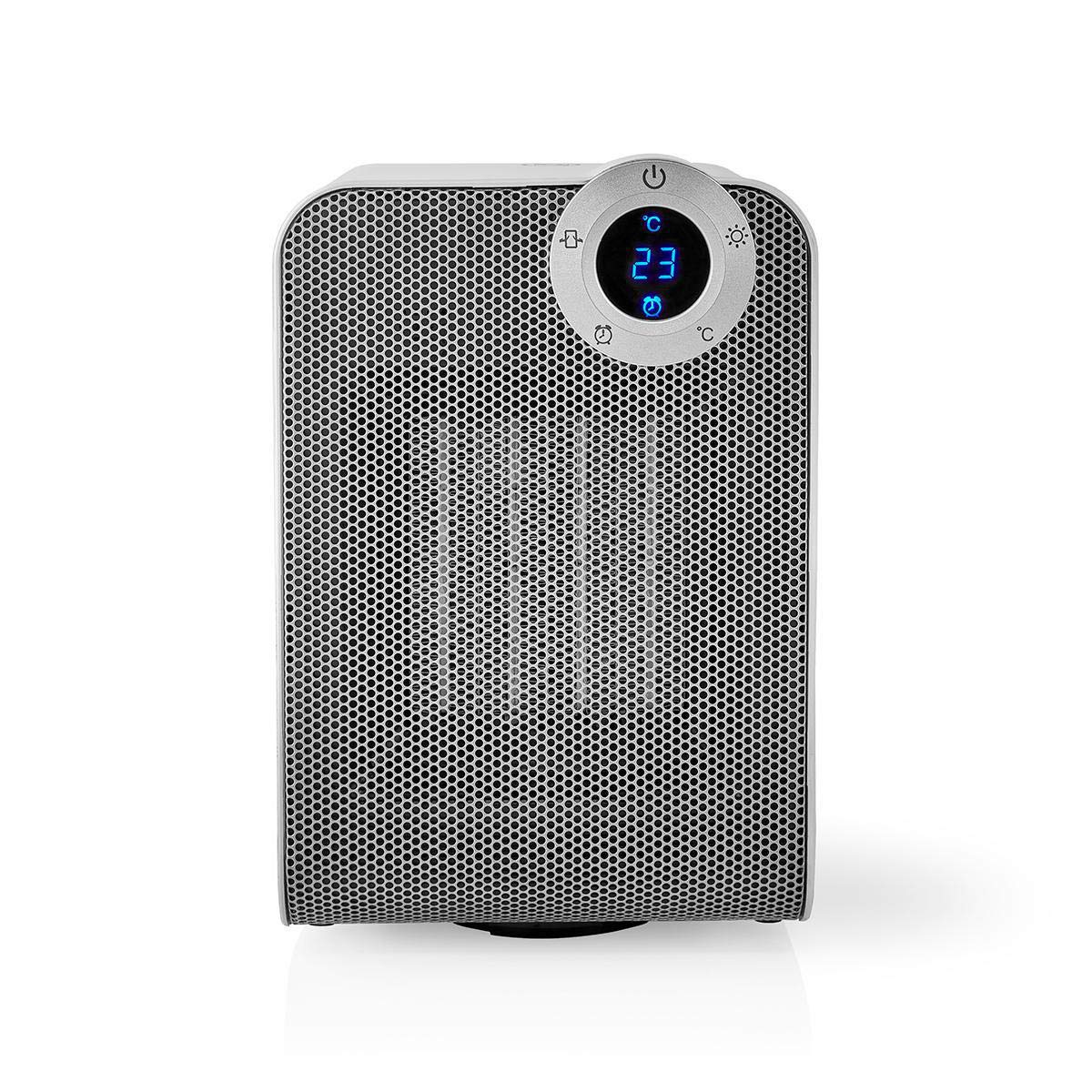
The front panel features a digital display that shows the current temperature and settings. Surrounding the display are touch-sensitive buttons for power, mode selection, oscillation, and timer functions.

The rear of the heater includes the main power switch (often a rocker switch) and the air intake grille. Ensure this area is not obstructed for proper airflow.

The compact design of the heater allows for easy placement in various indoor settings.
يثبت
فك التعبئة
- قم بإزالة السخان من عبوته بعناية.
- تحقق من عدم وجود أي تلف أثناء النقل. في حال وجود أي تلف، لا تشغّل الجهاز واتصل بخدمة العملاء.
- احتفظ بالتغليف للتخزين أو النقل في المستقبل.
التنسيب
- ضع السخان على سطح ثابت ومستوٍ.
- Ensure there is at least 1 meter (3 feet) of clear space around the heater to allow for proper air circulation and to prevent fire hazards.
- Do not place the heater near curtains, drapes, or other loose fabrics that could block the air intake or outlet.
- تأكد من عدم انضغاط سلك الطاقة أو وضعه تحت أشياء ثقيلة.
التشغيل الأولي
- Plug the heater into a suitable electrical outlet (220-240V AC, 50/60Hz).
- Flip the main power switch on the back of the unit to the 'ON' position.
- The digital display on the front will illuminate, indicating the heater is in standby mode.
Wi-Fi Connection & App Setup
The NEDIS Wi-Fi Smart Fan Heater can be controlled via the Nedis SmartLife app, offering advanced features and remote control.
- تنزيل نيديس سمارت لايف قم بتنزيل التطبيق من متجر التطبيقات (iOS) أو متجر Google Play (Android).
- قم بالتسجيل للحصول على حساب جديد أو قم بتسجيل الدخول إذا كان لديك حساب بالفعل.
- تأكد من أن هاتفك الذكي متصل بشبكة Wi-Fi بتردد 2.4 جيجا هرتز.
- في التطبيق، انقر على أيقونة "+" لإضافة جهاز جديد.
- Follow the on-screen instructions in the app to connect your heater to your Wi-Fi network. This usually involves putting the heater into pairing mode (refer to the app for specific instructions, often by pressing and holding a button on the heater).
- Once connected, you can control the heater from anywhere using the app.
تعليمات التشغيل
التحكم اليدوي
The heater can be operated directly using the touch buttons on the front panel:
- زر الطاقة: اضغط لتشغيل السخان أو إيقاف تشغيله.
- زر الوضع: Cycle through heating modes (e.g., High Heat 1800W, Low Heat 900W, Fan Only).
- ضبط درجة الحرارة: Use the '+' and '-' buttons (or similar) to set the desired temperature. The heater will operate at 1800W for rapid heating and automatically switch to 900W once the set temperature is approached.
- زر التذبذب: Press to activate or deactivate the horizontal oscillation feature, distributing heat across a wider area.
- زر المؤقت: Set a timer for the heater to automatically turn off after a specified duration.
SmartLife App Control
Once connected to the Nedis SmartLife app, you can access advanced control features:
- تشغيل/إيقاف التشغيل عن بُعد: تحكم في المدفأة من أي مكان.
- ضبط درجة الحرارة: Precisely set and monitor the room temperature.
- اختيار الوضع: Choose between different heating levels or fan-only mode.
- التحكم في التذبذب: تشغيل ميزة التذبذب أو إيقاف تشغيلها.
- الجدولة: Create custom heating schedules for different times of the day or week.
- وظيفة المؤقت: Set a countdown timer for automatic shutdown.
التحكم الصوتي
The heater supports voice control through popular smart assistants. To enable this, link your Nedis SmartLife account with your preferred voice assistant (Google Home or Amazon Alexa) via their respective apps. Once linked, you can use voice commands such as:
- "Hey Google, turn on the heater."
- "Alexa, set the heater to 22 degrees."
- "Hey Google, turn off the heater."
صيانة
تنظيف
Regular cleaning helps maintain the heater's efficiency and extends its lifespan.
- افصل دائمًا السخان واتركه حتى يبرد تمامًا قبل التنظيف.
- امسحي الأسطح الخارجية بقطعة ناعمة ، دamp القماش. لا تستخدم المنظفات أو المذيبات الكاشطة.
- Use a vacuum cleaner with a brush attachment to remove dust from the air intake and outlet grilles.
- تأكد من عدم دخول الماء إلى داخل السخان.
تخزين
عند عدم الاستخدام لفترات طويلة:
- Unplug the heater and clean it as described above.
- قم بتخزين المدفأة في عبوتها الأصلية أو في صندوق مناسب لحمايتها من الغبار والتلف.
- Keep it in a cool, dry place, away from direct sunlight and moisture.
استكشاف الأخطاء وإصلاحها
إذا واجهت مشاكل مع السخان الخاص بك، راجع المشاكل والحلول الشائعة التالية:
| مشكلة | السبب المحتمل | حل |
|---|---|---|
| السخان لا يعمل. | No power, main switch off, tip-over switch activated. | Check power outlet, ensure main switch is ON, place heater upright on a stable surface. |
| لا يوجد مخرج للحرارة. | Incorrect mode, thermostat setting too low. | Select a heating mode (High/Low), increase the thermostat setting above the current room temperature. |
| فشل الاتصال بشبكة Wi-Fi. | كلمة مرور Wi-Fi غير صحيحة، شبكة 5 جيجاهرتز، المسافة من جهاز التوجيه. | Verify Wi-Fi password, ensure you are on a 2.4GHz network, move heater closer to the router, try re-pairing. |
| يتم إيقاف تشغيل السخان بشكل غير متوقع. | Overheating protection, tip-over protection, timer activated. | Ensure heater is not covered, clear obstructions, place upright, check timer settings. Allow to cool before restarting. |
تحديد
| ميزة | مواصفة |
|---|---|
| رقم الموديل | WIFIFNH20CWT |
| مصدر الطاقة | كهرباء سلكية |
| انتاج الطاقة | 1800 واط (مرتفع) ، 900 واط (منخفض) |
| طريقة التسخين | الحمل الحراري |
| الأبعاد (الطول × العرض × الارتفاع) | 16.5 × 14.5 × 25 سم |
| وزن العنصر | 1.8 كجم |
| لون | أبيض فضي |
| المميزات الخاصة | On/Off Timer, Oscillation, Tip-over Protection, Thermostat, Wi-Fi, App Control, Voice Control (Alexa, Google Home) |
| نوع التثبيت | جبل الطابق |
| الاستخدام الموصى به | غرفة داخلية، منزل، غرفة دراسة |
| البطاريات المطلوبة | لا |
الضمان والدعم
Your NEDIS Wi-Fi Smart Fan Heater is covered by a manufacturer's warranty. Please refer to the warranty card included with your purchase for specific terms and conditions, including the warranty period and coverage details.
For technical support, troubleshooting assistance, or warranty claims, please contact NEDIS customer service. Contact information can typically be found on the product packaging, the NEDIS webالموقع أو إيصال الشراء الخاص بك.


