1. المقدمة
This manual provides detailed instructions for the installation, operation, and maintenance of your Dynavin N7-VT7 PRO Radio Navigation System. This system is designed as a direct replacement for the factory radio in VW Touareg models from 2003 to 2009, integrating seamlessly with your vehicle's existing systems.
تتضمن الميزات الرئيسية ما يلي:
- 7-inch capacitive LCD touch screen display (1024 x 600 resolution)
- Integrated GPS navigation with maps for North America, Europe, or Australia
- بلوتوث لإجراء مكالمات بدون استخدام اليدين وبث الصوت
- Apple CarPlay and Android Auto compatibility via USB
- USB and Micro SD card media playback
- موالف راديو AM/FM
- Backup camera readiness
- Integration with vehicle's DSP processor (if equipped)
2. معلومات السلامة
إخلاء المسؤولية القانونية الهامة:
- Installation must be performed by a trained specialist.
- Ensure the vehicle is de-energized before beginning installation.
- In some cases, the vehicle battery may need to be disconnected. Consult your vehicle manufacturer's guidelines.
- Modifying vehicle electronics may affect manufacturer warranty.
Always prioritize safety during installation and operation. Avoid operating the system's complex functions while driving to prevent distractions.
3. الإعداد والتثبيت
The Dynavin N7-VT7 PRO is designed for plug-and-play installation, integrating with your vehicle's factory wiring and controls. Professional installation is highly recommended to ensure proper functionality and to avoid damage to the unit or vehicle.
3.1 محتويات العبوة
تأكد من وجود جميع المكونات في العبوة:
- Dynavin N7-VT7 PRO Head Unit
- هوائي نظام تحديد المواقع العالمي (GPS)
- كابل يو اس بي
- Wiring Harnesses (vehicle-specific)
- دليل المستخدم (هذا المستند)
- ميكروفون خارجي (إن وجد)
3.2 انتهى التثبيتview
The unit replaces the existing factory radio. Specific steps for removal of the old unit and installation of the new Dynavin system will vary slightly depending on your vehicle's trim. Refer to a qualified installer or vehicle-specific guides for detailed instructions.

الشكل 3.1: The Dynavin N7-VT7 PRO unit seamlessly integrated into a Volkswagen Touareg dashboard, demonstrating its OEM-look design.
After physical installation, connect all wiring harnesses, the GPS antenna, and any external accessories like a backup camera or SiriusXM tuner (sold separately).
4. تعليمات التشغيل
The Dynavin N7-VT7 PRO features an intuitive touchscreen interface. Most functions are accessible via the main menu or dedicated physical buttons.
4.1 Main Interface Overview
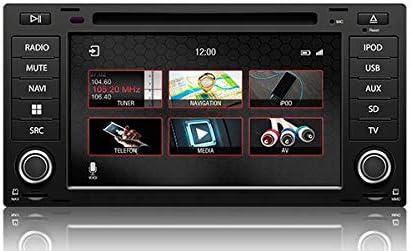
الشكل 4.1: The main menu screen displaying various function icons such as Radio, Navigation, Telephone, Media, and AV input.
From the main screen, tap on the desired icon to access functions like Radio, Navigation, Bluetooth (Telefon), Media (USB/SD), and AV input.
4.2 تشغيل الراديو
Tap the "Radio" icon from the main menu or press the physical "RADIO" button. You can tune to AM/FM stations, save presets, and access features like RDS (Radio Data System) where available.

الشكل 4.2: The radio interface showing station presets and current frequency. Users can navigate between stations using the on-screen arrows or physical controls.
For SiriusXM compatibility, an SXV300 Tuner (sold separately) is required. Once installed, access SiriusXM through the dedicated icon or source selection.

الشكل 4.3: The SiriusXM interface displaying channel information and presets, allowing access to satellite radio content.
4.3 نظام الملاحة
Tap the "Navigation" icon to launch the integrated GPS navigation software. The system comes pre-loaded with maps for North America, Europe, or Australia, depending on your region.
- نقطة الدخول إلى الوجهة: Enter addresses, points of interest, or coordinates.
- إرشادات الطريق: Follow turn-by-turn voice prompts and on-screen directions.
- رسم خريطة View: التبديل بين 2D و 3D views, adjust zoom levels.
4.4 اتصال البلوتوث
قم بإقران هاتفك الذكي عبر البلوتوث لإجراء مكالمات وبث صوتي بدون استخدام اليدين.
- Go to the "Telefon" (Bluetooth) menu.
- قم بتمكين Bluetooth على هاتفك الذكي وابحث عن الأجهزة المتاحة.
- Select "Dynavin" from the list on your phone and confirm the pairing code.
- بمجرد الاقتران، يمكنك إجراء واستقبال المكالمات وبث الموسيقى.
4.5 Apple CarPlay و Android Auto
Connect your compatible smartphone via USB to use Apple CarPlay or Android Auto. This allows you to access select phone apps directly on the Dynavin display.

الشكل 4.4: The Apple CarPlay interface displaying common applications like Phone, Music, Maps, and Messages, integrated with the Dynavin unit.
Ensure your phone's operating system is up to date for optimal performance with CarPlay or Android Auto.
4.6 تشغيل الوسائط (USB/SD)
Insert a USB drive or Micro SD card into the designated ports. The system supports various audio and video formats. Tap the "Media" icon to browse and play content.
4.7 إعدادات الصوت
Access the sound settings to adjust audio output, equalizer, and balance/fader controls. The system integrates with your vehicle's DSP processor if equipped.

الشكل 4.5: The sound settings interface, allowing users to adjust audio parameters such as balance, fader, and specific sound profiles within the vehicle cabin.
Additional sound options may include confirmation tones, PDC (Park Distance Control) and warning tones, and settings for factory ampالقاتلون.
4.8 إعدادات النظام
The system settings menu allows you to configure various aspects of the unit, including:
- منطقة: Set the geographical region for radio and navigation.
- لون: Adjust display color schemes.
- آلة تصوير: Configure backup camera settings.
- سطوع: Manually adjust screen brightness.
- المنطقة الزمنية: اضبط المنطقة الزمنية الصحيحة.
- يعكس: Configure reverse camera and PDC integration.

الشكل 4.6: The system settings interface, showing options for region, display color, camera settings, brightness adjustment, time zone, and reverse camera configuration.
5. الصيانة
5.1 تنظيف الشاشة
استخدم قطعة قماش ناعمة وخالية من الوبر لمسح شاشة اللمس برفق. لإزالة البقع الصعبة، امسحها برفق.ampامسح الشاشة بقطعة قماش مبللة بالماء أو بمنظف آمن. تجنب المواد الكاشطة أو المواد الكيميائية القاسية.
5.2 تحديثات البرامج الثابتة
Periodic firmware updates may be released to improve performance, add features, or address issues. Check the official Dynavin website or contact your distributor for information on available updates and instructions for installation.
6. استكشاف الأخطاء وإصلاحها
If you encounter issues with your Dynavin N7-VT7 PRO, refer to the following common solutions:
- لا يوجد طاقة: Check all wiring connections and vehicle fuses. Ensure the vehicle battery is properly connected.
- لا يوجد صوت: تأكد من توصيلات السماعات. تحقق من مستويات الصوت وإعدادات كتم الصوت. تأكد من تحديد مصدر الصوت الصحيح.
- فقدان إشارة GPS: تأكد من تثبيت هوائي نظام تحديد المواقع العالمي (GPS) بشكل صحيح وأن له صورة واضحة view من السماء.
- مشكلات الاقتران بالبلوتوث: Delete previous pairings from both the unit and your phone. Restart both devices and attempt pairing again.
- شاشة اللمس لا تستجيب: Perform a soft reset (refer to specific instructions from Dynavin support if available).
- لا يتم الاتصال بنظامي Apple CarPlay و Android Auto: Ensure your phone is compatible and its operating system is updated. Try a different USB cable.
For persistent issues, contact Dynavin customer support or your authorized dealer for assistance.
7. المواصفات
| ميزة | مواصفة |
|---|---|
| رقم الموديل | N7-VWTG-PRO |
| حجم العرض | 7 بوصة |
| دقة العرض | 1024 × 600 |
| نوع العرض | Capacitive LCD, Anti-glare Touchscreen |
| نظام التشغيل | DynOS |
| الاتصال | يو اس بي، بلوتوث |
| نوع الخريطة | North America, Europe, or Australia (region-specific) |
| نوع خدمة المركبة | Car (VW Touareg 2003-2009) |
| أبعاد الحزمة | 13 × 11 × 9 بوصة |
8. الضمان والدعم
For warranty information, please refer to the documentation provided with your purchase or contact your authorized Dynavin dealer. J&T Distributing is the official distributor of Dynavin in North America and can provide support for products purchased through their channels.
For technical assistance, troubleshooting, or inquiries regarding firmware updates, please visit the official Dynavin webالموقع أو الاتصال بخدمة دعم العملاء الخاصة بهم.


