تعليمات السلامة الهامة
Please read these instructions carefully before using your Coredy R650 Ultra Robot Vacuum and retain them for future reference. Failure to follow these instructions may result in electric shock, fire, or serious injury.
- يمكن استخدام هذا الجهاز من قبل الأطفال الذين تبلغ أعمارهم 8 سنوات فأكثر والأشخاص ذوي القدرات البدنية أو الحسية أو العقلية المحدودة أو الذين يفتقرون إلى الخبرة والمعرفة إذا تم الإشراف عليهم أو توجيههم فيما يتعلق باستخدام الجهاز بطريقة آمنة وفهم المخاطر التي ينطوي عليها.
- يجب مراقبة الأطفال والتأكد من عدم لعبهم بالجهاز.
- لا يجوز للأطفال القيام بأعمال التنظيف والصيانة دون إشراف.
- استخدم فقط محول الطاقة الأصلي الذي توفره لك الشركة المصنعة.
- لا تستخدم المكنسة الروبوتية في البيئات الرطبة أو بالقرب من الماء.
- Remove all loose cables, small objects, and fragile items from the floor before operation to prevent entanglement or damage.
- Do not operate the robot vacuum in areas with open flames or flammable materials.
- تأكد من وضع قاعدة الشحن على سطح مستوٍ مقابل الحائط، مع وجود مساحة خالية كافية حولها.
- Do not carry the robot vacuum by its handle when it is powered on.
- قم بإيقاف تشغيل المكنسة الروبوتية وافصل قاعدة الشحن قبل إجراء أي صيانة أو تنظيف.
محتويات الحزمة
تأكد من وجود جميع المكونات وأنها في حالة جيدة عند فتح العبوة.
- 1x Coredy R650 Ultra Robotic Vacuum Cleaner
- 1x قاعدة شحن
- 1x 500ml Dust Bin (pre-installed)
- 2x Side Brushes (one pair)
- 1x Filter (pre-installed)
- 1 × جهاز التحكم عن بعد
- 1 × محول الطاقة
- أداة تنظيف واحدة
- 1 × دليل المستخدم

Image: The Coredy R650 Ultra Robot Vacuum, its remote control, and a smartphone displaying the Coredy app interface.
المنتج انتهىview
Robot Vacuum Components
- الغطاء العلوي: Houses the power button and Wi-Fi indicator.
- زر الطاقة: Initiates or pauses cleaning, powers on/off.
- صندوق القمامة: Collects debris, located at the rear of the robot.
- الفرش الجانبية: Two rotating brushes on the front sides for edge and corner cleaning.
- الفرشاة الرئيسية: V-shaped roller brush located underneath for deep cleaning.
- عجلات القيادة: Two large wheels for movement across various surfaces.
- عجلة عالمية: Front wheel for navigation.
- شحن جهات الاتصال: Two metal strips on the bottom for connecting to the charging base.
- أجهزة استشعار السقوط: Located on the bottom to prevent falls.
- أجهزة استشعار الأشعة تحت الحمراء: Front-facing sensors for obstacle detection.
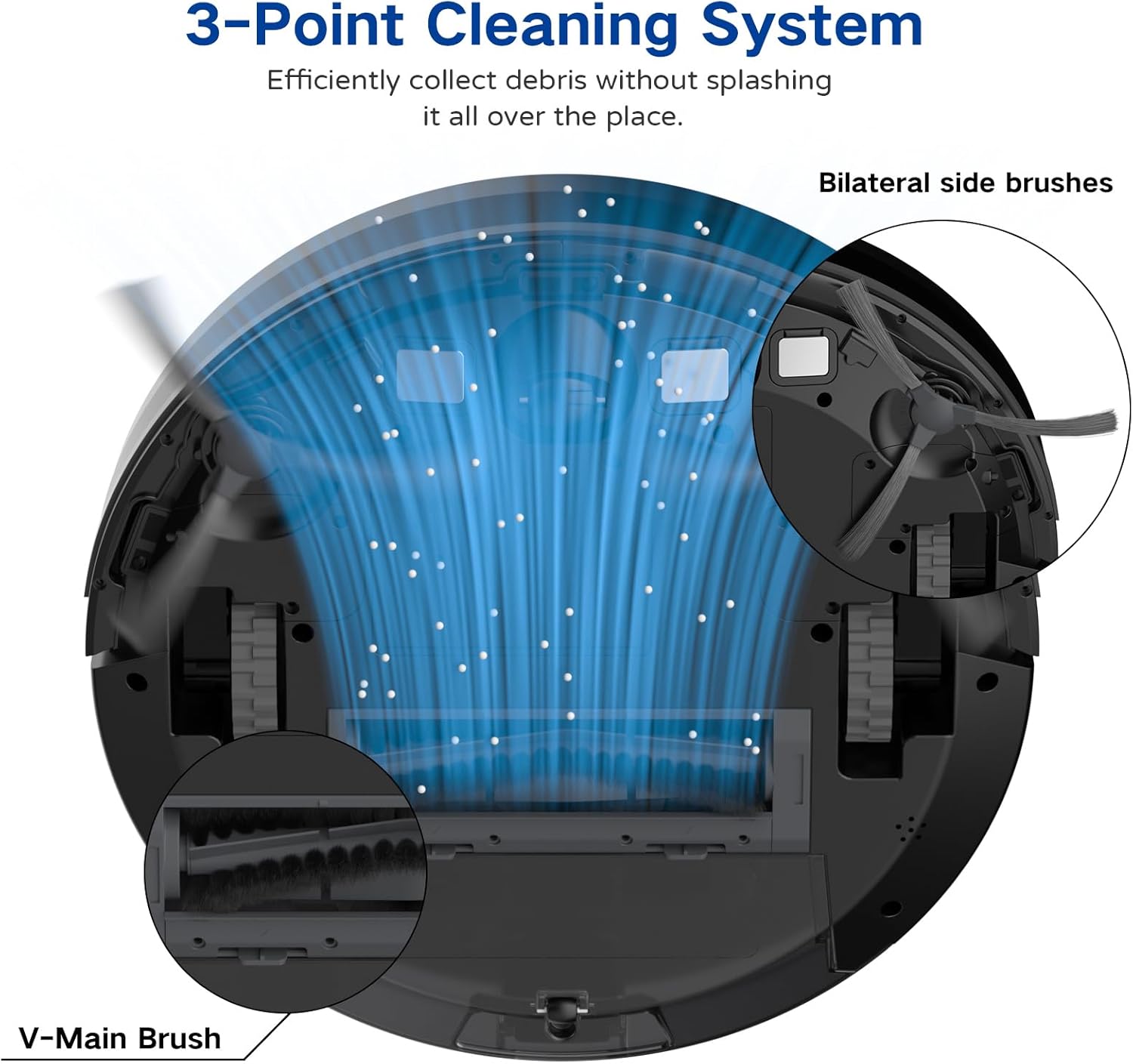
Image: A diagram illustrating the robot vacuum's 3-Point Cleaning System, showing bilateral side brushes and the V-main brush efficiently collecting debris.
مكونات قاعدة الشحن
- دبابيس الشحن: Connect with the robot's charging contacts.
- مؤشر الطاقة: يظهر حالة الشحن.
- منفذ الطاقة: يتصل بمحول الطاقة.
يثبت
1. Positioning the Charging Base
Place the charging base on a hard, level surface against a wall. Ensure there is at least 3 feet (1 meter) of clear space to the front and 1.5 feet (0.5 meters) to each side of the charging base to allow the robot to dock properly. Plug the power adapter into the charging base and then into a wall outlet.
2. الشحن الأولي
Place the robot vacuum onto the charging base, ensuring the charging contacts align. The robot will begin charging automatically. For first-time use, charge the robot for at least 5-6 hours until the indicator light turns solid green, indicating a full charge.
3. تركيب الفرش الجانبية
Attach the two side brushes to the posts on the bottom of the robot by pressing them down until they click into place. Ensure they are securely fastened.
4. Connecting to the Coredy App
- Download the 'Coredy' app from the App Store (iOS) or Google Play Store (Android).
- تسجيل حساب وتسجيل الدخول.
- Follow the in-app instructions to add your R650 Ultra robot vacuum to your account. This typically involves connecting your phone to a 2.4GHz Wi-Fi network and then connecting the robot to the same network.

Image: A hand interacting with a smartphone showing the Coredy app, which displays a real-time map of the robot's cleaning path and offers control options.
5. تكامل المساعد الصوتي (Alexa/Google Assistant)
Once connected to the Coredy app, you can link your robot vacuum to Amazon Alexa or Google Assistant for voice control.
- افتح تطبيق Alexa أو Google Home.
- انتقل إلى قسم "المهارات والألعاب" (Alexa) أو "يعمل مع Google" (Google Home).
- بحث عن the 'Coredy' skill/service and enable it.
- Log in with your Coredy app account credentials when prompted.
- Discover devices. You can now use voice commands like "Alexa, turn on Coredy R650 Ultra" or "Hey Google, start cleaning with Coredy R650 Ultra."

Image: The Coredy R650 Ultra Robot Vacuum positioned near its charging dock, with an Amazon Echo Dot in the background, illustrating voice control capabilities.
تشغيل المكنسة الروبوتية
Starting/Stopping Cleaning
- البدء اليدوي: Press the power button on the robot or the 'Clean' button on the remote control.
- التحكم في التطبيق: Use the Coredy app to start or stop cleaning.
- التحكم الصوتي: Use compatible voice assistants (e.g., "Alexa, start Coredy R650 Ultra").
- يوقف: Press the power button on the robot or the 'Clean' button on the remote during operation to pause. Press again to resume.
أوضاع التنظيف
The R650 Ultra offers various cleaning modes to suit different needs:
- التنظيف التلقائي: The robot automatically cleans in a Z-shaped path, adjusting to different floor types.
- تنظيف البقعة: The robot intensely cleans a specific small area in a spiral pattern.
- تنظيف الحواف: يقوم الروبوت بالتنظيف على طول الجدران وحواف الأثاث.
- التحكم اليدوي: Use the remote control or app to direct the robot manually.

Image: The Coredy R650 Ultra Robot Vacuum cleaning a hard floor, illustrating its Gyroscopic Dynamic Navigation and Z-shaped cleaning path for thorough coverage.
جدولة التنظيف
You can schedule cleaning times using the Coredy app or the remote control. Refer to the app's interface or the remote control section of this manual for detailed instructions on setting schedules.
تعديل قوة الشفط
The R650 Ultra features adjustable suction power, with a maximum of 2200 Pa. It also includes an Auto Carpet Boost feature that automatically increases suction when carpet is detected.
إعادة الشحن التلقائي
When the battery level is low or a cleaning cycle is complete, the robot will automatically return to its charging base to recharge.
صيانة
تضمن الصيانة الدورية الأداء الأمثل وتطيل عمر مكنسة الروبوت الخاصة بك.
1. إفراغ سلة المهملات
It is recommended to empty the dustbin after each use.
- اضغط على زر تحرير سلة المهملات واسحبها للخارج.
- Open the dustbin cover and empty the contents into a trash bin.

Image: The Coredy R650 Ultra Robot Vacuum on a wooden floor, with its 500ml dustbin detached and placed beside it, highlighting its capacity.
2. تنظيف المرشح
Clean the filter weekly, or more frequently if you have pets or high usage.
- قم بإزالة الفلتر من سلة المهملات.
- Tap the filter gently to remove loose dirt.
- Rinse the filter under running water. Ensure it is completely dry before reinstalling.
3. تنظيف الفرشاة الرئيسية
Clean the main brush weekly.
- Turn the robot over and remove the main brush cover.
- ارفع الفرشاة الرئيسية.
- Use the provided cleaning tool to remove hair and debris wrapped around the brush.
- أعد تركيب الفرشاة الرئيسية والغطاء.
4. تنظيف الفرشاة الجانبية
افحصي الفرش الجانبية بانتظام للتأكد من خلوها من الشعر المتشابك أو الأوساخ.
- اسحب الفرش الجانبية برفق لأعلى لإزالتها.
- قم بإزالة أي شعر أو شوائب.
- Reattach the side brushes, ensuring they click into place.
5. تنظيف المستشعرات ونقاط اتصال الشحن
Wipe the drop sensors, infrared sensors, and charging contacts on both the robot and the charging base with a clean, dry cloth monthly.
استكشاف الأخطاء وإصلاحها
If you encounter issues with your Coredy R650 Ultra, refer to the table below for common problems and solutions.
| مشكلة | السبب المحتمل | حل |
|---|---|---|
| الروبوت لا يعمل | بطارية منخفضة؛ قم بإيقاف تشغيل الطاقة | اشحن الروبوت؛ تأكد من تشغيل مفتاح الطاقة. |
| الروبوت لا يشحن | Charging contacts dirty; Charging base unplugged | نظف نقاط التلامس الخاصة بالشحن؛ تأكد من توصيل قاعدة الشحن بالكهرباء. |
| الروبوت يتعطل بشكل متكرر | Obstacles on floor; Robot stuck under furniture | Clear floor of cables/small items; Use boundary strips or block off low-clearance areas. |
| أداء التنظيف الضعيف | سلة المهملات ممتلئة؛ الفرش متشابكة؛ الفلتر مسدود | أفرغ سلة المهملات؛ نظف الفرش الرئيسية والجانبية؛ نظف الفلتر أو استبدله. |
| لا يمكن الاتصال بشبكة Wi-Fi/التطبيق | Incorrect Wi-Fi password; 5GHz Wi-Fi network; Robot too far from router | Verify password; Ensure 2.4GHz Wi-Fi; Move robot closer to router. |
تحديد
Technical specifications for the Coredy R650 Ultra Robot Vacuum.
| ميزة | التفاصيل |
|---|---|
| ماركة | كوريدي |
| اسم الموديل | Coredy R650 Ultra Robotic Vacuum Cleaner |
| قوة الشفط | ما يصل إلى 2200 باسكال |
| عمر البطارية | حتى 120 دقيقة |
| سعة سلة المهملات | 500 مليلتر |
| أبعاد المنتج | 12.7 بوصة طول × 12.7 بوصة عرض × 2.76 بوصة ارتفاع |
| طريقة التحكم | تطبيق، جهاز تحكم عن بعد، تحكم صوتي |
| الأجهزة المتوافقة | أمازون إيكو، جوجل هوم، الهواتف الذكية |
| نوع الفلتر | خرطوشة (HEPA) |
| نوع التنقل | Gyroscopic Dynamic Navigation |

Image: A technical drawing illustrating the top and side dimensions of the Coredy R650 Ultra Robot Vacuum, showing its 12.7-inch diameter and 2.72-inch height.
الضمان والدعم
For warranty information, please refer to the warranty card included in your product packaging or visit the official Coredy website. If you require technical support or have questions not covered in this manual, please contact Coredy customer service through the contact information provided on their webالموقع أو في وثائق الشراء الخاصة بك.


