مقدمة
This manual provides detailed instructions for the setup, operation, and maintenance of your JENSEN JTA-230R 3-Speed Stereo Turntable with Built-in Speakers. Please read this manual thoroughly before using the product to ensure proper function and longevity.
الميزات الرئيسية
- Belt-driven 3-speed stereo turntable: Supports 33-1/3, 45, and 78 RPM records.
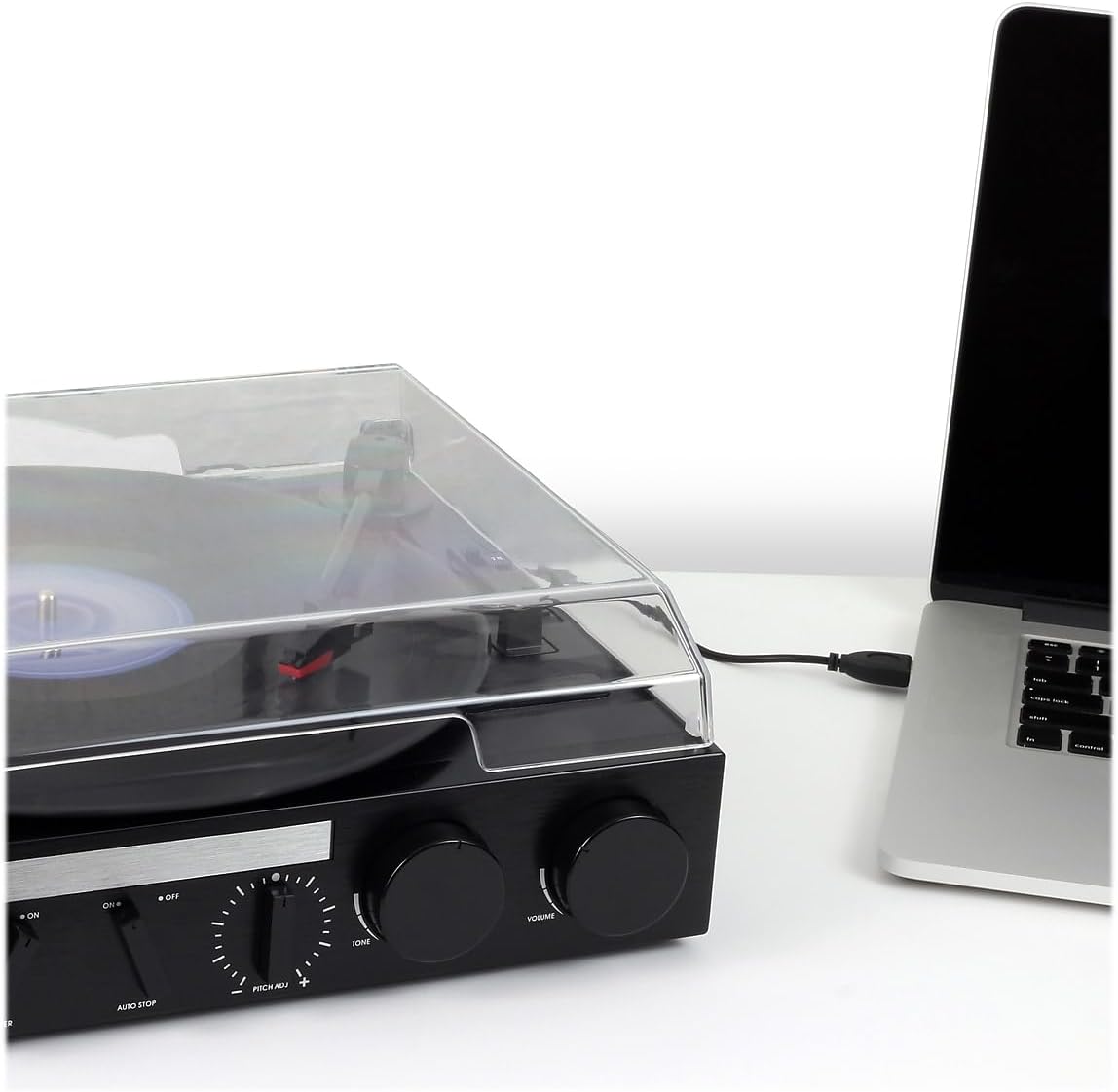
- USB port with included cable and software: Enables recording, editing, and converting vinyl records to digital MP3 format.
- Auxiliary input: Allows connection of external audio devices such as iPods, MP3 players, or other digital audio players.
- Stereo headphone output: For private listening.
- RCA line outputs: For connecting the turntable to an external home music system or ampمكبر.
- Built-in stereo speakers: Provides integrated audio playback.
- Front-mounted pitch control: For fine-tuning record speed.
- Tone control: For adjusting sound quality.
يثبت
- فك التعبئة: Carefully remove the turntable from its packaging. Retain all packing materials for future transport or storage.
- الموقع: Place the turntable on a stable, level surface away from direct sunlight, heat sources, and excessive dust or vibration.
- غطاء الغبار: The unit includes a clear dust cover to protect the platter and tonearm when not in use. Ensure it is properly hinged.
- توصيل الطاقة: Connect the AC power adapter to the DC input jack on the rear of the unit, then plug the adapter into a standard wall outlet.
- حماية القلم: Remove the clear plastic stylus protector from the needle before first use.

تعليمات التشغيل
عزف أسطوانة من الفينيل
- تشغيل الطاقة: Turn the POWER/VOLUME knob clockwise to power on the unit. The power indicator light will illuminate.
- حدد الوظيفة: Set the FUNCTION switch to 'PHONO'.
- مكان السجل: Open the dust cover and carefully place a vinyl record on the turntable platter.
- حدد السرعة: Set the SPEED SELECTOR switch (33/45/78) to match the playback speed of your record. For 45 RPM records, place the included 45 RPM adapter on the center spindle.
- ارفع ذراع التسجيل: ارفع ذراع التسجيل برفق باستخدام ذراع التوجيه.
- موضع ذراع التسجيل: Move the tonearm over the desired track of the record.
- ذراع النغمة السفلي: Slowly lower the tonearm onto the record using the cueing lever. The record will begin to play.
- ضبط مستوى الصوت: Adjust the volume using the POWER/VOLUME knob.
- الإيقاف التلقائي: The AUTO STOP switch can be set to ON or OFF. When ON, the turntable will automatically stop spinning when the record finishes. When OFF, the turntable will continue to spin.
- نهاية التشغيل: At the end of the record, lift the tonearm, return it to the tonearm rest, and lower the cueing lever. Turn the POWER/VOLUME knob counter-clockwise to power off the unit.

استخدام الراديو
- تشغيل الطاقة: أدر مقبض الطاقة/مستوى الصوت باتجاه عقارب الساعة.
- حدد الوظيفة: Set the FUNCTION switch to 'AM' or 'FM' for radio playback.
- محطة الضبط: Rotate the TUNING knob to select your desired radio station.
- ضبط مستوى الصوت: Adjust the volume using the POWER/VOLUME knob.
Connecting External Devices (AUX Input)
- توصيل الجهاز: Use an audio cable (not included) to connect your external audio device (e.g., MP3 player, smartphone) to the AUX IN jack on the front of the turntable.
- حدد الوظيفة: Set the FUNCTION switch to 'AUX'.
- تشغيل الصوت: Start playback on your external device. The audio will play through the turntable's built-in speakers.
- ضبط مستوى الصوت: Adjust the volume using the POWER/VOLUME knob on the turntable and/or the volume control on your external device.
استخدام سماعات الرأس
Plug your headphones into the HEADPHONE jack on the front of the unit for private listening. The built-in speakers will be muted when headphones are connected.
Connecting to an External Audio System (RCA Line Out)
Use RCA cables (not included) to connect the RCA LINE OUT jacks on the rear of the turntable to an available audio input on your home stereo system or powered speakers. This allows you to play vinyl records through a larger sound system.
Converting Vinyl to MP3 (USB Recording)
The JTA-230R includes a USB port and software for converting your vinyl records to digital MP3 fileس. اتبع الخطوات التالية:
- تثبيت نظام التشغيل: Install the provided software (e.g., Audacity) onto your computer.
- توصيل يو اس بي: قم بتوصيل مشغل الأسطوانات بجهاز الكمبيوتر الخاص بك باستخدام كابل USB المرفق.
- التحضير للتسجيل: Open the software on your computer and follow its instructions to prepare for recording.
- Play Record: Start playing your vinyl record on the turntable as described in the 'Playing a Vinyl Record' section.
- Record and Save: Use the software to record the audio. Once recorded, you can edit and save the tracks as MP3 files on your computer for playback on digital devices.
صيانة
تنظيف الوحدة
- امسح الجزء الخارجي من الوحدة بقطعة قماش ناعمة دamp القماش. لا تستخدم المنظفات أو المذيبات الكاشطة.
- Keep the dust cover closed when not in use to prevent dust accumulation on the platter and stylus.
العناية بالقلم
- القلم (الإبرة) مكون حساس. تعامل معه بحرص.
- نظف القلم بشكل دوري باستخدام فرشاة ناعمة، مع الحرص على التنظيف بلطف من الخلف إلى الأمام.
- A worn or damaged stylus can harm your records and degrade sound quality. Replace the stylus if it appears bent, chipped, or if sound quality diminishes significantly.
استكشاف الأخطاء وإصلاحها
| مشكلة | السبب المحتمل | حل |
|---|---|---|
| لا يوجد طاقة | Power cord not connected; Power outlet not active; Unit not turned on. | Ensure power cord is securely plugged in; Check power outlet; Turn POWER/VOLUME knob clockwise. |
| لا يوجد صوت من مكبرات الصوت | مستوى الصوت منخفض جدًا؛ مفتاح الوظيفة غير صحيح؛ سماعات الرأس موصولة. | Increase volume; Set FUNCTION switch to 'PHONO', 'AM', 'FM', or 'AUX' as appropriate; Disconnect headphones. |
| صوت مشوه | Dirty record; Worn stylus; Incorrect speed; Tone control setting. | Clean record; Replace stylus; Verify correct speed (33/45/78 RPM); Adjust TONE control. |
| Record speed too fast or too slow | Incorrect speed selector setting; Pitch control adjustment. | Set SPEED SELECTOR to match record (33-1/3, 45, or 78 RPM); Adjust PITCH ADJ. knob for fine-tuning. |
| تخطي التسجيل | Dirty or scratched record; Turntable not level; Stylus worn or damaged. | Clean record; Ensure turntable is on a stable, level surface; Replace stylus. |
تحديد
- رقم الموديل: جتا -230 ر
- أبعاد المنتج: 11.34 × 12 × 4.96 بوصة
- وزن السلعة: 1 جنيه (454 جرام)
- ماركة: جينسن
- سرعة الدوران القصوى: 78 دورة في الدقيقة
- مادة: بلاستيك
- لون: أسود
- ميزة خاصة: محمول
- الأجهزة المتوافقة: Headphone, MP3 Player, Speaker, Tablet
- المكونات المتضمنة: Product, Manual
الضمان والدعم
Information regarding product warranty and customer support is not available in the provided data. Please refer to the product packaging or manufacturer's webالموقع للحصول على التفاصيل.


