1. انتهى المنتجview
This manual provides detailed instructions for the operation and maintenance of your Calvas Air Conditioner Remote Control. This remote is designed to be compatible with various Mitsubishi air conditioner models, ensuring convenient control over your cooling and heating settings.
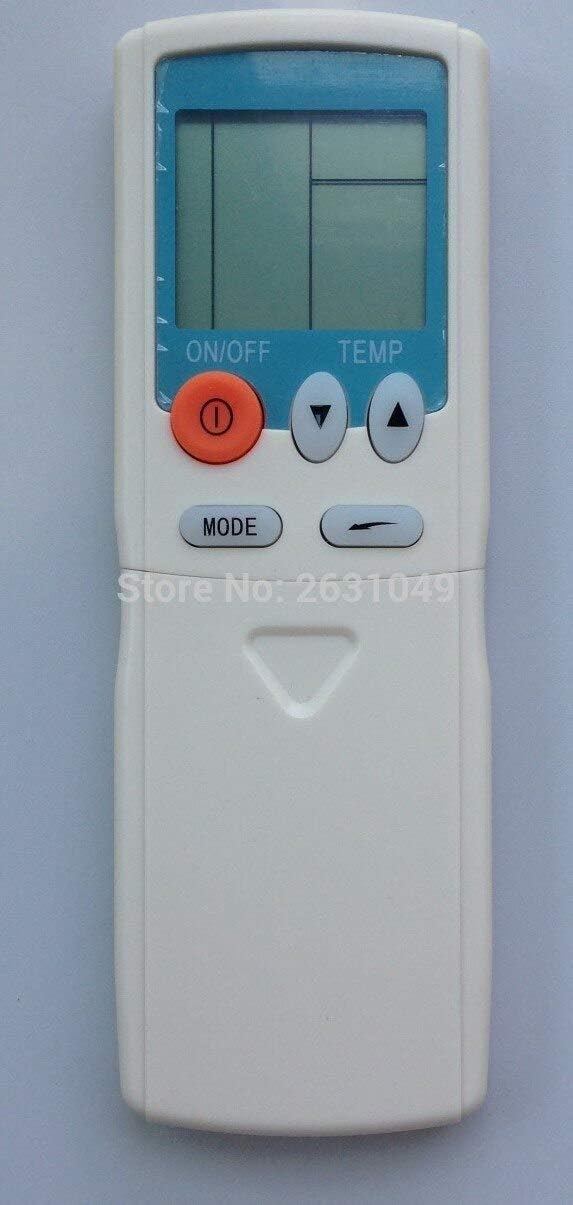
الشكل 1: الجبهة view of the Calvas Air Conditioner Remote Control. It features a clear LCD display at the top, an orange ON/OFF button, two triangular temperature adjustment buttons (up and down), and a MODE button below them. The remote is white with a light blue accent around the display.
2. الإعداد
2.1 تركيب البطارية
To begin using your remote control, you must first install the batteries. This remote requires standard batteries (typically AAA, though the product specifications mention Lithium, please verify the battery type indicated in the battery compartment).
- حدد موقع حجرة البطارية في الجزء الخلفي من جهاز التحكم عن بعد.
- قم بتحريك غطاء حجرة البطارية للأسفل أو في الاتجاه المشار إليه بالسهم لفتحه.
- Insert the batteries, ensuring the positive (+) and negative (-) terminals align correctly with the markings inside the compartment. Incorrect insertion can prevent the remote from functioning.
- قم باستبدال غطاء حجرة البطارية عن طريق تحريكه مرة أخرى إلى مكانه حتى يصدر صوت نقرة آمنة.
After battery installation, the LCD display on the remote should illuminate, indicating it is ready for use.
3. تعليمات التشغيل
Familiarize yourself with the buttons on your remote control to effectively manage your air conditioner's functions.

الشكل 2: مفصل view of the remote control with the lower panel extended, revealing additional function buttons. These include buttons for fan speed, timer settings, and possibly a reset clock function.
3.1 الوظائف الأساسية
- زر التشغيل/الإيقاف (●): Press this orange button to turn the air conditioner unit on or off.
- أزرار ضبط درجة الحرارة (▲ TEMP ▼): Use the up (▲) and down (▼) triangular buttons to increase or decrease the desired temperature setting.
- زر الوضع: Press this button to cycle through the available operating modes, such as Cool, Heat, Fan, Dry, and Auto. The current mode will be displayed on the LCD screen.
3.2 الوظائف المتقدمة (تحت الغطاء المنزلق)
Some models of this remote control feature a sliding cover at the bottom that reveals additional function buttons. Slide the cover down to access these controls.
- أزرار سرعة المروحة: Typically represented by fan icons, these buttons allow you to adjust the fan speed (e.g., Low, Medium, High, Auto).
- Timer Buttons (HR., MIN.): Used to set the ON/OFF timer for the air conditioner. Refer to your air conditioner's main manual for specific timer programming instructions.
- زر CLEAR: May be used to clear certain settings or timer programs.
- RESET CLOCK Button: Used to reset the internal clock of the remote, if applicable.
- مؤشر البطارية: Some remotes may have a low battery indicator or a button to check battery status.
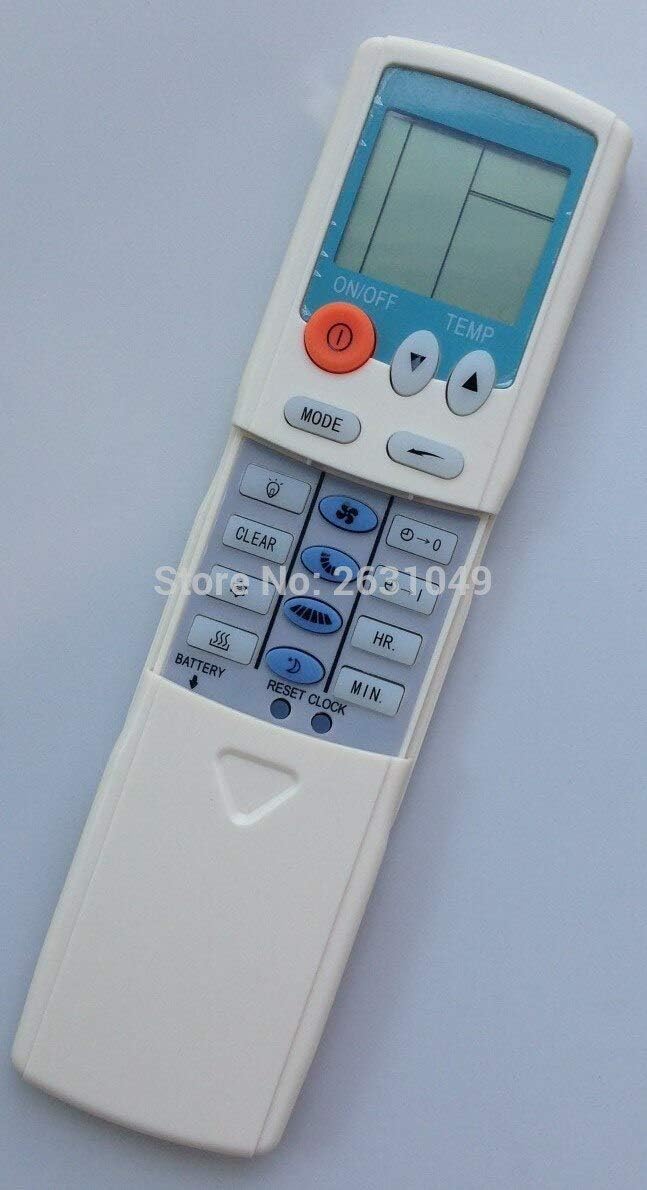
الشكل 3: الجانب view of the remote control, providing a clearer perspective of the button arrangement and the sliding cover mechanism.
4. الصيانة
4.1 تنظيف جهاز التحكم عن بعد
To ensure the longevity and proper functioning of your remote control, keep it clean and free from dust and debris.
- Wipe the surface of the remote with a soft, dry cloth.
- للأوساخ العنيدة، بخفة دampبلّل قطعة القماش بالماء أو بمنظف خفيف غير كاشط. لا ترش المنظف مباشرة على جهاز التحكم عن بعد.
- تجنب استخدام المواد الكيميائية القاسية أو المذيبات أو مواد التنظيف الكاشطة، لأنها قد تتلف طلاء جهاز التحكم عن بعد أو مكوناته الداخلية.
4.2 استبدال البطارية
Replace batteries when the display becomes dim or the remote's range decreases. Always replace all batteries at the same time with new ones of the same type.
- اتبع خطوات تركيب البطارية الموضحة في القسم 2.1.
- تخلص من البطاريات المستعملة بطريقة مسؤولة وفقًا للوائح المحلية.
5. استكشاف الأخطاء وإصلاحها
If you experience issues with your remote control, try the following troubleshooting steps before seeking further assistance.
| مشكلة | السبب المحتمل | حل |
|---|---|---|
| Remote not responding / Air conditioner not reacting. |
|
|
| العرض باهت أو فارغ. |
|
|
| تعمل وظائف التحكم عن بعد بشكل متقطع. |
|
|
6. المواصفات
| ميزة | التفاصيل |
|---|---|
| ماركة | البقع الصلعاء |
| توافق النموذج | HYPFCR-38W, HYPFCR-30, HYPFCR-37W, HYPFCR-47, HYPFCR-48W |
| الاتصالات اللاسلكية | الأشعة تحت الحمراء (IR) |
| تكرار | 433 ميجا هرتز |
| قناة | 1 |
| الأجهزة المتوافقة | مكيف الهواء |
| مادة | آخر |
| نوع البطارية | Lithium (Please verify actual battery type in compartment, typically AAA/AA for remotes) |


