
1. المقدمة وما فوقview
Thank you for choosing the Lorex Analog 4K Weatherproof Indoor/Outdoor HD Wired Add-On Security Camera. This manual provides essential information for the proper installation, operation, and maintenance of your new security camera. This camera is designed as an add-on unit and requires a compatible Lorex recorder (DVR/NVR) for full functionality.
This camera features 4K resolution for superior image clarity, robust weatherproof construction for reliable indoor and outdoor use, and advanced deterrence features such as motion-activated lights and remote-triggered sirens. Its long-range night vision ensures comprehensive surveillance even in low-light conditions.
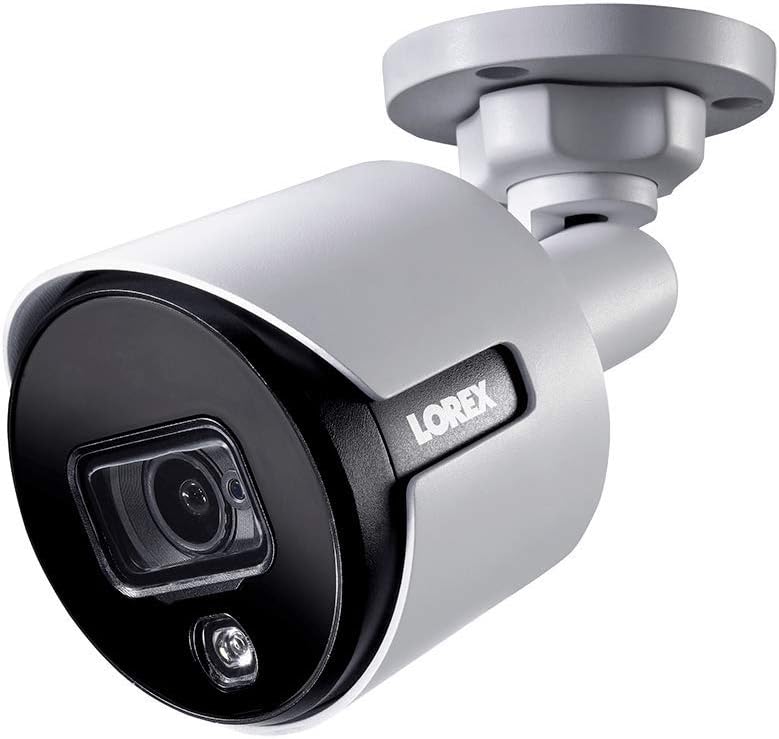
الشكل 1.1: الزاوية الأمامية view of the Lorex 4K Weatherproof Security Camera. This image shows the camera's bullet form factor, lens, and integrated light.
2. محتويات العبوة
The Lorex Analog 4K Weatherproof Indoor/Outdoor HD Wired Add-On Security Camera package includes:
- 1 x Lorex Analog 4K Weatherproof Indoor/Outdoor HD Wired Add-On Security Camera (Model: LBV8543XW)
- طقم التثبيت (مسامير ومثبتات جدارية)
- Allen Key (for adjustment)
Note: This is an add-on camera. Video cables, power adapters, and a compatible Lorex recorder are sold separately and are required for operation.
3. الميزات الرئيسية
- دقة 4K Ultra HD: Provides exceptional detail and clarity with an 8MP effective still resolution.
- تصميم مقاوم للعوامل الجوية (IP67): Durable metal housing ensures reliable performance in various weather conditions, suitable for both indoor and outdoor installation.
- Long Range Night Vision: See clearly up to 150 feet (45m) in ambient night conditions and up to 98 feet (30m) in total darkness. Features Color Night Vision for enhanced detail in low light.
- Motion-Activated Warning Light: Integrated LED light can be triggered by motion to deter intruders.
- Remote-Triggered Siren: Activate a loud siren directly from your Lorex recorder or connected app to scare away unwanted visitors.
- Wired Connectivity (BNC): Ensures a stable and secure connection to your Lorex DVR/NVR system.
- درجة حرارة التشغيل الواسعة: Functions reliably in temperatures up to 60 degrees Celsius.
4. الإعداد والتثبيت
Before installation, ensure you have a compatible Lorex recorder (DVR/NVR) and necessary video/power cables.
4.1 اختيار الموقع
اختر موقعًا يوفر المطلوب viewing angle and is within reach of your Lorex recorder and a power source. Consider areas prone to intrusion, such as entry points or vulnerable perimeters. The camera is suitable for ceiling mount and wall mount applications.

الشكل 4.1: الجانب view of the Lorex 4K Weatherproof Security Camera, showing its adjustable mounting base.
4.2 تركيب الكاميرا
- تحديد أماكن حفر الثقوب: Use the mounting template (if provided) or the camera base to mark the positions for drilling.
- ثقوب الحفر: Drill pilot holes for the mounting screws. If mounting on drywall or masonry, insert the provided wall plugs.
- الكاميرا الآمنة: قم بمحاذاة قاعدة الكاميرا مع الثقوب المحفورة وثبتها باستخدام البراغي المرفقة.
- ضبط الزاوية: Loosen the adjustment screws on the camera body using the Allen key to position the camera for the optimal viewزاوية الضبط. أحكم ربط البراغي بعد ضبطها.
4.3 توصيل الكاميرا
- توصيل كابل الفيديو: Connect one end of the BNC video cable (not included) to the camera's BNC port and the other end to an available video input channel on your Lorex recorder.
- توصيل الطاقة: Connect the camera's power input to a compatible power adapter (not included). Ensure the power adapter is connected to a power outlet.
- Power On Recorder: Ensure your Lorex recorder is powered on and properly configured.
5. تعليمات التشغيل
Once the camera is physically installed and connected to your Lorex recorder, you can begin operation.
5.1 Viewفي البث المباشر
Access your Lorex recorder's interface (via monitor, Lorex Home app, or client software) to view the live video feed from the camera. Ensure the correct channel is selected.

الشكل 5.1: الصورة عن قرب view of the Lorex 4K Weatherproof Security Camera's lens and integrated light.
5.2 Motion Detection and Smart Deterrence
Your Lorex recorder manages motion detection settings. Refer to your recorder's manual for detailed instructions on configuring motion zones and sensitivity.
- Motion-Activated Light: The camera's integrated light can be set to activate automatically upon motion detection. This setting is typically configured within your Lorex recorder's deterrence or alarm settings.
- Remote-Triggered Siren: You can manually activate the camera's siren through your Lorex recorder's interface or the Lorex Home app. This feature is useful for immediate deterrence.

Figure 5.2: The Lorex 4K Weatherproof Security Camera mounted on a brick wall at night, demonstrating its motion-activated light feature.
5.3 الرؤية الليلية
The camera automatically switches to night vision mode in low-light conditions. The infrared (IR) LEDs provide illumination for clear black and white video. Color Night Vision (CNV) may be available if there is sufficient ambient light, providing full-color video in low-light scenarios.
6. الصيانة
تضمن الصيانة الدورية الأداء الأمثل وطول عمر كاميرا المراقبة الخاصة بك.
- تنظيف: قم بتنظيف عدسة الكاميرا والغلاف بشكل دوري باستخدام قطعة قماش ناعمة.amp قطعة قماش. تجنب استخدام المنظفات الكاشطة أو المذيبات التي قد تتلف الطلاء أو العدسة.
- التحقق من الاتصالات: Ensure all cable connections (BNC and power) are secure and free from corrosion, especially for outdoor installations.
- تحديثات البرامج الثابتة: Regularly check the Lorex website or your recorder's settings for available firmware updates for your camera and recorder to ensure the latest features and security enhancements.
- الظروف البيئية: While weatherproof, extreme conditions outside the specified operating temperature range (up to 60°C) may affect performance.
7. استكشاف الأخطاء وإصلاحها
If you encounter issues with your Lorex camera, refer to the following common troubleshooting steps:
| مشكلة | السبب المحتمل | حل |
|---|---|---|
| لا يوجد بث فيديو من الكاميرا | اتصال كابل فضفاض لا يوجد طاقة للكاميرا Incorrect channel selected on recorder | Check BNC and power connections. Ensure power adapter is working and connected. Verify the correct input channel on your Lorex recorder. |
| جودة صورة رديئة / فيديو غير واضح | عدسة متسخة التركيز غير الصحيح (إذا كان قابلاً للتعديل) Cable interference/damage | قم بتنظيف عدسة الكاميرا بقطعة قماش ناعمة. Ensure the camera is properly focused (if applicable). Check video cable for damage or interference. Use high-quality cables. |
| الرؤية الليلية لا تعمل | مصابيح LED بالأشعة تحت الحمراء محجوبة قوة غير كافية إعدادات الكاميرا | Ensure nothing is blocking the IR LEDs. تأكد من استقرار مصدر الطاقة. Check night vision settings on your Lorex recorder. |
| لا يتم تفعيل خاصية كشف الحركة | Incorrect motion zone setup الحساسية منخفضة جدًا عرقلة في view | Review and adjust motion detection zones on your recorder. زيادة حساسية الحركة. Clear any obstructions from the camera's field of view. |
For more advanced troubleshooting, consult your Lorex recorder's user manual or visit the Lorex support webموقع.
8. المواصفات
| ميزة | مواصفة |
|---|---|
| رقم الموديل | LBV8543XW |
| دقة التقاط الفيديو | 4K (دقة صور ثابتة فعالة 8 ميجابكسل) |
| تكنولوجيا الاتصال | BNC (Wired) |
| الاستخدام الداخلي والخارجي | داخلي، خارجي |
| تصنيف الحماية الدولية | IP67 (مقاوم للعوامل الجوية) |
| نطاق الرؤية الليلية | 150 قدم (45 م) |
| المميزات الخاصة | Motion Sensor, Night Vision, Motion Activated Lights, Remote-Triggered Siren |
| عامل الشكل | رصاصة |
| مادة | معدن |
| درجة حرارة التشغيل (العليا) | 60 درجة مئوية |
| أبعاد المنتج (الطول × العرض × الارتفاع) | 16 × 6 × 6 بوصة |
| وزن العنصر | 0.01 أونصة |
| رمز المنتج الموحد | 695529017136 |
| طريقة التحكم | App, Remote (via compatible Lorex recorder) |
9. الضمان والدعم
Lorex products are designed for reliability and performance. For information regarding your product's warranty, please refer to the warranty policy available on the official Lorex website or the documentation included with your Lorex recorder.
For technical support, product registration, or to download the latest software and firmware updates, please visit the official Lorex support page or the Lorex Store:
- Lorex Store: Visit the Lorex Store on Amazon
- دليل المستخدم (PDF): يتوفر أيضًا دليل مستخدم شامل بصيغة PDF للتنزيل: تنزيل دليل المستخدم
When contacting support, please have your product model number (LBV8543XW) and serial number ready.