1. المقدمة
This manual provides comprehensive instructions for the setup, operation, maintenance, and troubleshooting of your Canyon CNS-SW71SS Smartwatch. Please read this manual carefully before using your device to ensure proper function and longevity.
The Canyon CNS-SW71SS Smartwatch is designed to help you monitor your fitness activities and stay connected. It features a 1.22-inch color screen, multi-sport modes, heart rate monitoring, sleep tracking, and notification alerts. Its IP68 water resistance makes it suitable for various environments.
2. انتهى المنتجview
2.1 الميزات الرئيسية
- 1.22-inch color touch screen display.
- Multi-sport mode for tracking various activities.
- Daily activity monitoring: calories, steps, heart rate, and sleep.
- Notifications for incoming calls, SMS, emails, calendar events, and social media.
- Music control and remote camera function.
- Smart alarm and weather data display.
- عمر بطارية يصل إلى 7 أيام.
- IP68 water resistance (submersible up to 1 meter for 30 minutes).
- اتصال بلوتوث 4.0.
- Compatible with iOS and Android operating systems.
- Comes with two interchangeable wristbands: metal and TPU.
2.2 مكونات
The Canyon CNS-SW71SS Smartwatch consists of the main watch unit, interchangeable wristbands, and a charging cable.

الشكل 1: الجبهة view of the Canyon CNS-SW71SS Smartwatch, showing the display with steps, distance, calories, and heart rate data.

الشكل 2: بزاوية view of the Canyon CNS-SW71SS Smartwatch, featuring a silver metal mesh strap and a round display.
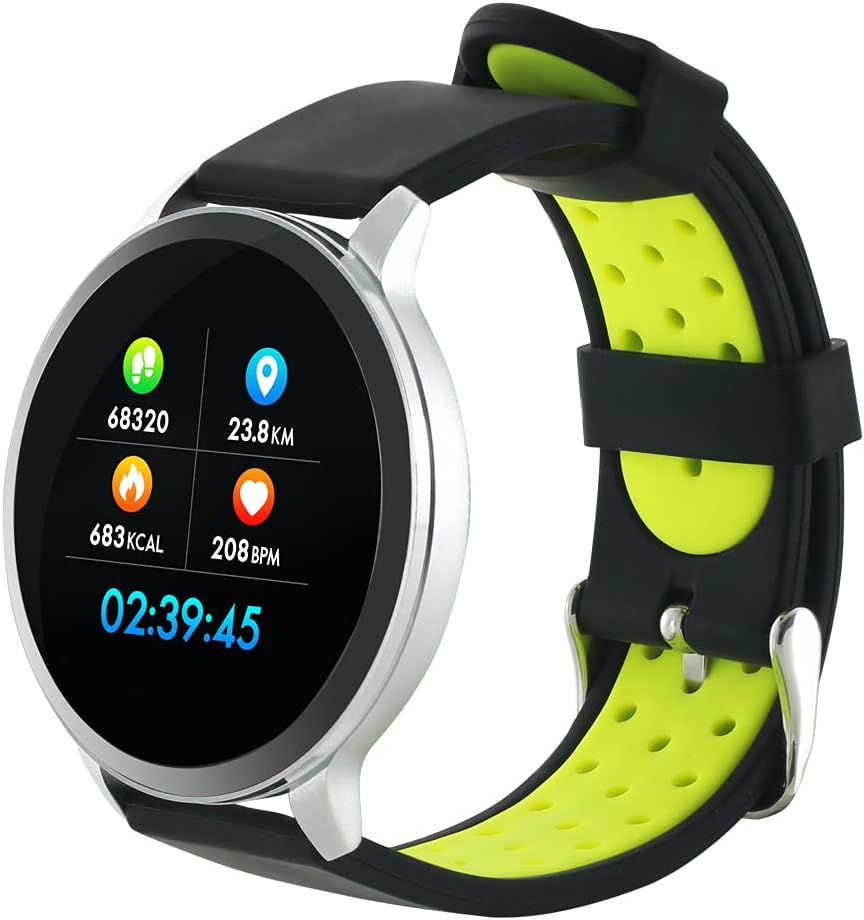
Figure 3: The Canyon CNS-SW71SS Smartwatch shown with an alternative black and lime green TPU strap, highlighting its interchangeable design.

الشكل 4: خلفي view of the Canyon CNS-SW71SS Smartwatch, displaying the optical heart rate sensor and magnetic charging contacts.

Figure 5: The retail packaging for the Canyon CNS-SW71SS Smartwatch, illustrating key features and the included two straps.
3. الإعداد
3.1 شحن الساعة الذكية
- Connect the charging cable to a USB power adapter (not included) or a computer's USB port.
- Align the magnetic charging pins of the cable with the charging contacts on the back of the smartwatch. The watch will vibrate and display a charging icon.
- Allow approximately 2-3 hours for a full charge. A full charge provides up to 7 days of usage.
3.2 Installing the Canyon Fit Application
- Scan the QR code provided in the packaging or search for "Canyon Fit" in your smartphone's app store (Google Play Store for Android, Apple App Store for iOS).
- قم بتحميل وتثبيت التطبيق.
- Open the Canyon Fit app and follow the on-screen instructions to create an account and set up your profile.
3.3 الاقتران بهاتفك الذكي
- تأكد من شحن ساعتك الذكية وتشغيلها.
- قم بتمكين البلوتوث على هاتفك الذكي.
- افتح تطبيق Canyon Fit.
- Navigate to the device pairing section within the app (usually found under 'Device' or 'Profile').
- Select your smartwatch (e.g., "CNS-SW71SS") from the list of available devices.
- قم بتأكيد طلب الاقتران على كل من هاتفك الذكي وساعتك الذكية إذا طُلب منك ذلك.
3.4 تركيب/تغيير الأساور
The smartwatch comes with two wristbands (metal and TPU) that can be interchanged. To attach or change a wristband, locate the quick-release pins on the underside of the strap. Slide the pin to detach the current strap and then align and slide the pin of the new strap into the corresponding holes on the watch body until it clicks into place.
4. تعليمات التشغيل
4.1 الملاحة الأساسية
- شاشة اللمس: Swipe left/right to navigate through different functions and menus. Swipe up/down to view الإشعارات أو الإعدادات السريعة.
- زر جانبي: Press the side button to return to the main watch face or to wake up the screen. A long press may access power options or specific features depending on the context.
4.2 تتبع اللياقة البدنية
- وضع الرياضات المتعددة: Access the 'Workout' or 'Sport' menu on your watch. Select your desired activity (e.g., running, cycling, walking) to start tracking. The watch will record duration, distance, calories burned, and heart rate.
- النشاط اليومي: The watch automatically tracks your steps, distance, and calories burned throughout the day. View these statistics on the watch face or in the Canyon Fit app.
- رصد معدل ضربات القلب: The watch continuously monitors your heart rate. You can also manually initiate a heart rate measurement from the heart rate interface.
- تتبع النوم: Wear the smartwatch to bed, and it will automatically track your sleep patterns, including deep sleep, light sleep, and wake times. View detailed sleep analysis in the Canyon Fit app.
4.3 الإشعارات
Once paired with your smartphone and with notification permissions granted in the Canyon Fit app, your smartwatch will display alerts for:
- المكالمات الواردة
- رسائل SMS
- رسائل البريد الإلكتروني
- أحداث التقويم
- Social Media Apps (e.g., WhatsApp, Facebook, Instagالرامات " الذاكرة العشوائية في الهواتف والحواسيب)
مرر لأعلى على وجه الساعة لـ view recent notifications. You can dismiss notifications from the watch.
4.4 وظائف إضافية
- التحكم بالموسيقى: While music is playing on your phone, you can use the watch to play/pause, skip tracks, and adjust volume.
- كاميرا عن بعد: Open the camera function in the Canyon Fit app. Use your smartwatch as a remote shutter button to take photos on your phone.
- إنذار الذكية: Set alarms through the Canyon Fit app. The watch will vibrate to wake you up gently.
- بيانات الطقس: Once connected to your phone, the watch will display current weather conditions and forecasts for your location.
5. الصيانة
5.1 التنظيف
- امسح شاشة الساعة وجسمها بقطعة قماش ناعمة و...amp قطعة قماش.
- For the metal strap, use a soft brush to gently clean any debris. For the TPU strap, wash with mild soap and water.
- تأكد من أن جهات اتصال الشحن نظيفة وجافة قبل الشحن.
- تجنب استخدام المواد الكيميائية القاسية أو المواد الكاشطة للتنظيف.
5.2 مقاومة الماء (IP68)
The Canyon CNS-SW71SS Smartwatch is IP68 rated, meaning it is resistant to dust and can be immersed in water up to 1 meter deep for a maximum of 30 minutes. While it can withstand splashes, rain, and brief immersion, it is not recommended for hot showers, saunas, or diving, as steam and high water pressure can compromise the seals.
- Do not press any buttons while the watch is submerged.
- قم بتجفيف الساعة جيدًا بعد تعرضها للماء.
5.3 العناية بالبطارية
- تجنب تفريغ البطارية بالكامل بشكل متكرر.
- قم بشحن الجهاز بانتظام، حتى لو لم يكن قيد الاستخدام، للحفاظ على صحة البطارية.
- قم بتخزين الساعة في مكان بارد وجاف عندما لا تكون قيد الاستخدام لفترات طويلة.
6. استكشاف الأخطاء وإصلاحها
- الساعة لا تعمل: تأكد من شحن الساعة بالكامل. وصلها بالشاحن لمدة 30 دقيقة على الأقل.
- لا يمكن الاقتران بالهاتف الذكي:
- تأكد من تمكين Bluetooth على هاتفك.
- Ensure the Canyon Fit app has necessary permissions.
- أعد تشغيل هاتفك والساعة الذكية.
- حاول إلغاء إقران الجهاز ثم إعادة إقرانه من خلال التطبيق.
- عدم ظهور الإشعارات:
- Check notification settings in the Canyon Fit app and your phone's system settings.
- تأكد من أن الساعة متصلة عبر البلوتوث.
- بيانات غير دقيقة لمعدل ضربات القلب/النشاط:
- تأكد من ارتداء الساعة بشكل مريح على معصمك، وليس ضيقًا جدًا أو فضفاضًا جدًا.
- قم بتنظيف المستشعر الموجود على الجزء الخلفي من الساعة.
- Environmental factors or certain movements can affect accuracy.
- الشاشة لا تستجيب: Try restarting the smartwatch by holding down the side button. If unresponsive, allow the battery to fully drain and then recharge.
7. المواصفات
| اسم الموديل | سي إن إس-SW71SS |
| ماركة | CANYON |
| حجم العرض | 1.22 بوصة |
| توافق نظام التشغيل | أندرويد، آي أو إس |
| تكنولوجيا الاتصال | بلوتوث 4.0 |
| تصنيف مقاومة الماء | IP68 |
| المميزات الخاصة | Wireless Charging (implied by product data), Multi-Sport Mode, Heart Rate Monitor, Sleep Tracker, Notifications |
| الأجهزة المتوافقة | الهاتف الذكي |
| بطارية | قابلة للشحن (واحدة مرفقة) |
| خيارات الألوان | Black, Lime Green, Silver |
8. الضمان والدعم
For warranty information and technical support, please refer to the documentation included with your purchase or visit the official Canyon website. You can also contact Canyon customer service for assistance with product issues or inquiries.
الدعم عبر الإنترنت: https://canyon.eu/support/ (مثالamp(يرجى مراجعة صفحة الدعم الرسمية للاطلاع على الرابط)