مقدمة
This manual provides detailed instructions for the installation and maintenance of Hongfa replacement parts for your iRobot Roomba 700 series robot vacuum cleaner. Regular replacement of these components is essential to maintain optimal cleaning performance and extend the lifespan of your device.
التوافق: This kit is compatible with iRobot Roomba 700 series models including 700, 720, 750, 760, 765, 770, 772, 772e, 774, 775, 776, 776p, 780, 782, 782e, 785, 786, 786p, and 790 vacuum cleaners.
محتويات الحزمة
The Hongfa 22-piece replenishment kit includes the following items:
- 10 × مرشحات
- شنومكس x الجانب فرش
- 2 x Bristle Brushes
- 2 x Flexible Beater Brushes
- 2 x Cleaning Tools

الشكل 1: انتهىview of all replacement parts included in the kit.
الإعداد والتثبيت
Follow these steps to replace the components of your iRobot Roomba 700 series vacuum.
1. Replacing the Filters
Filters should be replaced every 2-3 months to maintain cleaning performance.
- Remove the dust bin from your Roomba.
- Open the dust bin cover and remove the old filter.
- Insert a new filter into the designated slot in the dust bin. Ensure it is seated correctly.
- Close the dust bin cover and reinsert the bin into the Roomba.

Figure 2: Dimensions of the replacement filter.
Video 1: Step-by-step guide on how to replace the filter in a Roomba 700 series.
2. Replacing the Side Brush
The side brush helps sweep debris from edges and corners into the cleaning path. Replace it when bristles show wear.
- Flip your Roomba over.
- Use a screwdriver to remove the screw holding the side brush in place.
- قم بإزالة الفرشاة الجانبية القديمة.
- قم بمحاذاة الفرشاة الجانبية الجديدة وثبتها بالبرغي.
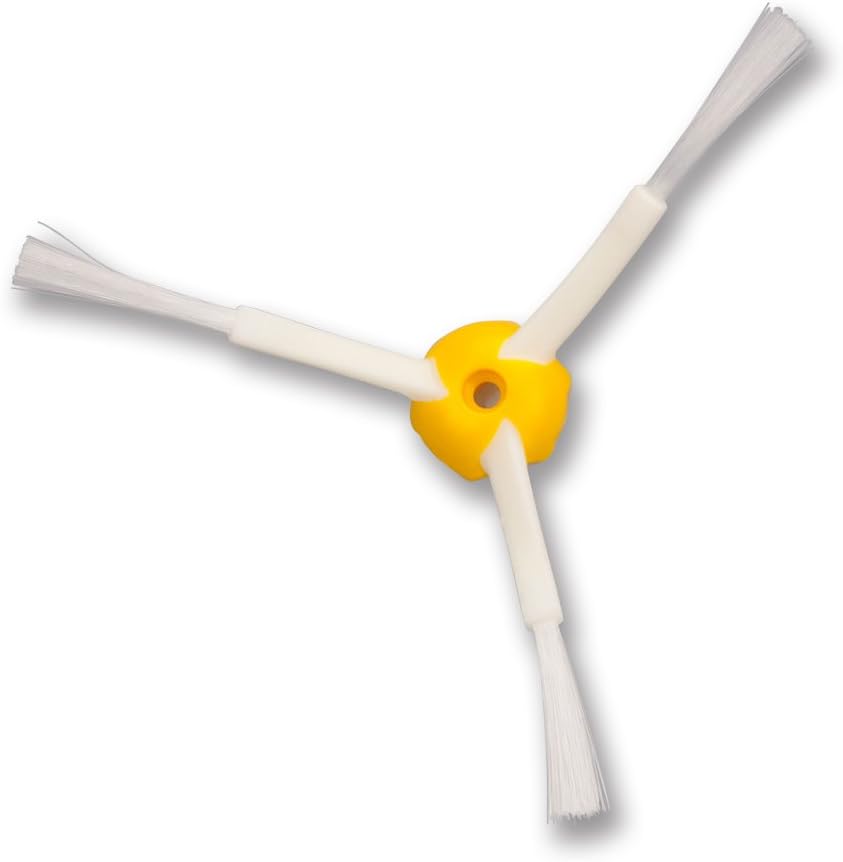
Figure 3: Replacement side brush.
Video 2: Demonstration of how to replace the side brush on a Roomba 700 series.
3. Replacing the Bristle and Flexible Beater Brushes
These main brushes work together to agitate and lift debris from your floors. Replace them when they appear worn or damaged.
- Flip your Roomba over.
- Locate the brush guard and release the tabs to open it.
- Remove the old bristle brush and flexible beater brush.
- Insert the new flexible beater brush first, ensuring the square and hexagonal ends align with their respective slots.
- Insert the new bristle brush, aligning its ends similarly.
- Close the brush guard until it clicks into place.

Figure 4: Bristle brush and flexible beater brush.
Video 3: Instructions for replacing the main brushes in a Roomba 700 series.
صيانة
Regular cleaning and timely replacement of parts are crucial for your Roomba's performance.
أدوات التنظيف
The kit includes two cleaning tools to help remove hair and debris from the brushes.
- Use the red comb-like tool to slide over the bristle brush and cut through tangled hair.
- The small orange brush can be used to clean dust and debris from filters and other crevices.

Figure 5: Red cleaning tool for main brushes.

Figure 6: Small orange cleaning brush.
تردد الاستبدال
- المرشحات: Every 2-3 months, or more frequently if you have pets or high traffic.
- الفرش الجانبية: Every 3-6 months, or when bristles are visibly worn or bent.
- Main Brushes (Bristle & Flexible Beater): Every 6-12 months, or when cleaning performance decreases significantly.
تحديد
| ميزة | التفاصيل |
|---|---|
| ماركة | هونغفا |
| معلومات النموذج | HFAVC140 |
| جهاز متوافق | iRobot Roomba 700 series |
| Material Type (Filters) | مرشح هواء عالي الكفاءة |
| وزن العنصر | 1.15 رطل |
| أبعاد الحزمة | 10 × 8 × 2.2 بوصة |
استكشاف الأخطاء وإصلاحها
إذا انخفض أداء التنظيف لدى جهاز Roomba الخاص بك بعد استبدال بعض الأجزاء، فضع في اعتبارك ما يلي:
- انخفاض الشفط: Ensure filters are clean and correctly installed. A clogged filter can significantly reduce suction power.
- Poor Debris Pickup: Check that the main brushes (bristle and flexible beater) are free of tangles and installed correctly. Ensure the side brush is spinning freely.
- ضوضاء غير عادية: Verify that all brushes are properly seated and not obstructed by debris.
- مشكلات الأداء العامة: Always ensure genuine or compatible replacement parts are used. Refer to your Roomba's original manual for specific error codes or further troubleshooting steps.
الضمان والدعم
For warranty information regarding your Hongfa replacement parts, please refer to the product packaging or contact the seller directly. Keep your proof of purchase for any warranty claims.
For general support or further assistance with your iRobot Roomba, please consult the official iRobot website or your Roomba's original user manual.


