1. المقدمة
This manual provides essential instructions for the installation, operation, and maintenance of your FSP iFP600 Uninterruptible Power Supply (UPS). Please read this manual thoroughly before installing or operating the unit to ensure proper function and safety. The FSP iFP600 is designed to provide reliable power backup and surge protection for your electronic devices.

الصورة 1.1: الجبهة view of the FSP iFP600 UPS, showcasinبفضل تصميمه المدمج وشاشته LCD المتكاملة.
2. تعليمات السلامة
Please adhere to these important safety guidelines during installation, operation, and maintenance of the UPS:
- لا تفتح جهاز UPSasinز. لا توجد قطع غيار قابلة للصيانة من قِبل المستخدم. يُرجى إحالة جميع أعمال الصيانة إلى فنيي صيانة مؤهلين.
- Do not connect appliances that could overload the UPS, such as laser printers, vacuum cleaners, or heaters.
- Ensure the UPS is connected to a grounded AC power outlet.
- Avoid placing the UPS in direct sunlight, near heat sources, or in environments with excessive dust, humidity, or corrosive substances.
- Position the UPS in a well-ventilated area to prevent overheating.
- In case of fire, use a dry chemical extinguisher. Water can be hazardous.
- The battery inside the UPS is not user-replaceable. Battery replacement should only be performed by qualified personnel.
3. انتهى المنتجview
The FSP iFP600 UPS provides reliable power protection for your critical electronics. It features a compact design and an intuitive LCD display for monitoring status.
3.1 محتويات العبوة
عند فتح العبوة، يرجى التأكد من أن جميع المكونات موجودة وغير تالفة:
- FSP iFP600 UPS Unit
- دليل المستخدم (هذا المستند)
- سلك الطاقة
- كابل اتصال USB
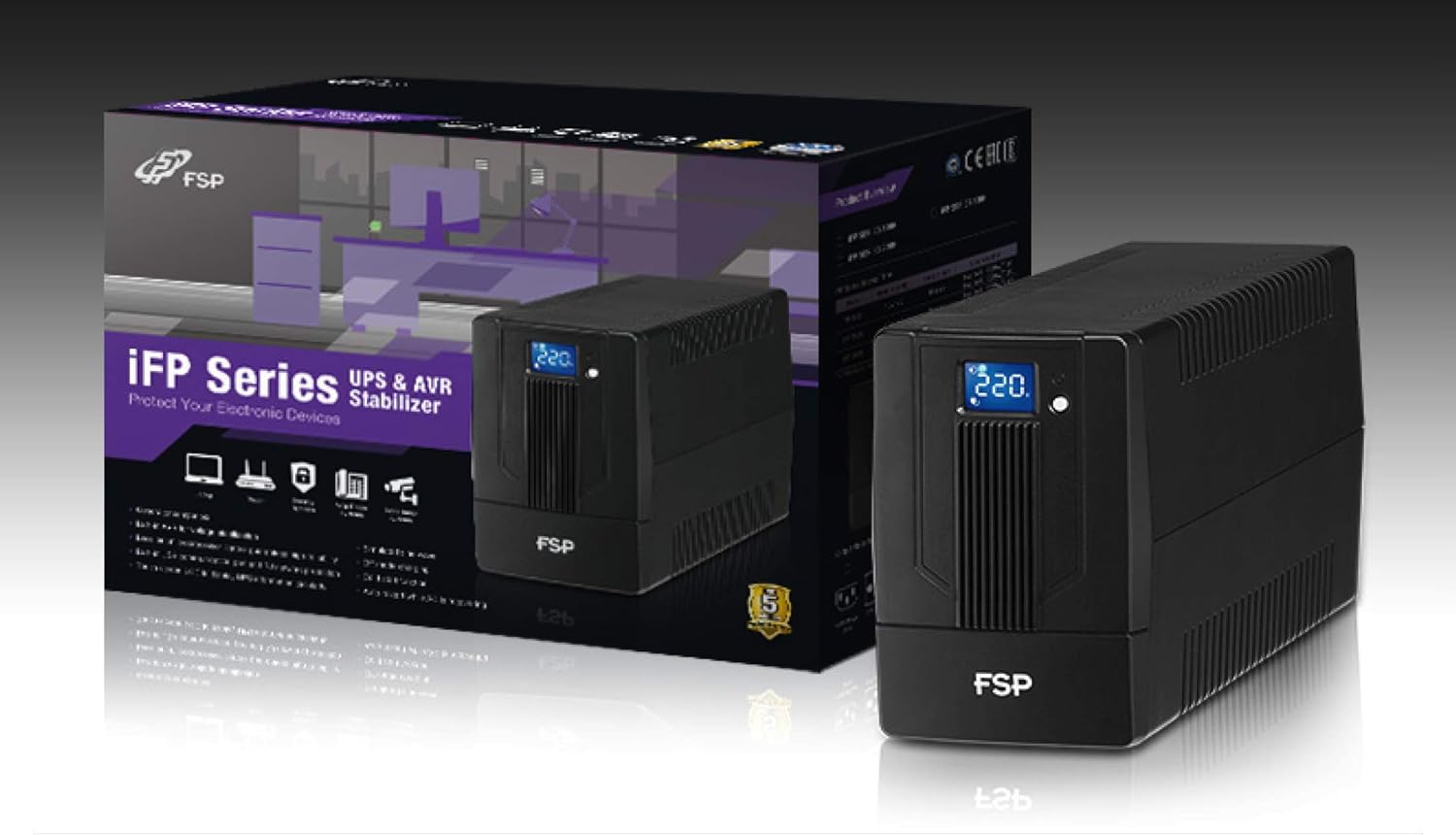
Image 3.1: The FSP iFP600 UPS shown alongside its retail packaging, illustrating the product's presentation.
3.2 مكونات اللوحة الخلفية
Familiarize yourself with the connections on the rear panel of the UPS:

الصورة 3.2: تفصيلية view of the FSP iFP600 UPS rear panel, highlighting connection points.
- المنافذ: Two SCHUKO type outlets for connecting protected equipment.
- مدخل التيار المتردد: Connects the UPS to the main utility power.
- الفيوز/قاطع الدائرة: Overcurrent protection for the UPS.
- اتصال USB: Port for connecting to a computer for monitoring and management.
- Combo RJ11/RJ45 Surge Protection: يوفر حماية من ارتفاع التيار الكهربائي لخطوط الهاتف/الشبكة.
4. الإعداد والتثبيت
Follow these steps to set up your FSP iFP600 UPS:
- فك التعبئة: أخرج جهاز UPS من عبوته بعناية. افحصه بحثًا عن أي ضرر ناتج عن الشحن.
- الموقع: Place the UPS on a flat, stable surface in a clean, cool, and well-ventilated area. Ensure adequate clearance around the unit for airflow.
- الشحن الأولي: Connect the UPS to a standard grounded AC outlet using the provided power cord. Allow the unit to charge for at least 4-6 hours before initial use to ensure optimal battery performance. The UPS will charge whether it is turned on or off.
- ربط المعدات: Plug your computer, monitor, and other critical electronic devices into the UPS outlets (A). Do not connect surge suppressors or power strips to the UPS outlets.
- اتصال USB (اختياري): Connect the USB cable from the UPS USB port (D) to your computer's USB port to enable power management software features (software not included, typically downloaded from manufacturer's webموقع).
- RJ11/RJ45 Protection (Optional): For surge protection of your telephone or network line, connect the incoming line to the 'IN' port of the Combo RJ11/RJ45 (E) and connect the 'OUT' port to your device.
5. تعليمات التشغيل
5.1 تشغيل/إيقاف التشغيل
- لتشغيل: اضغط مع الاستمرار على زر الطاقة الموجود على اللوحة الأمامية لمدة 2 ثوانٍ تقريبًا حتى تسمع صوت تنبيه وتضيء شاشة LCD.
- لإيقاف التشغيل: اضغط مع الاستمرار على زر الطاقة لمدة 2 ثوانٍ تقريبًا حتى تسمع صوت تنبيه وتنطفئ شاشة LCD.
5.2 معلومات شاشة LCD
The FSP iFP600 features an LCD display that provides real-time status information. The display is touch-sensitive for navigating information.

Image 5.1: The LCD display of the FSP iFP600 UPS, indicating voltage output and its touch-screen functionality.
The LCD display typically shows:
- حجم الإدخالtage
- حجم الإخراجtage
- مستوى شحن البطارية
- مستوى تحميل
- Operating Mode (e.g., AC mode, Battery mode)
- Warning/Fault Indicators
5.3 تشغيل وضع البطارية
When the utility power fails or fluctuates outside acceptable limits, the UPS will automatically switch to battery mode. During battery mode, the UPS will provide power to connected equipment from its internal battery. An audible alarm will sound to indicate battery operation.
6. الصيانة
Proper maintenance ensures the longevity and reliability of your UPS.
- تنظيف: Use a soft, dry cloth to clean the exterior of the UPS. Do not use liquid or aerosol cleaners.
- العناية بالبطارية: To maximize battery life, ensure the UPS is connected to AC power and fully charged. If the UPS is stored for an extended period, recharge it every three months to prevent battery degradation.
- استبدال البطارية: The internal battery (12V / 7Ah x1) is not user-serviceable. Battery replacement should only be performed by FSP-certified service personnel or a qualified technician. Incorrect battery replacement can pose a risk of explosion or injury.
- تخزين: Store the UPS in a cool, dry place with adequate ventilation. Ensure the battery is fully charged before storage.
7. استكشاف الأخطاء وإصلاحها
Refer to the following table for common issues and their solutions. If the problem persists, contact FSP support.
| الأعراض | إنذار صوتي | السبب المحتمل | حل |
|---|---|---|---|
| UPS operating on battery power | يصدر صوتًا كل 10 ثانية | Utility power failure or fluctuation | Save work and shut down equipment if power outage is prolonged. UPS will return to AC mode when power is restored. |
| تحذير انخفاض البطارية | الصفافير كل ثانية | شحن البطارية منخفض للغاية | Immediately save work and shut down connected equipment. |
| حالة التحميل الزائد | يصدر صوتًا كل ثانية واحدة | تجاوزت المعدات المتصلة سعة وحدة الإمداد بالطاقة غير المنقطعة (UPS). | Disconnect non-essential equipment until the alarm stops. Ensure total load is within UPS capacity. |
| عطل UPS | التصفير المستمر | خطأ داخلي أو خلل | Turn off the UPS and disconnect it from the AC outlet. Contact FSP technical support. |
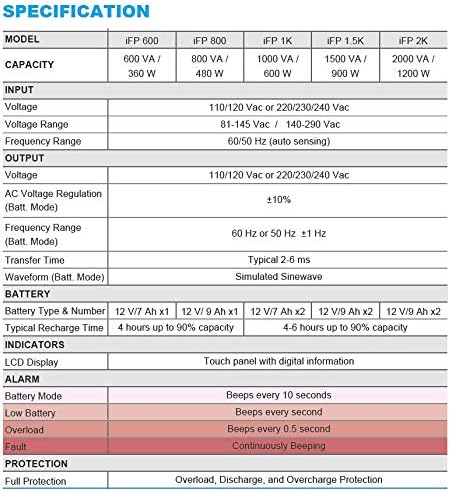
Image 7.1: Excerpt from the FSP iFP series specification table, detailing alarm indicators and their meanings.
8. المواصفات
Detailed technical specifications for the FSP iFP600 UPS:
| ميزة | مواصفة |
|---|---|
| نموذج | iFP 600 |
| سعة | 600 فولت أمبير / 360 واط |
| حجم الإدخالtage | 110/120 Vac or 220/230/240 Vac |
| حجم الإدخالtage المدى | 81-145 Vac / 140-290 Vac |
| نطاق تردد الإدخال | 60/50 هرتز (الاستشعار التلقائي) |
| حجم الإخراجtage | 110/120 Vac or 220/230/240 Vac |
| المجلد ACtagهـ التنظيم (وضع بات) | ±10% |
| Output Frequency Range (Batt. Mode) | 60 Hz or 50 Hz ±1 Hz |
| وقت النقل | نموذجي 2-6 مللي ثانية |
| الطول الموجي (وضع Batt.) | محاكاة Sinewave |
| نوع البطارية ورقمها | 12V / 7Ah x1 |
| وقت إعادة الشحن النموذجي | 4 ساعات حتى 90% من السعة |
| المؤشرات | LCD Display (Touch panel with digital information) |
| حماية | Overload, Discharge, and Overcharge Protection |
| وزن العنصر | 9.24 رطل (4.2 كجم) |
| أبعاد المنتج (الطول × العرض × الارتفاع) | 11.81 × 3.98 × 5.59 بوصة |
| لون | أسود |
| مادة | معدن |
9. الضمان والدعم
FSP products are designed for reliability and performance. For warranty information, please refer to the warranty card included with your product or visit the official FSP website. For technical support, troubleshooting assistance, or service inquiries, please contact FSP customer service through their official channels.
يمكنك العثور على مزيد من المعلومات وموارد الدعم على FSP Store on Amazon.


