1. المقدمة
The LAUNCH CR319 is a handheld On-Board Diagnostics II (OBD2) code reader designed to assist in diagnosing vehicle engine issues. It provides access to various diagnostic functions to help users identify and clear trouble codes, monitor vehicle performance data, and check emission readiness status. This manual provides detailed instructions for the proper use and maintenance of your CR319 device.
2. انتهى المنتجview
2.1 الميزات الرئيسية
- وظائف OBD2 الكاملة: يدعم جميع أوضاع اختبار OBD2 العشرة.
- مكتبة البحث عن بيانات المستهلك المباشر: Built-in database with over 3000 code definitions.
- دعم متعدد اللغات: Available in English, Portuguese, Russian, Italian, Spanish, French, and German.
- التوصيل والتشغيل: No batteries or charger required; powered directly from the vehicle's OBD2 port.
- تصميم مضغوط: سهل التعامل والتخزين.
2.2 مكونات الجهاز
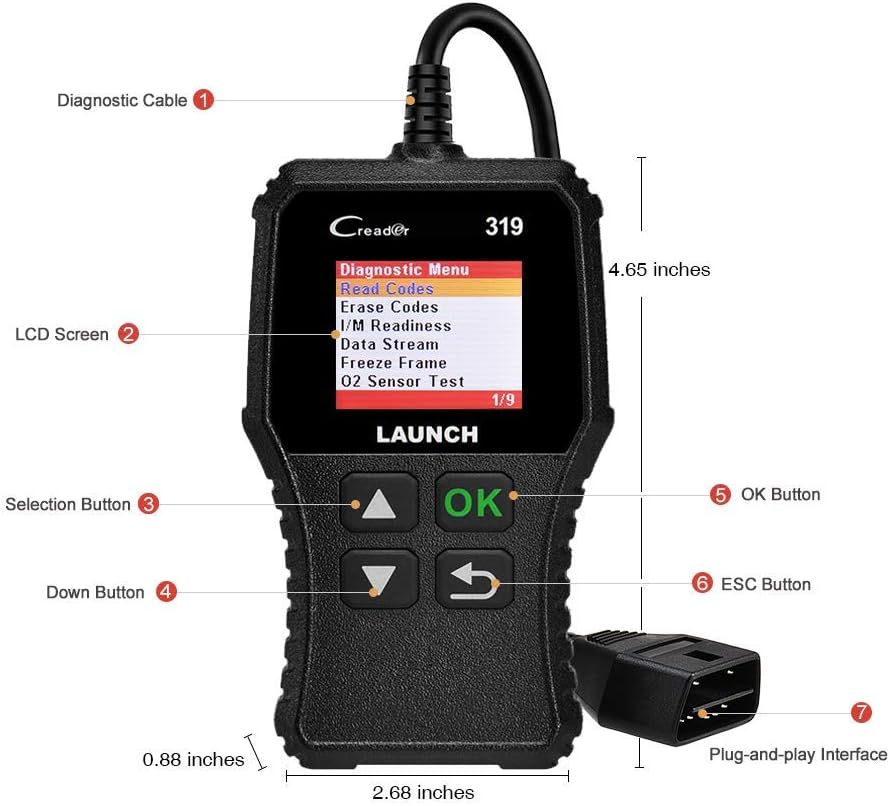
The image above illustrates the main components of the LAUNCH CR319 OBD2 Scanner. Key parts include the Diagnostic Cable (1) for connecting to the vehicle, the LCD Screen (2) for displaying information, Selection Buttons (3) for navigation, the Down Button (4), the OK Button (5) for confirmation, the ESC Button (6) to return to the previous screen, and the Plug-and-Play Interface (7) which is the OBD2 connector.
3. الإعداد
- حدد منفذ OBD2: The OBD2 port is typically located under the dashboard on the driver's side of the vehicle. Refer to your vehicle's owner's manual if you cannot locate it.
- توصيل الماسح الضوئي: Plug the CR319's diagnostic cable connector firmly into the vehicle's OBD2 port. The device will power on automatically.
- بدء تشغيل السيارة: Turn the vehicle's ignition to the 'ON' position (engine off) or start the engine, depending on the diagnostic function you intend to perform.
4. تعليمات التشغيل
After connecting the CR319 to your vehicle, the main menu will appear. Use the Up/Down selection buttons to navigate through the options and the OK button to confirm a selection. The ESC button returns to the previous screen.
4.1 قراءة الرموز
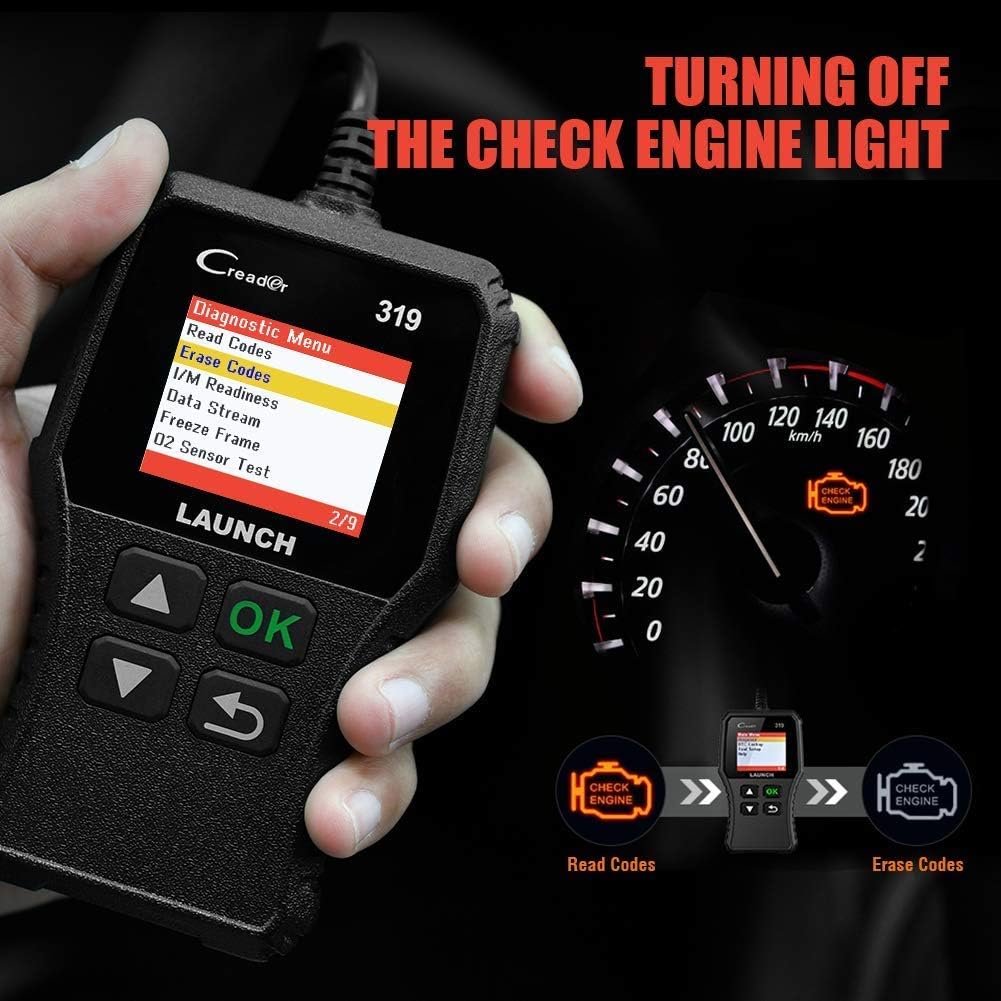
تسترجع هذه الوظيفة رموز أعطال التشخيص (DTCs) من كمبيوتر السيارة. تشير هذه الرموز إلى مشكلات محددة اكتشفها نظام التشخيص الذاتي للسيارة.
- من القائمة الرئيسية، حدد 'Diagnose'.
- يختار "قراءة الرموز".
- The scanner will display any stored, pending, or permanent codes along with their descriptions.
4.2 مسح الرموز
This function erases DTCs from the vehicle's computer and turns off the Check Engine Light (MIL). Ensure any underlying issues are resolved before clearing codes, as they may reappear.
- من القائمة الرئيسية، حدد 'Diagnose'.
- يختار "مسح الرموز".
- Confirm the action when prompted. The Check Engine Light should turn off.
4.3 I / M الجاهزية
This function checks the status of the vehicle's emission-related monitoring systems to determine if they are ready for an emissions test.
- من القائمة الرئيسية، حدد 'Diagnose'.
- يختار "الاستعداد".
- The screen will display the status of various monitors (e.g., Misfire Monitor, Fuel System Monitor). 'OK' or 'Complete' indicates the monitor has run and passed; 'INC' or 'Incomplete' means the monitor has not yet run or completed its diagnostic cycle.
4.4 Data Stream (Live Data)

This function displays real-time operational data from the vehicle's engine control unit (ECU). This data can include engine RPM, vehicle speed, oxygen sensor readings, coolant temperature, and more.
- من القائمة الرئيسية، حدد 'Diagnose'.
- يختار 'Data Stream'.
- Use the Up/Down buttons to scroll through the various data parameters.
4.5 إطار التجميد
When an emission-related fault occurs, the vehicle's computer records a snapshot of operating conditions at the time of the fault. This data is called Freeze Frame data.
- من القائمة الرئيسية، حدد 'Diagnose'.
- يختار 'Freeze Frame'.
- Review المعايير المسجلة لفهم الظروف التي حدث في ظلها العطل.
4.6 بحث DTC

This feature allows you to manually enter a Diagnostic Trouble Code and view its definition from the scanner's internal database.
- من القائمة الرئيسية، حدد "البحث عن رمز DTC".
- Use the navigation buttons to input the desired DTC.
- يضعط 'OK' ل view the code definition.
4.7 Other OBD2 Functions
The CR319 also supports the following OBD2 functions, accessible through the 'Diagnose' menu:
- اختبار مستشعر O2: Retrieves oxygen sensor monitor test results for the most recently completed tests.
- اختبار نظام تبخير الوقود (الوضع 8): يبدأ اختبار نظام التحكم في انبعاثات التبخر.
- اختبار الشاشة الداخلية (الوضع 6): يسترجع نتائج الاختبارات لمكونات وأنظمة مجموعة نقل الحركة المتعلقة بالانبعاثات والتي لا تخضع للمراقبة المستمرة.
- معلومات السيارة: يعرض رقم تعريف المركبة (VIN) ومعرف المعايرة (CALID) ورقم التحقق من المعايرة (CVN).
5. التوافق

The LAUNCH CR319 OBD2 Scanner is compatible with most American, European, and Asian vehicles manufactured from 1996 and newer that are OBDII-compliant. It supports all standard OBDII protocols, including KWP2000, ISO9141, J1850 VPW, J1850 PWM, and CAN (Controller Area Network).
5.1 المركبات المدعومة
- 12V Gasoline cars.
- Vehicles compliant with OBDII standards (1996 US-based, 2000 EU-based, and newer Asian cars).
5.2 Not Supported Vehicles
- Diesel cars.
- 24V Heavy duty vehicles.
- Hybrid vehicles.
- Electric vehicles.
6. المواصفات
| ميزة | مواصفة |
|---|---|
| نموذج | سي آر 319 |
| عرض | شاشة LCD ملونة |
| حجم التشغيلtage | 9-18V (via OBD2 port) |
| البروتوكولات المدعومة | KWP2000، ISO9141، J1850 VPW، J1850 PWM، CAN |
| الأبعاد (الطول × العرض × الارتفاع) | 1.5 × 6 × 10.8 بوصة |
| وزن | 7.4 أونصات |
| درجة حرارة التشغيل | 0 درجة مئوية إلى 50 درجة مئوية (32 درجة فهرنهايت إلى 122 درجة فهرنهايت) |
| درجة حرارة التخزين | -20 درجة مئوية إلى 70 درجة مئوية (-4 درجة فهرنهايت إلى 158 درجة فهرنهايت) |
| اللغات المدعومة | English, Portuguese, Russian, Italian, Spanish, French, German |
7. استكشاف الأخطاء وإصلاحها
7.1 الجهاز لا يعمل
- Ensure the diagnostic cable is securely connected to the vehicle's OBD2 port.
- تأكد من أن مفتاح تشغيل السيارة في وضع "التشغيل" أو أن المحرك يعمل.
- Check the vehicle's fuse for the OBD2 port (consult your vehicle's owner's manual).
7.2 خطأ في الاتصال بالمركبة
- Confirm the vehicle is OBDII-compliant (generally 1996 and newer for gasoline vehicles).
- Ensure the diagnostic cable is properly connected.
- Turn off the ignition, wait 10 seconds, then turn it back to 'ON' and try again.
- If possible, test the scanner on another compatible vehicle to rule out a device malfunction.
7.3 Codes Cannot Be Cleared
- Ensure the vehicle's ignition is in the 'ON' position (engine off).
- If the underlying fault that triggered the code is still present, the code may not clear or will reappear immediately. Address the vehicle's issue first.
8. الصيانة
- تنظيف: استخدم قطعة قماش ناعمة وجافة لتنظيف الجهاز. تجنب استخدام المنظفات الكاشطة أو المذيبات.
- تخزين: قم بتخزين الماسح الضوئي في بيئة نظيفة وجافة بعيدًا عن درجات الحرارة القصوى وأشعة الشمس المباشرة.
- العناية بالكابلات: Do not pull the cable forcefully or bend it sharply. Inspect the cable for damage before each use.
9. الضمان والدعم
For warranty information, technical support, or service inquiries, please contact LAUNCH customer support. Refer to the product packaging or the official LAUNCH webالموقع للحصول على تفاصيل الاتصال الحالية.


