1. المقدمة
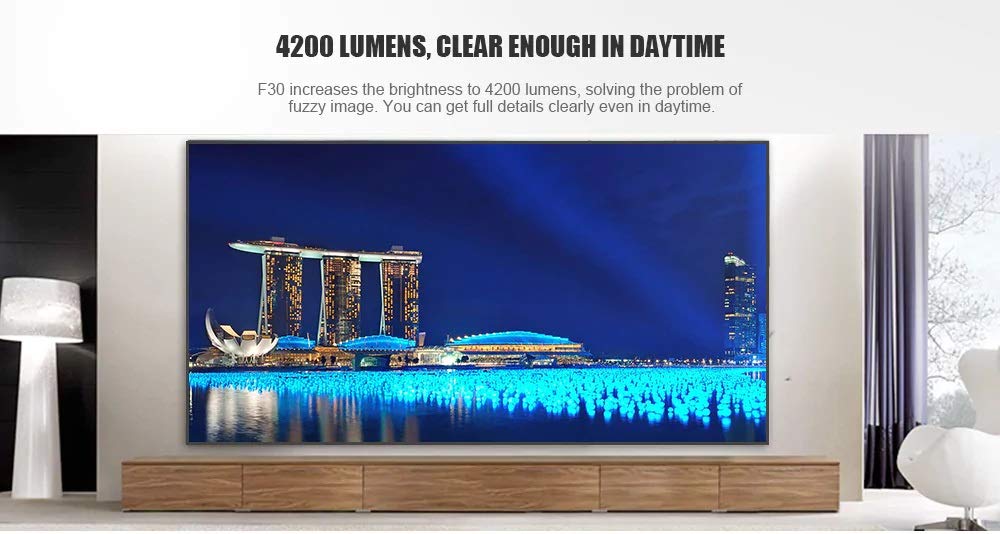
This manual provides essential instructions for the safe and efficient use of your Vivibright F30 Projector. Please read this manual thoroughly before operating the device and retain it for future reference. The Vivibright F30 is a Full HD 1080p LED projector designed for home theater, education, and business presentations, offering 4200 lumens brightness and multiple connectivity options.
2. معلومات السلامة
- مزود الطاقة: استخدم محول الطاقة المحدد فقط. تأكد من مستوى الصوتtagيتوافق مع متطلبات جهاز العرض.
- تهوية: لا تسد فتحات التهوية. تأكد من وجود مساحة كافية حول جهاز العرض لضمان تدفق الهواء بشكل صحيح ومنع ارتفاع درجة حرارته.
- حرارة: جهاز العرض lamp generates heat. Avoid touching the lens or vents immediately after use.
- حماية العين: لا تنظر مباشرة إلى عدسة جهاز العرض عندما يكون الضوءamp is on. The bright light can cause eye strain or damage.
- الموقع: ضع جهاز العرض على سطح مستوٍ وثابت. تجنب وضعه في ضوء الشمس المباشر، أو بالقرب من مصادر الحرارة، أو في بيئات ذات رطوبة عالية أو غبار.
- تنظيف: افصل الكهرباء قبل التنظيف. استخدم قطعة قماش ناعمة وجافة. لا تستخدم منظفات سائلة أو بخاخات.
- الخدمة: Do not attempt to service the projector yourself. Refer all servicing to qualified personnel.
3. محتويات العبوة
تأكد من وجود جميع العناصر في العبوة:
- Vivibright F30 Projector
- كابل الطاقة
- جهاز التحكم عن بعد
- دليل المستخدم (هذا المستند)
- كابل HDMI (قد يختلف حسب المنطقة/العبوة)
4. انتهى المنتجview
تعرّف على مكونات جهاز العرض وواجهاته.
الشكل 4.1: أمام view of the Vivibright F30 Projector, showing the lens and ventilation.

الشكل 4.2: جانب view of the Vivibright F30 Projector, highlighting the various input ports.
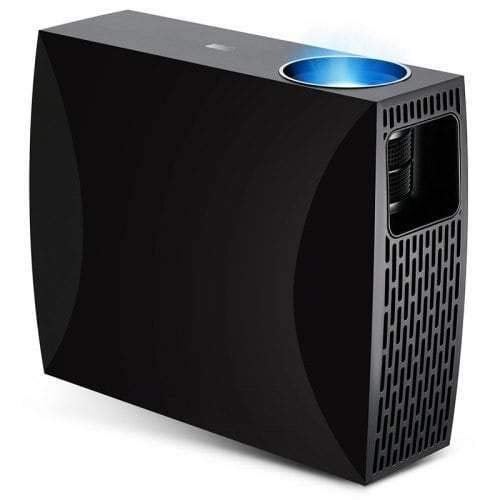
الشكل 4.3: Top or rear view of the Vivibright F30 Projector, showing control buttons or additional vents.
4.1. الواجهات
- منافذ HDMI: For connecting devices like laptops, gaming consoles, Blu-ray players, and media players.
- منفذ VGA: For connecting older computers or other VGA-compatible devices.
- منافذ USB: For connecting USB storage devices to play media directly.
- الصوت خارج: لتوصيل مكبرات الصوت الخارجية أو سماعات الرأس.
- مدخلات الطاقة: لتوصيل كابل الطاقة.
5. الإعداد
5.1. تحديد مستوى
Position the projector on a stable surface or mount it appropriately. Ensure the projector is perpendicular to the projection screen for optimal image geometry. The projection distance can range from 1.2 to 6.8 meters, depending on the desired screen size.
5.2. توصيل الطاقة
- قم بتوصيل كابل الطاقة بمنفذ إدخال الطاقة الخاص بجهاز العرض.
- قم بتوصيل الطرف الآخر من كابل الطاقة بمأخذ كهربائي مؤرض.
5.3. توصيل أجهزة الإدخال
Connect your desired source device (e.g., laptop, media player) to the projector using an appropriate cable (HDMI, VGA, USB). Ensure the cable is securely connected to both the projector and the source device.
5.4. ضبط التركيز وتصحيح الانحراف
- ركز: Rotate the focus ring on the projector lens until the image appears sharp and clear on the screen.
- كيستون: If the projected image is trapezoidal (wider at the top or bottom), use the keystone correction feature (manual or digital, depending on model) to adjust the image to a rectangular shape.
6. تعليمات التشغيل
6.1. تشغيل / إيقاف التشغيل
- تشغيل الطاقة: Press the power button on the projector or the remote control. The indicator light will change, and the lamp سوف تضيء.
- إيقاف التشغيل: Press the power button again. Confirm shutdown if prompted. Allow the projector to cool down before unplugging it.
6.2. اختيار مصدر الإدخال
Press the "Source" button on the remote control or the projector's control panel to cycle through available input sources (HDMI1, HDMI2, VGA, USB). Select the input corresponding to your connected device.
6.3. التنقل في القائمة
Use the arrow buttons on the remote control or projector to navigate through the on-screen display (OSD) menu. Press "OK" or "Enter" to select an option and "Exit" or "Menu" to go back or close the menu.
6.4. إعدادات الصورة والصوت
Adjust picture settings such as brightness, contrast, color, and aspect ratio via the OSD menu to optimize image quality. Adjust volume levels for the built-in speaker or connected external audio devices.
7. الصيانة
7.1. تنظيف العدسة
امسح عدسة جهاز العرض برفق بقطعة قماش ناعمة وخالية من الوبر مصممة خصيصًا للأسطح البصرية. لا تستخدم مواد كاشطة أو مواد كيميائية قاسية.
7.2. تنظيف هيكل جهاز العرض
استخدم قطعة قماش ناعمة وجافة لتنظيف الجزء الخارجي من جهاز العرض. بالنسبة للبقع العنيدة، استخدم قطعة قماش ناعمة قليلاً.amp يمكن استخدام قطعة قماش، ثم قطعة قماش جافة. تأكد من عدم دخول أي سائل إلى فتحات التهوية.
7.3. لamp حياة
The Vivibright F30 Projector utilizes an LED lamp with an estimated lifespan of up to 50,000 hours, requiring no regular replacement under normal usage conditions.
8. استكشاف الأخطاء وإصلاحها
| مشكلة | السبب المحتمل | حل |
|---|---|---|
| لا توجد صورة معروضة |
|
|
| الصورة ضبابية |
|
|
| Image is trapezoidal (keystone effect) |
|
|
| لا يوجد صوت |
|
|
| يسخن جهاز العرض بشكل مفرط أو يتوقف عن العمل |
|
|
9. المواصفات
| ميزة | التفاصيل |
|---|---|
| ماركة | Vivibright |
| نموذج | ف30 |
| الدقة الأصلية | 1920 × 1080 (دقة عالية كاملة) |
| الدقة المدعومة | حتى 4K |
| سطوع | 4200 Lumens (LED Luminous) |
| نسبة التباين | 2200:1 |
| تكنولوجيا العرض | شاشة الكريستال السائل |
| Lamp يكتب | قاد |
| Lamp حياة | تصل إلى 50,000 ساعة |
| مسافة الإسقاط | من 1.2 إلى 6.8 متر |
| مستوى الضوضاء | 29 ديسيبل |
| الاتصال | اتش دي ام اي، في جي ايه، يو اس بي |
| المميزات الخاصة | Portable, Built-in Speaker |
| وزن العنصر | 3 كجم |
| نوع التركيب | جبل منضدية |
10. الضمان والدعم
10.1. معلومات الضمان
The Vivibright F30 Projector comes with a ضمان لمدة سنة واحدة يسري هذا الضمان من تاريخ الشراء. ويغطي عيوب التصنيع والأعطال الناتجة عن الاستخدام العادي. يرجى الاحتفاظ بإثبات الشراء لتقديم مطالبات الضمان.
لا يغطي الضمان الأضرار الناجمة عن سوء الاستخدام أو الحوادث أو الإصلاحات غير المصرح بها أو التلف الناتج عن الاستخدام العادي.
10.2. دعم العملاء
For technical assistance, warranty claims, or further inquiries, please contact Vivibright customer support through their official website or the contact information provided with your purchase documentation. When contacting support, please have your product model (F30) and purchase details ready.


