1. المقدمة
Thank you for choosing the Hoco E30 Wireless Earphone. This manual provides essential information for setting up, operating, and maintaining your earphone. Please read it carefully before use to ensure optimal performance and longevity of your device.
2. معلومات السلامة
To prevent damage to your device or injury to yourself and others, please observe the following safety precautions:
- تجنب التعرض لفترات طويلة لمستويات صوت عالية لمنع تلف السمع.
- Do not use the earphone while driving or in situations where you need to be aware of your surroundings.
- احفظ الجهاز بعيدًا عن الماء والرطوبة ودرجات الحرارة القصوى.
- Do not attempt to disassemble, repair, or modify the earphone. This will void the warranty.
- استخدم فقط كابلات ومحولات الشحن المتوفرة أو المعتمدة.
- يحفظ بعيدًا عن متناول الأطفال والحيوانات الأليفة.
3. محتويات العبوة
يرجى تحديد المربع للعناصر التالية:
- Hoco E30 Wireless Earphone
- كابل شحن USB
- دليل المستخدم
4. انتهى المنتجview
Familiarize yourself with the components of your Hoco E30 Wireless Earphone:

الشكل 4.1: جانب view of the Hoco E30 Wireless Earphone, highlighting its sleek design and ear hook.

الشكل 4.2: The Hoco E30 Wireless Earphone positioned next to a smartphone, illustrating its compact size and wireless connectivity.
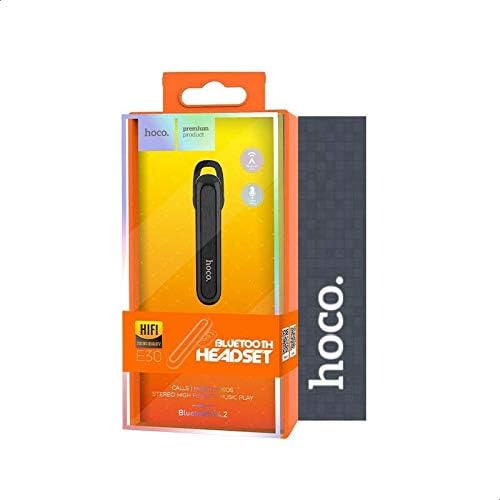
الشكل 4.3: The retail packaging for the Hoco E30 Wireless Earphone, displaying branding and key features.
5. الإعداد
5.1 شحن سماعة الأذن
Before first use, fully charge your Hoco E30 earphone.
- Connect the provided USB charging cable to the charging port on the earphone.
- Connect the other end of the USB cable to a DC 5V power source (e.g., a USB wall adapter or computer USB port).
- سوف يضيء مؤشر الشحن.
- Charging typically takes approximately 2 hours. The indicator light will change or turn off once charging is complete.
5.2 الاقتران بجهاز
To connect your Hoco E30 earphone to your smartphone or other Bluetooth-enabled device:
- Ensure the earphone is fully charged and turned off.
- Press and hold the multi-function button on the earphone until the indicator light flashes red and blue alternately, indicating it is in pairing mode.
- على جهازك، قم بتمكين البلوتوث وابحث عن الأجهزة المتاحة.
- Select "Hoco E30" from the list of found devices.
- Once paired, the indicator light on the earphone will flash blue slowly, and you will hear a confirmation tone.
- The earphone has a transmission range of up to 10 meters (33 feet).
6. تعليمات التشغيل
6.1 تشغيل/إيقاف التشغيل
- تشغيل الطاقة: Press and hold the multi-function button for approximately 3 seconds until the blue indicator light flashes and you hear a power-on tone.
- إيقاف التشغيل: Press and hold the multi-function button for approximately 5 seconds until the red indicator light flashes and you hear a power-off tone.
6.2 إدارة المكالمات
- الرد على المكالمة: Briefly press the multi-function button when an incoming call rings.
- إنهاء المكالمة: Briefly press the multi-function button during a call.
- رفض المكالمة: Press and hold the multi-function button for 2 seconds when an incoming call rings.
- إعادة الاتصال بالرقم الأخير: اضغط مرتين على الزر متعدد الوظائف عندما لا تكون في مكالمة.
6.3 تشغيل الموسيقى
- تشغيل/إيقاف مؤقت: Briefly press the multi-function button to play or pause music.
- المسار التالي: Press and hold the multi-function button for 2 seconds to skip to the next track.
- المسار السابق: Press and hold the multi-function button for 2 seconds (during playback) to go to the previous track.
Note: The Hoco E30 supports A2DP and AVRCP protocols for high-quality audio streaming and remote control. Volume control is typically managed via the connected device.
6.4 Battery Status Display
The Hoco E30 earphone supports battery level display on compatible Apple iOS devices and some Android smartphones. Check your device's notification bar or Bluetooth settings for this feature.
7. الصيانة
- تنظيف: Use a soft, dry cloth to clean the earphone. Do not use harsh chemicals or abrasive materials.
- تخزين: قم بتخزين سماعة الأذن في مكان بارد وجاف بعيدًا عن أشعة الشمس المباشرة ودرجات الحرارة العالية.
- العناية بالبطارية: لإطالة عمر البطارية، تجنب تفريغ سماعة الأذن بالكامل بشكل متكرر. اشحنها بانتظام، حتى لو لم تكن قيد الاستخدام لفترات طويلة.
8. استكشاف الأخطاء وإصلاحها
If you encounter issues with your Hoco E30 earphone, try the following solutions:
| مشكلة | حل |
|---|---|
| سماعة الأذن لا تعمل. | Ensure the earphone is fully charged. Connect it to a power source and try again. |
| لا يمكن الاقتران بالجهاز. |
|
| لا يوجد صوت أو جودة الصوت رديئة. |
|
| الشحن لا يعمل. |
|
9. المواصفات
| ميزة | التفاصيل |
|---|---|
| نموذج | إي30 |
| نسخة البلوتوث | V4.2 WT |
| البروتوكولات المدعومة | سماعة رأس، بدون استخدام اليدين، A2DP، AVRCP |
| انتقال المدى | 10 أمتار (33 قدم) |
| تردد الإرسال | 2.4 جيجاهرتز |
| حجم الشحنtage | تيار مستمر 5 فولت |
| وقت الشحن | حوالي 2 ساعات |
| سعة البطارية | 60 مللي أمبير |
| وقت التحدث | حوالي 3.5 ساعات |
| وقت تشغيل الموسيقى | حوالي 3.5 ساعات |
| وقت الاستعداد | حوالي 110 ساعات |
| الوزن الصافي للمنتج | 6 جرام |
| الأبعاد (الطول × العرض × الارتفاع) | 58 مم × 14 مم × 25 مم |
| مادة | بلاستيك |
| طريقة التحكم | يلمس |
| لون | الأسود والفضي |
10. الضمان والدعم
Hoco products are designed and manufactured to the highest quality standards. This product is covered by a limited warranty from the date of purchase. Please refer to the warranty card included in your package for specific terms and conditions.
For technical support or warranty claims, please contact your local Hoco distributor or visit the official Hoco webلمزيد من المعلومات.


